


Authors:
Marina Kaganovich, Executive Trust Lead • Engineering - Office of CISO
David Stone, Director, Financial Services, Office of the CISO
Cyber fraud does more than just deplete bank accounts, it acts as a persistent corrosive, systematically eroding the fundamental societal trust required for a functioning global digital economy. When the platforms and communication channels we rely on, from professional emails to personal messaging, become vectors for deception, the impact on society extends beyond financial loss to include a pervasive sense of skepticism and psychological insecurity.
Digital confidence breakdowns stifle innovation and weaken the social fabric, as individuals increasingly view every online interaction through a lens of suspicion rather than connection. Below we explore a common cyber fraud use case and the steps you can take to protect yourself from falling victim to it.
Account Takeover & Business Email Compromise
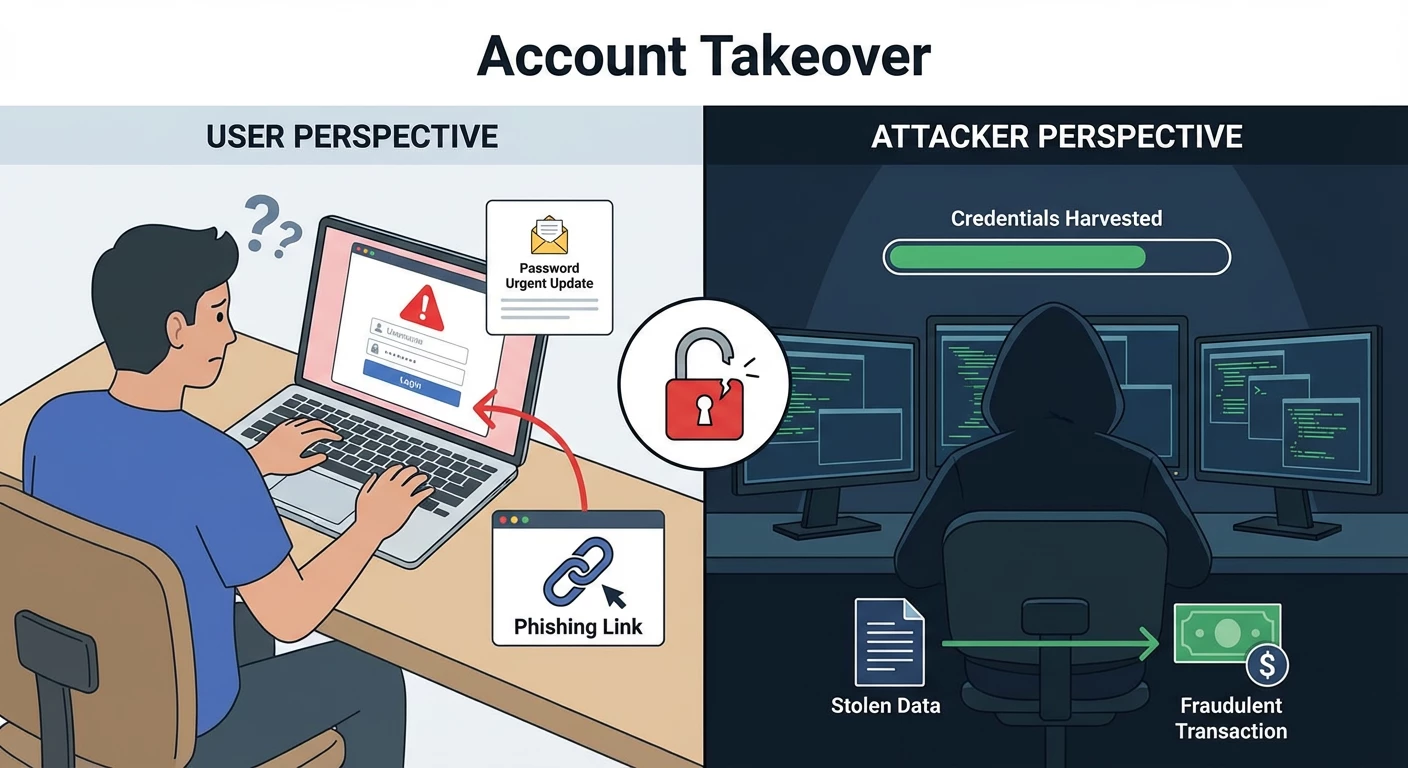
Account Takeover (ATO) and Business Email Compromise (BEC) are deeply linked. ATO is often the initial step or a key component of a BEC attack, where attackers gain control of an email account to then execute sophisticated scams like fraudulent wire transfers or data theft. Essentially, BEC is a broader category of crime that leverages ATO to commit financial fraud. Put simply, ATO is the act of gaining unauthorized access to an account, whereas BEC uses that access, or the illusion of it, to trick people into taking actions that benefit the attacker.
The use of genAI has enabled BEC to metamorphose from simple wire transfer requests into complex narratives that span weeks. AI scrapes social media, corporate press releases, and other sources of publicly available information to construct a personalized attack vector for their targets. An attack today does not begin with a demand for money; it begins with a casual reference to a real-world conference the CEO just attended or a specific project mentioned in a quarterly earnings call. This hyper-personalization bypasses the skepticism triggers trained into employees, who are taught to look for generic markers of fraud, like poor grammar or vague requests.
In addition, as email filters have improved at analyzing text and URLs, attackers have pivoted to vectors that bypass these controls, such as through QR code phishing. This deceptively simple yet technically sophisticated evasion tactic often involves embedding QR codes in PDF attachments disguised as legitimate business documents. Because the malicious payload is encoded within an image, it often bypasses secure email gateways that primarily scan for malicious text strings or known bad URLs in the email body. When a user scans the QR code, they often do so with their personal phone, a device often lacking the robust endpoint protection of a corporate laptop. This transition from the corporate network to a personal device creates a security gap, moving the attack from a protected corporate environment to an unmanaged personal device.
Despite the variations in attack paths, email and text message scams remain the primary vectors for perpetrating fraud. Defense requires a combination of technical controls and behavioral defense, which we discuss below.
10 capabilities to mitigate cyber fraud
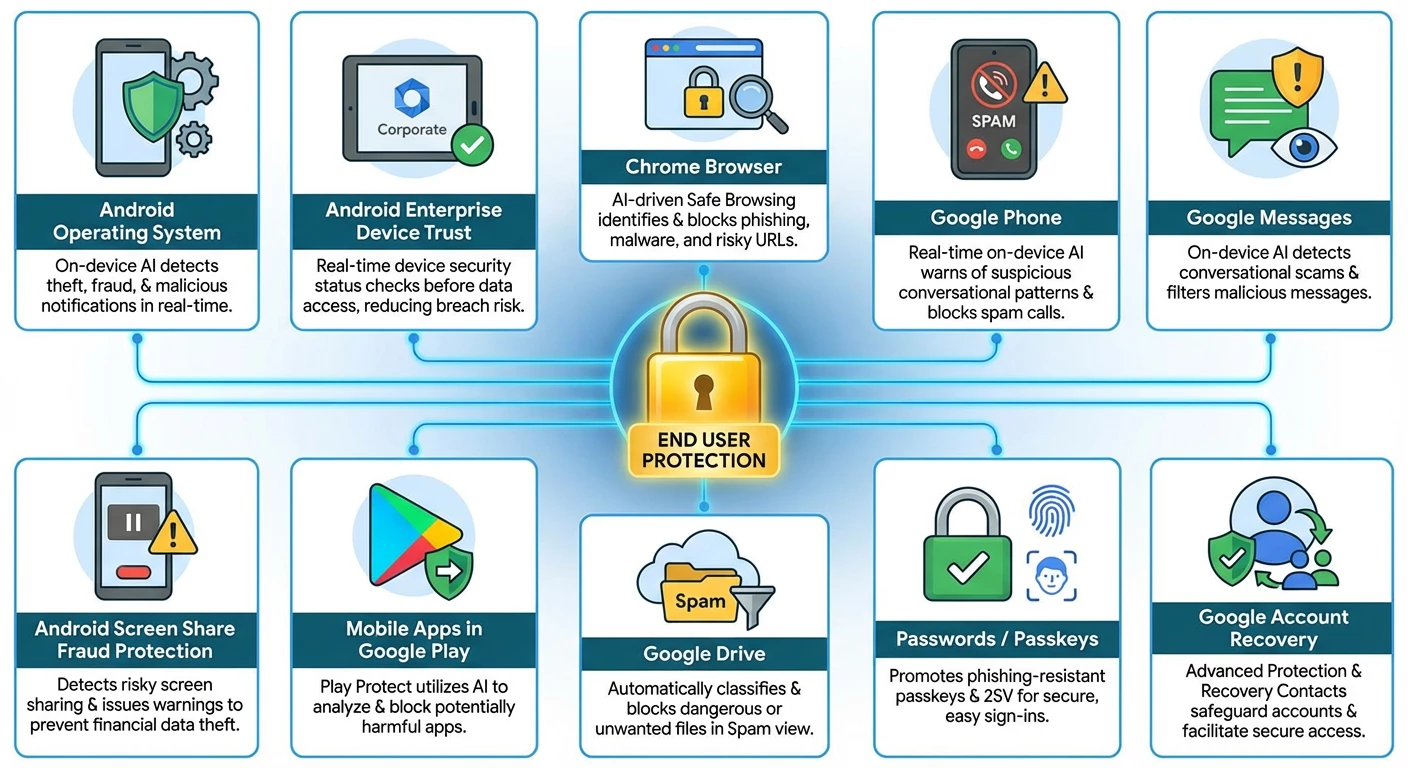
Google has deployed a comprehensive suite of AI-driven tools spanning its cloud, browser, and mobile ecosystems to combat the evolving fraud landscape. These enterprise and consumer-grade capabilities help detect and neutralize threats in real-time, and while many are enabled by default, there are additional steps you can take to enhance your fraud defense posture. While some of these are still at the pilot phase in certain countries, we are looking to roll them out around the world.
- Android Operating System
The latest updates to Android introduce groundbreaking features that use on-device AI to detect theft attempts, provide real-time scam and fraud protection while preserving your privacy, and enable you to create a private space on your phone to shield sensitive apps from prying eyes.
- Android Enterprise Device Trust
By making it easy to continuously check the security status of a device through the Android Management API, Device Trust from Android Enterprise helps reduce the risk of data breaches caused by outdated security patches, on-device malware and weak lock screen passcodes. Built on the principles of Zero Trust, this solution gives businesses real-time insight into device posture before granting access to sensitive data whether or not the device is enrolled with an enterprise mobility management provider.
- Chrome Browser
Google Safe Browsing helps keep you safe while you surf the web by identifying phishing, malware, scams and other online threats in real time. It’s used by Chrome and other popular browsers, Search, Android, Google Ads and Gmail. Following the success of Safe Browsing, we launched the Enhanced Protection mode of Safe Browsing in Chrome to better address the increasingly sophisticated threats people face online. If you turn on Enhanced Protection, much of the additional protection you receive comes from advanced AI and machine learning models designed to spot dangerous URLs engaging in known phishing, social engineering and scam techniques. These models are trained to distinguish between real and malicious websites based on millions of real-world examples.
- Google Phone
Phone by Google automatically blocks known spam calls so your phone never even rings, while Call Screen can answer the call on your behalf to identify fraudsters. If you answer, the protection continues with Scam Detection (further discussed below), which uses on-device AI to provide real-time warnings for suspicious conversational patterns. This processing is ephemeral, meaning no call content is ever saved or leaves your device. Android also helps stop social engineering during the call itself by blocking high-risk actions like installing unknown apps or disabling security settings, and warns you if your screen is being shared unknowingly.
- Google Messages
In Google Messages, spam protection is the broader system that automatically filters unwanted messages. Building on the spam protection mechanism, Scam Detection identifies a wider range of fraudulent activities, specifically targeting conversational scams, which often initially appear harmless but slowly try to manipulate the user into sharing sensitive information or sending funds. It uses on-device AI to analyze the patterns of a conversation in real-time, looking for the tell-tale signs of a scam. This processing happens privately, ensuring the content of your conversations remains private to you. These systems are designed to identify and automatically block a wide range of unsolicited or bulk messages, including general marketing, promotions, and known malicious links.
Android’s Key Verifier tool adds an extra layer of trust to your private conversations by protecting Google Messages users from impersonators and fraudsters. It works by allowing you to scan a QR code for your trusted contacts, adding extra assurance that your end-to-end encrypted messages are truly private with the right person on the other end.
One trending tactic among scammers involves sending fraudulent text messages, either directly to your phone or through messaging apps and social media sites. These messages often solicit or demand money and link out to scammy sites. To help you spot these scams, we’ve now added new capabilities to Circle to Search and Lens that will help you see the telltale signs so you can avoid getting deceived.
- Android’s In-call Scam Protection For Financial Apps
Android’s in-call scam protection for financial apps helps protect you when scammers calling from a number not saved in your contacts attempt to trick you into sharing your screen while using a participating financial app to access sensitive financial information. The feature can issue a warning to the user that the caller might be a scammer, pausing the action for 30 seconds to break the sense of urgency, and offers to terminate the potentially fraudulent call and stop sharing instantly.
- Mobile Apps in Google Play
Google utilizes advanced AI to proactively identify and reject malicious apps on the Play Store. If a user tries to install a harmful app, Google Play Protect will scan the app in real time and provide alerts to safeguard the device. For further protection, Google Play Protect’s enhanced fraud protection pilot analyzes and automatically blocks the installation of apps that may use sensitive permissions frequently abused for financial fraud when the user attempts to install the app from an Internet-sideloading source (web browsers, messaging apps or file managers).
- Google Drive
Similar to Gmail, which blocks 99% of spam messages, Spam view in Google Drive automatically classifies content into spam view, protecting you from seeing dangerous or unwanted files. This view makes it easier to separate and review your files, decide what you might view as spam, and stay safe from potential unwanted or abusive content.
- Passwords / Passkeys
The emerging trend is to move beyond passwords altogether, while keeping sign-ins as easy as possible, so we strongly encourage using modern methods like Sign in with Google and passkeys, which can be stored in and synced across your devices with Google Password Manager. Passkeys are phishing-resistant and can log you in simply with the method you use to unlock your device (like your fingerprint or face ID), no password required. And when you pair the ease and safety of passkeys with your Google Account, you can then use Sign in with Google to log in to your favorite websites and apps, limiting the number of accounts you have to maintain.
For those who prefer passwords, we have tools like 2-Step Verification (2SV), the Google Authenticator App and Google Password Manager that provide a second line of defense so that a password alone can’t empower a bad actor.
- Google Account Recovery
Guard against account takeover through the Advanced Protection Program which safeguards users with high visibility and sensitive information from targeted online attacks by requiring enhanced identity verification, and Cross Account Protection, through which Google can share security notifications about suspicious events with apps and services you’ve connected to your Google Account. That way, participating third-party apps and services can use Google’s suspicious event detection to help keep you safer online.
Irrespective of whether you use passwords or passkeys, review your account recovery options to ensure you have access in the event you forget your password or lose your phone. Consider Recovery Contacts which lets you choose trusted friends or family members to help if you get locked out of your Google Account. It’s a simple, secure way to turn to people you trust when other recovery options aren’t available.
Behavioral defenses to mitigate fraud
Technical controls, while essential, cannot stop every threat, particularly those that rely on social engineering rather than technical exploits. Building a vigilant and resilient mindset requires a shift from compliance-based training to a focus on the psychology of fraud.
Scams succeed because they are designed to hijack the brain's emotional processing. Attackers use emotional triggers such as by creating a false sense of urgency around a particular action, feigning authority, and feeding on human curiosity, thereby attempting to compel immediate action. Being aware of these triggers helps to take action to mitigate the risk of being caught up in these types of scams.
Recognize that these are the signs of a potential attack and pause to consider your next steps. Verify that the information is coming from a trusted source. For instance, if you receive an email that appears to come from a known contact, use another channel to contact them to verify the request is legitimate. If the request appears to come from a bank, log in through the official app or website, rather than by clicking on the provided link.
The battle against fraud is asymmetric. Attackers use the speed and scale of AI automation and the nuance of psychological manipulation to breach defenses. However, the defense is evolving to meet this challenge through technological innovation and human vigilance. For further reference, take a closer look at how to avoid and report scams, dig deeper into text-based scams, and refer to our past blogs on this topic here and here.
Lastly, check out Google’s Be Scam Ready game - by exposing you to common scam tactics, it raises awareness and helps you develop the critical thinking skills needed to identify and avoid fraud in the real world. It does this by immersing the player in realistic scam and fraud scenarios.
