




In our previous blog, we introduced statistical search and demonstrated how we can build a Top 10 list of IP address pairs by event count. We discussed how YARA-L structures can be used in search to achieve this and that background will serve as our starting point for today, so if you haven’t gotten a chance to check out the first blog, I urge you to do that before proceeding.
Our starting point has not changed, we have a set of network events from Zeek that includes fields for IP addresses, ports, bytes sent and received and types of connections.
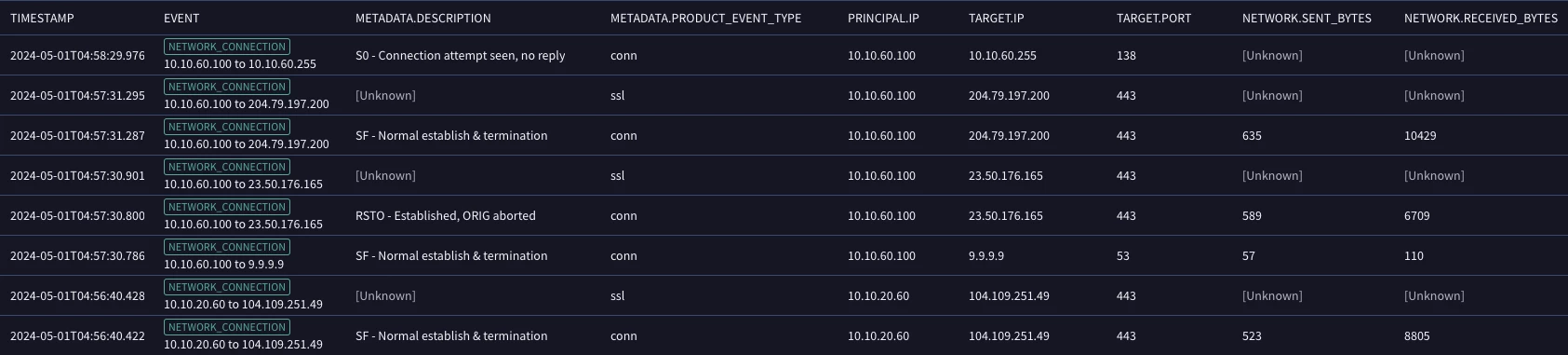
This time, let’s better understand which IP pairs are the top talkers, but rather than base this on the number of events generated, let’s base this on the number of bytes sent. Because we are not changing our aggregation of events, we are still grouping on IP address pairs. Our filtering statement and match section remain the same.
However, because we want to base our results on a different calculation than the event count, we need to add these calculations to our outcome section. This is where we draw on the other aggregate functions available to us in YARA-L. The following aggregation functions can be used in the outcome section of a search.
- count
- count_distinct
- sum
- max
- min
- array
- array_distinct
- avg
- stddev
Let’s add two additional rows to our outcome section, one each for the sum of the field network.sent_bytes and network.received_bytes fields. Because we want our output to be based on the sum of the sent bytes, we can modify the order section to sort first by the outcome variable for the sum of the sent bytes in descending order and in case there is an IP address pair with the same byte value, we will sort in ascending order by event count. Finally, we are only going to return the top five rows this time.
metadata.event_type = "NETWORK_CONNECTION" and metadata.vendor_name = "Zeek"
$principal_ip = principal.ip
$target_ip = target.ip
match:
   $principal_ip, $target_ip
outcome:
   $event_count = count_distinct(metadata.id)
   $sum_bytes_sent = sum(network.sent_bytes)
   $sum_bytes_received = sum(network.received_bytes)
order:
   $sum_bytes_sent desc, $event_count
limit:
   5
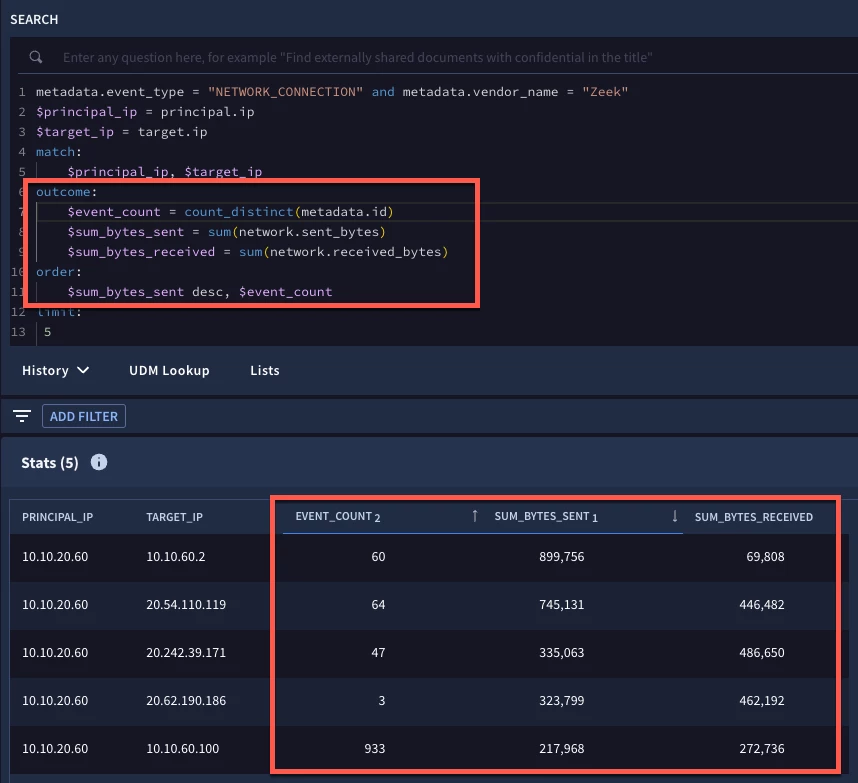
Notice the additional rows in our outcome section and the change in the sort and how that translates to our results. With multiple sorts in our search, the tabular output has a subscript number next to the field to indicate the first value sorted and in what order, ascending or descending, followed by the next sorted field and so forth. If we wanted to override the sort in the UI and wanted to sort our results by the field sum_bytes_received, for example, we could do this by clicking on the header.
Let’s continue to evolve our search. This time, let’s exclude IP address pairs where the target IP is part of the CIDR netblock of 10.10.0.0/16. In the previous blog, I mentioned that we can use YARA-L functions in our searches and now we are going to use one of those functions, net.ip_in_range_cidr, in our filtering statement, to narrow our data set.
We can add additional calculations like the average bytes sent and received in the outcome section, much like we added the sum in our previous example. However, when calculating an average, it can be annoying to have a calculated value with a number of decimal places. To address this, the math.round function has been introduced and we will use that with our average aggregate function to round our results to two decimal places.
metadata.event_type = "NETWORK_CONNECTION" and metadata.vendor_name = "Zeek"
NOT net.ip_in_range_cidr(target.ip, "10.10.0.0/16")
$principal_ip = principal.ip
$target_ip = target.ip
match:
   $principal_ip, $target_ip
outcome:
   $event_count = count_distinct(metadata.id)
   $sum_bytes_sent = sum(network.sent_bytes)
   $sum_bytes_received = sum(network.received_bytes)
   $avg_bytes_sent = math.round(avg(network.sent_bytes),2)
   $avg_bytes_received = math.round(avg(network.received_bytes),2)
order:
   $sum_bytes_sent desc, $event_count
limit:
   5
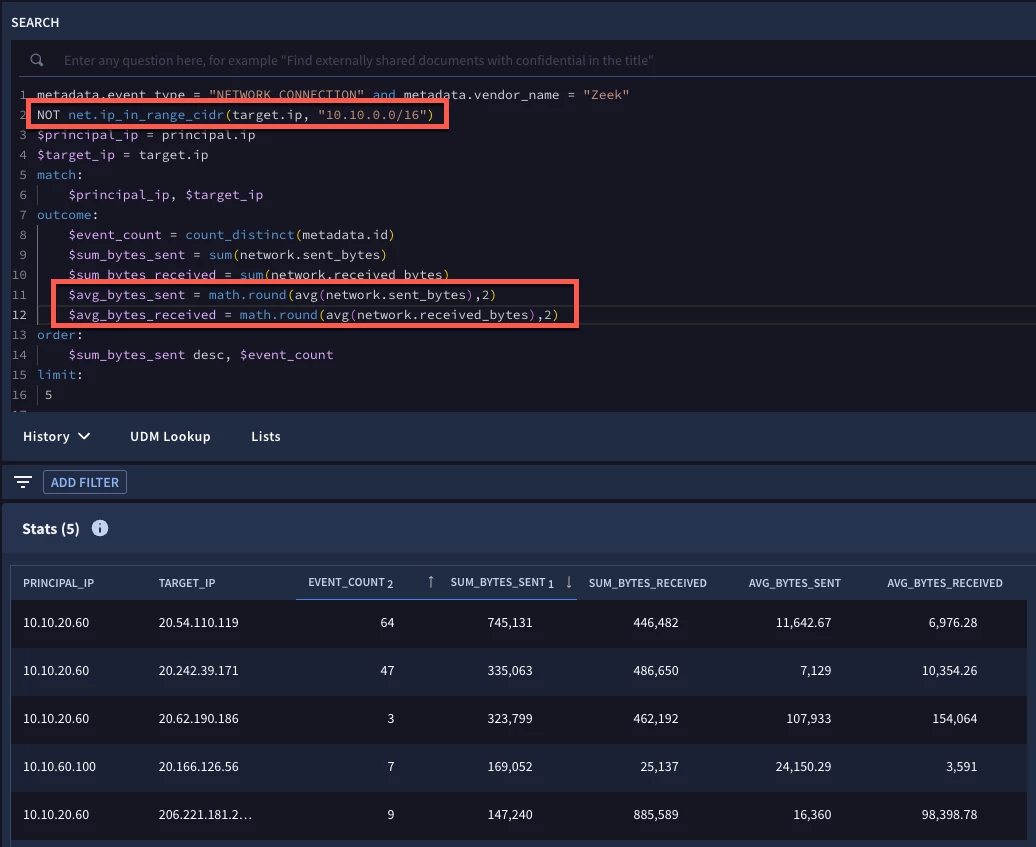
When we run our search, we can see the additional average byte fields with the rounded values and the target IP address field no longer includes IP addresses that are part of the 10.10.0.0/16 netblock.
Let’s look at one more example. Our data set will be slightly different this time because we are going to add time into our search and aggregate data for each day. Instead of using Zeek data, we are using Corelight events, but with the same UDM fields.
In our filtering statement, we are going to use the net.ip_in_range_cidr function and apply it to both IP address fields to focus our search on principal IPs in our netblock communicating with target IPs that are not in our netblock. We are also going to use the date function timestamp.get_date to convert the event timestamp for each event to a date.
The $date placeholder variable that we defined can then be used in our match section to group all events by a common date, principal and target IP combination.
In our outcome section, we are going to output values for the target.port and the different Corelight event types that are being logged from these events. For these values, we are not performing any computations on them, we just want to aggregate their values in an array, so we can use distinct_array to display these values.
We can calculate the total bytes for each row by taking the sum of the sent and the received bytes and using a mathematical operator, in this case +, to calculate this outcome variable. Finally, we can use an if then else statement to take aggregated outcome variables that we already computed and flag specific date and IP pairs as being suspicious by flagging them with the values of yes or no, based on the criteria in the if statement.
metadata.event_type = "NETWORK_CONNECTION" and metadata.vendor_name = "Corelight"
net.ip_in_range_cidr(principal.ip, "10.128.0.0/16")
NOT net.ip_in_range_cidr(target.ip, "10.128.0.0/16")
$principal_ip = principal.ip
$target_ip = target.ip
$date = timestamp.get_date(metadata.event_timestamp.seconds)
match:
   $date, $principal_ip, $target_ip
outcome:
   $target_port = array_distinct(target.port)
   $event_type = array_distinct(metadata.product_event_type)
   $event_count = count_distinct(metadata.id)
   $sum_bytes_sent = sum(network.sent_bytes)
   $sum_bytes_received = sum(network.received_bytes)
   $total_bytes = $sum_bytes_sent + $sum_bytes_received
   $suspicious_ip_pair = if($total_bytes > 4000000 and $event_count < 10, "YES", "NO")
order:
   $suspicious_ip_pair desc, $date desc
limit:
   5
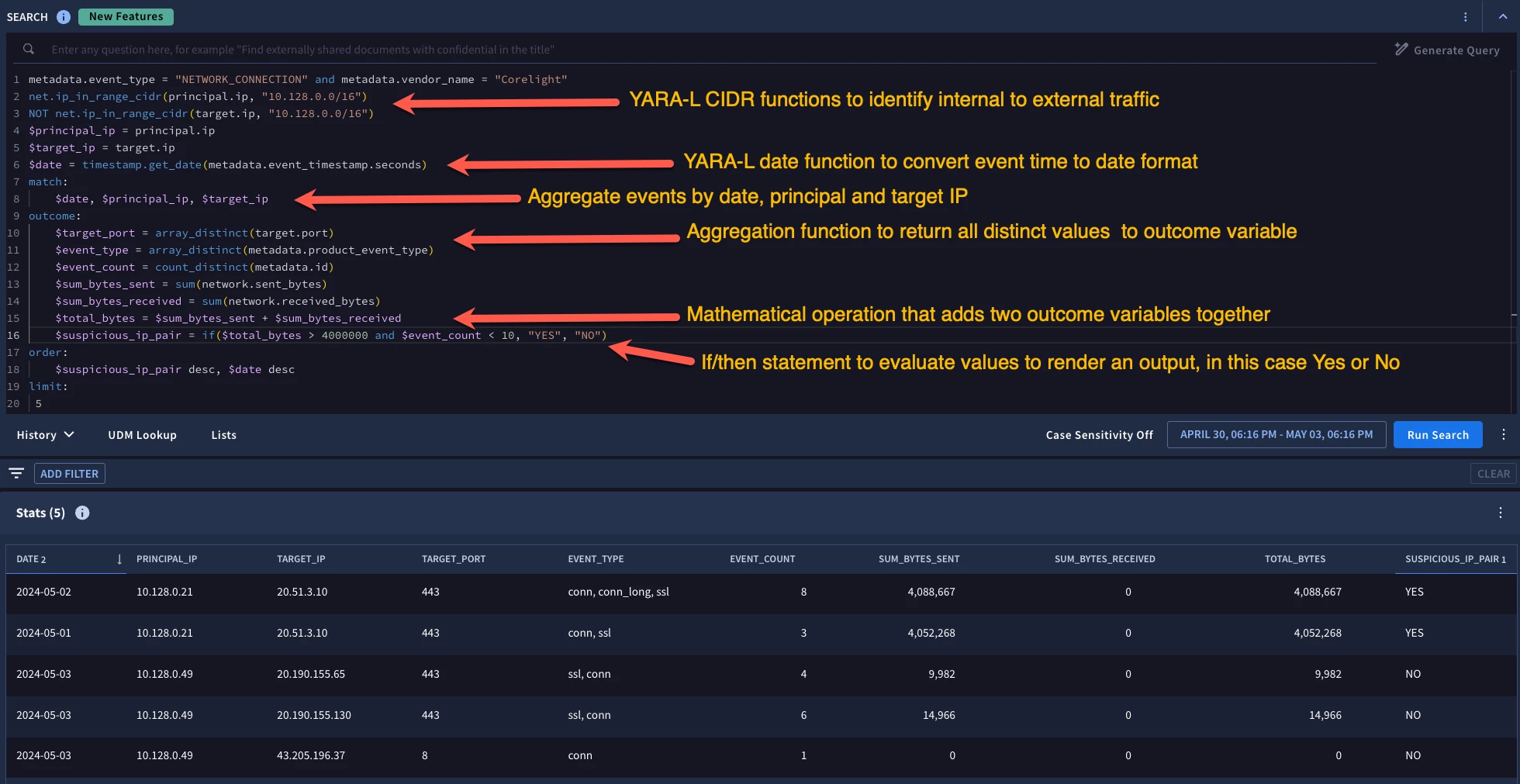
Because there is a lot going on, I annotated some of these newer pieces of this search in the image above, but the net result is that we have two days that an internal IP address communicated with an external IP address, the same pair actually, that met our criteria of a total byte count above our defined threshold and low event count below our threshold.
One more thing. If you want to take the output from a statistical search and export it, you can. Just click on the three dots on the far right of the tabular view and you can download the results to a csv file!
We’ve covered a good deal of ground in these two posts on building statistical searches in Google SecOps. As the year rolls on, I suspect we will be sharing more in this regard, but in the meantime, remember that YARA-L constructs are used for these statistical searches including the match section for aggregation and the outcome section for calculated values. And don’t forget that YARA-L functions can now be used in searches which provide even more flexibility when working with your data!
