Hello everyone,
I’ve seen various questions around the slack channel about the OVA deployment, so I’m writing this quick step by step guide about how to start using Siemplify.
After downloading the Latest OVA and deploying it to our VMware Workstation,
Login to the interactive shell using the default credentials sent in the Welcome email:
root, w2My$0c^^
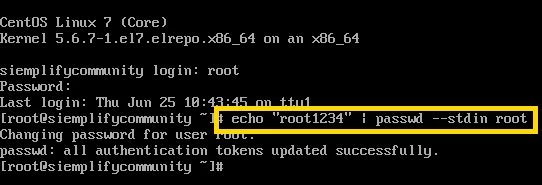
you might want to change this default password which you can by using the command:
# echo "newpassword" | passwd --stdin root
using the command “ip a” you’ll notice there is no network adapter:

we’ll configure our own one by using following steps:
VM > Settings > Hardware > Add > Network Adapter > Host-Only > Finish
[VM might do a state restore after finishing – just wait]
executing once again the command “ip a” will display us the ip address of our Siemplify portal:
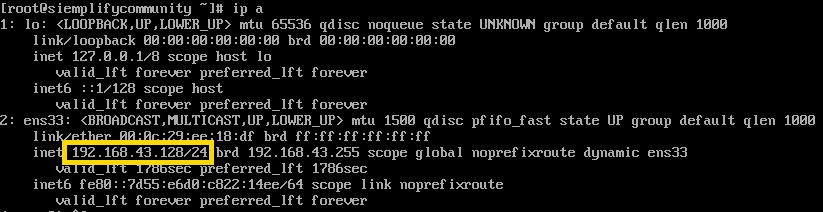
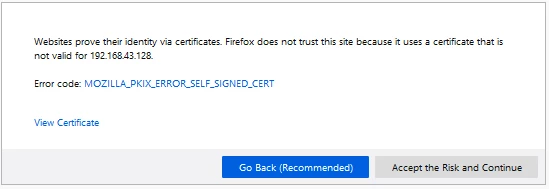
now we can surf into the portal using the given address, as there is no valid certificate you’ll have to add the address to the exception list and continue:
[exact message may differ depends on your web browser]
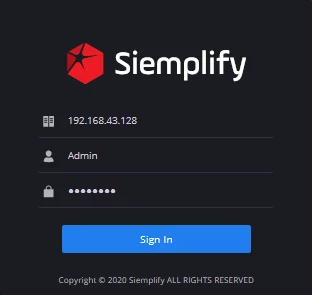
All we have left is to login to the portal using our default user:
Admin, password
And that's all! 😄☕️