



Author: Vasken Houdoverdov, Technical Solutions Consultant
Co-Author: Robert Parker, Senior Technical Solutions Consultant
Introduction
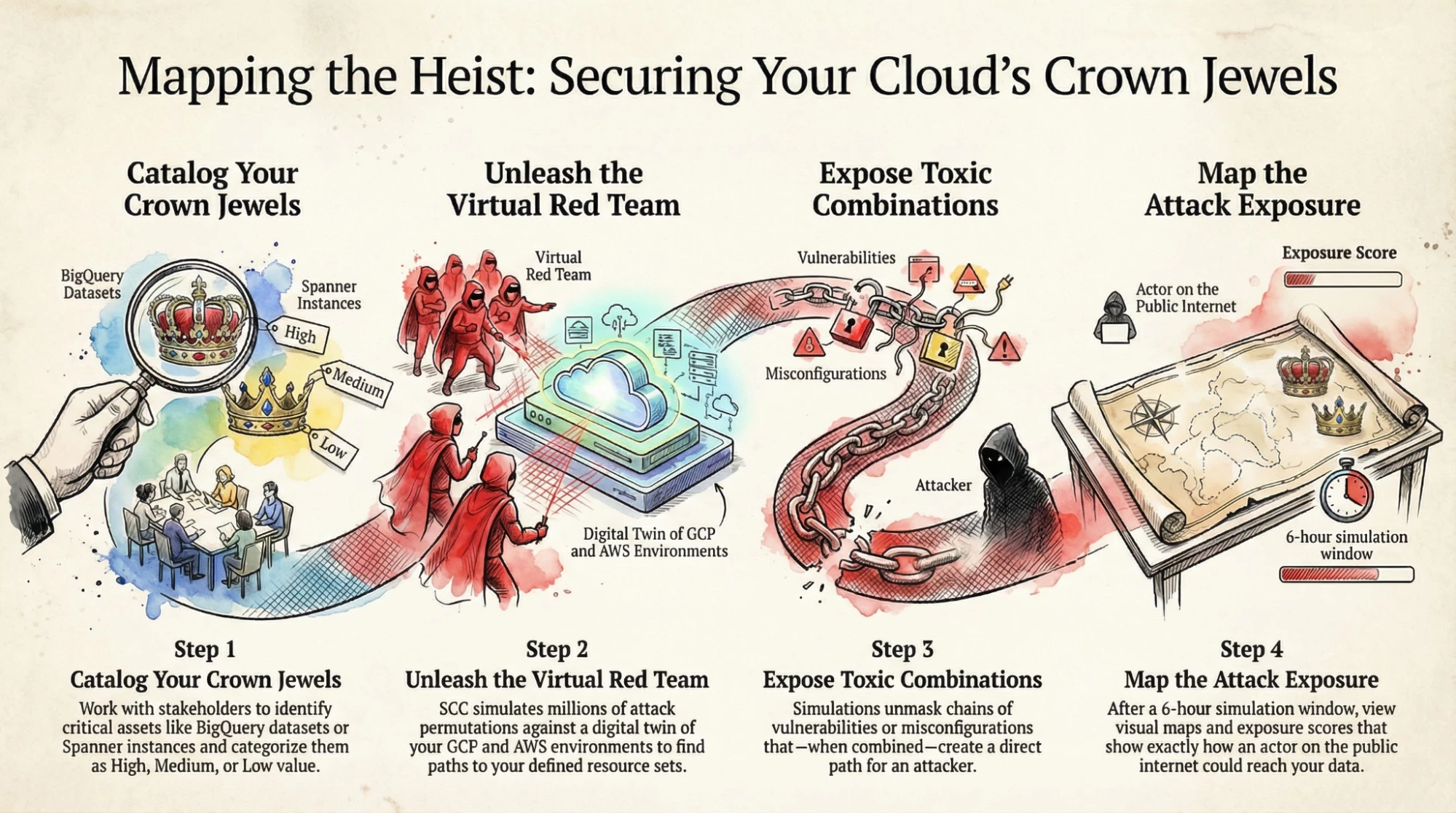
Attack Path Simulation is a capability in Security Command Center (SCC) which uses "Virtual Red Team" technology to run millions of attack permutations against a digital twin model of your organization's cloud environment. This provides a comprehensive view into configurations that would allow an attacker to compromise your cloud infrastructure.
One of the outcomes of running these attacks is identifying Toxic Combinations and their corresponding Attack Paths. Toxic Combinations are chains of vulnerabilities or misconfigurations that lead attackers to your most sensitive data. These toxic combinations represent ways that hypothetical actors can compromise cloud environments based on the cumulative configuration of multiple resources.
When attack path simulations run, they identify attack paths and calculate attack exposure scores for the resources that are the “crown jewels” in your cloud environment. In order to make these simulations meaningful you must specify what these resources are. This is done by configuring high-value resource sets.
This guide provides a framework for understanding and configuring high-value resource sets in SCC. Defining these resource sets is a critical step in prioritizing risk in your cloud environment.
Overview
What are high-value resource sets?
High-value resource sets are user-defined collections of the most business-critical assets within your cloud environment. These can include anything from sensitive data stores and production databases to key virtual machines and applications. Each high-value resource set can contain up to 1,000 resources.
Designating high-value resource sets is crucial for effective security posture management. It allows you to:
- Prioritize Alerts: Focus on the threats and vulnerabilities that pose the most significant risk to your business-critical assets.
- Enable Attack Path Simulation: This powerful feature simulates how an attacker could potentially move through your environment to compromise your most valuable resources.
- Enhance Threat Detection: Security Command Center services like Event Threat Detection and Container Threat Detection can use this information to better contextualize threats and tailor their analysis.
How do I define a high-value resource set?
The process of accurately defining a high-value resource set involves the following steps:
1. Work with stakeholders across your organization to identify the most business-critical assets in your cloud environment.
2. Access Security Command Center in your Google Cloud Console at the organization level. Click SCC Settings from the left vertical menu.
3. In SCC Settings, click the Attack Path Simulation tab. In the Resource value configurations section of this tab, click Create new configuration.
4. Defining your Sets: Create and name your resource sets, adding the identified critical assets.
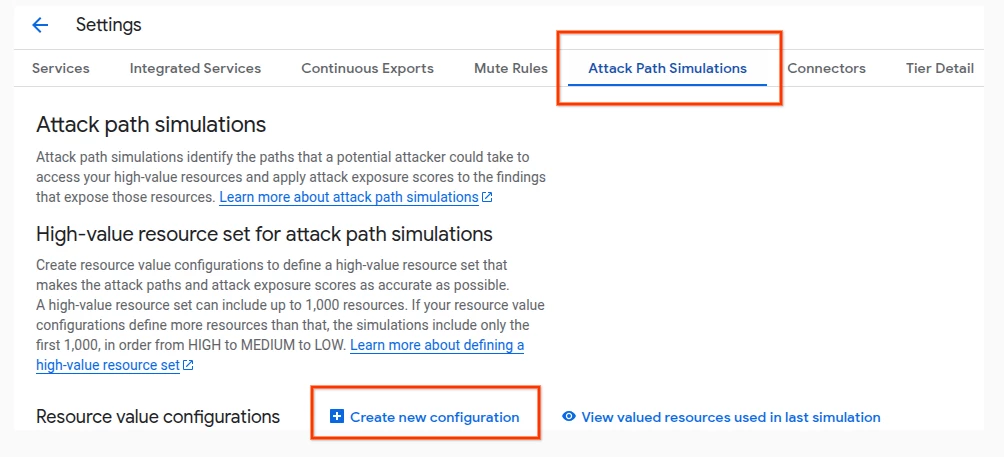
The Attack Path Simulation tab in SCC Settings.
What resource types can I select?
When selecting resources, you can pick from a large set of resource types, a subset of which is shown in this guide. You can also select Any to include all supported resource types.
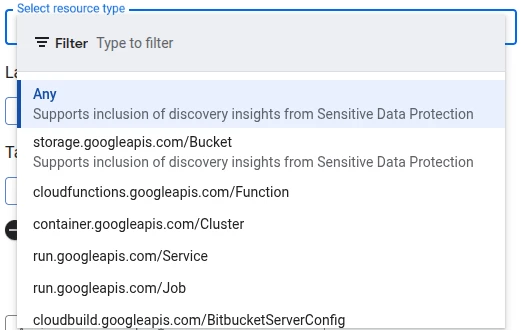
A subset of the available resource types when selecting resources in GCP.
Can high-value resources be specified for other cloud providers?
Yes, you can specify high-value resources for AWS too. Doing so requires specifying an AWS Account ID and AWS region, along with specifying the AWS resource types.
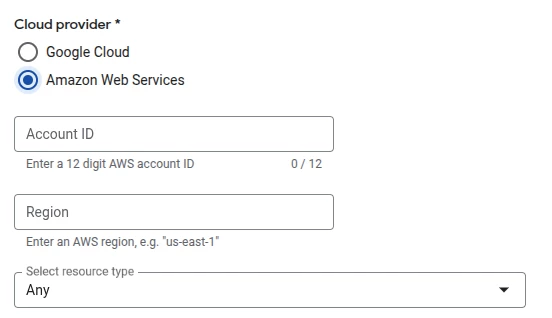
You can specify assets that are located in AWS by specifying the Account ID and Region.
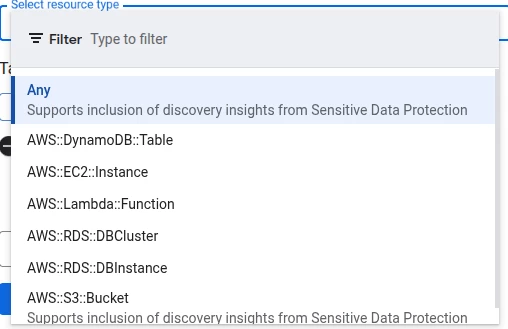
A subset of the available resources when selecting resources in AWS.
What resource values should I select?
Once you select a resource type, the next step is to assign a resource value to the chosen resource type. For each resource value configuration, you can select one of four values: High, Medium, Low, and None. You can optionally specify Labels and Tags at this stage, which will make this resource configuration match only those resources that have the specified Labels or Tags.
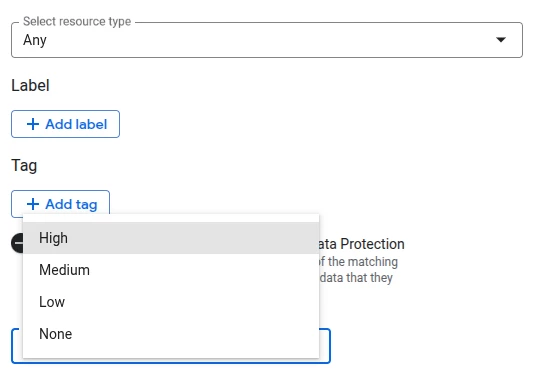
When defining a resource set, you can specify a resource type and associated resource value
(High, Medium, Low, or None).
Putting it to Use
Now that we’ve looked at the various options available when defining a resource value configuration in Security Command Center, let’s put this information to practical use by defining a resource value configuration for a specific use case.
Let’s say we’re working on a project in Cymbal Corp. that includes the following resources:
- A proprietary dataset in BigQuery that holds sample data used for model evaluation.
- A number of ephemeral compute engine VMs that are used for non-sensitive development work.
- Three Spanner instances that support mission-critical database access to end-users.
- Multiple Cloud Function configurations based on established open source examples.
- A number of storage buckets that contain public-facing assets, like resources that would be served by a content delivery network (CDN) for public viewing.
Our first step here is to identify which subset of our resources represent our high-value assets. In our example, we can infer that the high-value assets would be the BQ dataset, and the three Spanner instances. While the rest of the resources might be valuable, we’re focusing on defining the most business-critical assets in this exercise.
Let’s add both as separate resource value configurations, both of which would be set to a resource value of High.

Specifying the BigQuery Datasets resource type in Cymbal Corp. as High value.
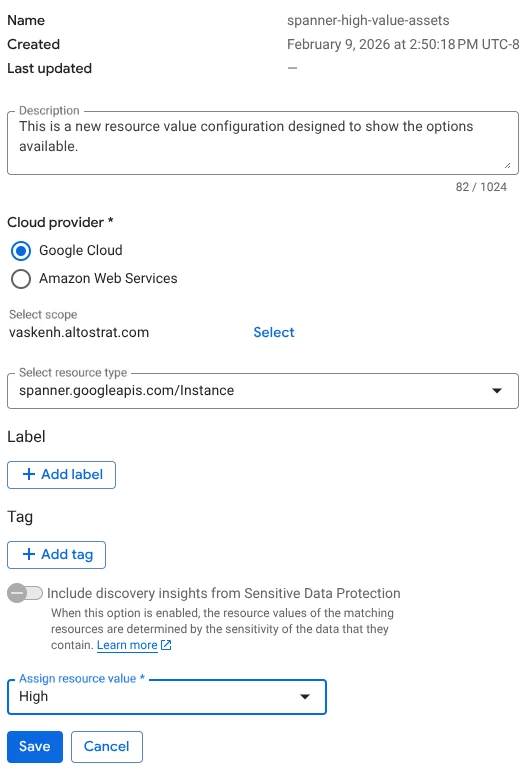
Specifying the Spanner resource type in Cymbal Corp. as High value.
After saving both resource value configurations, we can confirm that both show up in the list of resource value configurations, along with their associated cloud provider and resource value.
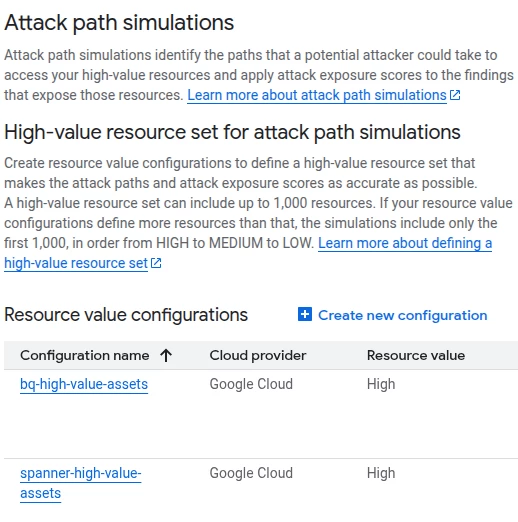
Confirming both resource value configurations have been committed, with the correct values.
Analyzing the Results: Asset View
Once your high-value set is defined, wait at least six hours for the next attack path simulation to complete, and for the associated findings to populate in the SCC console.
You can view existing high-value resources by navigating to Assets > High Value Resource Set, which shows the high-value resources used in the last attack path simulation. For each asset, an Attack Exposure Score is provided.
An attack exposure score is a measure of how exposed resources are to potential attack if a malicious actor were to gain access to your Google Cloud environment. You may also see references to a Toxic Combination Score, which is a similar scoring model used specifically for Toxic Combination findings. The general guidelines provided in our documentation and in this guide are relevant to both score types.
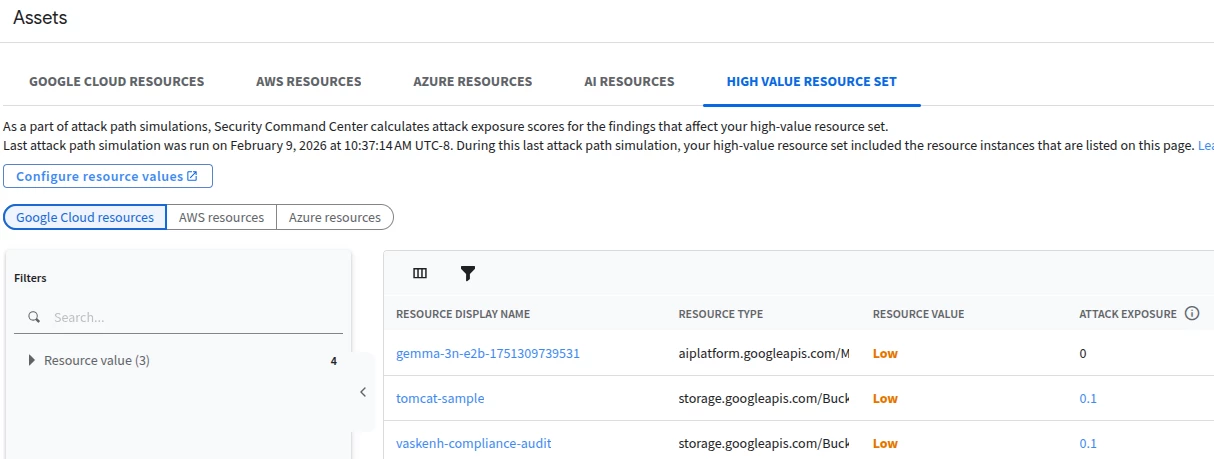
Viewing the High Value Resource Set in Assets View
By clicking on the Attack Exposure Score, you can view the attack paths associated with this finding, as shown below.
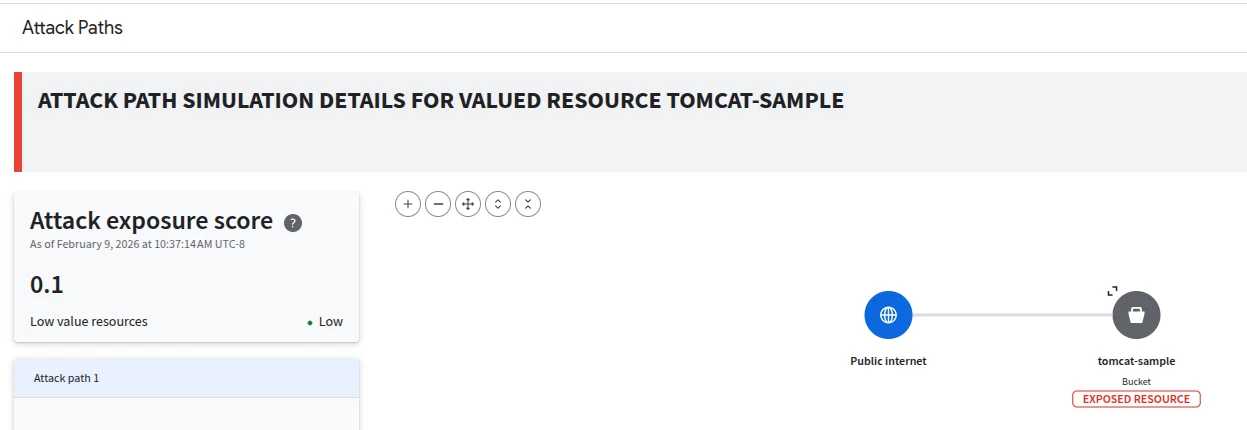
Viewing the Attack Path associated with a resource by clicking the attack exposure score.
Analyzing the Results: Findings View
You can also use the Findings view of Security Command Center to narrow in on toxic combinations. After navigating to the Findings section of SCC, you can do this by applying the Toxic Combination filter under the Finding Class section in Quick Filters.
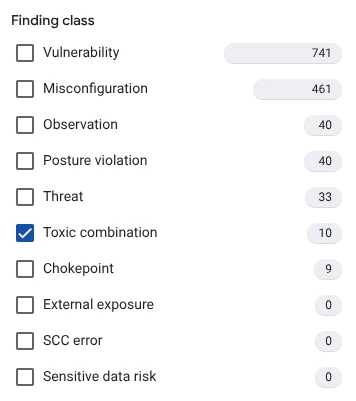
The available options when filtering SCC Findings by class.
The resulting findings will be the subset of findings that are Toxic Combinations, an example of which is shown below.
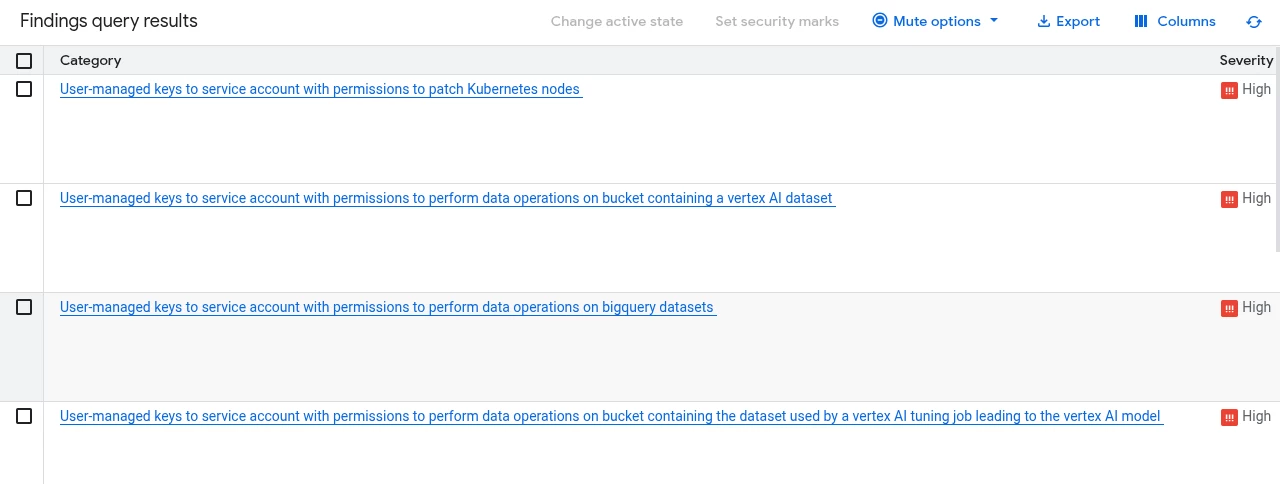
A selection of Toxic Combinations that display after we specify our Finding class filter.
Let’s take a closer look at one of these Toxic Combinations to get a better understanding of what this type of finding looks like in practice. Clicking one of the findings will open a modal view of that particular finding, including listing the Toxic combination score for the finding. By clicking the Toxic Combination score, we can access the full attack path details like shown below. This helps with visualizing how the misconfigured resources can be leveraged by attackers on the public internet to ultimately access your sensitive resources.
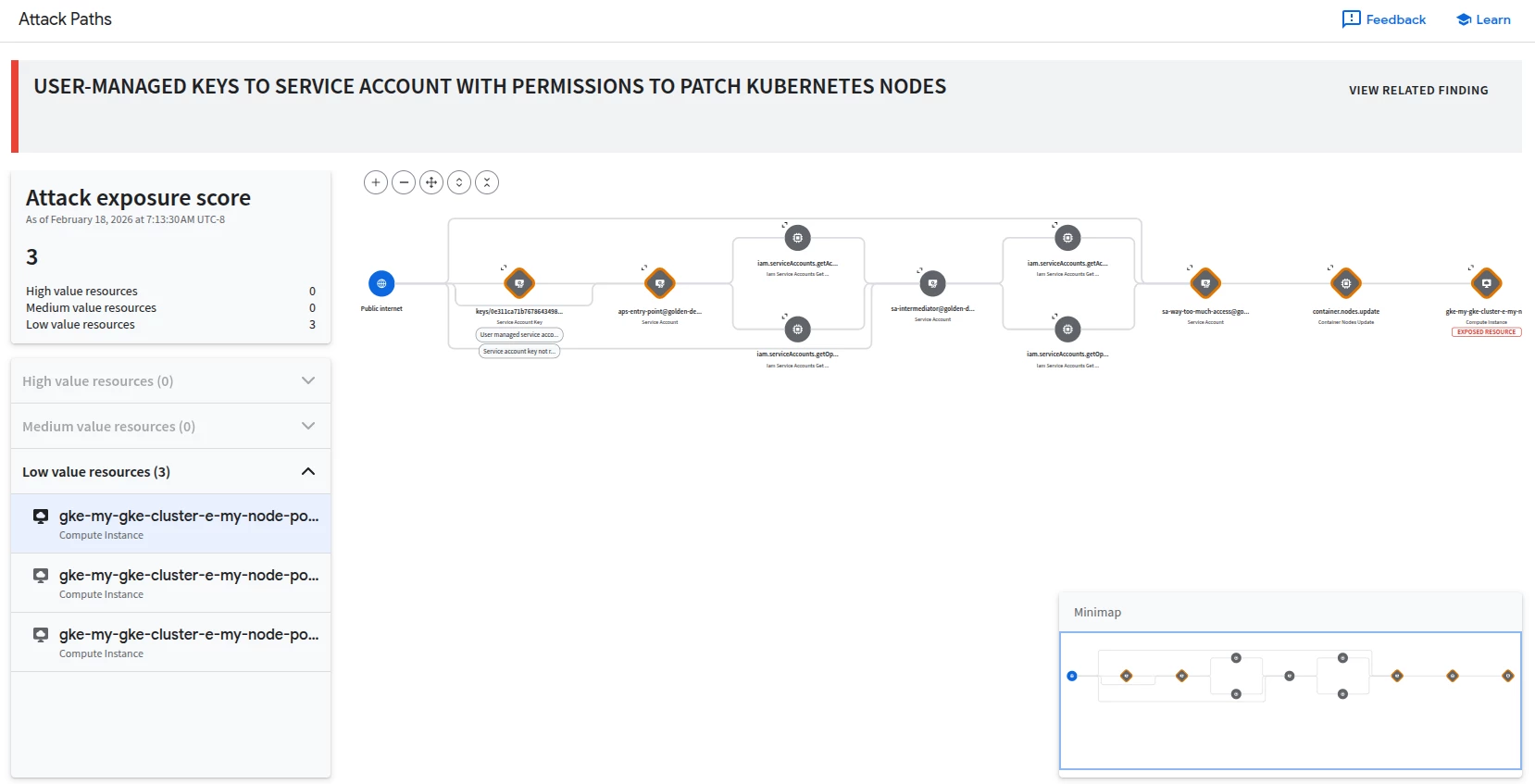
An example Toxic Combination finding, indicating that a service account has user-managed keys, and that these keys can be used to modify (patch) Kubernetes nodes.
Conclusion
By carefully defining and maintaining accurate resource value configurations within Security Command Center, you can significantly enhance the effectiveness of the attack path simulation capability. Defining these assets enables SCC to map attack exposure scores to business-critical assets, prioritizing findings that carry the highest risk for your organization.
In this guide, we examined multiple components of Security Command Center that are related to defining high-value resources and analyzing their associated findings. We started by defining the Attack Path Simulation capability in SCC and described the various outputs of this capability, like Toxic Combinations and the generation of hypothetical attach paths through your cloud environment. We then covered the configuration elements associated with leveraging Attach Path Simulation, like defining high-value resource sets across multiple cloud providers. Finally, we described how to examine findings related to high-value resources in SCC.
With the information in this adoption guide, you are equipped to understand and implement the Attack Path Simulation capability in SCC!
