



Author: Jose Luis Sanchez Martinez, Senior Security Engineer, Google Threat Intelligence
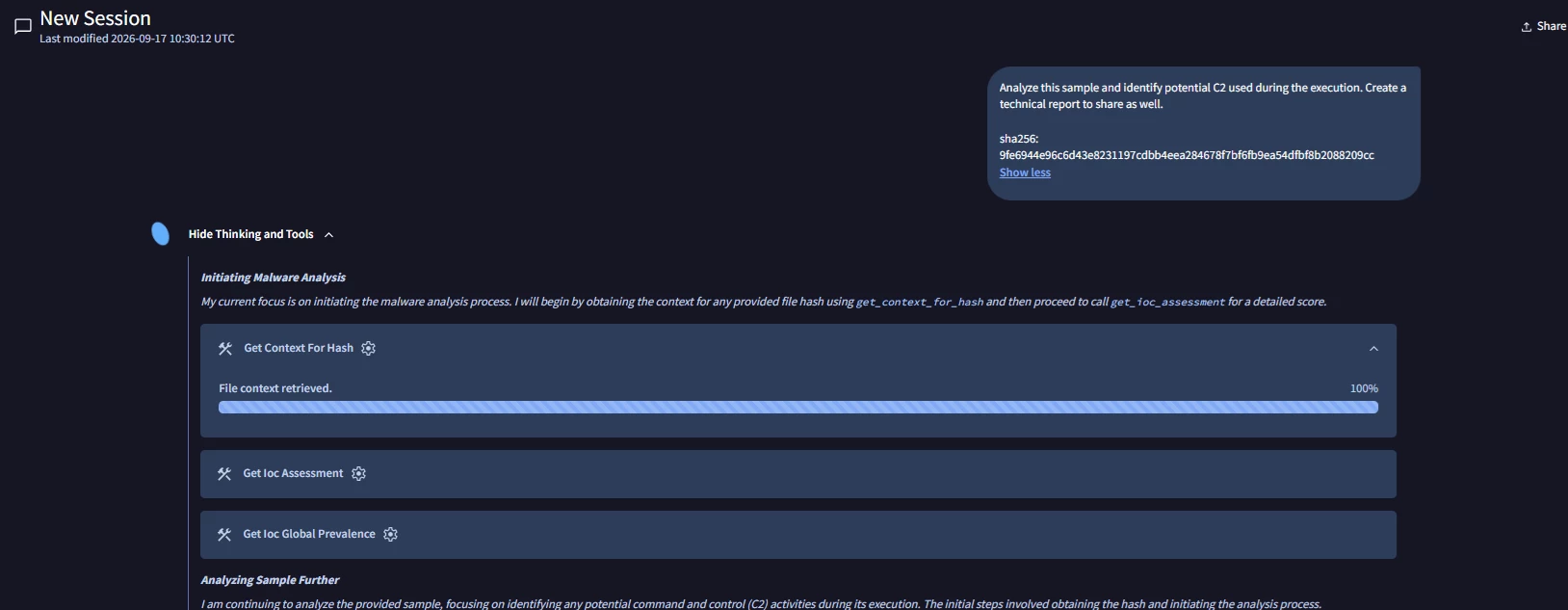
While the interactive chat interface in Google Threat Intelligence (GTI) provides a natural entry point for ad-hoc investigations, security analysts rarely spend their day inside a browser tab. Core operations live in SOAR playbooks, Jupyter notebooks, automated data pipelines, and scheduled scripts.
The Agentic Threat Intelligence API bridges that gap, exposing the platform's autonomous reasoning, tools, and threat telemetry over HTTP. This guide walks through using the API in production pipelines: opening sessions, consuming raw event transcripts, enforcing machine-readable JSON for automation, generating reusable hunting queries, and scheduling autonomous sweeps with Flows.
This post walks through how to use the API in practice, drawing directly from my own work and everyday analyst workflows. All the examples, indicators, and timings below were captured live during development—including the real-world hitches and lessons learned along the way.
📘 Access note. The Agentic Threat Intelligence API is in Preview and requires a Google Threat Intelligence license. Advanced AI automation capabilities (such as Flows) are available for Enterprise, Enterprise Plus, and Integration Advanced tiers. If your key is a standard VirusTotal key, these endpoints will not respond. The current requirements are listed in the Sessions API overview.
Introducing the endpoints for GTI API’s agentic capabilities
There are two families of endpoints, and they solve two different problems.
Sessions are conversations. You post a message, the agent investigates, and you get back the full transcript — including every tool it called on the way. That is the part you wire into your own code.
Flows are scheduled automation. You describe a small graph — when to run, what to ask, who to email — and the platform runs it for you on a cron.
Everything hangs off the usual VirusTotal API v3 base URL and uses the same authentication header you already use for everything else:
Base URL: https://www.virustotal.com/api/v3
Auth:     x-apikey: <your GTI API key>
All available endpoints for creating sessions and flows can be found in our documentation.
Your first session
The simplest possible call. Note that the body is multipart/form-data, not JSON — that is because the same endpoint also accepts file attachments, which I will use later.
# Ensure you have sufficient quota to run this. This script is illustrative only to demonstrate how to use this feature and we do not assume responsibility for quota consumption.
curl -s -X POST "https://www.virustotal.com/api/v3/agentspace/sessions" \
  -H "x-apikey: $GTI_APIKEY" \
  -F "message=Give me a short reputation assessment of the domain example.com" \
  -D headers.txt -o session.json
Two things to look at immediately. First, the session ID comes back in a response header, not only in the body:
x-session-id: dca5dd2c-608c-4b99-8a52-0cb6ce9fc75b
Second, keep in mind that the call is synchronous. Rather than returning a job ID to poll, the connection stays open until the agent finishes processing. To ensure you can run all types of queries without hitting premature termination, we strongly recommend raising your HTTP timeout.
The response body is a standard JSON:API document containing an agentic_session object. The full transcript of the investigation lives in attributes.events — an ordered sequence including USER_MESSAGE, AGENT_THOUGHT, FUNCTION_CALL, FUNCTION_RESPONSE, and AGENT_FINAL_RESPONSE. Tool arguments live in args_json as a serialized JSON string. Furthermore, note that the session returned directly by POST has a temporary placeholder title (Session for <uuid>), while calling GET a few seconds later returns the permanent human-readable title generated by the agent.
A small client to keep things readable
To spare you the fatigue of repetitive curl commands throughout this walkthrough, we will use a straightforward helper function. It is intentionally simple and designed solely for demonstration, so be sure to check your environment’s quotas before running large workloads.
Note that the API response does not include token consumption or cost metrics. If your workflows require execution timing or resource accounting, you will need to instrument client-side tracking—wrapping calls with your own wall-clock timer remains the most reliable path.
# Ensure you have sufficient quota to run this. This script is illustrative only to demonstrate how to use this feature and we do not assume responsibility for quota consumption.
#!/usr/bin/env python3
"""Minimal client for the Agentic Threat Intelligence API."""
import json
import os

import requests

BASE = "https://www.virustotal.com/api/v3"
HEADERS = {"x-apikey": os.environ["GTI_APIKEY"]}

# The endpoint is synchronous: it returns only when the agent is done.
TIMEOUT = 900


def ask(message, files=None):
    """Open a new session with a first message. Returns (session_id, session)."""
    attachments = None
    if files:
        attachments = [("files", (os.path.basename(p), open(p, "rb"))) for p in files]
    r = requests.post(f"{BASE}/agentspace/sessions", headers=HEADERS,
                      data={"message": message}, files=attachments, timeout=TIMEOUT)
    r.raise_for_status()
    return r.headers["X-Session-Id"], r.json()["data"]


def follow_up(session_id, message):
    """Continue an existing conversation. The agent keeps the previous context."""
    r = requests.post(f"{BASE}/agentspace/sessions/{session_id}", headers=HEADERS,
                      data={"message": message}, timeout=TIMEOUT)
    r.raise_for_status()
    return r.json()["data"]


def get_session(session_id):
    r = requests.get(f"{BASE}/agentspace/sessions/{session_id}",
                     headers=HEADERS, timeout=60)
    r.raise_for_status()
    return r.json()["data"]


def _events(session, message_type):
    return [e for e in session["attributes"]["events"]
            if e["message_type"] == message_type]


def answer(session):
    """The agent's final answer, as markdown."""
    out = []
    for event in _events(session, "AGENT_FINAL_RESPONSE"):
        for widget in event["agent_final_response"].get("widgets", []):
            if widget["widget_type"] == "MARKDOWN_TEXT":
                out.append(widget["markdown_text_widget"]["text"])
    return "\n".join(out)


def tool_calls(session):
    """Every tool the agent invoked, in order. This is your audit trail."""
    return [(e["function_call"]["name"],
             json.loads(e["function_call"].get("args_json") or "{}"))
            for e in _events(session, "FUNCTION_CALL")]
The arguments live in args_json, a JSON string, not in an args object. My first version of this helper read e["function_call"]["args"], got None for every call, and I spent a while convinced the API was not returning tool arguments at all. It was; I was reading the wrong key.
Case 1: triaging a sample end to end
Let's demonstrate Google Threat Intelligence API’s agentic functionality with real examples of analyst workflows. We picked a recent commodity stealer sample straight out of Google Threat Iintelligence and asked the kind of question you would ask a junior analyst.
# Ensure you have sufficient quota to run this. This script is illustrative only to demonstrate how to use this feature and we do not assume responsibility for quota consumption.
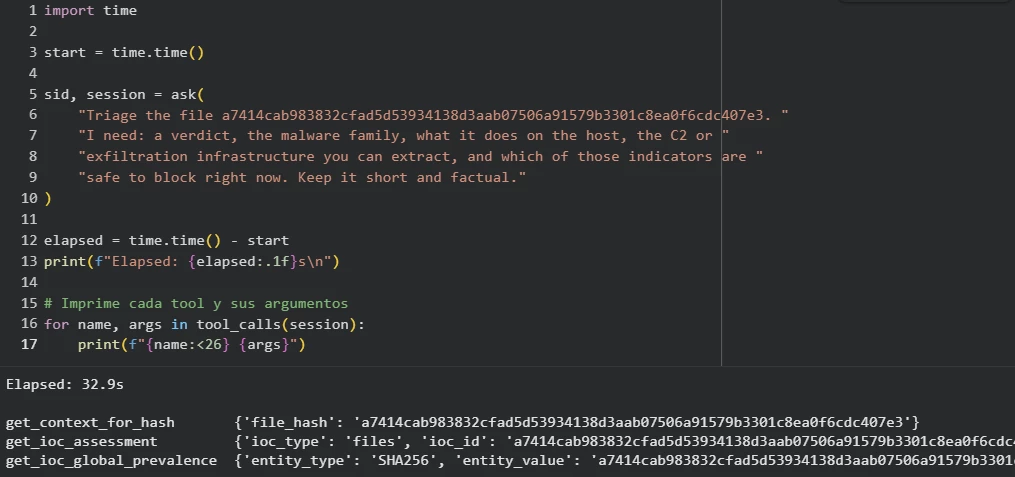
sid, session = ask(
    "Triage the file a7414cab983832cfad5d53934138d3aab07506a91579b3301c8ea0f6cdc407e3. "
    "I need: a verdict, the malware family, what it does on the host, the C2 or "
    "exfiltration infrastructure you can extract, and which of those indicators are "
    "safe to block right now. Keep it short and factual."
)
45.7 seconds. Three tool calls:
get_context_for_hash      {"file_hash": "a7414cab983832cfad5d5393..."}
get_ioc_assessment        {"ioc_type": "files", "ioc_id": "a7414cab983832cfad5d5393..."}
get_ioc_global_prevalence {"entity_value": "a7414cab983832cfad5d5393...", "entity_type": "SHA256"}
Three calls, and one of them — get_context_for_hash — is doing most of the work: it returns the sandbox behaviour, the detection ratio and the extracted configuration in one go.
🤖 Agentic Threat Intelligence — Live Response
Executive VerdictThe analyzed sample is Malicious with 63 security vendor detections and a confirmed Google Threat Intelligence malicious assessment. Malware Family |
| Indicator | Type | Category |
|---|---|---|
| scaffegclasiqwp[.]shop | Domain | Active C2 |
| condedqpwqm[.]shop | Domain | Active C2 |
| deteriotraiwo[.]shop | Domain | Active C2 |
| evoliutwoqm[.]shop | Domain | Active C2 |
| locatedblsoqp[.]shop | Domain | Active C2 |
| millyscroqwp[.]shop | Domain | Active C2 |
| stagedchheiqwo[.]shop | Domain | Active C2 |
| stamppreewntnq[.]shop | Domain | Active C2 |
| traineiwnqo[.]shop | Domain | Active C2 |
Sandbox telemetry also recorded outbound DNS communication to nonasthmatic[.]com.
Actionable Blocking Guidance
-
Safe to Block Immediately: all nine extracted .shop domains represent adversary-controlled command-and-control infrastructure and can be blocked at the perimeter (DNS/firewall/web proxy) with zero operational false-positive risk.
-
Caution / Exclude: do not block embedded legitimate infrastructure observed in binary strings or certificates, which is referenced for code signature validation and TLS operations.
This distinction is critical for production pipelines. Naive string extraction often pulls benign domains out of embedded certificates and dependencies, risking operational outages if pushed directly to a perimeter blocklist. Here, the agent exercised contextual reasoning on its own—distinguishing active adversary C2 infrastructure from legitimate platform dependencies without requiring explicit prompt tuning. For automated blocking, always have your pipeline filter specifically on the agent's explicit verdict and category tags rather than raw extracted string lists.
Case 2: making the agent talk to your SOAR instead of to you
Markdown is lovely for a human and useless for a playbook. The good news is that you can simply ask for a contract, and the agent will honour it.
We ran the exact same investigation as Case 1, changing only the instructions about the output:
# Ensure you have sufficient quota to run this. This script is illustrative only to demonstrate how to use this feature and we do not assume responsibility for quota consumption.
sid, session = ask(
    "Triage the file a7414cab983832cfad5d53934138d3aab07506a91579b3301c8ea0f6cdc407e3 "
    "and answer ONLY with a JSON object, no prose and no markdown fences, using exactly "
    'this schema: {"verdict": "malicious|suspicious|benign|unknown", '
    '"confidence": "high|medium|low", "family": string, '
    '"iocs": [{"type": "domain|ip|url|sha256", "value": string, '
    '"blockable": true|false}], "summary": string}'
)

verdict = json.loads(answer(session))   # this just works
The final response came back as raw JSON, no fences, no preamble, json.loads on the first attempt:
{
  "verdict": "malicious",
  "confidence": "high",
  "family": "Lumma Stealer",
  "iocs": [
    {"type": "sha256", "value": "a7414cab983832cfad5d53934138d3aab07506a91579b3301c8ea0f6cdc407e3", "blockable": true},
    {"type": "domain", "value": "caffegclasiqwp.shop", "blockable": true},
    {"type": "domain", "value": "stamppreewntnq.shop", "blockable": true},
    {"type": "domain", "value": "stagedchheiqwo.shop", "blockable": true},
    {"type": "domain", "value": "millyscroqwp.shop",   "blockable": true},
    {"type": "domain", "value": "evoliutwoqm.shop",    "blockable": true},
    {"type": "domain", "value": "condedqpwqm.shop",    "blockable": true},
    {"type": "domain", "value": "traineiwnqo.shop",    "blockable": true},
    {"type": "domain", "value": "locatedblsoqp.shop",  "blockable": true},
    {"type": "domain", "value": "deteriotraiwo.shop",  "blockable": true}
  ],
  "summary": "The sample is a Win32 executable identified as Lumma Stealer (LUMMAC.V2), an information stealer detected by multi-engine antivirus solutions, sandbox detonation, and Mandiant automated configuration extraction with nine active C2 domains."
}
Same three tool calls as Case 1, same conclusions, in a shape you can hand straight to a firewall API. Two practical notes:
-
The phrase "no markdown fences" is doing real work in that prompt. Leave it out and you will spend your afternoon stripping ```json from strings. Even with it, wrap the parse in a try/except and fall back to extracting the first {...} block — this is still a language model at the end of the pipe.
-
The second note is about latency: constraining the output to a compact JSON schema generally completes faster than generating a full prose report because the model produces significantly fewer output tokens.
Case 3: attaching files, and telling the agent what they are
The POST /agentspace/sessions endpoint accepts a files field, enabling you to attach non-malicious data files—such as SIEM exports, log extracts, or incident CSVs—directly into the session. The session environment is backed by a real file system. When attaching structured telemetry rather than a malware binary, instruct the agent to inspect the file using its file system tools and specify the analysis you want performed on its contents:
# Ensure you have sufficient quota to run this. This script is illustrative only to demonstrate how to use this feature and we do not assume responsibility for quota consumption.
sid, session = ask(
    "The attached siem_export.csv is a plain text CSV data file, not a malware sample. "
    "Open it with the file system tools, read every row, and triage each indicator: "
    "tell me whether it is malicious or benign, what threat family or role it belongs to, and group the related indicators into a single incident summary.",
    files=["siem_export.csv"]
)
Behind the scenes, the agent uses its built-in file system capabilities to list the session workspace, locate the uploaded file, and read its raw contents before pivoting into threat intelligence lookups for each extracted indicator. Because the CSV also contained timestamp and telemetry source columns alongside the indicators, the agent incorporated them directly into the final incident report:
🤖 Agentic Threat Intelligence — Incident Report
|
It then grouped the first four into a single incident with a timeline built from the CSV's own timestamps, and left the other two out of it as noise. That is a genuinely useful artifact to hand a shift lead, and it came out of one HTTP call with a file attached.
Case 4: getting the hunt back as queries you can re-run
This is the one I like most as an analyst, and it provides a reliable pattern for threat hunting over HTTP. Instead of asking the agent to perform an open-ended campaign hunt in a single call, ask it to hand you the pivots as VT Intelligence search queries:
# Ensure you have sufficient quota to run this. This script is illustrative only to demonstrate how to use this feature and we do not assume responsibility for quota consumption.
sid, session = ask(
    "Give me two VT Intelligence search queries I can run to find more samples from the "
    "same campaign as a7414cab983832cfad5d53934138d3aab07506a91579b3301c8ea0f6cdc407e3, "
    "one based on its extracted malware configuration and one based on embedded URLs. "
    "Show the query, say what it pivots on, and give a rough idea of how noisy it will be. "
    "Do not run a full campaign investigation, just the queries."
)
What we got:
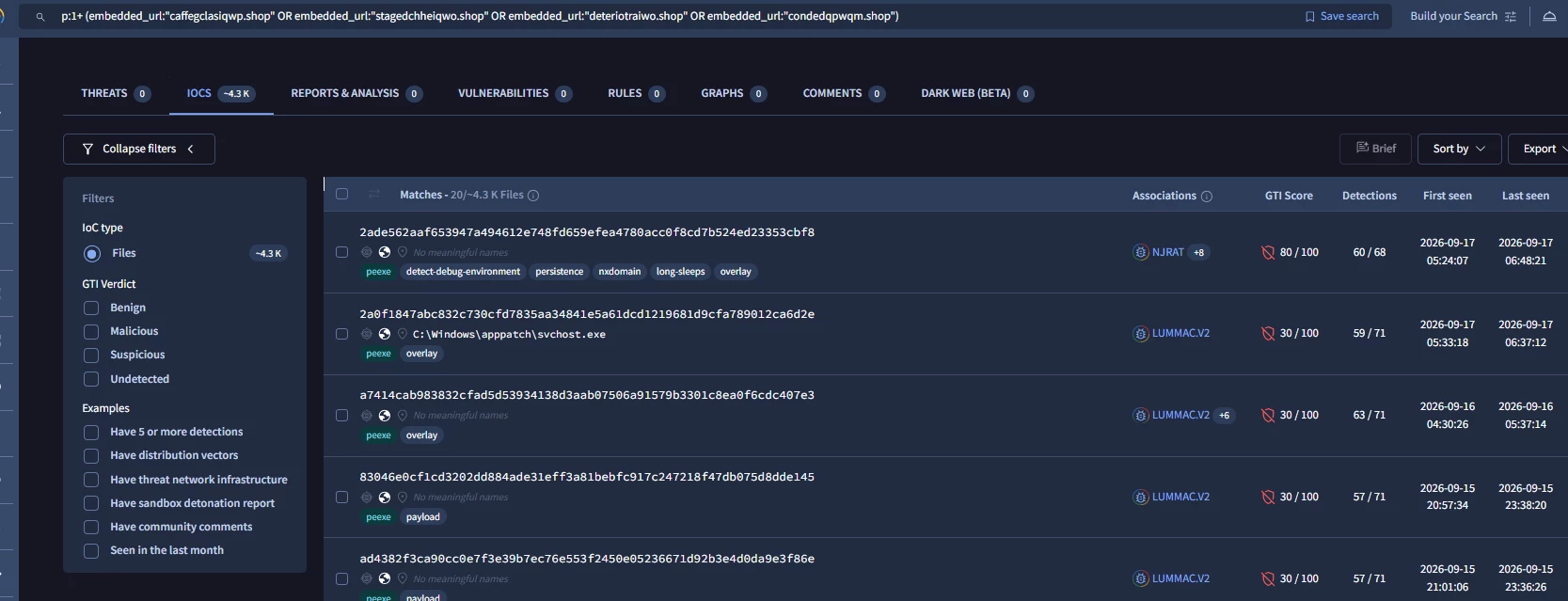
🤖 Agentic Threat Intelligence — Live ResponseQuery 1: Based on Extracted Malware Configuration
Query 2: Based on Embedded URLs
|
Two 100% valid, runnable queries using official modifiers (malware_config: and embedded_url:), the rationale behind each pivot, and an honest noise assessment. Testing both queries against VT intelligence returns thousands of live campaign hits (malware_config:"hRjzG3--PETER" alone surfaces over 3,300 related Lumma binaries). All supported syntax options are documented in the file search modifiers reference.
And because it is a query rather than a list of results, it stays useful tomorrow.
💡 One parsing detail. The final response of this session came back as markdown widgets. Don't assume widgets[0] is always the whole answer if multiple widgets are emitted — iterate the list and join. The answer() helper above already does this.
Flows: when you don't want to be the cron job
Sessions are reactive; you initiate them to investigate the system after an incident occurs. Flows are the other half: you describe an investigation once and the platform runs it on a schedule.
A Flow is an automated workflow: a fixed sequence of nodes that run one after another. There are three supported shapes today:
Schedule Time → Run Prompt
Schedule Time → Run Prompt → Send Email
Schedule Time → Run Saved Search
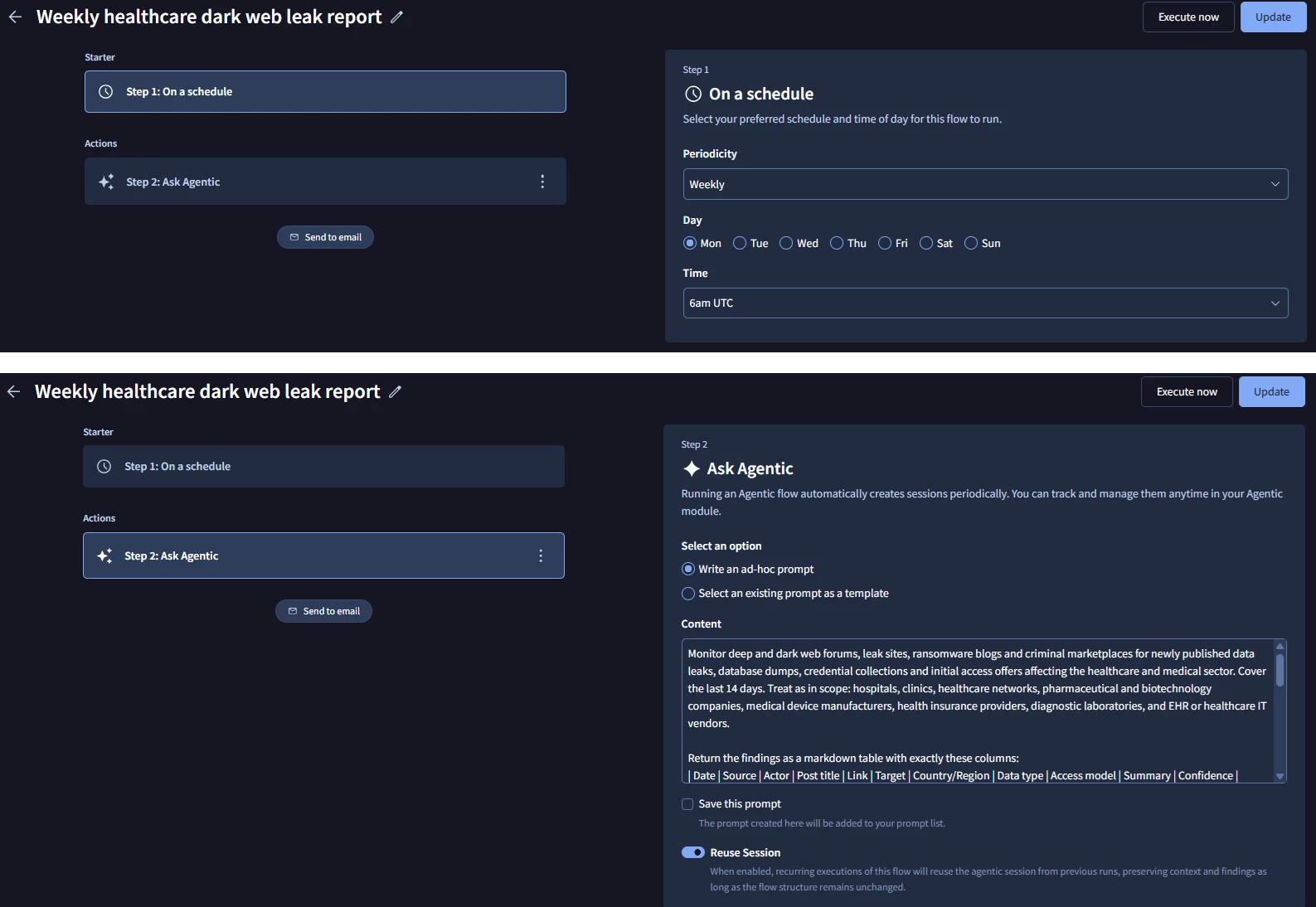
Here is a two-node Flow created entirely through the API: a weekly sweep of dark web forums and leak sites for data affecting the healthcare and medical sector — with the output format specified down to the column.
# Ensure you have sufficient quota to run this. This script is illustrative only to demonstrate how to use this feature and we do not assume responsibility for quota consumption.
PROMPT = (
  "Monitor deep and dark web forums, leak sites, ransomware blogs and criminal "
  "marketplaces for newly published data leaks, database dumps, credential "
  "collections and initial access offers affecting the healthcare and medical "
  "sector. Cover the last 14 days. Treat as in scope: hospitals, clinics, "
  "healthcare networks, pharmaceutical and biotechnology companies, medical "
  "device manufacturers, health insurance providers, diagnostic laboratories, and EHR or healthcare IT vendors."
  "\n"
  "Return the findings as a markdown table with exactly these columns:\n"
  "| Date | Source | Actor | Post title | Link | Target | Country/Region | "
  "Data type | Access model | Summary | Confidence |\n"
  "Column rules:\n"
  "- Date: publication date of the post, ISO format.\n"
  "- Source: the forum, marketplace, channel or leak site where it was published.\n"
  "- Actor: the handle of the account that published it, exactly as written.\n"
  "- Post title: verbatim title of the post, truncated to 80 characters.\n"
  "- Link: direct URL to the post. If you cannot produce a link, drop the row.\n"
  "- Target: hospital/clinic, pharma/biotech, health insurance, medical devices, or healthcare IT.\n"
  "- Country/Region: the geography the victim belongs to.\n"
  "- Data type: patient records/PHI, credentials, PII, internal documents, source code, network access.\n"
  "- Access model: for sale, auction, free download, private sale, ransomware extortion.\n"
  "- Summary: two sentences maximum, factual, no speculation.\n"
  "- Confidence: high, medium or low, based on the actor's track record and "
  "whether the claim is corroborated.\n"
  "After the table add a section titled 'Priority assessment' listing the findings "
  "that warrant immediate action and why, and a section titled 'Sources checked' "
  "listing where you looked.\n"
  "Only report posts you can actually cite. If nothing in the period meets the "
  "criteria, say so explicitly rather than widening the scope. Do not include "
  "findings you already reported in previous runs."
)

flow = {
  "data": {
    "type": "flow",
    "attributes": {
      "name": "Weekly healthcare dark web leak report",
      "enabled": False,
      "nodes": [
        {
          "id": "trigger",
          "type": "NODE_TYPE_SCHEDULE_TIME",
          "name": "Every Monday at 06:00",
          "schedule_node": {"cron_expression": "0 6 * * 1", "timezone": "UTC"}
        },
        {
          "id": "prompt",
          "type": "NODE_TYPE_RUN_PROMPT",
          "name": "Dark web leak sweep",
          "run_prompt_node": {"prompt": PROMPT, "reuse_session": True}
        }
      ],
      "connections": [
        {"source_node_id": "trigger", "target_node_id": "prompt", "source_handle": ""}
      ]
    }
  }
}

requests.post(f"{BASE}/flows", headers=HEADERS, json=flow)
That prompt is long on purpose. Three parts of it are doing real work.
The scope definition. "Healthcare" is ambiguous — does a medical device supplier count? Does a third-party service desk vendor? Spelling out the boundary means the agent is not guessing at it differently every week.
The column contract. This is the same trick as Case 2, applied to a scheduled job. By naming the columns and defining each one, the output stops being prose and becomes something you can parse, diff against last week's run, and push into a tracker. The instruction that matters most is Link: ... If you cannot produce a link, drop the row — it makes an unverifiable finding cheaper to discard than to include, which is exactly the incentive you want in an unattended report.
The refusal clause. "If nothing in the period meets the criteria, say so explicitly rather than widening the scope" exists because the failure mode of a keen agent with an empty result set is to quietly relax your filters and hand you adjacent noise instead.
Two flags in the payload deserve a paragraph each.
cron_expression plus timezone is exactly what it looks like — standard five-field cron, IANA timezone. Nothing clever.
reuse_session is the clever one. Set it to true and every run continues the same Agentic session instead of starting fresh, so the agent keeps the memory of what it already told you. That is what makes the last sentence of the prompt — "do not repeat findings you already reported in previous runs" — actually enforceable. Without it, your weekly report re-reports the same leaks forever and people stop reading it by the third Monday. (Editing the Flow graph starts a new session, so treat prompt changes as a reset.)
Running one on demand
Notice that we created the Flow above with "enabled": False so it does not start firing on its cron schedule immediately (see Understanding Consumption for quota details). Because Run now (/execute) works even when a Flow is disabled, it is the natural way to test and validate your prompt on demand before enabling the schedule:
# Ensure you have sufficient quota to run this. This script is illustrative only to demonstrate how to use this feature and we do not assume responsibility for quota consumption.
curl -s -X POST -H "x-apikey: $GTI_APIKEY" \
  "https://www.virustotal.com/api/v3/flows/$FLOW_ID/execute"
You get back a flow_execution object straight away, already showing the per-node breakdown:
{
  "id": "1acbb8e5-c476-4a3f-8c89-0eb2627d0bbc",
  "type": "flow_execution",
  "attributes": {
    "status": "EXECUTION_STATUS_RUNNING",
    "steps": [
      {"node_type": "NODE_TYPE_SCHEDULE_TIME", "status": "STEP_STATUS_SUCCESS"},
      {"node_type": "NODE_TYPE_RUN_PROMPT",    "status": "STEP_STATUS_PENDING"}
    ]
  }
}
Unlike sessions, this call is asynchronous: calling execute places the Flow into an execution pipeline queue, so there may be a short delay before execution begins. Poll /flow_executions/{id} with generous timeouts until status reaches EXECUTION_STATUS_COMPLETED, at which point the Run Prompt step of the flow execution object returns the full result:
"run_prompt_output": {
  "session_id": "35b96388-344b-4714-b88e-31ed46a74f9a",
  "gti_agentic_response": "| Date | Source | Actor | Post title | Link | ..."
}
That session_id is the bridge between the two APIs. The Flow output gives you the answer; the session ID lets you GET /agentspace/sessions/{id} and pull the full reasoning and every tool call behind it. If a report says something surprising, you can audit it without leaving your script.
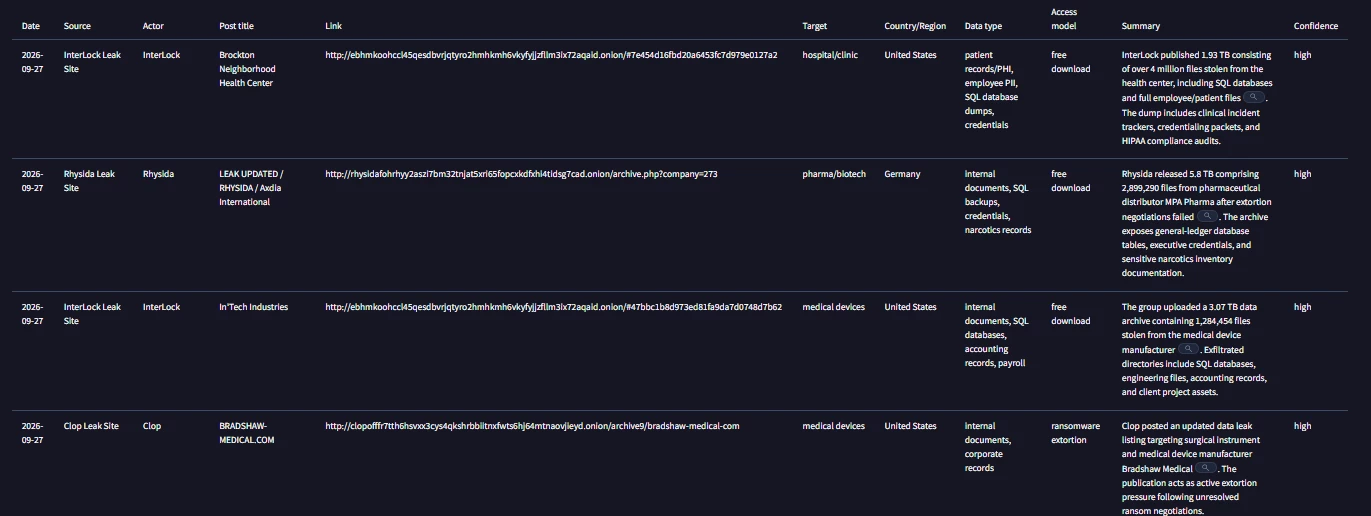
And the report came back in the shape I asked for. Nine findings across five ransomware leak sites, every one of them with an actor, a post and a citation. Abridged to fit the page — the real table has eleven columns:
| Date | Source | Actor | Target | Data Type | Access | Confidence |
| 2026-09-27 | InterLock Leak Site | InterLock | hospital/clinic | patient records/PHI, SQL dumps, credentials | free download | high |
| 2026-09-27 | Rhysida Leak Site | Rhysida | pharma/biotech | nternal documents, SQL backups, narcotics records | free download | high |
| 2026-09-27 | InterLock Leak Site | InterLock | medical devices | internal documents, SQL databases, payroll | free download | high |
| 2026-09-27 | Clop Leak Site | Clop | medical devices | internal documents, corporate records | ransomware extortion | high |
| 2026-09-27 | Settra Leak Site | Settra | healthcare IT | internal documents, employee PII/SSNs, credentials | free download | high |
The agent also surfaced a coordinated wave of four simultaneous medical device extortion listings posted by Clop on the same day, and separated active extortion threats from already-unsealed multi-terabyte data dumps in its assessment — exactly the kind of synthesis you do not get from a keyword alert.
The Summary column did its job too. This is one cell, verbatim:
Settra published a 161 GB data archive belonging to healthcare IT and service desk provider Alphanumeric Systems. Exposed documents reveal enterprise pharmaceutical service desk operations, state Medicaid support data, and unmasked employee PII.
Then the two sections I asked for at the end. Priority assessment ranked the top four findings and explained why — placing the community health center breach first due to 1.93 TB of unsealed production SQL backups (CW_Data_FullBackup.bak) and patient clinical records creating immediate HIPAA and medical identity theft exposure; the pharmaceutical distributor second because the 5.8 TB dump exposed controlled substance distribution logs (BtM permits for fentanyl and oxycodone) alongside plaintext executive credential stores; and the healthcare IT provider third because compromising a 24x7 service desk vendor exposes downstream pharmaceutical and state Medicaid clients to supply-chain social engineering. And Sources checked listed the leak sites and forums it actually swept:
- InterLock Data Leak Site
- Rhysida Data Leak Portal
- Clop Data Leak Archive
- Settra Data Leak Site
- MetaEncryptor Leak Blog
- Cybercrime & Database Forums (DarkForums, Cracked, BreachForums, Exploit, XSS)
- Monitored initial access broker (IAB) channels on Telegram
That last section is the one I would not skip. A report that tells you where it looked is a report you can argue with — if your sector lives on a board that is not in that list, you now know your coverage gap, and you can name it in the next prompt.
One practical note on the Link column. Every row came back with a link to the original post and, inside the summary, a citation link into the platform's own dark web object for it. In a published write-up you want the latter: it is stable, it does not point your readers at a criminal forum, and anyone with access can open the indexed copy with the actor profile attached.
Conclusion
What changes when Agentic Threat Intelligence becomes an HTTP endpoint is not that you can ask it questions — you could already do that — it is that the answer arrives in the same place as the alert, at the same time as the alert, with the reasoning attached. A stealer sample goes from "unknown hash in the EDR console" to "confirmed family, nine C2 domains, ten indicators cleared for the blocklist and four explicitly excluded" in seconds, and no human had to open a browser.
A few things stood out while building all of this:
-
It is a transcript API, not a completion API. Every verdict comes with the list of tools the agent ran to reach it. For anything you intend to act on automatically, that auditability matters more than the prose.
-
It behaves well when it has nothing to say. Asked a question with no answer, the agent reports an empty result rather than manufacturing indicators. That is the property that decides whether you can leave a scheduled job running unattended.
-
It formats for the machine you tell it about. Ask for JSON and you get JSON; ask for an eleven-column report with a citation rule and you get that.
-
Flows close the loop. Sessions answer questions you thought to ask. Flows answer the ones you would have forgotten to — a weekly dark web sweep of your sector, landing on Monday morning with actors, links and a priority call already attached, and memory of what it told you last week.
Everything here is in Public Preview, quotas are currently waived on the session endpoints and will be enforced at launch, and the team genuinely wants the feedback. If you build something interesting on top of this — or if you hit something I did not — we would like to hear about it.
If you would rather not write the HTTP layer at all, there is a third option I did not cover here: the Agentic MCP server exposes the same capabilities to any MCP-compatible client. And if you are still getting to know what the agent can do before automating it, the Agentic user guide is the place to start.
