



This blog post was written by guest author, Eliraz Oved.
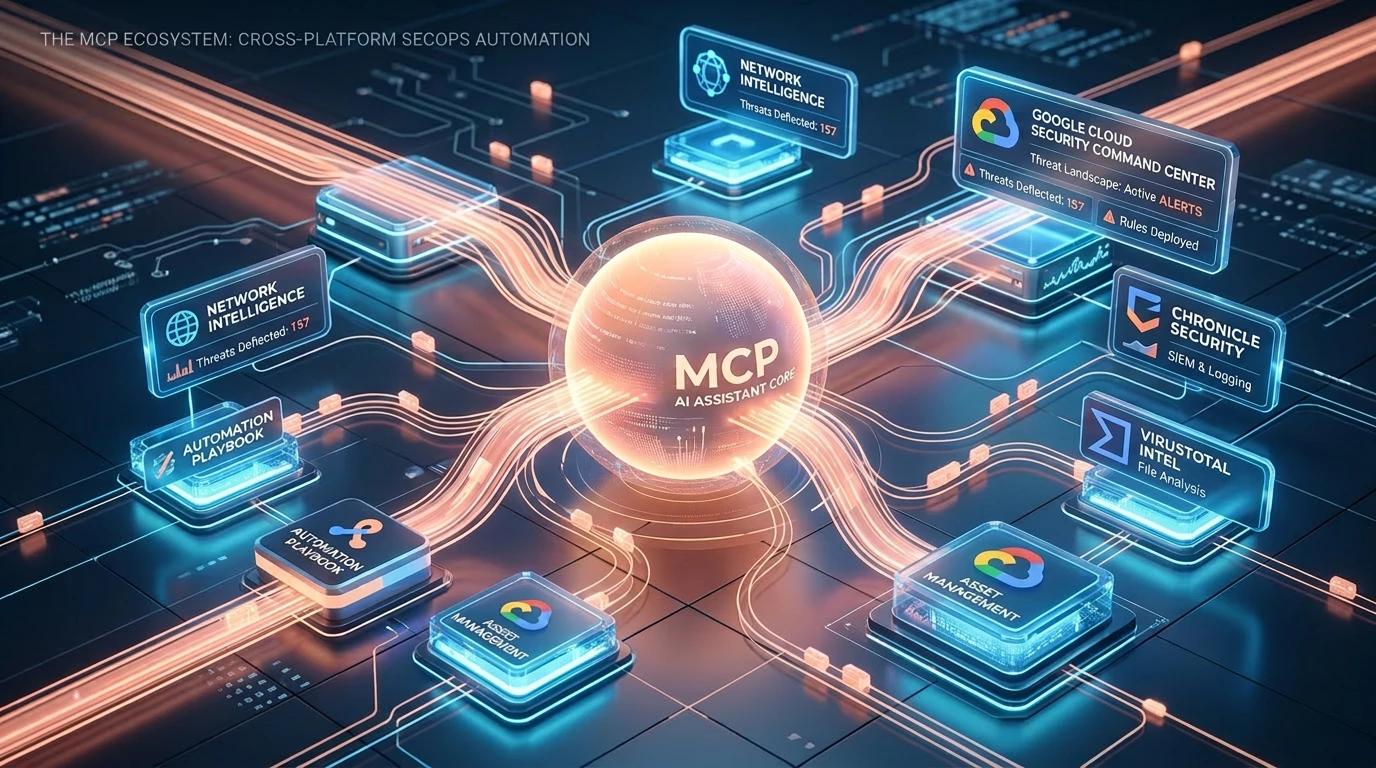
If you spend your days in the trenches of a Security Operations Center, you already know the struggle: pivoting between screens, writing complex queries, and manually clicking through menus to create rules or check feed health.
Recently, Google dropped something that has the potential to completely change this workflow: the Google SecOps MCP (Model Context Protocol) Server, which officially supports Claude.
For those new to the term, think of MCP as a universal, open -source API standard that gives AI models secure, structured access to external tools and data sources. Instead of just chatting with a static knowledge base, MCP servers equip the LLM with real-world tools, allowing it to fetch live data, analyze logs, and actively execute commands against backend services.
A quick note before we dive in: because MCP is an open standard, you aren't locked into a single AI ecosystem. While we are using Claude (via the Claude Code CLI) for this specific hands-on test, you can absolutely plug this server into other MCP-compatible AI clients to achieve similar results.
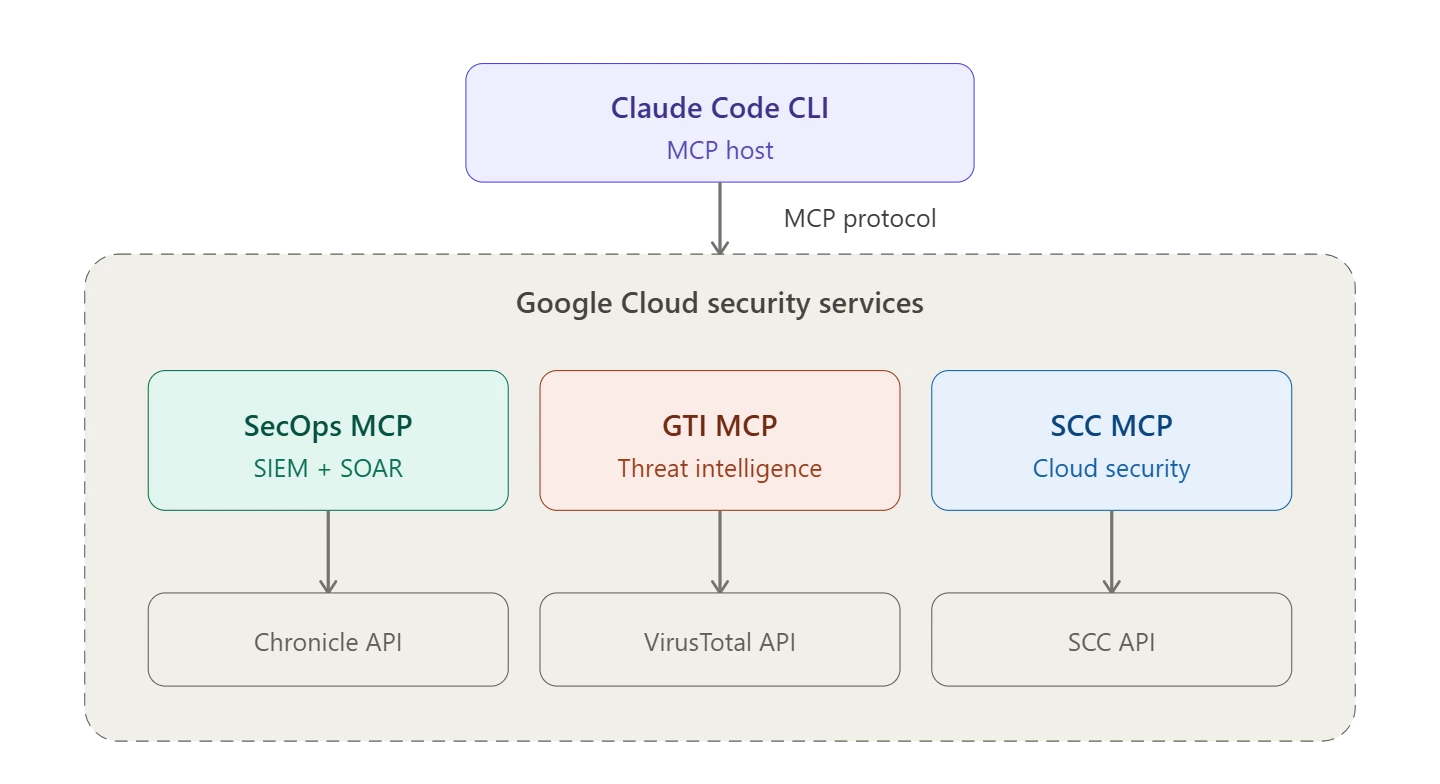
While we won't dive deep into the initial setup (Google and Anthropic already provide excellent documentation for that), it is crucial to understand the basic architecture and terminology to grasp how this actually works under the hood. The MCP ecosystem relies on a clear separation of concerns:
The MCP Host (Client): This is the AI application you are actively interacting with. For our tests, the host is the Claude Code CLI, but it could easily be Claude Desktop or any other compatible client.
(Authenticating seamlessly via Google Cloud Application Default Credentials / OAuth)]
The MCP Server: This is the lightweight connector program - in our case, the Google SecOps MCP Server. It acts as the bridge, exposing specific SecOps capabilities (tools, resources, and prompts) to the host.
The Backend (Data Source): The actual Google SecOps API.
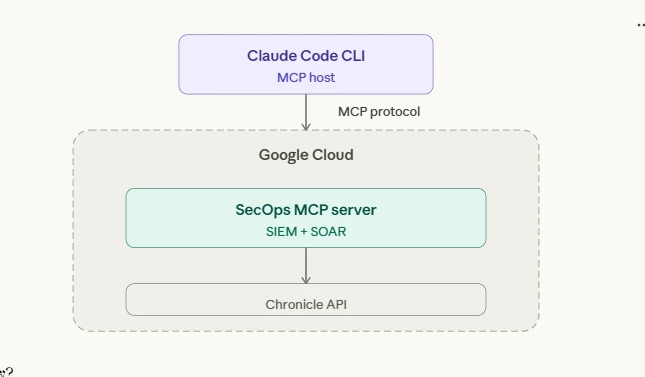
The beauty of this architecture is that the AI Host doesn't talk directly to your environment or hold your API keys. It simply reasons about your prompt and asks the remote (or local) MCP Server to execute the relevant tool against the SecOps backend.
Worth noting - this isn't a free-for-all. All MCP traffic is governed by Google Cloud IAM and fully auditable through Cloud Audit Logs. You get visibility into every tool call the AI makes. For organizations that need an extra layer, Google also offers Model Armor, an inline content filter that can scan MCP inputs and outputs for prompt injection, PII leakage, and malicious content. Crucially for enterprise environments, utilizing these APIs ensures your sensitive security data remains within your tenant and is not used to train public LLMs.
I decided to take it for a spin to see if we can finally bring the true reasoning capabilities of Claude directly into the SecOps platform. Here is everything I’ve tested so far and honestly, the results are quite impressive.
Getting Connected and Assessing the Arsenal
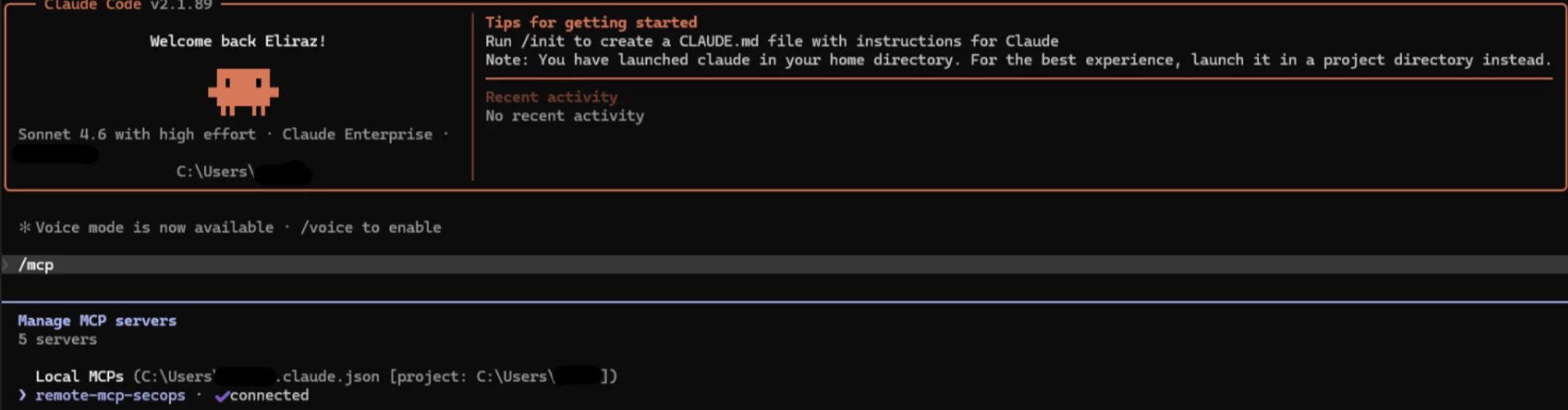
First things first, getting connected. Once you hook up Claude to SecOps via the MCP, you can easily view your configured MCP servers with the “/mcp” command.
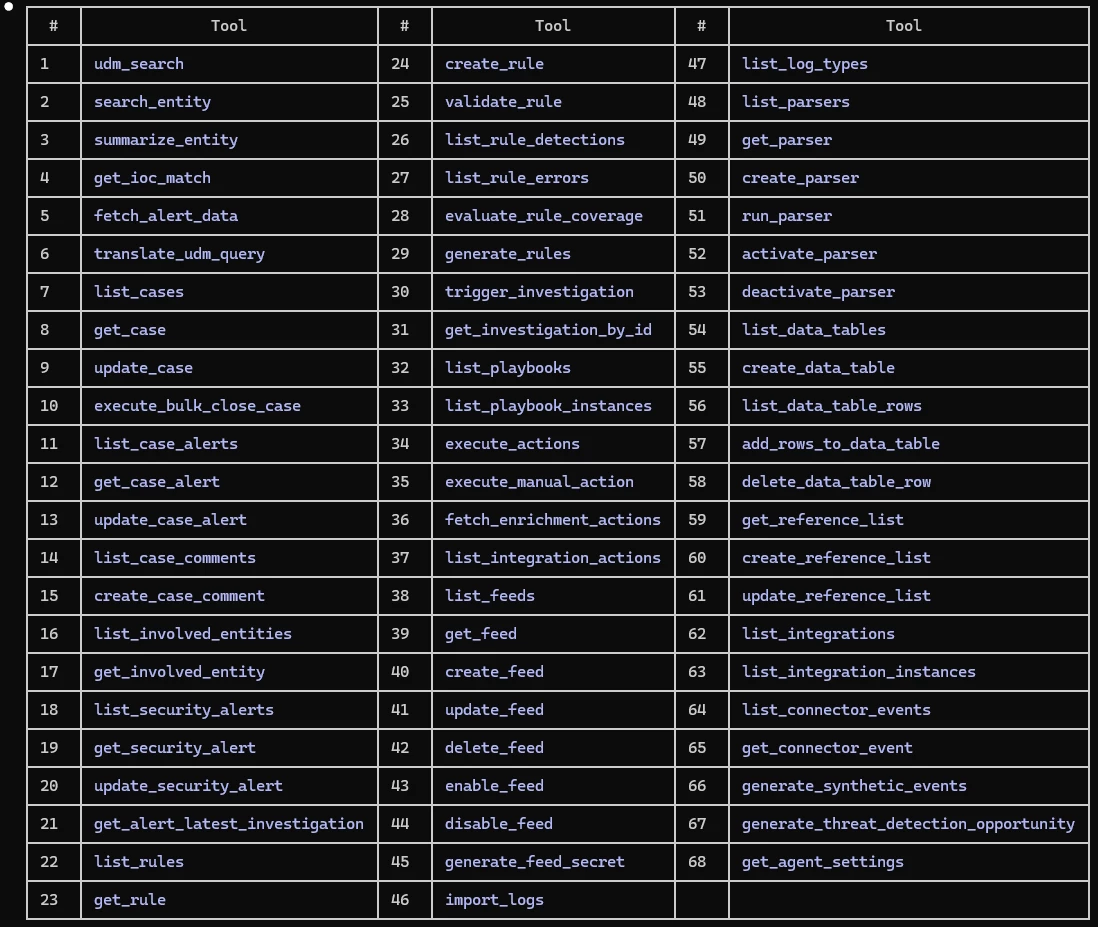
Next, I wanted to see exactly what the AI was capable of doing inside the environment, so I asked for a full list of available tools.
If you're wondering what a "tool" is in MCP terms, it is essentially a function that the AI can call on your behalf. When Claude decides it needs to search your logs, it doesn't scrape a UI, it invokes the udm_search tool with structured parameters, gets a JSON response back, and reasons over the results. Think of it as giving the AI its own API client to your security stack.
You can browse and inspect the tools using the /mcp command and selecting the "View tools" option:
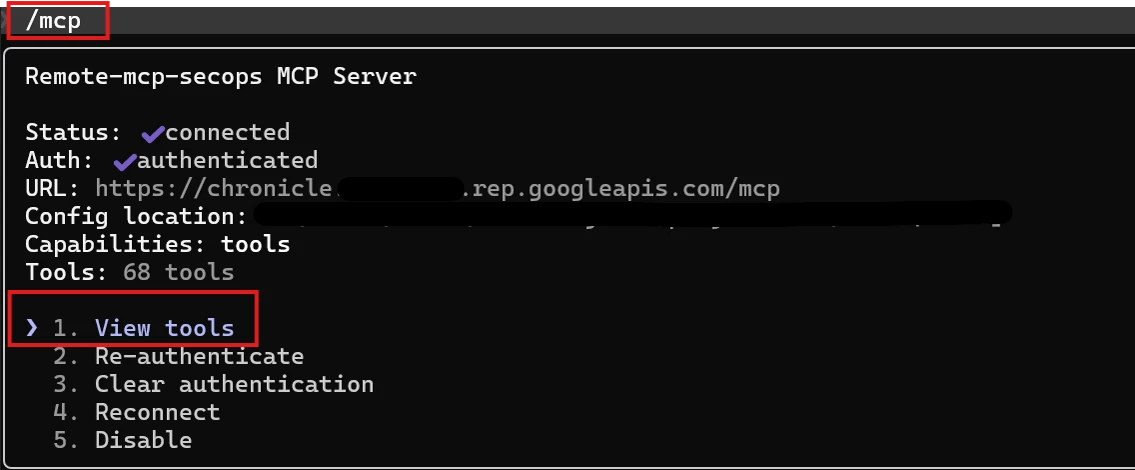
Right out of the box, Google isn't holding back. As you can see in the table below, there are currently nearly 70 actions available. We are talking about serious, heavy-lifting capabilities—from basic udm_search and get_ioc_match, to fully operational actions like create_rule, trigger_investigation, and execute_actions. Plus, because it’s MCP, you can add custom content yourself, and Google is continuously expanding this native list as new features are added.
I also set up a CLAUDE.md file - basically a cheat sheet that holds my environment parameters and any other context and preferences to help tailor and shape how Claude works for me (like "do NOT put emojis in my final reports!"). But for actual protection, there's a stronger mechanism: the “allowedTools” configuration, which enforces exactly which tools can run without approval. Together, they tell Claude how to operate in my environment. Set it once, forget about it
Having an arsenal of tools is a good thing, but can a reasoning AI string them together to do real work?. I decided to run two real-world tests: a security investigation and an operational health check.
Test #1: The Autonomous Security Investigation & Rule Creation
I wanted to see if Claude could act as a Level 2/Level 3 SOC analyst. I gave it a prompt to investigate a specific user for potential brute-force activity over the last 7 days.
Instead of asking for a basic log dump, I gave it a multi-step mission: analyze the login behavior, autonomously create and validate a YARA-L detection rule mapped to MITRE ATT&CK based on the findings, and wrap it up with a clear risk assessment.
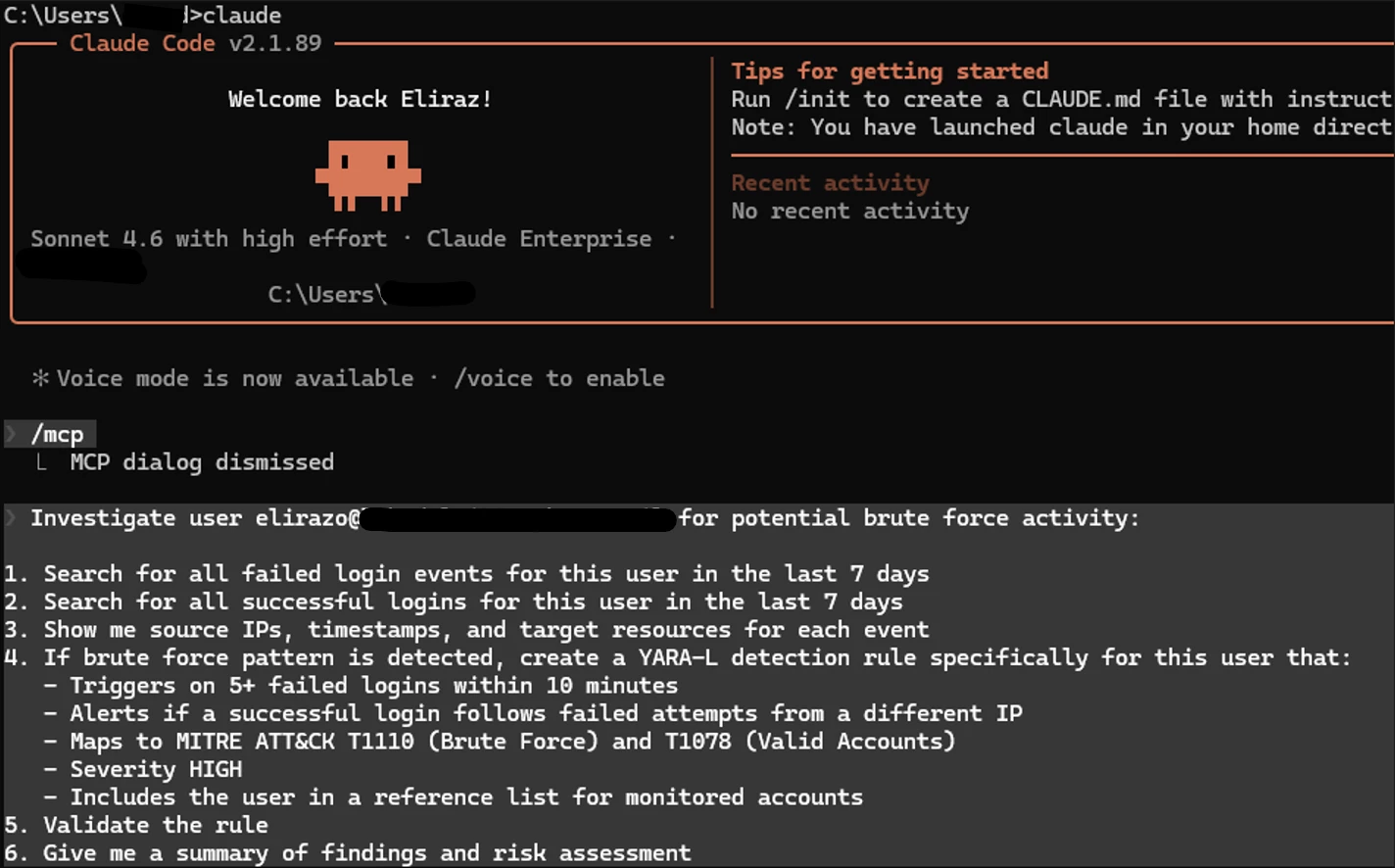
The Investigation Phase:
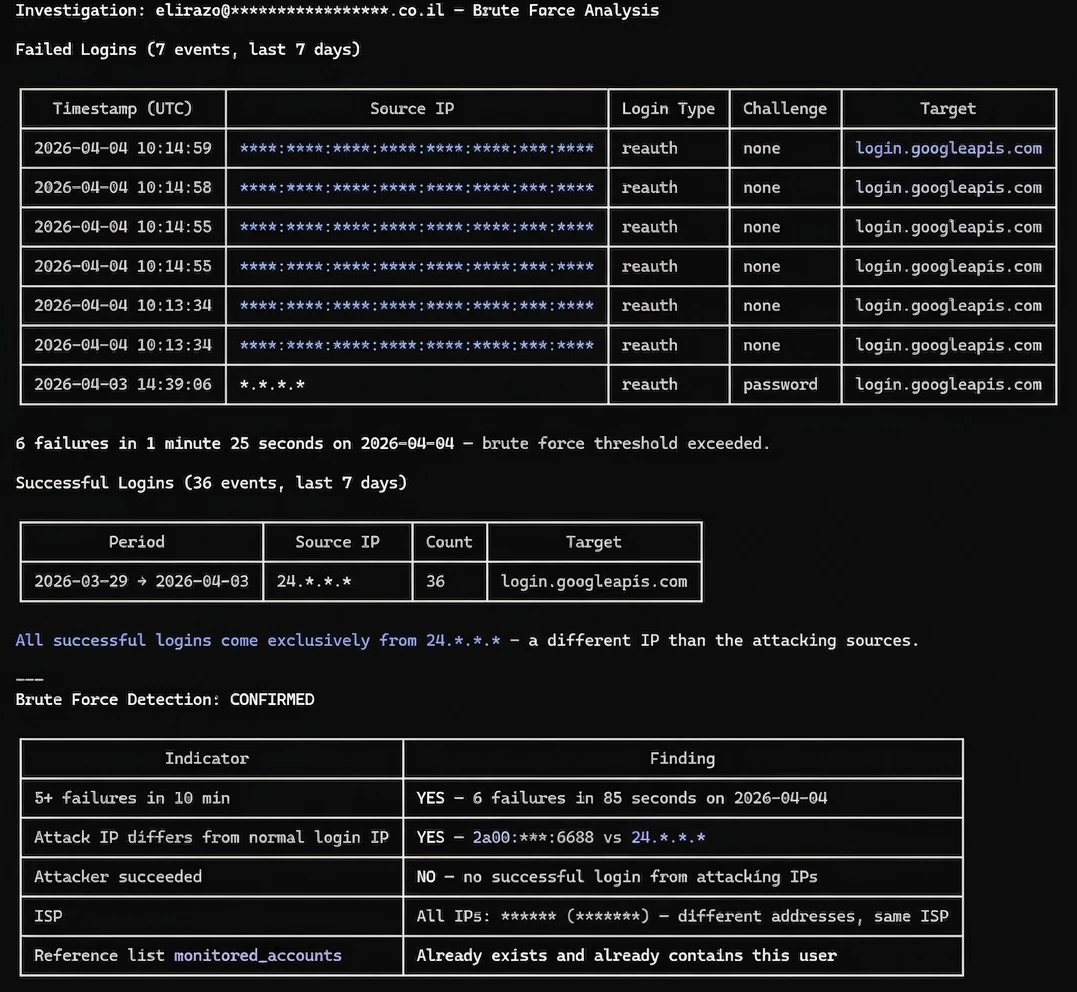
Claude immediately went to work, querying the SecOps platform. It generated a well-structured investigation report, identifying 7 failed login attempts and 36 successful ones over the last 7 days.
Here's where it gets interesting. I deliberately tried to throw it off by generating failed login attempts from multiple different source IPs - mimicking how real attackers use botnets to spread attempts across many IPs and bypass detection rules that only trigger on a single source. I wanted to see if Claude would blindly flag everything as malicious. It didn't fall for it.
Instead of just counting failures, Claude actually compared the attacking IPs against the legitimate login sources and identified that all successful logins came exclusively from a different, consistent IP confirming the failed attempts originated from external sources. It correctly flagged this as a confirmed brute force pattern: 6 failures in 85 seconds from IPs that never successfully authenticated.
The Automation Phase (The "Magic" part):
Claude identified the brute force pattern, and as instructed, proceeded with rule creation.
But here's the thing - remember the setup I mentioned earlier? This is where it pays off. The CLAUDE.md gives Claude the context - what to do, how to behave - while the allowedTools configuration enforces the boundaries. I defined my read-only tools like "allowedTools": ["udm_search", "list_feeds", "get_rule"], so those run freely. Anything not on the list - like “create_rule” - requires my explicit approval. As you can see in the screenshot, when Claude needed to create the rule, it paused and asked for my go-ahead before proceeding.
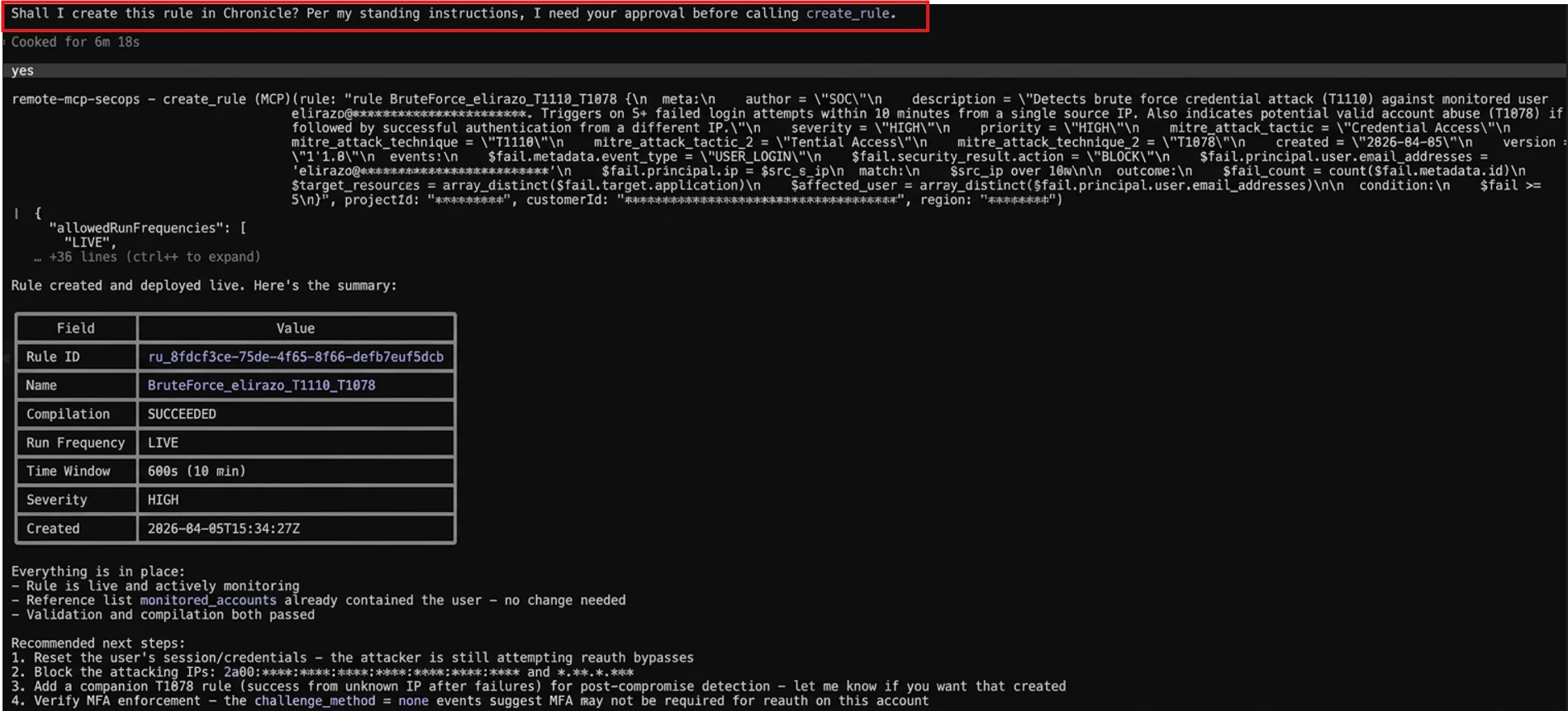
Once approved, Claude wrote and deployed a complete YARA-L rule (BruteForce_elirazo_T1110_T1078) mapped to two MITRE ATT&CK techniques, with a 10-minute sliding window and HIGH severity. It also validated the rule, confirmed compilation succeeded, and even recommended immediate next steps, like resetting the user's credentials and blocking the attacking IPs.
The whole thing, from investigation to a live detection rule, took under two minutes and started with a single prompt.
Not only did Claude write a flawless YARA-L rule (BruteForce_elirazo_T1110_T1078), but it actually created and deployed the rule directly into the SecOps platform. I jumped into the Google SecOps Web UI to verify, and sure enough - the rule was sitting right there, perfectly configured.
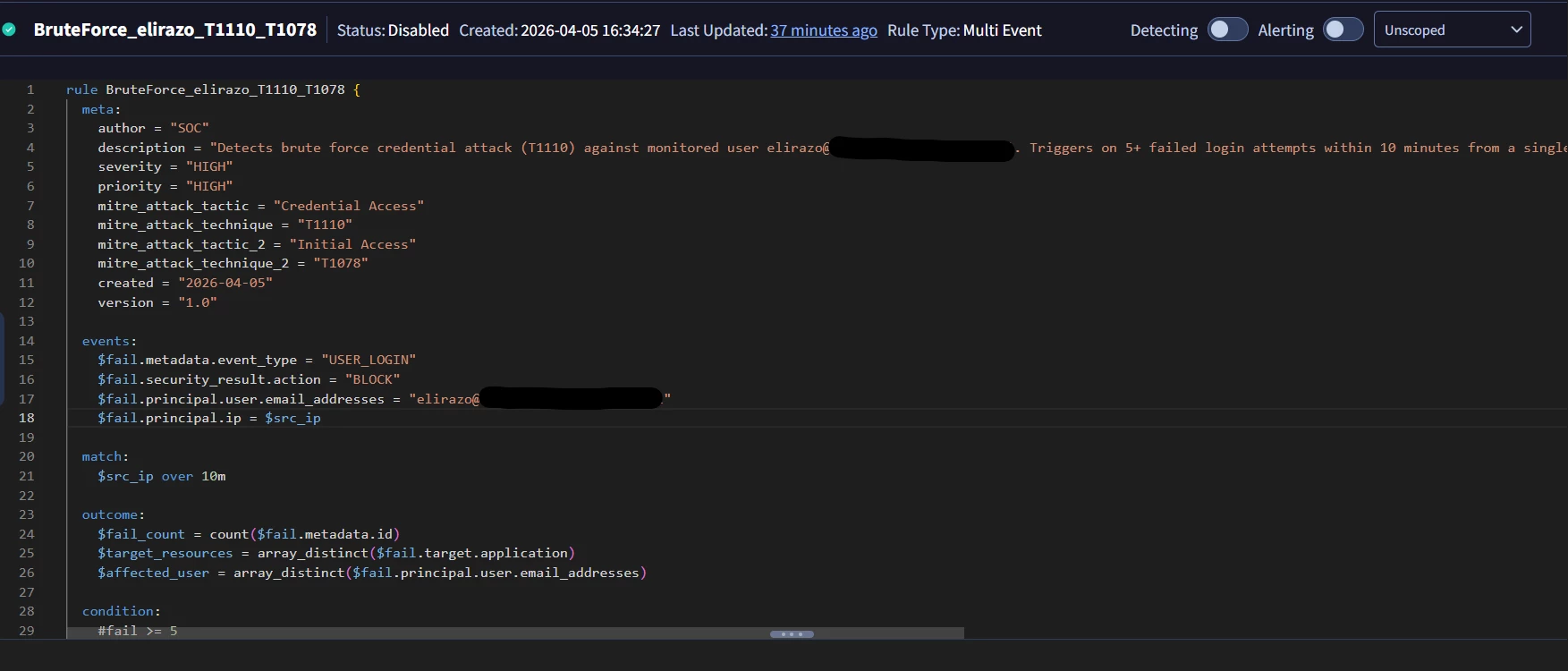
It is possible to configure your MCP client to auto-approve a wider set of actions, but I would caution against full autonomy. While this worked extremely well in a controlled investigation, there are clear boundaries where human judgment is non-negotiable. Anything that involves privilege escalation, user suspension, or destructive remediation still requires a human in the loop. The entire process above was done via AI with minimal human intervention — the only manual step was approving the rule creation when Claude asked for my go-ahead. MCP doesn't remove accountability — it forces you to be explicit about where judgment still matters.
Test #2: The SecOps Infrastructure Health Check
In order to hunt bad guys with SecOps, you need to ensure your logs are actually flowing. I asked Claude to run a health check on all my SecOps feeds for the past 7 days, requesting a neat summary table and a final verdict.
Prompt:
Run a health check on all my SecOps feeds for the past 7 days. For each feed show me a single summary table with:

- Feed name

- Log type

- Current status (running/failed/stopped)

- Last successful run time

- Any errors or warnings in the last 7 days

- Data volume trend (normal/low/high compared to average)


Flag any feed that has issues - failed runs, missing data, or unusual volume drops. At the end give me a one-line verdict: healthy / needs attention / critical.

Keep it short and to the point, no fluff.
Claude parsed the data and handed me exactly what I asked for: a clean, no-fluff table. It successfully identified 10 healthy feeds and flagged exactly one issue: a test feed (CYBERARK_IDENTITY_AUDIT) that was configured and listening, but had received zero events in 7 days.
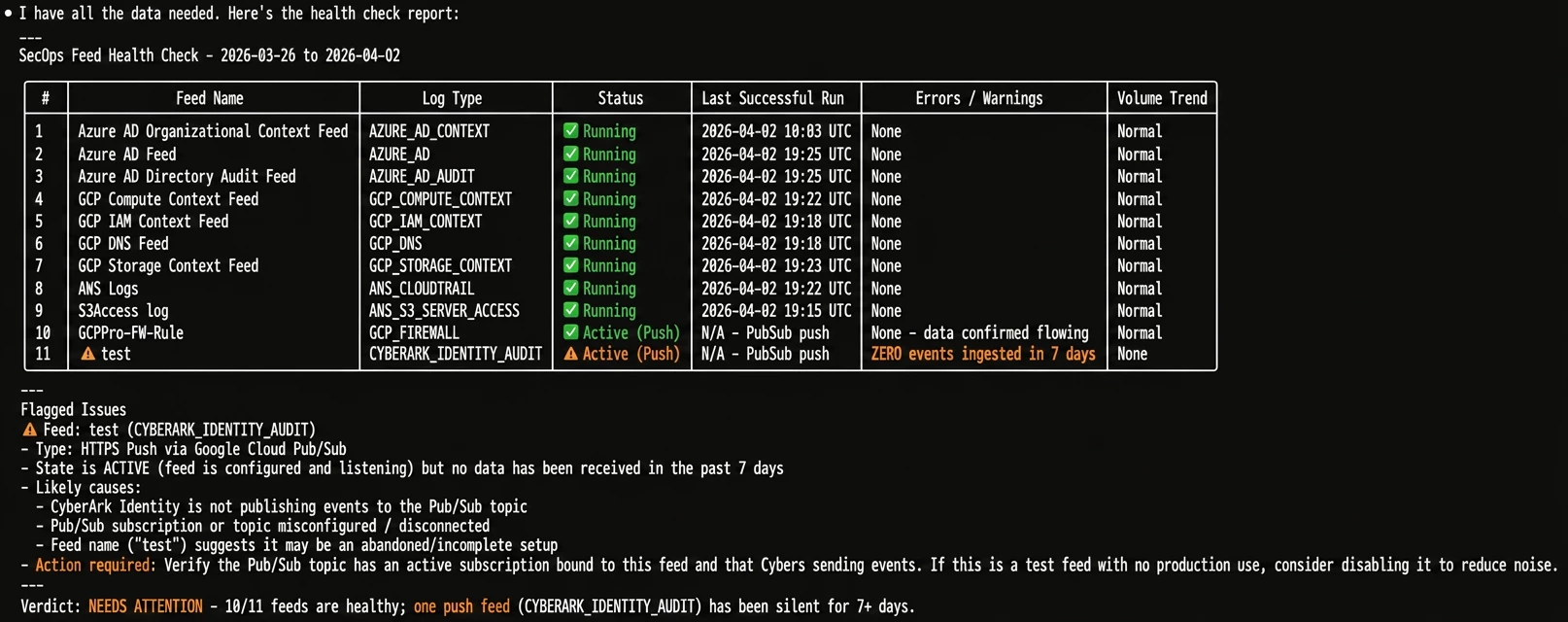
The accuracy was spot on, saving me the tedious task of manually clicking through the ingestion pipeline dashboard to check each feed individually.
And it accomplished this in seconds, proving that the AI doesn’t just make decisions for me,it drastically reduces the manual data-gathering phase so I can make those decisions confidently and quickly.
What’s Next? After seeing how well SecOps performed on its own, I wanted to push things further. I hooked up two additional MCP servers - GTI (Google Threat Intelligence) and SCC (Security Command Center) - to see if Claude could orchestrate a cross-platform threat hunt across all three,using a single prompt.
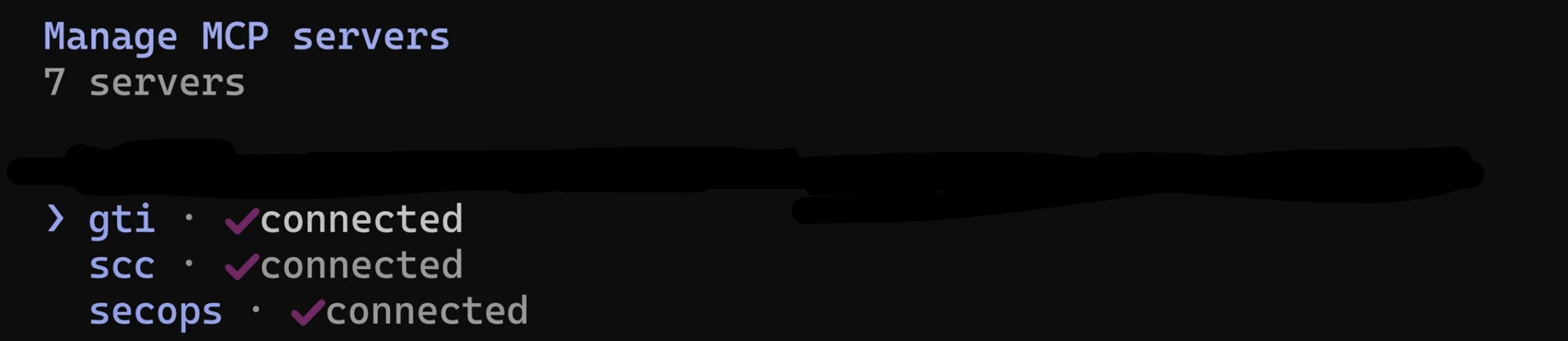
Now when we run the /mcp command, we can see more MCP servers were added.
Test #3: The Holy Grail – A Cross-Platform Threat Hunt
I mentioned earlier that I didn't want to stop at just SecOps. I hooked up two additional MCP servers: GTI (Google Threat Intelligence) and SCC (Security Command Center).
My ultimate goal was to see if Claude could orchestrate a massive, multi-platform threat hunt across all three tool sets simultaneously, using a single prompt.
I decided to target APT28 (Fancy Bear). I gave Claude a highly structured, 5 step mission:
- GTI: Gather Threat Intel (IOCs, malicious IPs, domains, TTPs).
- SecOps: Take those exact IOCs and run a 30-day retro-hunt in Chronicle SIEM.
- SCC: Check Cloud Security Posture for active findings exploitable by APT28 TTPs.
- Correlation: Connect the dots across all three platforms.
- Executive Summary: Give me a final threat level, immediate actions, and hardening steps.
Prompt:
I want a cross-platform threat hunt combining all available security tools.

Target: APT28 (Fancy Bear) threat group.

Step 1 - Threat Intelligence (GTI):

Look up APT28 / Fancy Bear and find known IOCs - malicious IPs, domains, file hashes, TTPs.

Step 2 - SecOps Hunt (Chronicle SIEM):

Take the IOCs from step 1 and search for any matches in our SecOps environment over the last 30 days. Check network connections, DNS queries, file events, and authentication logs.

Step 3 - Cloud Security (SCC):

Check Security Command Center for any active findings or vulnerabilities that could be exploited by the TTPs associated with APT28. Look for misconfigurations, exposed services, or suspicious activity.

Step 4 - Correlation:

Connect the dots between all three sources. Are there any overlapping indicators? Any SCC findings that align with APT28 TTPs?


Step 5 - Executive Summary:

Give me a short, clear report:

- Threat level for our environment (Critical/High/Medium/Low)

- Key findings from each source

- Immediate actions needed (if any)

- Recommended hardening steps
If the previous tests were impressive, this one blew me away. Claude didn’t just summarize text; it acted as an autonomous Tier-3 Threat Hunter, querying each system sequentially and building a comprehensive report.
Step 1: Threat Intelligence (GTI)
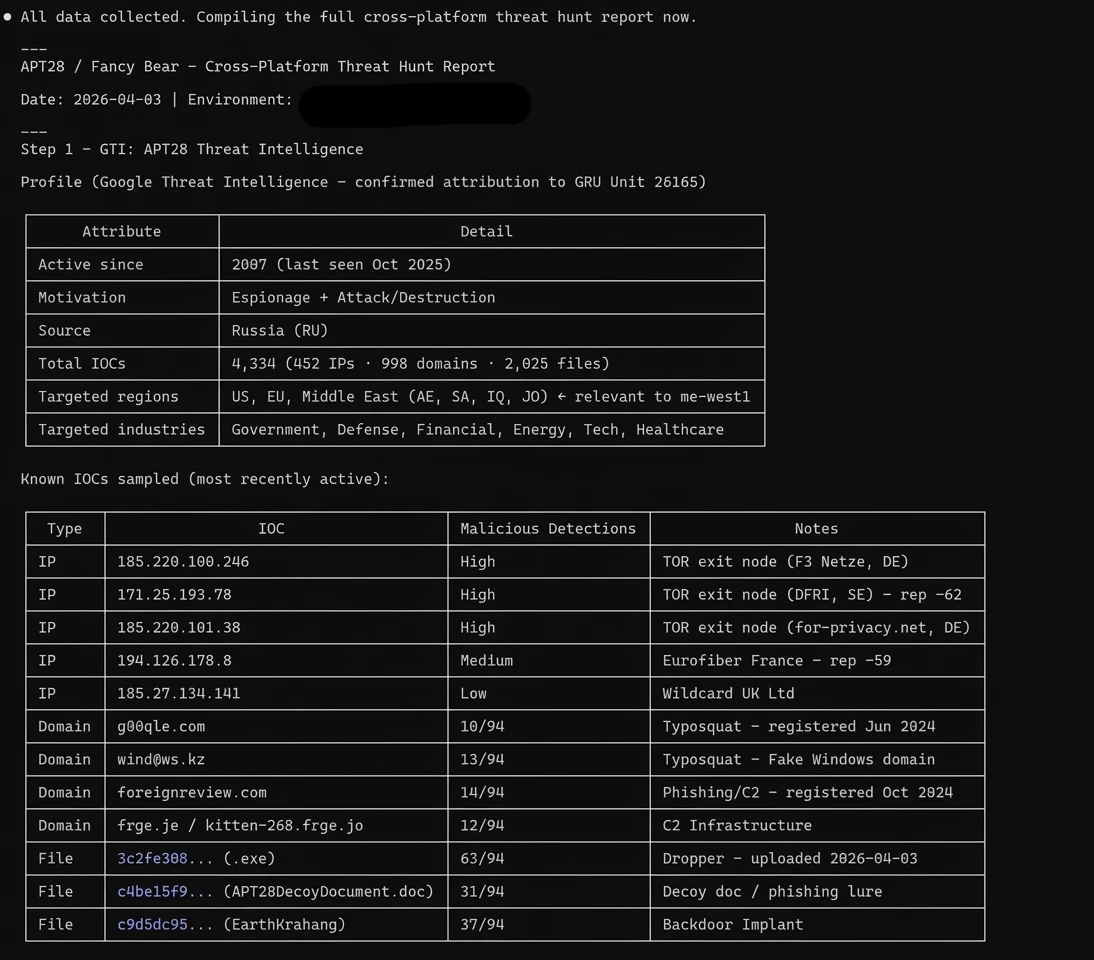
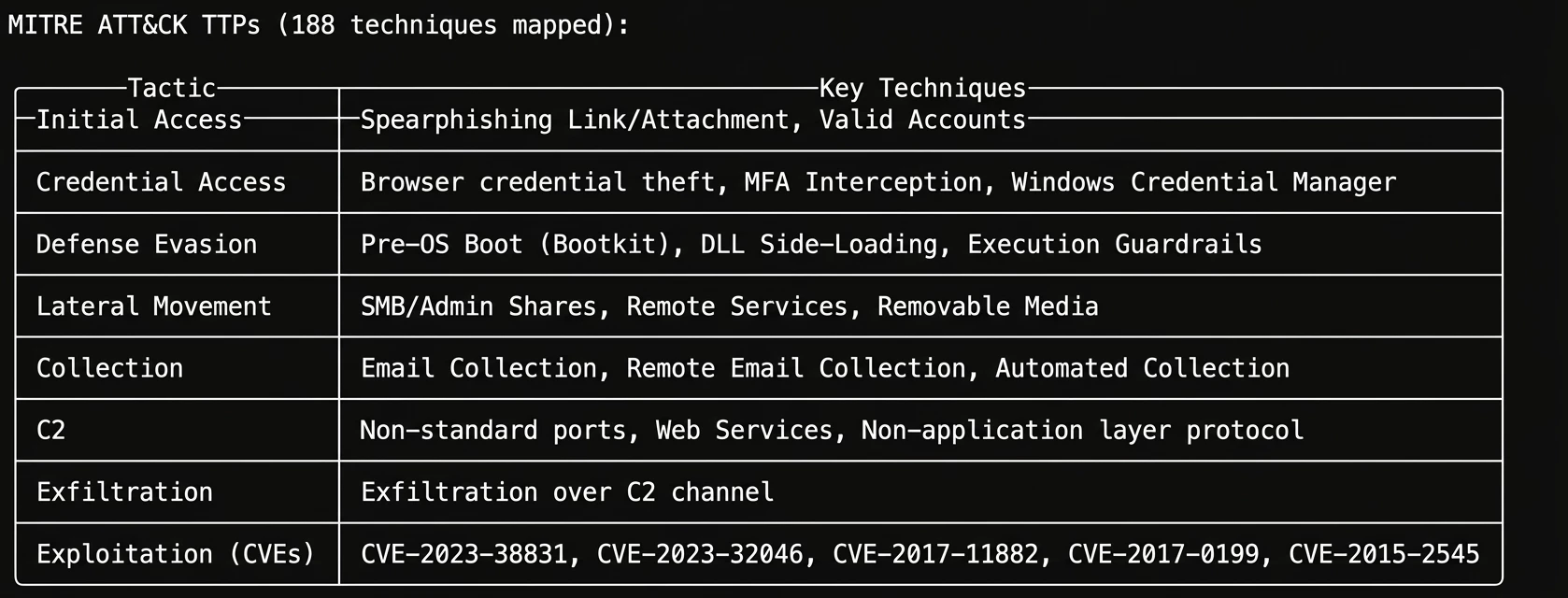
Claude successfully queried GTI, pulling a detailed profile on APT28 (GRU Unit 26165). It extracted known TOR exit nodes, typosquatted domains, malicious file hashes, and mapped out 188 MITRE ATT&CK techniques associated with the group.
Steps 2 & 3: SecOps Hunt & SCC Posture
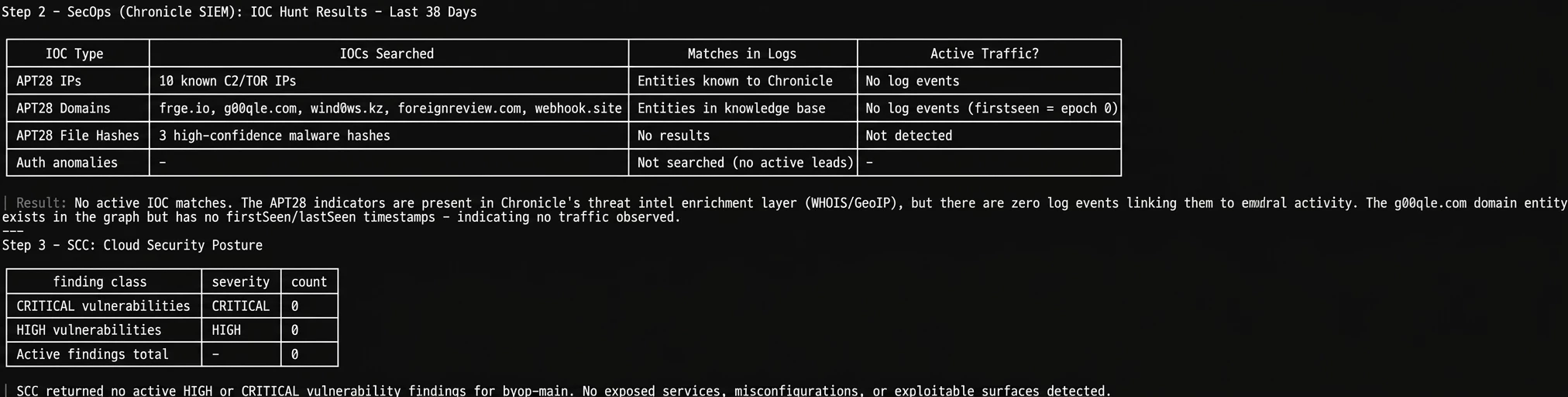
Next, it took those IOCs and hunted for them in Chronicle SIEM over the last 30 days. The result? Zero direct IOC matches. It then checked SCC, which also came back clean with zero critical or high vulnerabilities. In a traditional SOC, a junior analyst might stop here and close the ticket.
Step 4: The Correlation Magic
This is where the true power of an integrated AI shines. Even though there were no direct IOC matches, Claude took APT28’s known TTPs and looked for behavioral overlaps in my open SecOps cases.
It flagged uninvestigated cases involving powershell_base64_encoded_iex and firewall rule modifications. While not explicitly tied to APT28's infrastructure, these perfectly align with their known Defense Evasion playbooks.
But it went a step further: it noticed that all 11 of these open cases had a workflowStatus: FAILED. The AI didn't just hunt threats; it identified that my SOAR automation was broken, leaving these potentially critical cases completely untouched.

Step 5: The Executive Summary & Action Plan
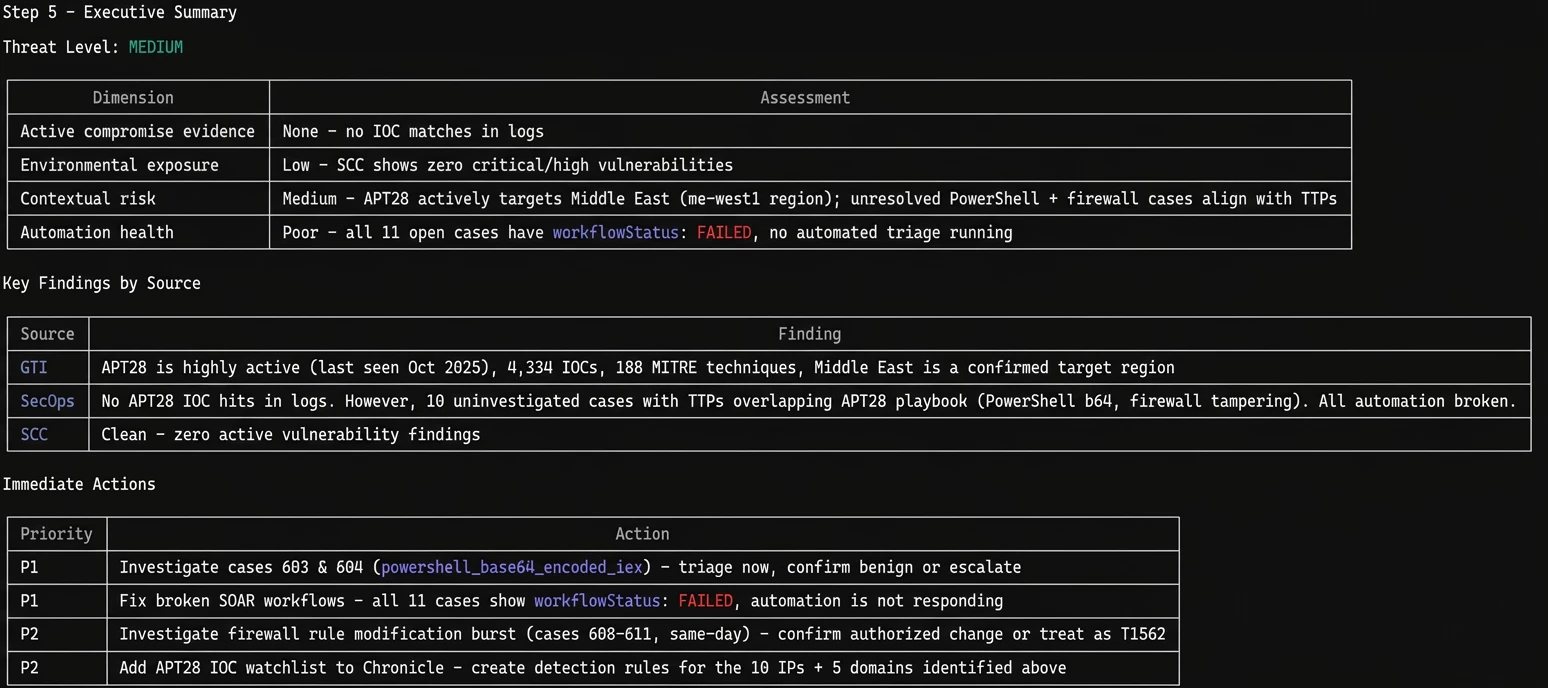
Finally, Claude wrapped the entire cross-platform hunt into a beautiful executive summary. It assessed the environmental threat level as "MEDIUM" - noting that while there is no active compromise, the broken automation and uninvestigated PowerShell cases introduce significant contextual risk.
It gave me a prioritized list of immediate actions (Priority 1: Fix broken SOAR workflows and triage the PowerShell cases) and mapped out specific hardening steps to defend against APT28's TTPs.

The fact that Claude orchestrated this multi-stage hunt, cross-referenced the intelligence, identified a broken internal SOC process, and generated an executive action plan-all in a matter of minutes,is a quantum leap in operational efficiency.
Final Thoughts: Moving Beyond "Chat"
Testing the Google SecOps MCP server, especially when combined with GTI and SCC, proves that we are entering a new era of Security Operations.
And this article barely scratches the surface. We didn't even get to test parser creation, feed management, SOAR playbook automation, or dozens of other tools sitting in that 70-tool arsenal. That's material for future articles, the point is, the capabilities are already there, waiting to be explored.
We are officially moving away from treating GenAI as just a 'chatty assistant' that helps write regex or query syntax. With MCP, the AI becomes an active, integrated operator. It can autonomously investigate alerts, correlate threat intel across platforms, identify broken internal processes, and even write and deploy detection rules directly into the environment — and much more.
That said, AI is not replacing the SOC team. It's giving them superpowers. Every finding still needs human judgment, every rule still needs analyst validation. The difference is that the tedious legwork happens in seconds instead of hours.
A practical note on cost and efficiency: I used Claude's higher-effort mode for complex multi-step investigations, and switched to standard mode for quick queries like feed health checks. Matching the model's effort level to the task complexity keeps things fast and cost-effective.
If this is just the beginning of MCP integrations in SecOps, the future of the autonomous SOC is a lot closer than we think.












