



Blog Authors:
Sumit Patel, Regional Security Architect, Google Cloud
Kajan Moorthy, Staff Solutions Engineer, Cribl
In a perfect world, every security log would be indexed, searchable, and instantly available in your SIEM. In the real world, data is fragmented across cloud buckets, cold storage, and remote endpoints. Moving all that data just to see if it’s "interesting" is often too slow and too expensive.
By using Google SecOps SOAR as the orchestration brain and Cribl Search as the remote query engine, analysts can hunt for threats across their entire infrastructure without moving a single byte of data until they need it.
Where Cribl and Cribl Search Fit
Cribl is a telemetry data platform built to help IT and security teams collect, transform, route, store, and analyse telemetry with more flexibility and less operational overhead. It also gives teams the ability to route data to multiple destinations at once, so they can send the right data to the right tools without duplicating collection pipelines. Rather than forcing every log into a single expensive analytics tier, Cribl lets teams control where data lives, keep it in open formats, and access it across different storage and analytics environments.
Cribl Search is a unified search experience for telemetry data, combining high-speed search over data in Cribl with federated search across data where it already lives. For this workflow, the federated engine is what matters: it queries data across object storage, data lakes, APIs, and more without moving or rehydrating it first, making it an ideal remote query layer for Google SecOps.
Why Cribl Search with Google SecOps?
From a Google SecOps perspective, this integration helps customers with disparate data silos tackle the "Last Mile" visibility problem. By federating search, the SOAR platform becomes a unified command center for investigations that span data inside and outside the SIEM. Instead of pivoting between consoles, an analyst stays within their Case Wall, using automation to pull exactly what they need from remote sources like S3, Azure Blob, or edge devices.
Step 1: Building the Bridge in the SecOps IDE
While Google SecOps offers hundreds of out-of-the-box integrations, the SecOps IDE (Integrated Development Environment) is where the magic happens for custom workflows.
Using Python and the custom IDE, we built an integration for the Cribl Search API. This allows us to handle authentication, submit complex search strings, and—most importantly—manage the asynchronous nature of remote searches.
The source code for the custom Python integration is available at https://github.com/acidack/secopscriblintegration.
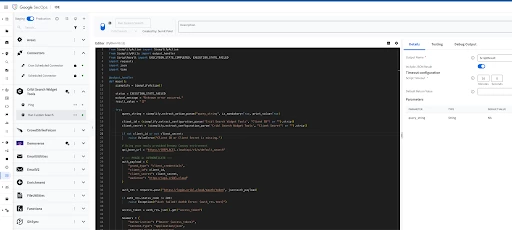
For those seeking a codeless alternative, Google SecOps also provides an out-of-the-box HTTPv2 integration. My colleague Mike Wilusz has detailed this approach in his blog post, "Searching Cribl Lake data with Google SecOps SOAR: a codeless guide".
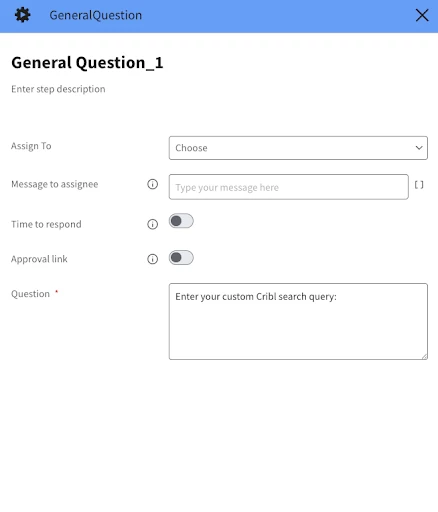
Step 2: Create the User Input Form (Instruction Step)
We start by creating a way for the analyst to provide their query.
-
Action: Search for "General Question" in the Step Selection.
-
Configuration (Parameters):
-
Question: Type: What is your Cribl Search query?
-
Answer Type: Select Free Text. This creates the input box for the analyst.
Settings Tab: Set the Action Type to Manual and assign it to [[Context.User]].
Step 3: Submit the Search to Cribl
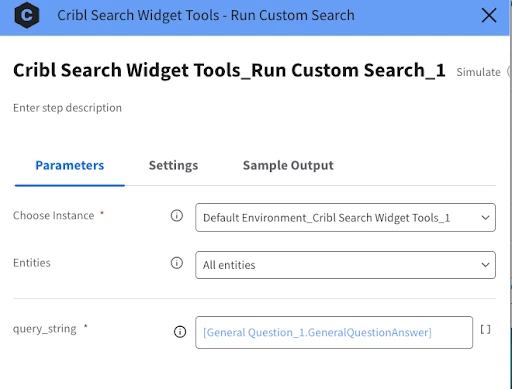
Now we pass that analyst-provided query to the API.
-
Action: Submit Search (or your custom HTTPV2 'Post' action).
-
Mapping the Variable: In the Body field of the action, use the dynamic variable from the previous step:
Step 4: The "Wait" Logic
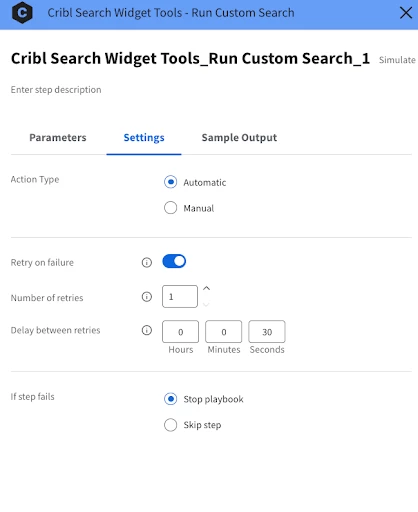
Federated searches aren't always instant. We need the playbook to be "patient."
-
Action: Add a Delay Playbook v2 step
-
Logic: Set the playbook to wait on a specified time e.g. 30 seconds.
Alternatively, you can set Retry on failure on the Run Search block.
Step 5: Retrieve and Transform (JSON to HTML)
Raw JSON from a search engine is often deeply nested. If you tried to put this directly into a table, columns would be missing or unreadable.
-
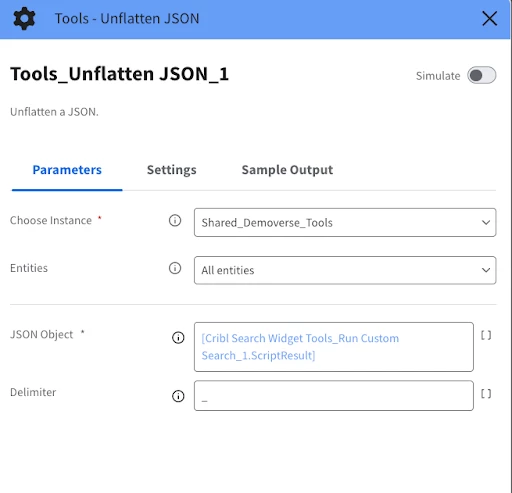
Action: Unflatten JSON (part of the Tools integration).
-
Why it matters: This step takes complex, nested JSON objects and "unpacks" them into a flat structure. This ensures that every field in the log (like source IP, event ID, or timestamp) is ready to be mapped as a clean column in the next step.
Step 6: Creating the Insight
This is the final step where the data becomes "human-readable." Instead of a simple table tool, we use the Template Engine to build a custom HTML view using Jinja2 syntax.
-
Why Jinja? It allows us to use logic (like if statements or for loops) to highlight specific results. For example, we can color-code high-priority IP addresses or format timestamps.
-
The Output: The Template Engine takes our unflattened data and renders a clean HTML table, which is then automatically posted as an Insight on the Case Wall.
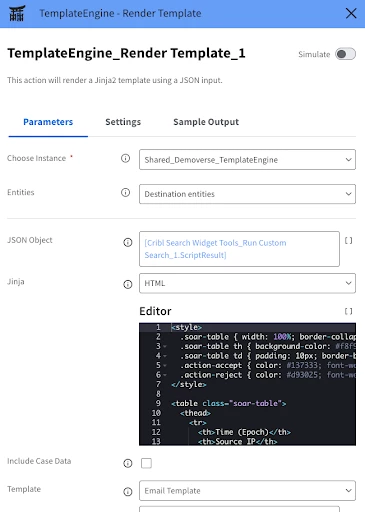
Note: The Jinja2 template script is also available in the same GitHub repository.
The end result is a clean table in your case Overview tab showing the results
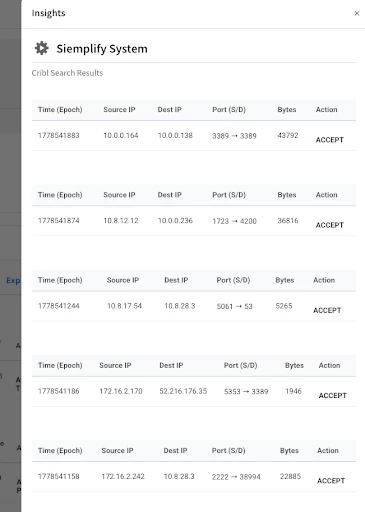
By following this "Codeless" approach, you are effectively creating a Dynamic Search Interface within your SOAR.
-
The Analyst provides the intent (The Query).
-
The Playbook provides the muscle (API calls and Polling).
-
The Platform provides the evidence (The Insight Table).
Step 7: Advanced Workflow Logic (Conditional Logic & Context)
Analysts can further refine their playbooks by incorporating advanced logic to handle diverse security scenarios. This is primarily achieved through conditional statements and sophisticated context management.
-
Branching Logic: By using Flow steps like Multi-Choice Questions, you can create divergent paths based on analyst decisions or automated conditions. For example, if an analyst confirms a threat (Yes), the playbook can proceed with high-threshold VirusTotal enrichment and automated UDM queries.
-
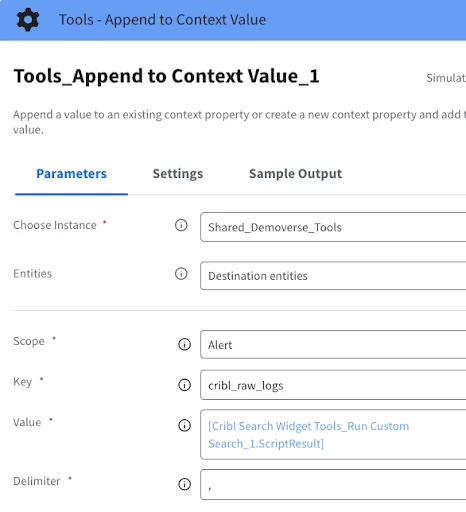
Context Management: A critical component of these workflows is the Append to Context Value action. This allows the playbook to store specific data points gathered during an investigation—such as discovered IP addresses or user roles—as persistent context within the case.
-
Cross-Alert Availability: Once data is appended to the context, it becomes accessible to all subsequent steps in the playbook and can even be shared across different alerts within the same case, ensuring a unified investigati
Conclusion: Faster Responses, Smarter Data
By combining Google SecOps’ orchestration with Cribl’s search-in-place capabilities, we’ve reduced the "Time to Answer" for complex investigations. Analysts no longer wait for ingestion—they just ask the question and get the answer.
