


Authors:
Christopher Altman, Group Product Manager - Cloud CEP
Justin Prosco, Senior Manager, Managed Defense - GCP Eng + Product US
Summary
There is a new integration experience currently available in public preview between Google Chrome Enterprise Premium and Google SecOps that allows security teams to quickly operationalize browser telemetry into their security detection, investigation, and response workflows.
For the modern enterprise, the browser has become the primary workspace. It is the operating system for the cloud—where identities are authenticated, sensitive data is processed, and critical applications are accessed. While traditional Endpoint Detection and Response (EDR) tools provide indispensable visibility into operating system processes and kernel-level activity, the browser represents a distinct layer of the environment that holds unique security value.
We are excited to announce a deeper integration between Chrome Enterprise Premium and Google Security Operations (SecOps). This collaboration is designed to enrich your existing security posture, offering Chrome admins a seamless onboarding experience while providing SOC analysts with application layer insights needed to augment their threat investigations. This integration operationalizes the Chrome Enterprise data already used by millions of business users into security workflows provided by Google Unified Security.
Completing the picture: A "better together" defense
Security teams rely on EDRs to monitor device health and execution, a foundation that is critical for stopping malware and other attacks that occur on endpoints. Leveraging browser telemetry provides security teams with a more comprehensive view of the attacks happening in enterprise applications, allowing teams to detect threats earlier in the attack life cycle.
Consider the initial access phase of an attack such as phishing. While an EDR is excellent at spotting a malicious payload after it executes on the device, Chrome telemetry offers the unique ability to "shift left." It can identify the initial engagement with a malicious site at the initial user interaction. This provides security teams with an early warning sign before the endpoint or user is compromised.
As adversaries shift their focus to identity and SaaS vectors, the value of browser data is even more critical. Techniques like session cookie theft or credential forgery often occur entirely within the browser's trusted process, bypassing traditional OS-level monitoring. Chrome acts as a specialized sensor in this domain, providing high-fidelity visibility into session anomalies and account manipulation. This allows analysts to distinguish between legitimate user behavior and sophisticated identity attacks in ways that general endpoint agents cannot.
When it comes to sensitive data exfiltration, context is key. Data movement often mimics legitimate behavior—uploading a file to personal cloud storage or pasting data into a web form. Chrome Enterprise Premium enriches this network activity with deep context, capturing the specific URL, file size, and destination as well as the overall URL and content risk, to identify malicious websites and files. This turns a generic "upload" event into actionable intelligence, allowing teams to differentiate between legitimate activity and a data leak.
Simplified Integration
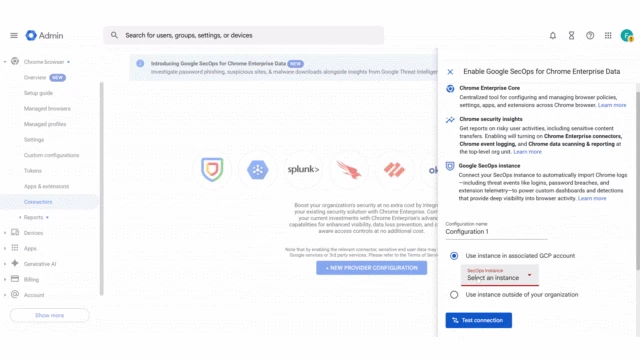
To truly realize this value, we knew we had to remove the barriers between IT and Security. For Chrome admins, we have introduced a new and easier onboarding experience, eliminating the need to manage API keys or complex configuration files. You can now quickly link Chrome Enterprise Premium to Google SecOps directly from the Chrome Admin console , ensuring that critical telemetry is available to your security team.
This streamlined process automatically configures Chrome with recommended security monitoring policies and eliminates manual configuration complexities. It also configures the Chrome telemetry routing to Google SecOps through Google Cloud, without traversing the public Internet. This architecture enhances both security and performance. We refer to this as the “keyless” integration since it does not require Google SecOps ingestion API keys like the previous connector.
For detailed configuration steps, please refer to the following Collect Chrome Enterprise data documentation for Google SecOps.
Enhanced Security Workflows
We have also enhanced the security analyst experience when using the Chrome Enterprise Premium data within Google SecOps.
Google Safe Browsing context in events:
Events originating from Chrome Enterprise Premium now include relevant Google Safe Browsing context such as file risk level for file downloads or URL risk for Suspicious URL events. This provides immediate, actionable intelligence to your SecOps teams, allowing them to quickly understand the risk associated with a particular web event—such as a user accessing a known malicious site—right within their security console.
The updated fields are documented in the field reference. Rows that appear with a “CEP Only” tag indicate the enriched fields that have been updated.
Enabling Chrome Enterprise Premium Threats Curated Detections:
We have also released a new curated detection ruleset (Chrome Enterprise Premium Threats) to identify modern, browser-based threats like phishing, malware downloads, and malicious extensions, providing a higher fidelity of detection than general endpoint security tools. These rules are designed to work with the Safe Browsing enhanced events.
Operations and Security Insights dashboards:
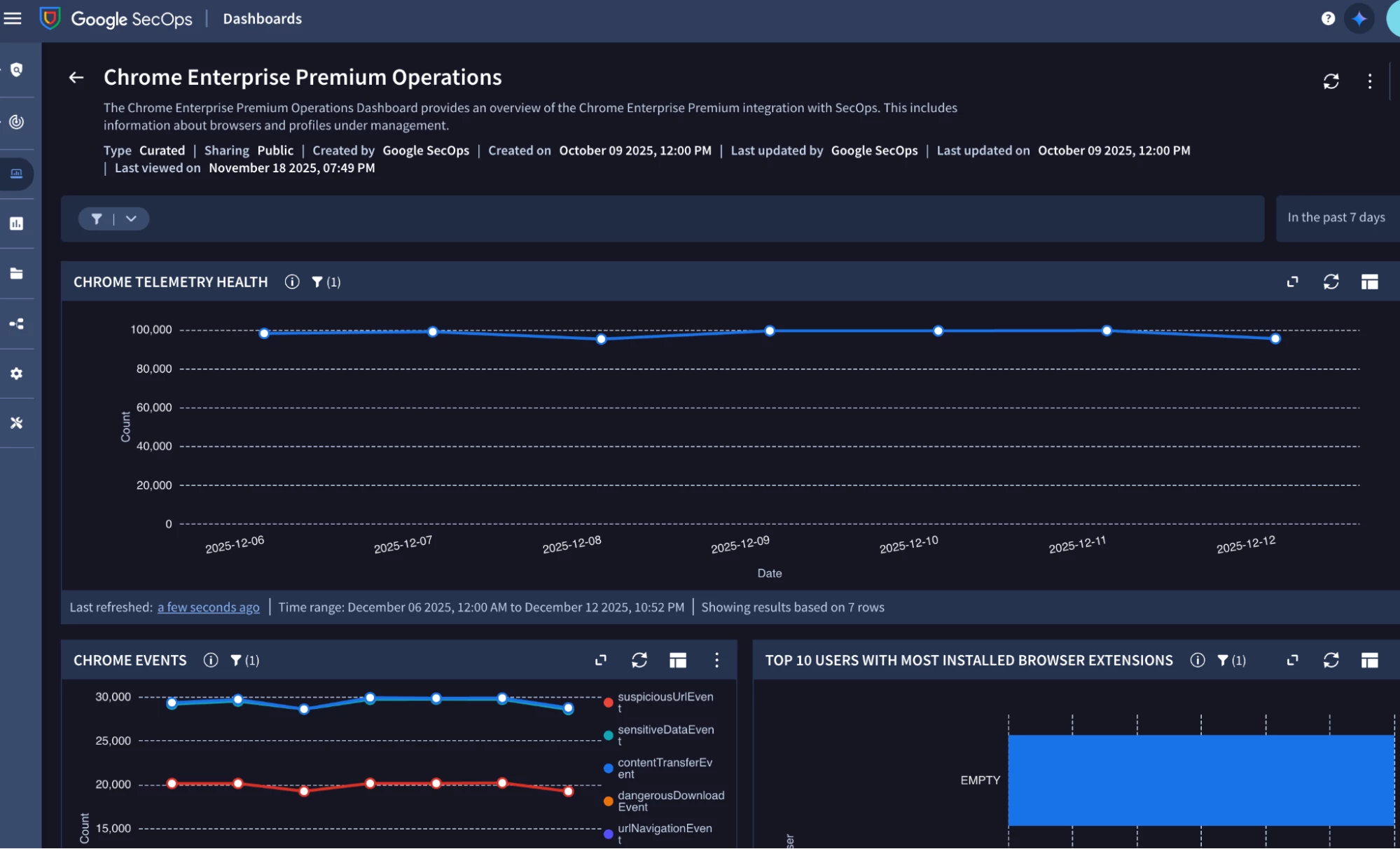
Visibility is the key to effective security operations. We have introduced two curated dashboards focused on Chrome Enterprise Premium data. An operations focused dashboard provides an overview of the Chrome telemetry and enterprise visibility available while the security insights dashboards provides details about threats and sensitive data transfer events detected. These dashboards offer a consolidated view of browser activity, threat landscape, and user-risk posture, enabling SecOps teams to monitor trends, identify high-risk users, and report on the effectiveness of their browser security program.
SOAR integration for blocking a malicious extension:
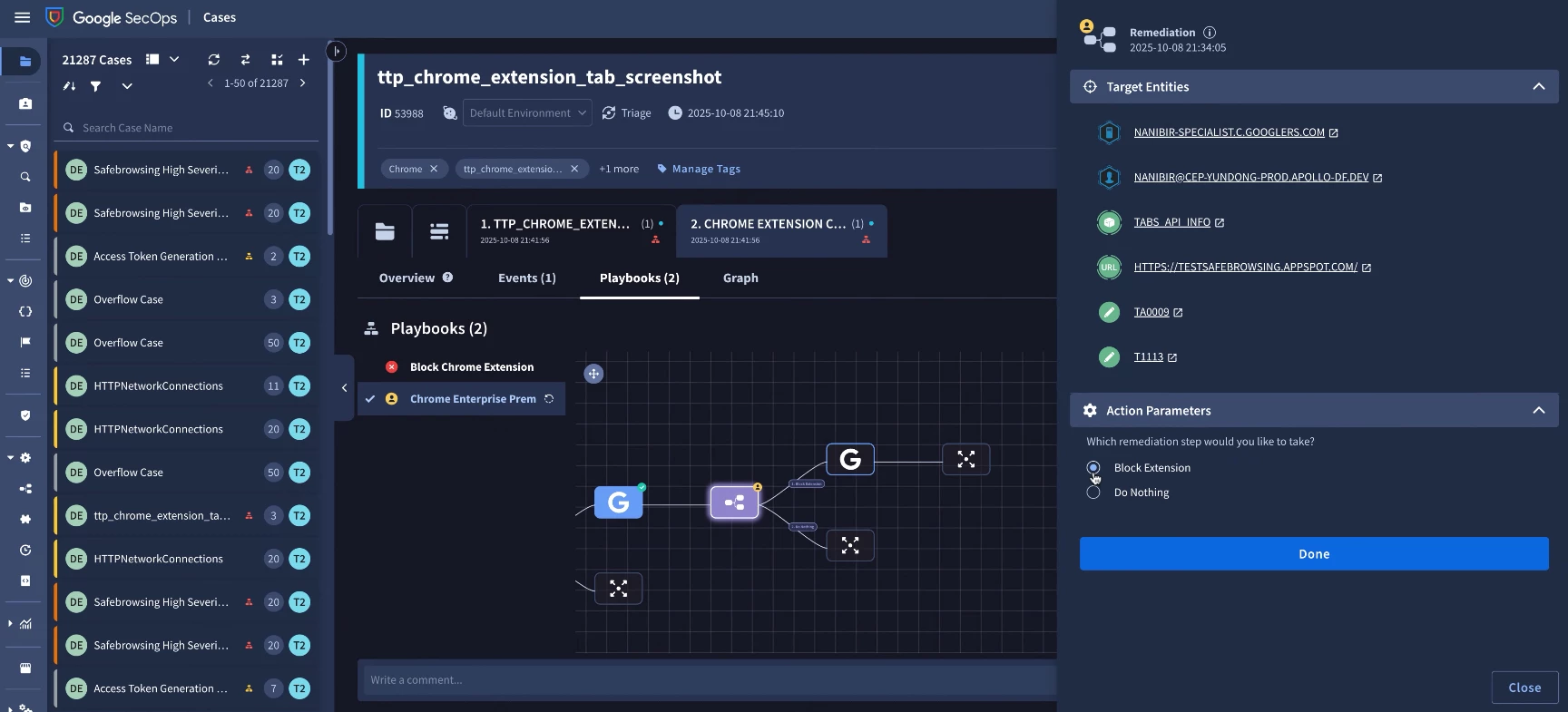
The true power of the Google Security Operations and Chrome Enterprise Premium integration is realized through response automation. We have updated the Google Workspace SOAR integration to allow analysts to respond to malicious Chrome extensions directly from a case in SecOps. New response actions are available to update the extension policy to block or unblock an extension across managed browsers and profiles Once an extension has been added to the block list, Chrome will prevent it from running on other managed browsers and profiles.
Conclusion
By unifying Chrome Enterprise Premium with Google Security Operations, we aren't just adding another log source; we are unlocking a new dimension of visibility to help security teams to protect their environment. This solution complements your existing EDR investments by illuminating the browser layer, ensuring that your security team has the full context for threats that originate in the browse: the initial click, user interactions, and data transfers.
If you have feedback or ideas for improvements to this integration that would help your team, please let us know.
To learn more about this integration, please refer to the following resources:
