



Authors:
Rashi Joshi, Product Manager, Google Cloud Identity and Infrastructure
Manish Gaur, Cloud Security Architect, Google Cloud
Google Cloud Privileged Access Manager
Enterprises are racing to deploy autonomous AI agents- from SRE incident responders and automated cloud operators to dynamic data orchestrators.
In our interactions with our customers we frequently hear the same core challenge from security architects: "How do we unlock the agility and velocity of AI agents without handing non-deterministic models the keys to the kingdom?"
Giving an AI agent standing administrative access (owner, editor, or permanent database admin rights) introduces an unacceptable operational risk. In this opening post of our Privileged Access Manager (PAM) blog series, we explore how Google Cloud Privileged Access Manager enables Zero Standing Privileges (ZSP) for agent identities by letting the AI agent act as the requester while keeping humans in command for privileged access.
The Risk of ambient agent privileges
Traditional automation (like cron jobs and CI/CD pipelines) executes deterministic, pre-compiled logic that can be tested and audited in advance. AI agents, however, are probabilistic and dynamic and granting these workloads standing elevated permissions means that any hallucination, unexpected prompt edge case, or context drift can impact live systems.
Standing Access Vs Privileged Access Manager
| Dimension | Standing Access | Privileged Access Manager |
| Default state | Permanently Elevated (Always on) | Zero Standing Privileges (Strict least-privilege baseline) |
| Elevation trigger | Not needed (Ambient authority) | On-demand grant (Justification required per grant) |
| Authorization gate | None (Unsupervised execution) | Human-in-the-Loop (HITL) (Explicit peer/admin approval) |
| Exposure window | Indefinite | Time-bound (Auto-revoked e.g. 30mins) |
| Blast Radius | Unconstrained (Easy lateral movement) | Contained (Granular scope via IAM conditions) |
How Privileged Access Manager transforms access control for Agent Identities
Google Cloud Privileged Access Manager (PAM) is a cloud-native security control designed to manage, secure, and audit time-bound, on-demand elevated access. This product is available for free in Google Cloud, except for two advanced features, Multi-party Approvals and Scope customization that are available with Security Command Center. Instead of granting permanent (standing) IAM roles, organizations can define entitlements with:
-
Eligible principals: Who can request the access (humans, service accounts, or native AI agents).
-
Elevated privileges: Precisely which predefined or custom IAM roles are available.
-
Maximum duration: How long the temporary grant will last (from minutes to hours).
-
Approvers: Whether the request requires multi-level or multi-party human intervention, with mandated business justifications.
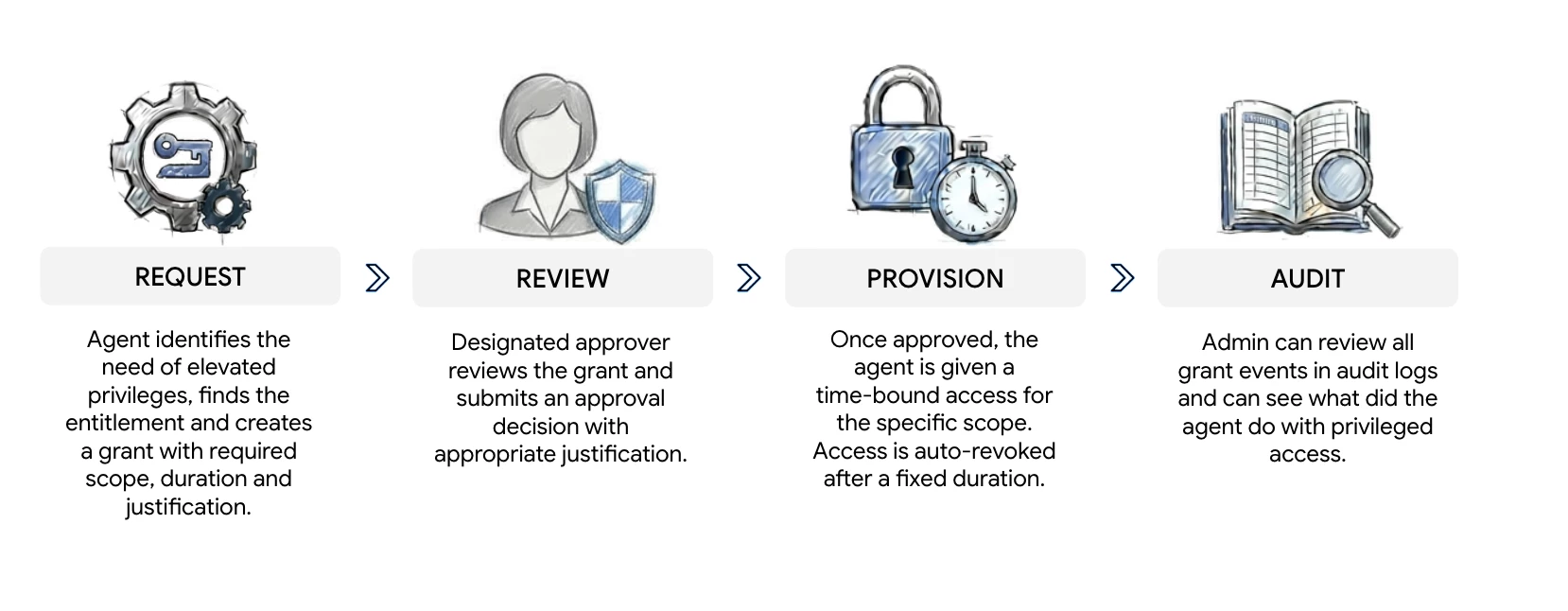
A requester creates a grant against the entitlement to obtain time-bound access to specific roles and resources.
Privileged Access Manager Flow:
For an overview of on-demand access with Privileged Access Manager, watch our deep-dive video on Privileged Access Management for break-glass events.
Why Privileged Access Manager is essential in an AI Agent World
Here is how you can use Privileged Access Manager to solve agent-specific risks:
-
Granular access: Rather than giving an incident-response agent permanent administrative access to cloud clusters, you can grant the agent with read-only permissions to start with. Only when needed, it can request a highly temporary grant via Privileged Access Manager giving needed justification (e.g., 10 minutes of access to a single Cloud Storage Bucket).
-
Oversight with approvals: Add human approvers in the loop to approve such grant requests and the approver can decide if access should be granted or not.
-
Automated Approvals: Set up agents or service accounts as Level 1 approvers to pre-screen grants before escalating to a Level 2 human approver.
-
Deep Auditing: Get a full audit trail of why an agent sought privileged permissions. Every event associated with the grant request including its justification, approver justification and history is recorded in immutable Cloud Audit Logs.
-
Scope via IAM Conditions: Create entitlements with scoped IAM roles and specific resources using tags or other IAM conditions.
Takeaways
You can retain definitive oversight over your agent identities by using Google Cloud Privileged Access Manager as a human-in-the-loop control plane. To start securing your agentic workloads:
-
Review your current AI service account permissions, identify high-risk standing privileges, and create your first PAM entitlement today.
-
Refer the IAM Helper skills for Privileged Access Manager and teach your agents to create their first grant.
Editor’s Note
Coming up next:
-
Architecting the PAM Circuit Breaker: Zero-Trust Guardrails for Autonomous GCP AI Agents
-
End-to-End Forensic Auditing: Linking PAM Approval Logs with Resource-Level Audit Trails
-
Scaling Org-Wide Approvals: Multi-Level Approvals and Custom Org Policy Integration
-
Agent-as-an-Approver: Automating Tier-1 Access Requests with Policy Guardrails
