Author:
Canburak Tümer, Strategic Cloud Engineer
Google Security Operations is an end-to-end security solution that brings together SIEM and SOAR capabilities to enhance detection, investigation and response against threats. Data can be ingested into Google SecOps in multiple ways, such as Google Cloud direct ingestion, BindPlane agent, Forwarders, and direct ingestion; see Google SecOps data ingestion.
In some manufacturing environments, there are limitations such as mixed logs being obtained over the same stream or logs needing complex transformation and enrichment. In this blog post, I will show you how to ingest data fields and transform mixed log types using Dataflow.
A feed is a part of the SIEM module of Google SecOps and helps with collecting event / log data. There are many predefined feeds which can collect data from a number of different sources and for a number of different log types.
Challenges
Feeds are only working with the assigned log types during feed creation. That means if there is a log source (e.g. a message queue or relay) with a mixture of different log types they need to be separated before sending into Google SecOps.
Some companies might have their own proprietary log format definitions. In that case, existing log types will not suffice to handle the incoming messages and ingestion pipeline would be required to use a custom feed.
Another challenge is the transformation of the data. Google SecOps has a parser mechanism to process raw logs into UDM format but when a more detailed transformation is needed (e.g. filtering, enriching etc.) Google SecOps might be an incorrect tool for the task.
Ingestion Options
Assumptions
In this article Dataflow will be considered the main transformation tool for logs before ingestion as most security teams would like to have their information as soon as the signal is emitted. And Dataflow is the tool for handling streaming and batch data processing in Google Cloud portfolio.
Also the logs are assumed to arrive from a message queue (in diagrams symbolized with Apache Kafka logo, but can be any other messaging) used as a sink of many log emitters, hence a message queue has many log types from many log sources.
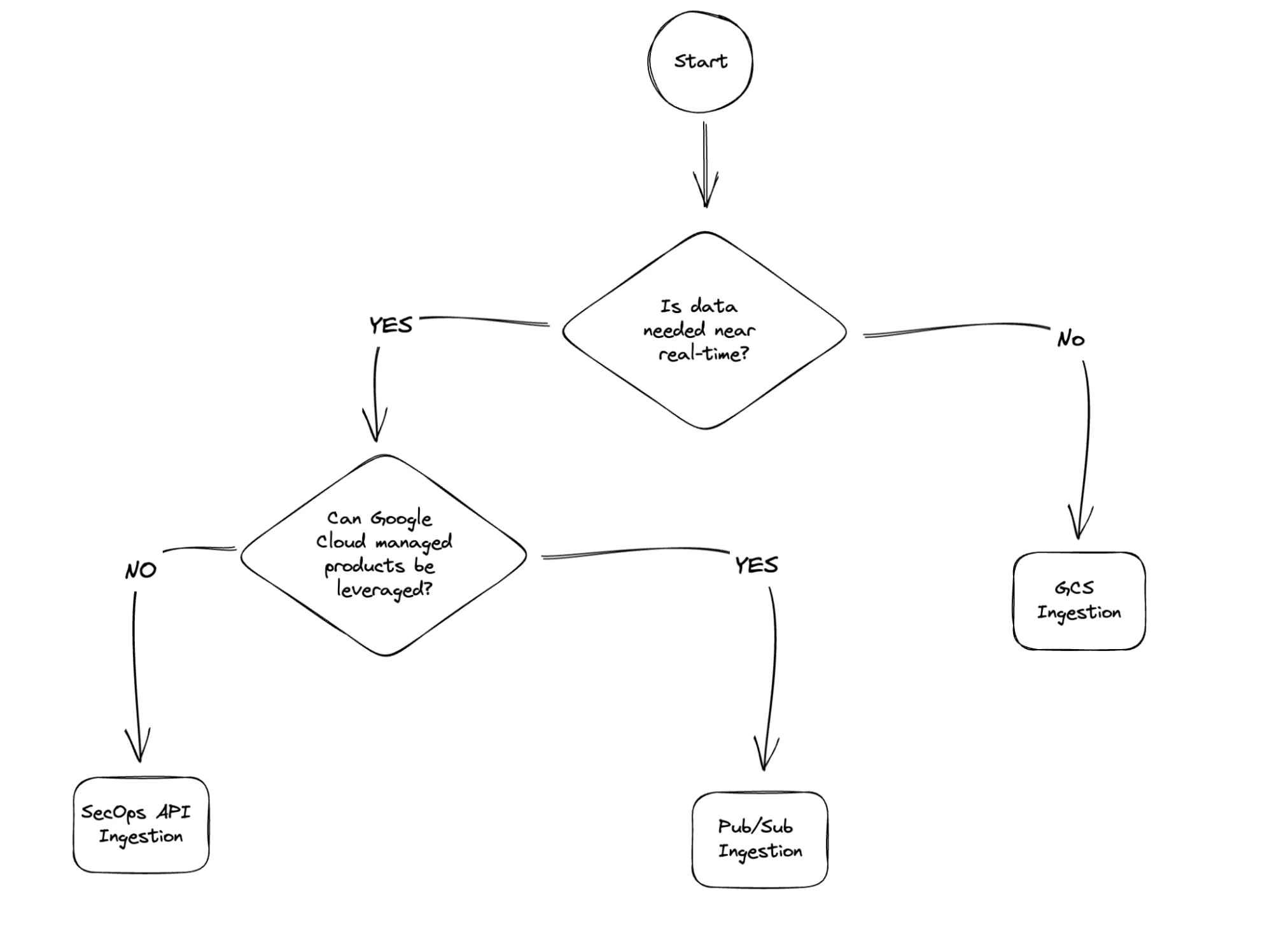
Option 1: Google Cloud Storage Feed
Google SecOps has a predefined feed which can poll the Google Cloud Storage folders. By using this feed developers can write data into GCS and Google SecOps will read from there.

Advantages
- Dataflow uses Apache Beam and has mature IO components that can write into Google Cloud Storage.
- Because a file based approach is being used, no need to have a streaming pipeline which may simplify the overall logic of data processing.
Disadvantages
- Google SecOps polls the Google Cloud Storage every 15 minutes and it can not be configured as of this writing. In case business logic needs a faster response time then this solution is not suitable.
- Google SecOps creates a Service Account to poll the Google Cloud Storage, and the user needs to grant access to the Service Account on bucket level. This can be a security challenge for some users as they may want full control over the Service Accounts.
Option 2: Google Cloud Pub/Sub Feed
Google SecOps has another predefined feed to collect data from Pub/Sub, it requires a push subscription to be created and messages to be pushed into an endpoint that is created during the feed creation.

Advantages
- Apache Beam has mature IO components that can write into Cloud Pub/Sub
- As messaging queues are utilized, streaming is possible.
- All the resources are Google Cloud’s managed products reducing the operational overhead for the developers and platform engineers.
- Pub/Sub enables other use cases like automated archiving with GCS Subscription.
- The Service Account will stay under the customer’s control.
Disadvantages
- Each Feed (or log type) needs its own Pub/Sub topic, if a customer has many different log types this can be a bottleneck to manage topics and subscriptions. They may use one topic and many subscriptions with filtering but this will multiply the cost, as each message will flow into many subscriptions.
- There is a limit of 15K messages per second.
Option 3: SecOps API
Google SecOps provides a set of REST APIs. logs:import method is the one that can be used for the SIEM logs import.

Advantages
- This method is independent of Google Cloud Storage or Google Cloud Pub/Sub. Developers can directly send requests to API endpoints.
- The method brings the ability to control request intervals from near-real-time to micro-batches.
- The Service Account is under control of the customer. Note that the service account needs at least chronicle.logs.import permission besides the Dataflow permissions.
Disadvantages
- As of writing of this document there is no published Apache Beam IO for Google SecOps that brings the responsibility of handling all API related mechanisms (retry, error handling, throttling etc.) onto the developer’s plate.
- There is a limitation ingestion rate, size and bust limit on Google SecOps; see service limits.
Handling Data Quality and Pipeline Reliability
Readers might notice, in every architecture diagram there is a Pub/Sub component labeled as Dead Letter Queue connected to a BigQuery component labeled as BigQuery Rejected Messages in the downstream.
Even when working with standard log types, there can be malformed messages or messages that are too big for the SecOps API limitations. In that case we don’t want our data pipeline to be stuck in a retry loop, or to fail silently dropping the message. Hence we are redirecting these messages to a permanent storage unit.
Benefits of this approach are
- The data pipeline will not fail due to a single erroneous log message
- Erroneous logs will be collected in a sink for investigation, that could lead into pipeline evolution
- Logs from the sink can be re-processed with the new version of pipeline
Conclusion
While the SecOps is a great tool, it has its limitations especially around data wrangling. When you need data transformation done, I suggest utilizing Dataflow for great streaming and batch transformation capabilities. Then ingest the prepared data into SecOps and for the ingestion method, I prepared a small decision tree hoping that should shed some light on your decision making.