



Author :
Vesselin Tzvetkov, Principal Security Engineer and Security Advisor
SIEM migrations are difficult tasks that take significant resources and time to conclude, as companies often accumulate thousands of custom rules on SIEM systems like ArcSight, QRadar, Splunk, and Azure Analytics. It is logical to ask: can we automate this migration? This blog will guide you through practical tools and approaches for automating rule migration.
Migration is a huge undertaking, and here we will focus only on existing rule migration. If you want to see a holistic view covering ingestion, parsers, and playbooks, please look at SIEM Replacement | Google Cloud, SIEM migration guide | Google Cloud, and the Next ‘26 Solution session: SecOps large scale migrations steps and leveraging GenAI to accelerate.
A translation of existing rules in YARA-L generally consists of the following steps, and I will show you how to leverage an AI helper to execute them:
-
Mapping existing customer rules to SecOps curated detections. There are thousands of curated detection rules available. Leveraging these instead of migrating custom rules is a huge benefit, as curated detections are managed by Google, saving you the operational overhead of maintaining custom logic.
-
Translating existing rules to YARA-L. After selecting the rules that need to be migrated, you must translate the existing logic into YARA-L syntax.
-
Annotating the rules. Once the logic is generated, you should add comments so that analysts understand the origin of the rule and how to tune and test it.
-
Generating synthetic logs for testing. You will need sample logs to verify that the rule triggers according to its intent. While testing with real log samples is best, you can generate synthetic ones if real samples are unavailable. This process can be integrated into a CI/CD pipeline.
-
Validation and fine tuning. Validation and fine tuning depending on your needs. This is out of scope of this blog.
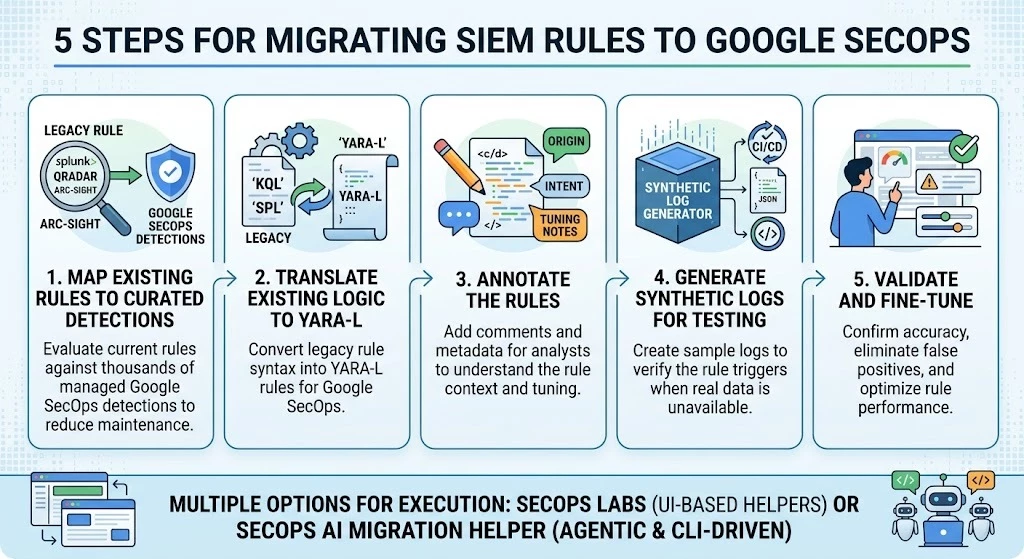
Rules migration steps overview
Let us now dive into the steps
Setup
You have multiple options for executing these steps. I will walk you through the two main approaches and how to prepare for them.
Google SecOps Labs
SecOps Labs provides helpers to translate rules, map detections, and create parser extensions; for more details, see Building Towards an Agentic SOC: Introducing SecOps Labs. This approach is ideal if you have a limited number of rules and prefer using a UI.
SecOps AI Migration Helper
The SecOps AI Migration Helper, part of the SecOps-Toolkit, is an open-source, community-driven solution. This CI/CD-driven approach uses the Antigravity CLI (or alternatively the Gemini CLI) to execute every step of the process. It automatically creates a file structure, annotated rules, and synthetic logs ready for your pipeline, and leverages an MCP server to validate the rules.
The SecOps AI Migration Helper significantly increases the speed of the migration process by minimizing technical complexities and automating repetitive workflows. While these tools automate repetitive tasks, they don't replace the need for careful human validation. When you gain experience with tools with few rules, you can easily modify the logic to execute batch processes tailored to your specific use case.
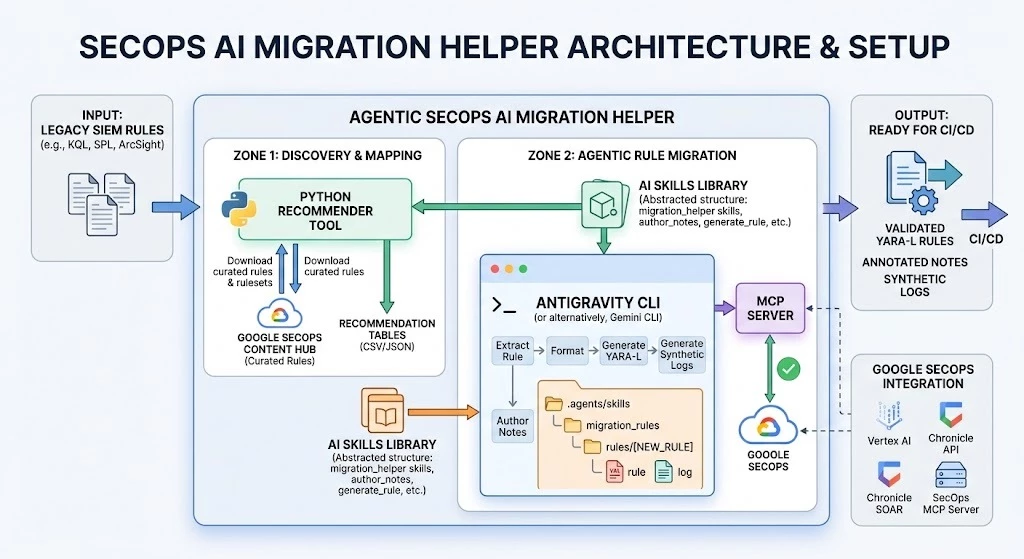
To get started, clone the SecOps-Toolkit repository and follow the instructions in the README.md to configure your SecOps development instance and Gemini access.
The repository also includes a demo set of rules in Microsoft KQL, SPL, QRadar, and ArcSight to help you familiarize yourself with the tool. See source rules at ./blueprints/secops-ai-migration-helper/migration_rules and migration rule output samples at ./blueprints/secops-ai-migration-helper/rules.
Familiarize yourself with Antigravity CLI skills in blueprints/secops-ai-migration-helper/.agents/skills (Gemini CLI blueprints/secops-ai-migration-helper/.gemini) since you may want to adapt it to your use cases.
Here are some key elements of the SecOps AI helper:
-
As more rules are migrated, the knowledge base of the tool increases and migration becomes more accurate since it uses the repository as its knowledge base.
-
The tool is flexible by understanding different formats of rules from a SIEM. It is not limited to certain languages or syntax.
-
The AI helper operates in clearly defined small steps, each with specific inputs and outputs. After you tune it to your environment, you can run all steps at once; see Tune the skills/commands to your use case.
-
A SecOps Analyst (Human in the loop) validates the output after every step. For example: formatting an original rule, then manual visual validation, then adding comments, etc.
-
A general all-in-one approach without tuning to your environment (e.g. migrating everything without considering human validation and equivalence to curated rules) is counterproductive.
Mapping existing custom rules to curated detections
The input typically consists of the description and logic of existing rules written in SPL, KQL, etc., often in common formats like CSV, MD, TXT, JSON, or DOCX. The output provides clear information on which curated detections offer the same coverage as the input rules. Note that you can enable rulesets and not individual rules.
SecOps AI Migration Helper
The tool downloads available curated detection rules and rulesets from your development SecOps instance's Content Hub, including descriptions and logic. If a rule is not available on your SecOps it will not be considered. It then compares this logic to your provided rules one by one to determine coverage. The output is a table providing clear recommendations and technical justifications for replacing custom rules with Google-managed curated detections. Here are the steps to follow:
-
Set up your environment variables to point to your development instance as described in blueprints/secops-ai-migration-helper/recommender_curated_community/README.md
-
Place your original rules in CSV, Markdown, or any other common format in the working folder. A sample is provided at and the format is not mandatory ./secops-ai-migration-helper/recommender_curated_community/resources/sample_unstructured_input.csv
-
Change the working directory of AI helper blueprints/secops-ai-migration-helper
-
Using the Antigravity CLI (or Gemini CLI), execute the command migration_helper_extract <file_path>. This will extract the rules into a structured JSON file located in the work_dir folder. For every rule, it will extract the use case ID (UCID), title, description, and logic.
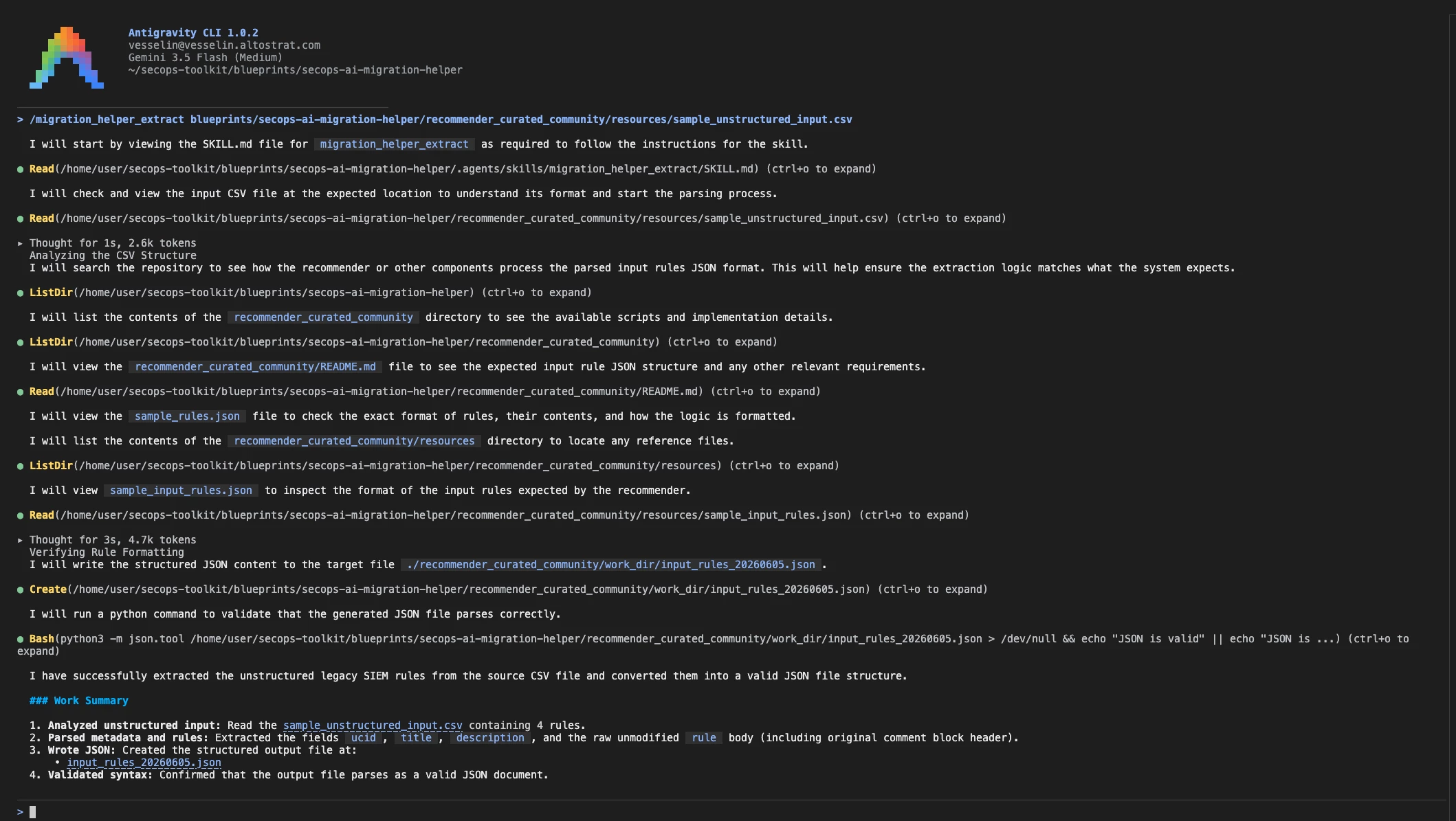
Overview Anigravity CLI steps migration_helper_extract
-
Run migration_helper_recommend <file_path>, pointing to the JSON output from the previous step. This process takes a few minutes as it downloads curated detections and evaluates your rules. The resulting recommendation tables will be saved in the work_dir folder. Review these three tables for detailed insights:
-
recommendation_curated_community.json is a JSON file with recommendations. For every provided rule, the following values are included:
-
-
Ucid: A unique identifier string from the provided rules
-
Title: Title of the rule extracted from the rule definition
-
Description: Description of the rule extracted from the rule definition
-
curated rules: A comma-separated list of curated detection rules that provide coverage in the format category/ruleSet/Rule
-
curated rules coverage: A qualitative assessment rating (no|partially|very good)
-
curated rationale: The technical justification
-
community rules: A comma-separated list of community rules
-
community rules coverage: A qualitative assessment rating (no|partially|very good)
-
community rationale: The technical justification
-
curated_community_recommendation.csv is a CSV file with recommendations suitable for a table view
-
recommendation_curated_rulesets.csv is a CSV with recommended rulesets suitable for a reverse lookup (i.e., which rulesets are recommended for the rules in the batch).
An example of the initial recommendation table highlighting curated detections is shown below; notably, similar insights are also generated for community-based rules. You can find a detailed sample within the blueprints/secops-ai-migration-helper/recommender_curated_community/resources directory. Here an example:
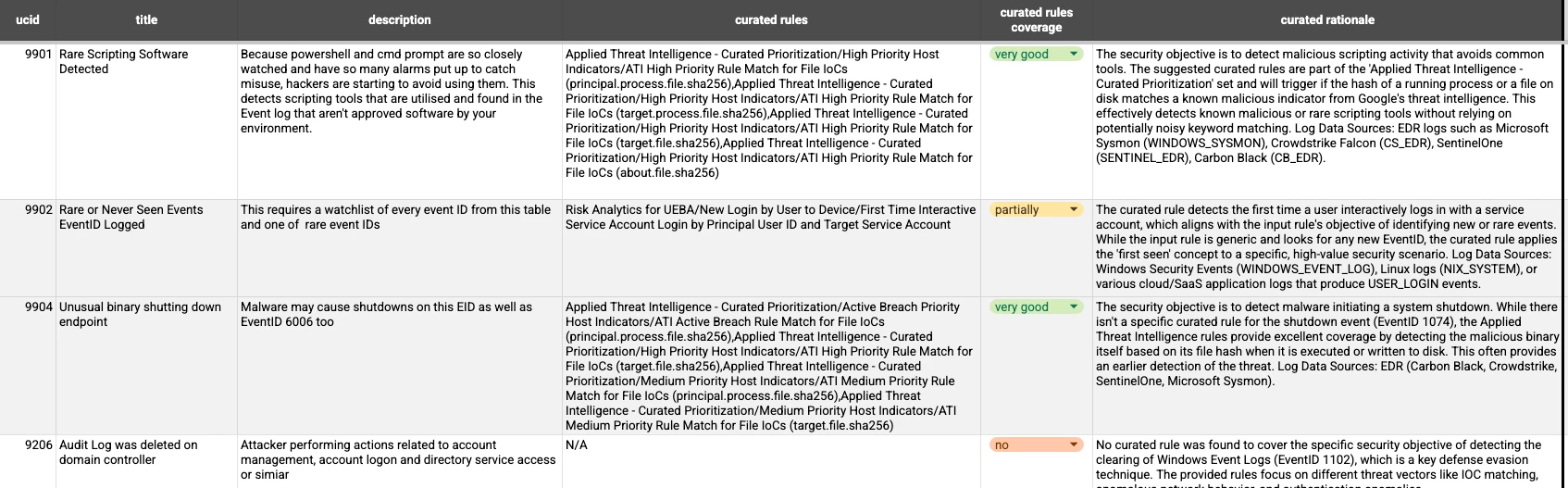
Sample output recommendation SecOps curated detention rules
Google SecOps Labs - Curated Detection Threat Mapping
If you possess specific knowledge regarding the MITRE ATT&CK techniques and tactics associated with your legacy rules, you can utilize the Curated Detection Threat Mapping capabilities. This process is further explained in the Building Towards an Agentic SOC: Introducing SecOps Labs community post.
Rule Logic Migration
This phase encompasses the technical generation of YARA-L logic, the systematic annotation of rules for clarity, and the creation of synthetic logs for validation purposes.
SecOps AI Migration Helper
Follow the following step in order to translate the rule.
- Upload the rules designated for migration into your CI/CD repository. You can find samples in blueprints/secops-ai-migration-helper/migration_rules if you want to just prototype. The input format is flexible; the Agent is designed to recognize and structure various logic types, including KQL, SPL, QRadar, and ArcSight. It will need finding the skill if this syntax is not generally recognizable.
- Invoke the migration process within the Antigravity CLI by running: /migration_helper_migrate_rule <input rules>
For example: /migration_helper_migrate_rule blueprints/secops-ai-migration-helper/migration_rules/demo_kql_9103.md. These commands execute multiple small steps, namely (prefix migration_helper_): init, format, generate_rule, generate_log, author_notes. You will potentially need to tune the skills/commands to your use case,see chapter later the document.
The finalized output assets will be organized within the specified folder hierarchy including the YARA-L rule and folder with sample logs
NOTE: You still need to manually fill in some metadata, validate and improve the rule logic; consider this AI tools output as a suggestion.
An example folder for example:
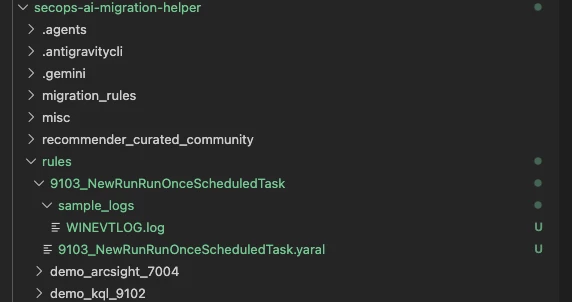
Directory overview of sample newly migrated rule
- You can execute an optional step: /migration_helper_validate <new_rules_name>. This will validate the rule using an MCP server on your SecOps instance.
Example of a rule migration output before Analyst improvements:
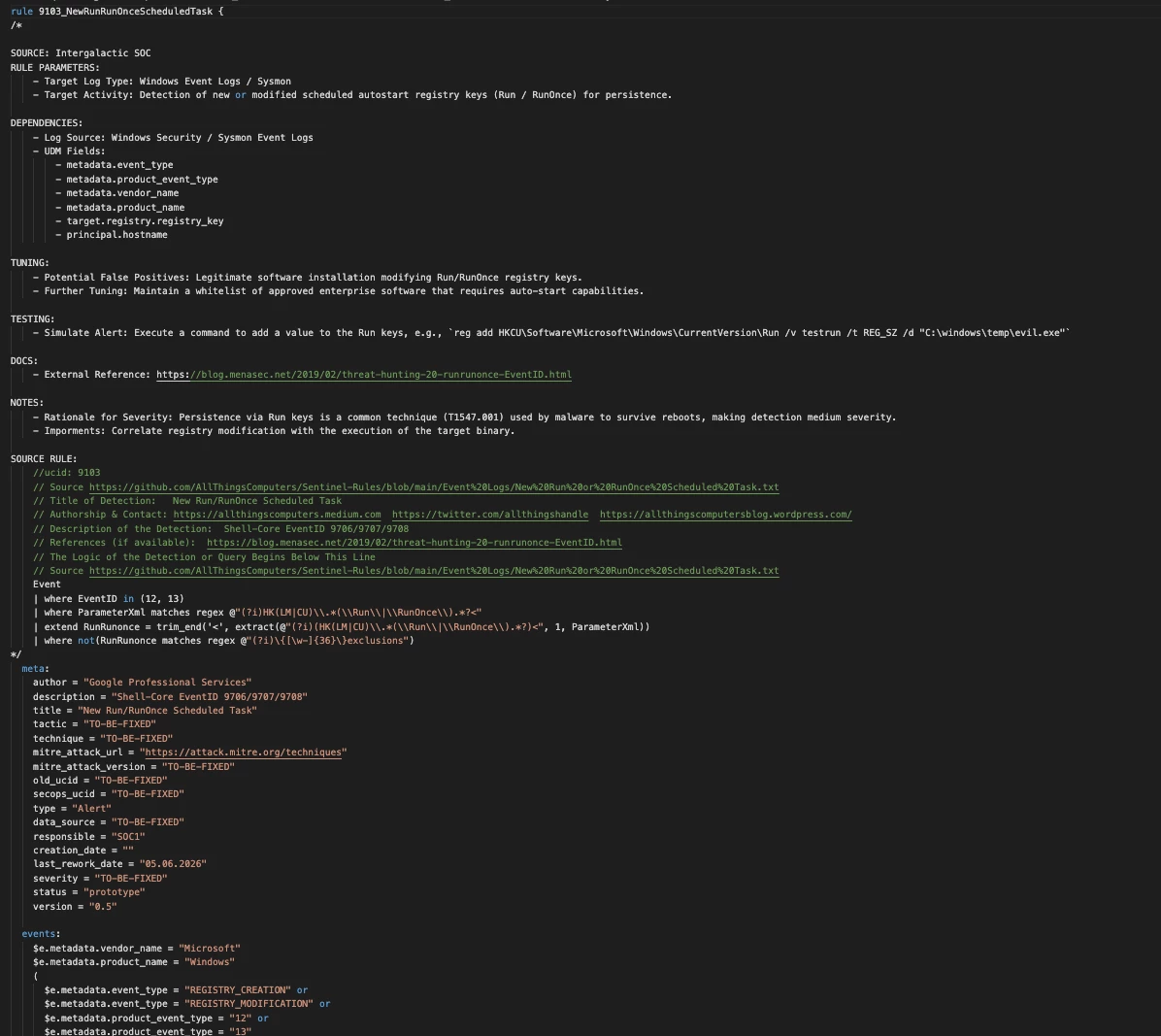
Sample newly migrated rule in YARA-L
Example of synthetic logs:
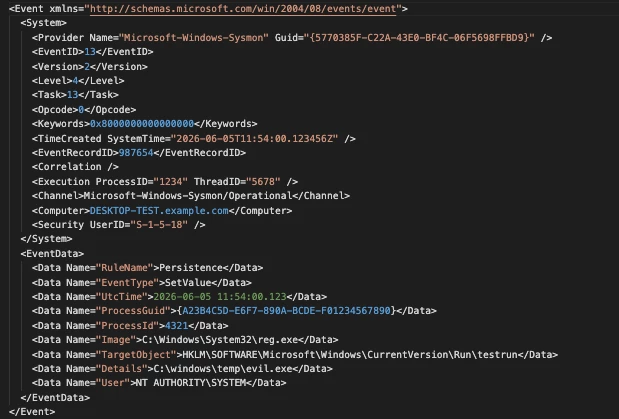
Sample synthetic log
Tune the skills/commands to your use case
Every migration is different and it is very important to adapt the Antigravity CLI skills in blueprints/secops-ai-migration-helper/.agents/skills (Gemini CLI blueprints/secops-ai-migration-helper/.gemini) to your particular use case. Take several sample rules from your SIEM from different product types (e.g. EDR, WAF etc.) execute all steps one by one, see README.md field for steps descriptions, and manually validate the output of each step. Adjust the command arguments accordingly until you get the desired output. After this, start the batch migration of the rules using the command /migration_helper_migrate_rule.
Google SecOps Labs - Rule Translator
You can leverage the Rule Translator Lab to translate your existing rules from SPL and KQL to YARA-L. Then, you will need to annotate them, collect logs, and place them in the correct location in the CI/CD pipeline, see Building Towards an Agentic SOC: Introducing SecOps Labs
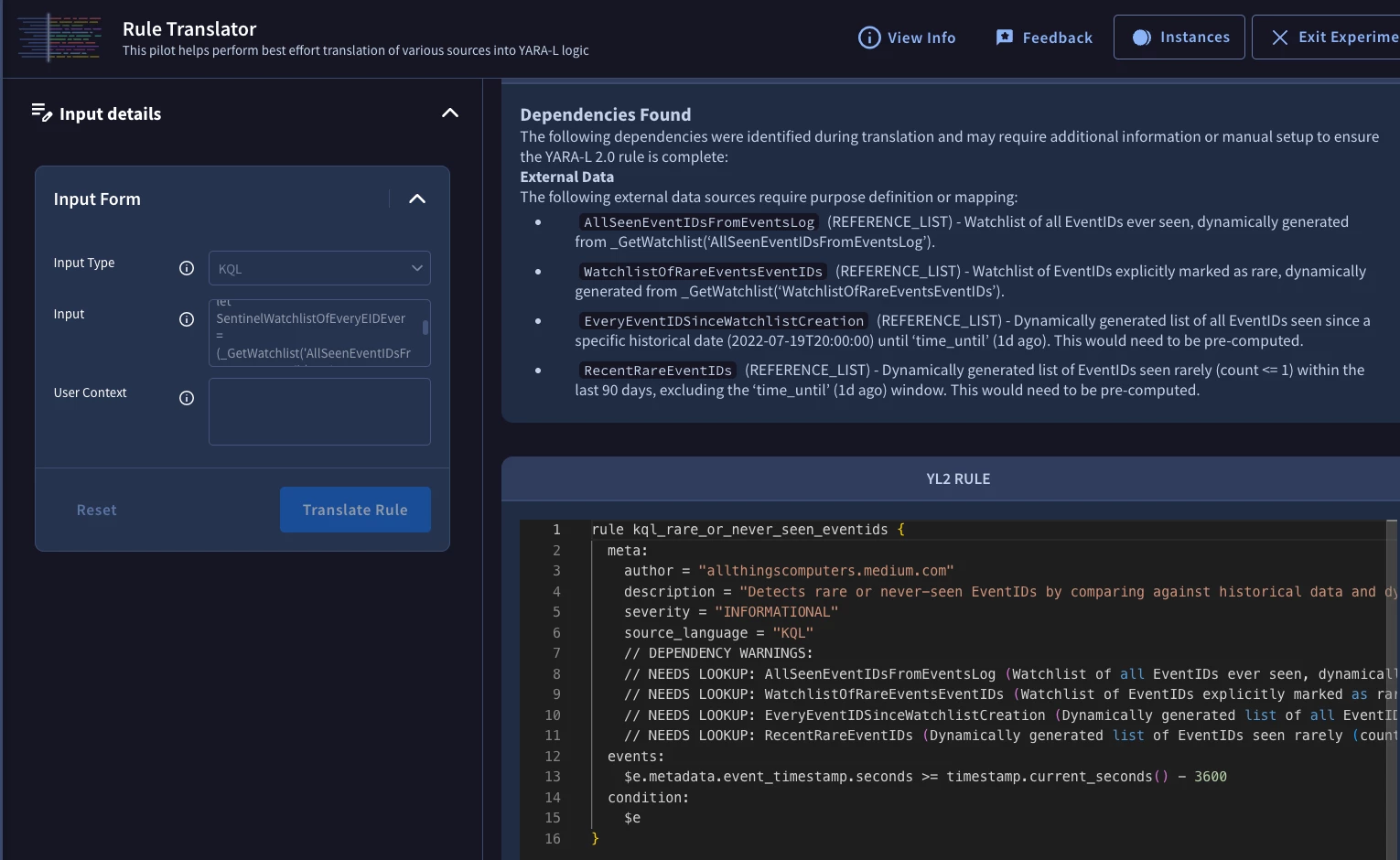
SecOps Labs - Rule Translator
