



Saved searches are a workflow optimization tool in Google Security Operations (SecOps). They enable security operations teams to store and share multi-line queries, retrieving them instantly without having to recall precise syntax and field mappings. Beyond convenience, they drive consistency during investigations and can serve as your curated library for threat hunting exercises.
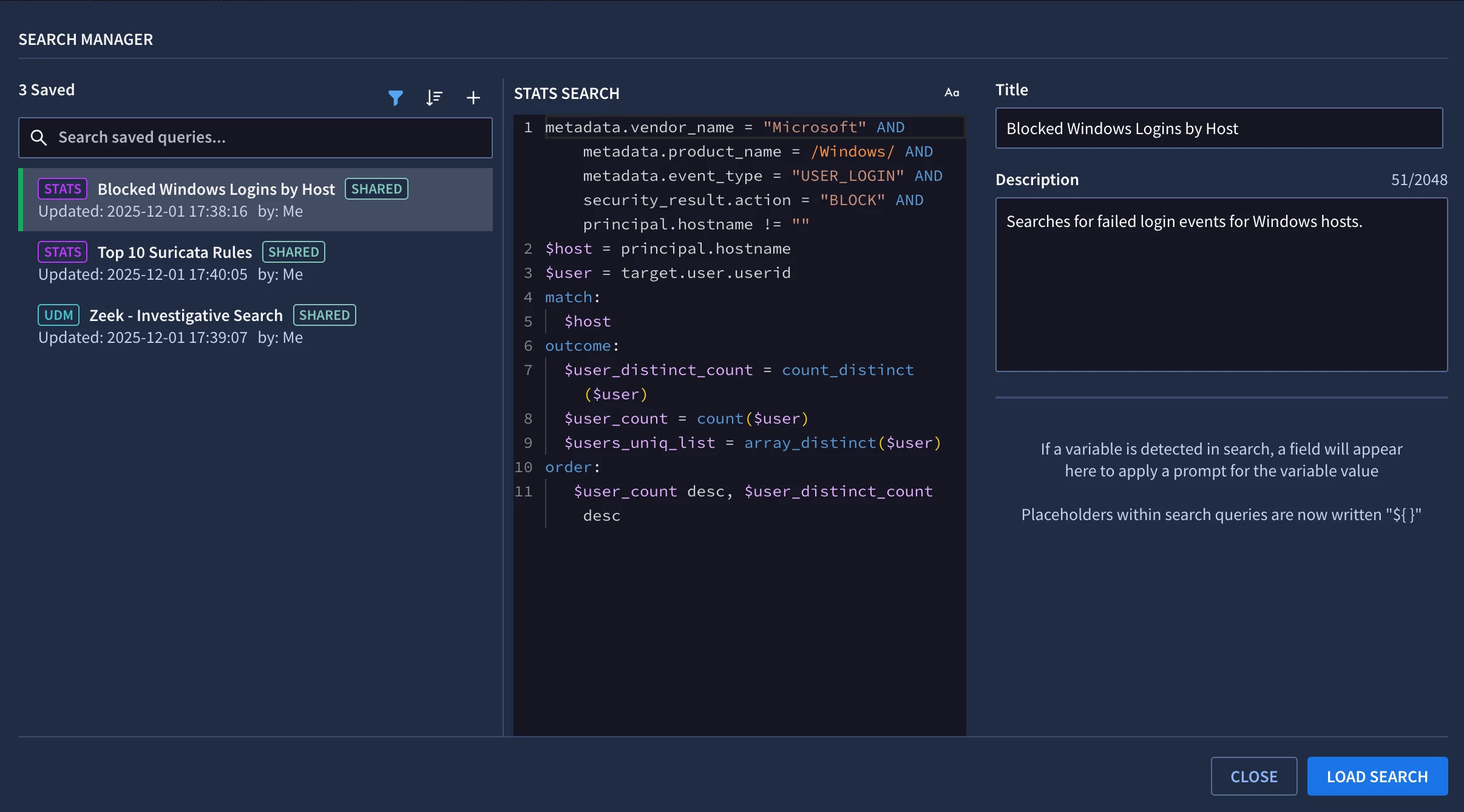
Reviewing saved searches in Google SecOps in Search Manager
Many Google SecOps customers manage their security content as code via the REST API using Content Manager or Terraform. By managing content as code, your Git repository becomes the single source of truth, ensuring that changes are tracked, tested, reviewed, and approved before they’re deployed to Google SecOps. We recently expanded Content Manager to support Saved Searches. In this post, we’ll look at how to programmatically retrieve, version control, and update your saved searches via the Google SecOps REST API.
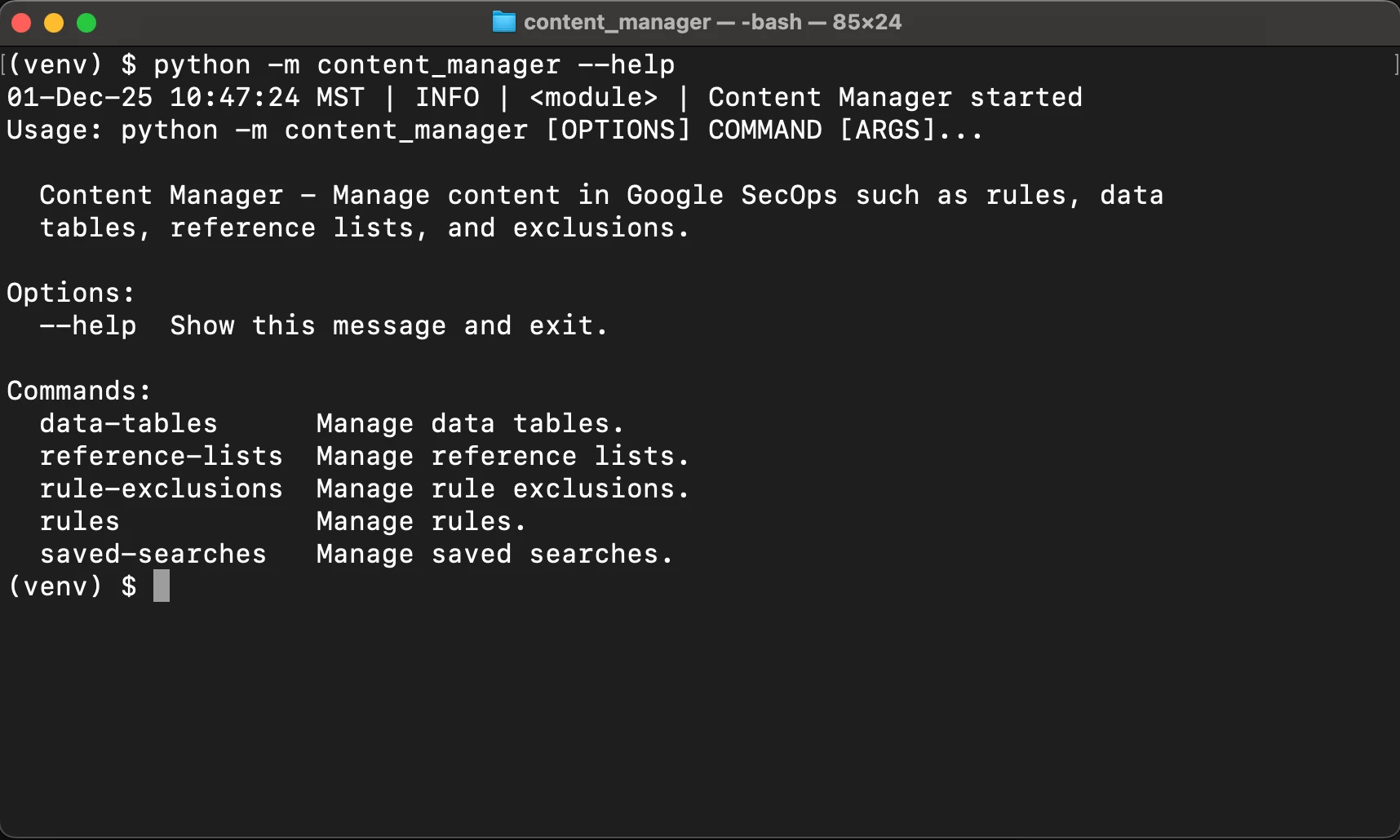
Reviewing the help output for Content Manager
The execution of the “get” command shown below retrieves all of my saved searches from Google SecOps and writes them to the “saved_search_config.yaml” file.
(venv) $ python -m content_manager saved-searches get
01-Dec-25 10:49:45 MST | INFO | <module> | Content Manager started
01-Dec-25 10:49:45 MST | INFO | get_saved_searches | Attempting to pull latest version of all saved searches from Google SecOps and update the local config file
01-Dec-25 10:49:45 MST | INFO | get_remote_saved_searches | Attempting to retrieve all saved searches from Google SecOps
01-Dec-25 10:49:46 MST | INFO | get_remote_saved_searches | Retrieved 3 saved searches
01-Dec-25 10:49:46 MST | INFO | get_remote_saved_searches | Retrieved a total of 3 saved searches
01-Dec-25 10:49:46 MST | INFO | dump_saved_search_config | Writing saved search config to /Users/x/Documents/projects/detection-rules/tools/content_manager/saved_search_config.yaml
In the generated YAML file, we get a structured entry for each saved search. Each saved search contains information such as the UDM query, description, created & updated timestamps, and the resource name for where the object lives in Google Cloud.
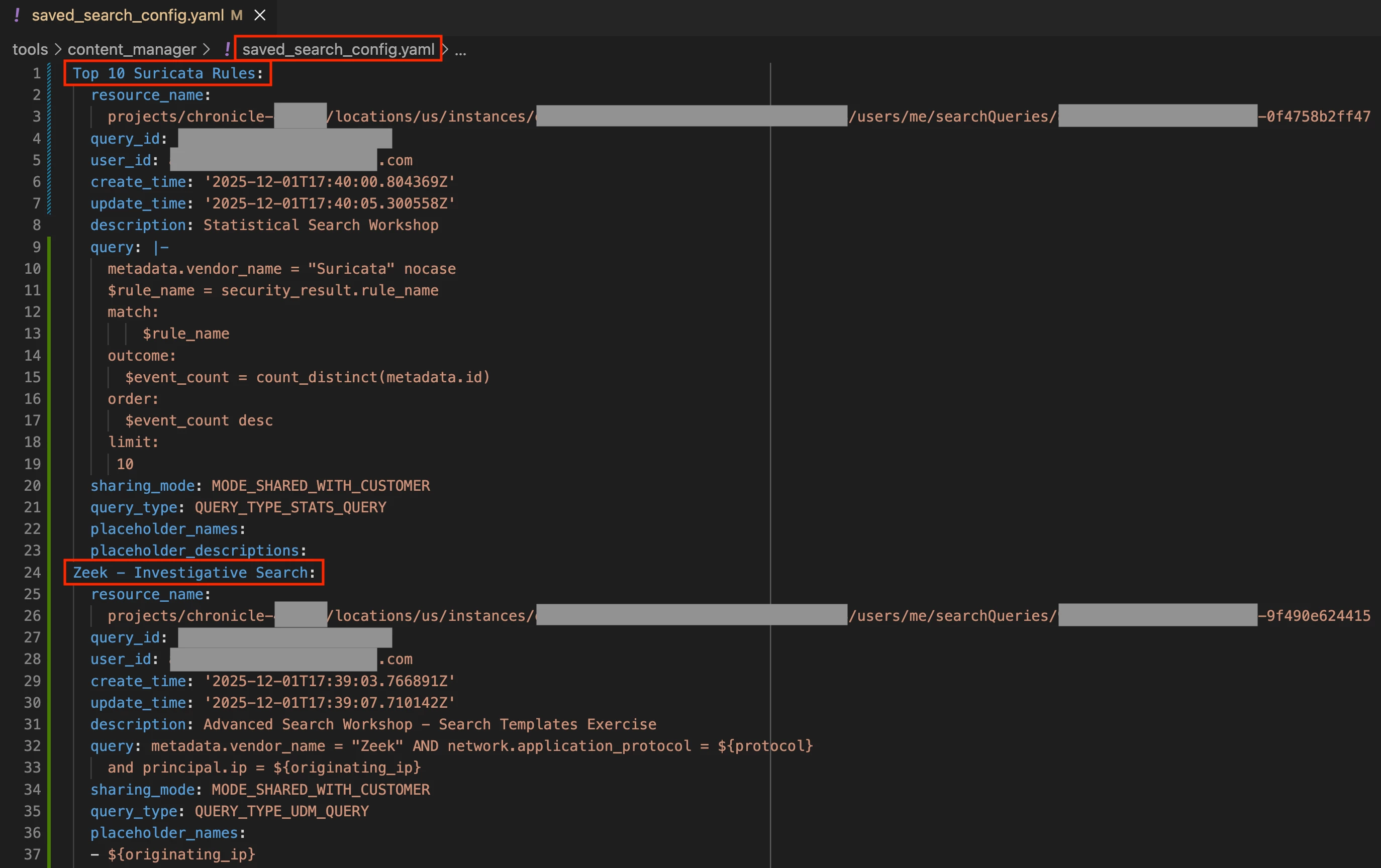
Reviewing the saved_search_config.yaml file
Executing the “update” command does the following:
- Loads the saved searches stored in the “saved_search_config.yaml” file
- Fetches all of the saved searches from Google SecOps
- Compares the saved searches in the config file with what’s in Google SecOps
- Creates and updates saved searches based on the comparison
- Retrieves the latest version of saved searches from Google SecOps and updates the config file. This step ensures that metadata such as the Google Cloud resource name and created & updated timestamps for saved searches in the config file are in sync with Google SecOps.
Let’s look at how to create a new saved search in the config file. In this example, I’m adding a new saved search named, “User Sign-ins By Status”. I’ve included a description and query for the saved search and specified that it should be shared with all users in my Google SecOps tenant. The supported values for the “query_type” field are listed in our documentation.
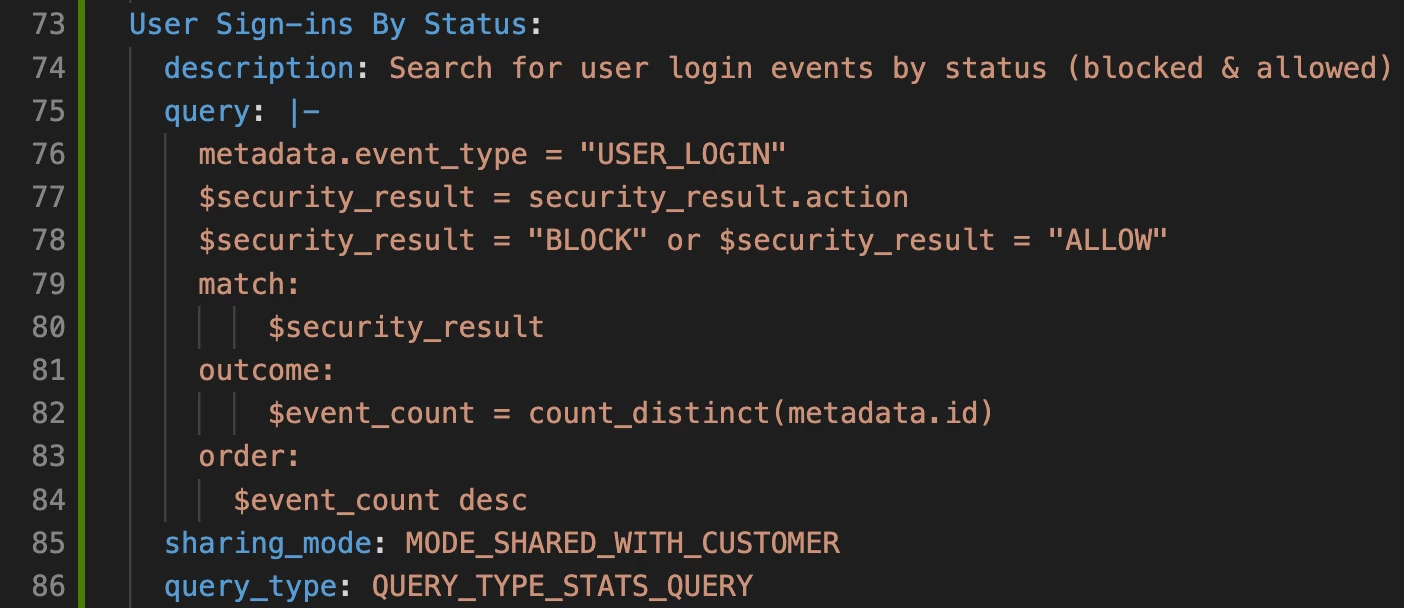
Creating a new saved search in the config file
Executing Content Manager’s “saved-searches update” command created the saved search successfully.
(venv) $ python -m content_manager saved-searches update
01-Dec-25 11:16:26 MST | INFO | <module> | Content Manager started
01-Dec-25 11:16:26 MST | INFO | update_saved_searches | Attempting to update saved searches in Google SecOps based on the local config file
01-Dec-25 11:16:27 MST | INFO | update_remote_saved_searches | Attempting to update saved searches in Google SecOps based on local config file /Users/x/Documents/projects/detection-rules/tools/content_manager/saved_search_config.yaml
01-Dec-25 11:16:27 MST | INFO | load_saved_search_config | Loading saved search config from /Users/x/Documents/projects/detection-rules/tools/content_manager/saved_search_config.yaml
01-Dec-25 11:16:27 MST | INFO | load_saved_search_config | Loaded 4 saved search config entries from file /Users/x/Documents/projects/detection-rules/tools/content_manager/saved_search_config.yaml
01-Dec-25 11:16:27 MST | INFO | update_remote_saved_searches | Attempting to retrieve latest version of all saved searches from Google SecOps
01-Dec-25 11:16:27 MST | INFO | get_remote_saved_searches | Attempting to retrieve all saved searches from Google SecOps
01-Dec-25 11:16:27 MST | INFO | get_remote_saved_searches | Retrieved 3 saved searches
01-Dec-25 11:16:27 MST | INFO | get_remote_saved_searches | Retrieved a total of 3 saved searches
01-Dec-25 11:16:27 MST | INFO | update_remote_saved_searches | Checking if any saved search updates are required
01-Dec-25 11:16:28 MST | INFO | update_remote_saved_searches | Created new saved search User Sign-ins By Status
01-Dec-25 11:16:28 MST | INFO | update | Logging summary of saved search changes...
01-Dec-25 11:16:28 MST | INFO | update | Saved searches created: 1
01-Dec-25 11:16:28 MST | INFO | update | created saved search ('User Sign-ins By Status', 'projects/chronicle-xxxxxx/locations/us/instances/{UUIDv4}/users/me/searchQueries/{UUIDv4}')
01-Dec-25 11:16:28 MST | INFO | update | Saved searches updated: 0
01-Dec-25 11:16:28 MST | INFO | get_remote_saved_searches | Attempting to retrieve all saved searches from Google SecOps
01-Dec-25 11:16:28 MST | INFO | get_remote_saved_searches | Retrieved 4 saved searches
01-Dec-25 11:16:28 MST | INFO | get_remote_saved_searches | Retrieved a total of 4 saved searches
01-Dec-25 11:16:28 MST | INFO | dump_saved_search_config | Writing saved search config to /Users/x/Documents/projects/detection-rules/tools/content_manager/saved_search_config.yaml
Reviewing the config file, we can see the Google Cloud resource name for the new saved search along with its metadata.
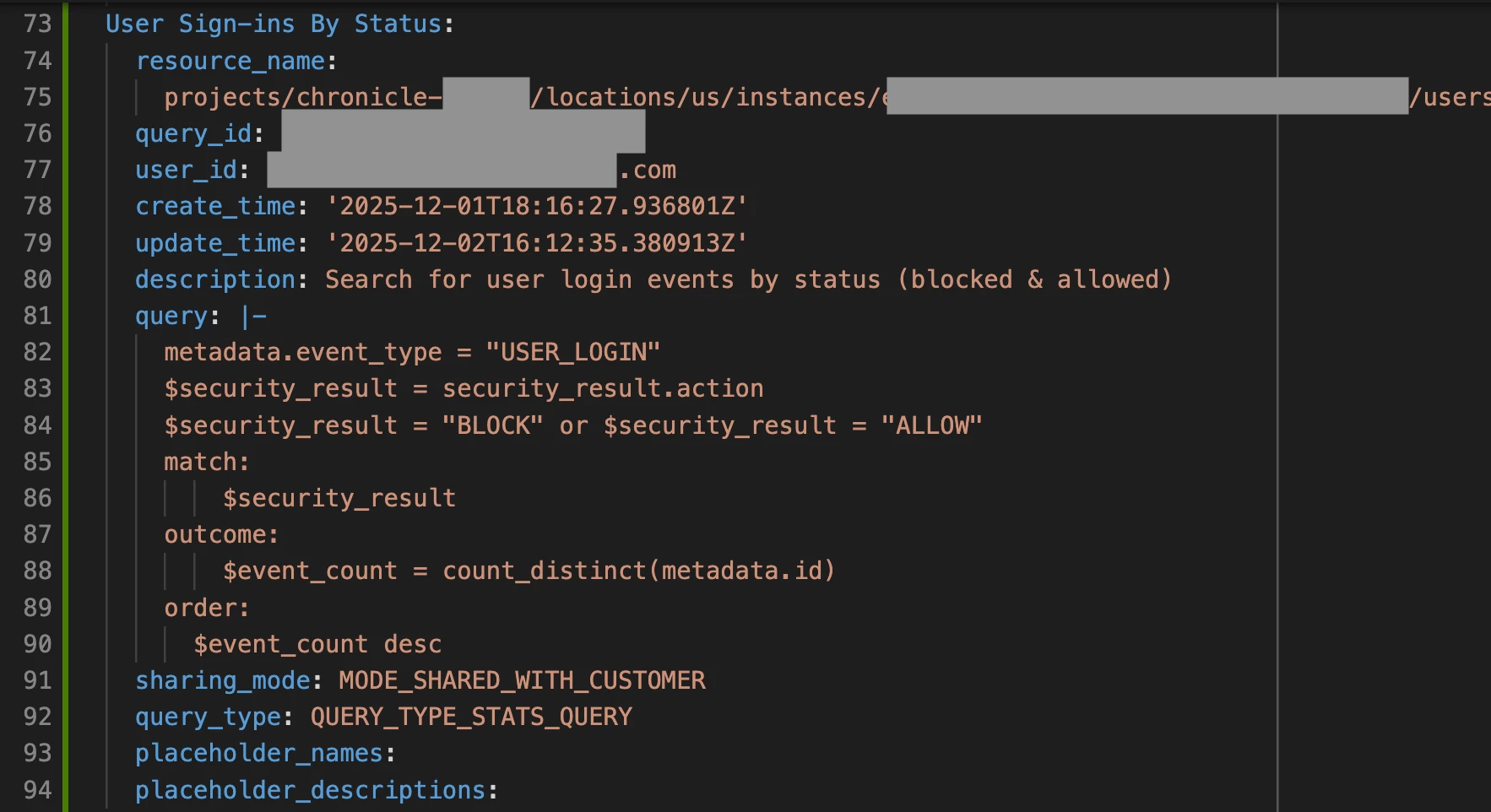
Reviewing the new saved search object in the config file
Finally, I can review the saved search in Google SecOps by opening the Search Manager.
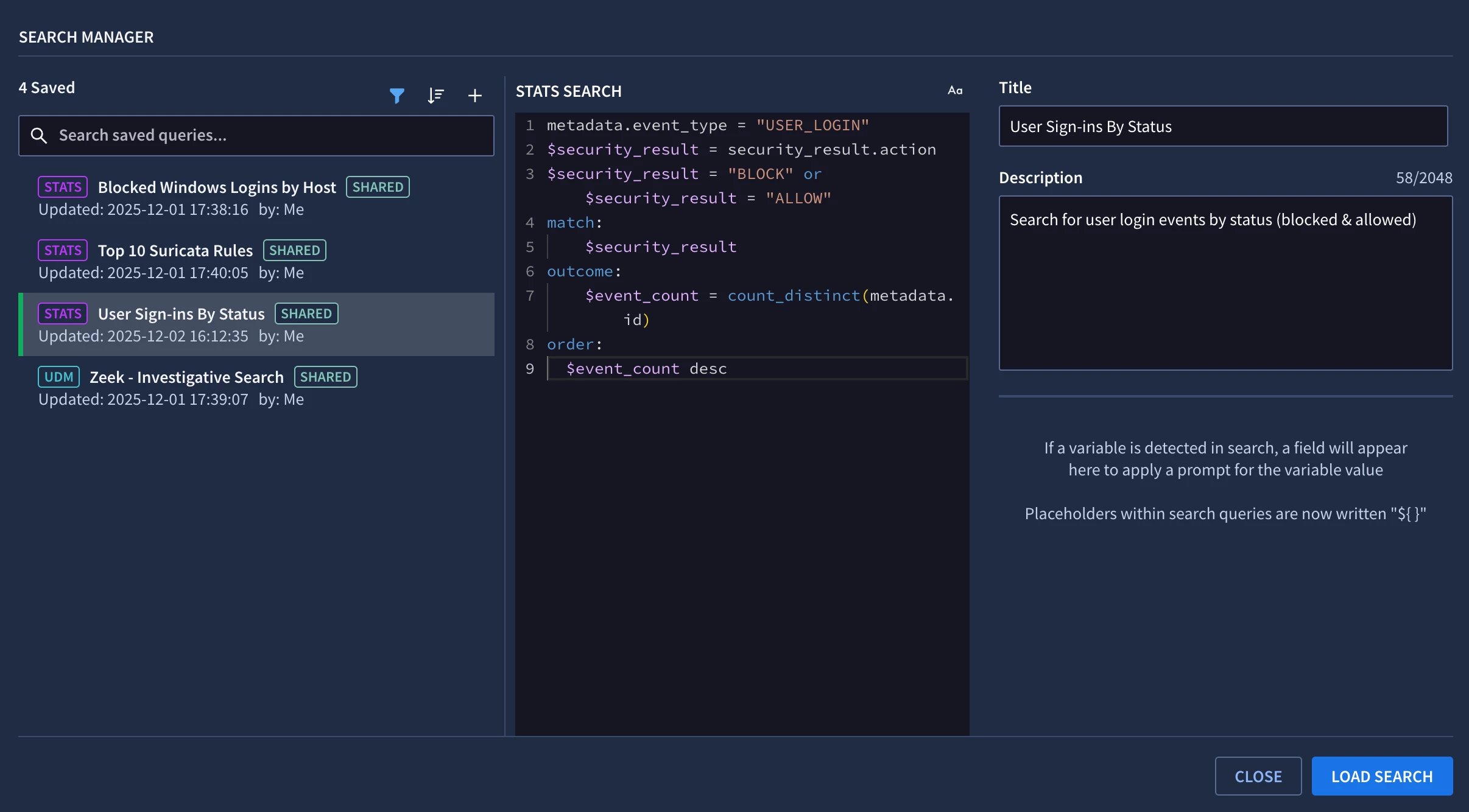
Reviewing the saved search in Search Manager
Like many Google SecOps customers, I’ve implemented Detection-as-Code with my own tenant using Content Manager and GitHub Actions workflows. To create a new saved search via my CI/CD pipeline, I create a new branch and pull request in GitHub to stage my proposed changes.
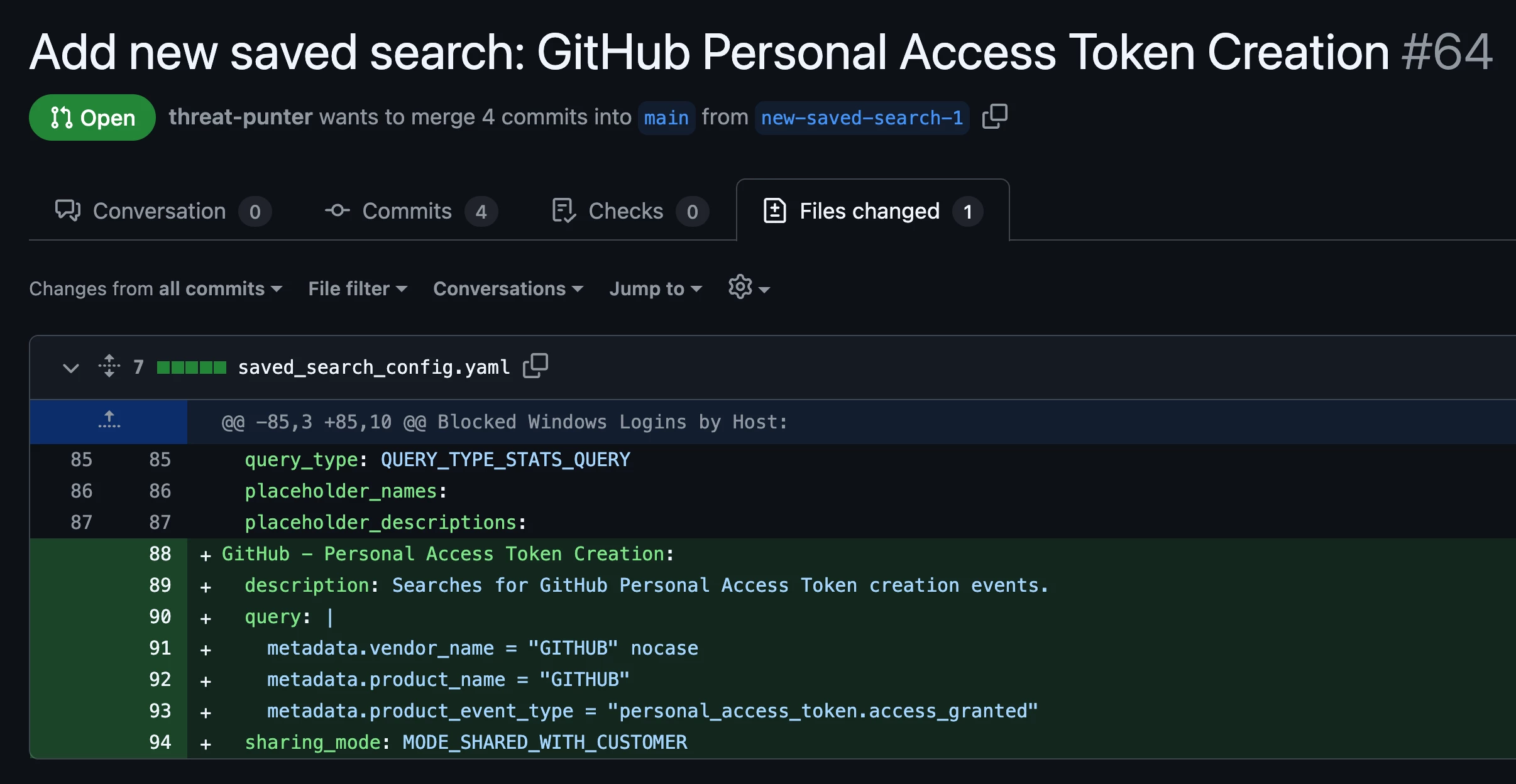
Creating a new saved search via GitHub
Once my unit tests pass, I can merge my changes into the “main” branch of the GitHub repository. My GitHub Actions workflow updates my saved searches in Google SecOps based on the configuration file in my GitHub repository. The GitHub Actions console output below shows that one saved search was created.

Reviewing the GitHub Actions workflow log
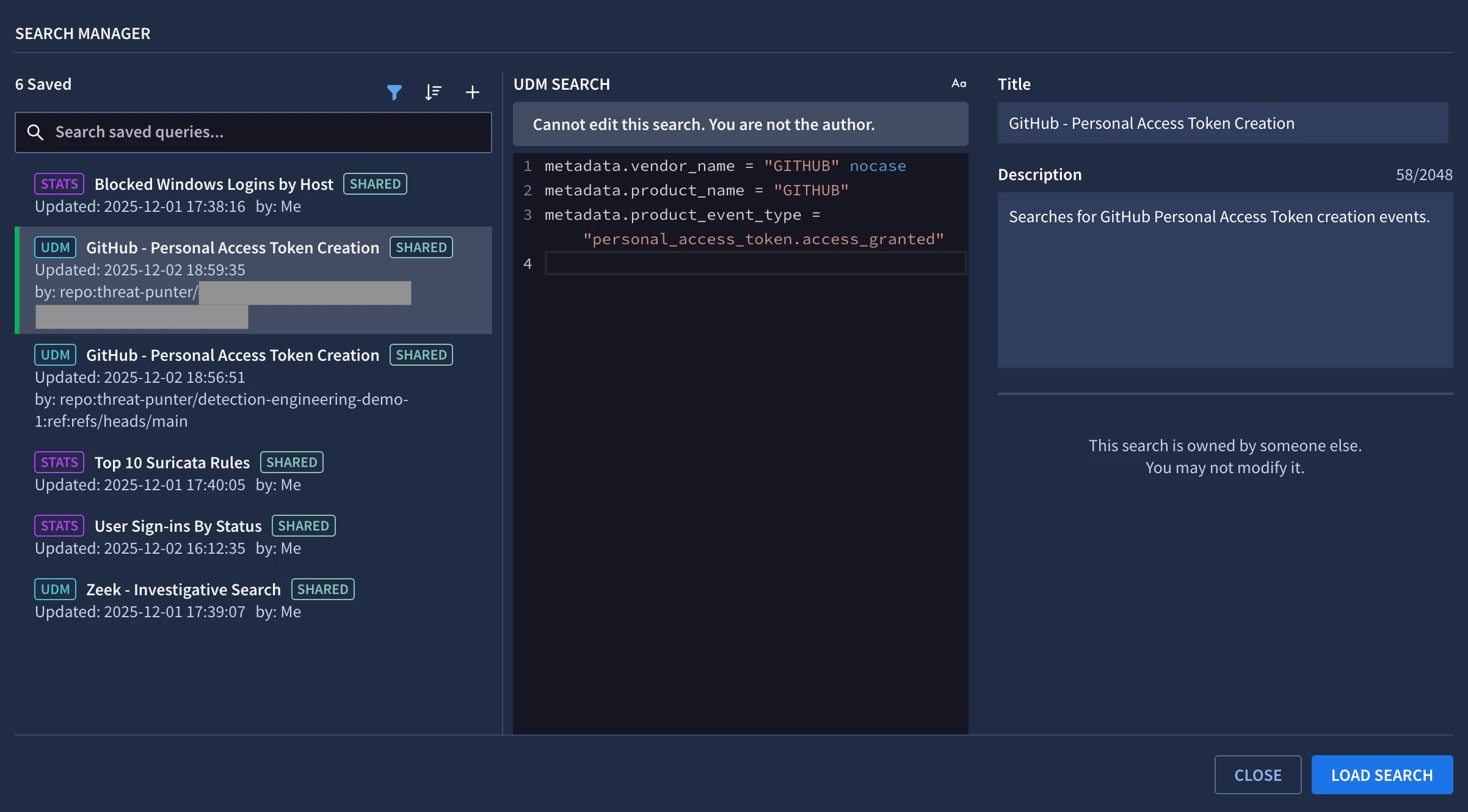
Viewing the new saved search in Google SecOps
That’s it for this post where we looked at how to manage saved searches via the Google SecOps REST API. Content Manager is a utility that makes it easy for security teams to manage their content such as rules, rule exclusions, data tables, and saved searches in an automated fashion. Please leave a comment below if you’d like to see support added for other content types.
