




Let’s take a look at what I like to refer to as the statistics of statistics challenge. You’ve built a search and you’ve generated a statistical output, a count, an average, maybe even a standard deviation. Cool, cool. But now you are being asked to take that output and apply another statistical calculation to it. Today, we are going to start down this path to introduce you to multi-stage searches and how you can build your own with Google Security Operations (SecOps) search and dashboards.
Terminology
Let’s start with some new terminology. The two key terms that we will introduce today are named stage and root stage.
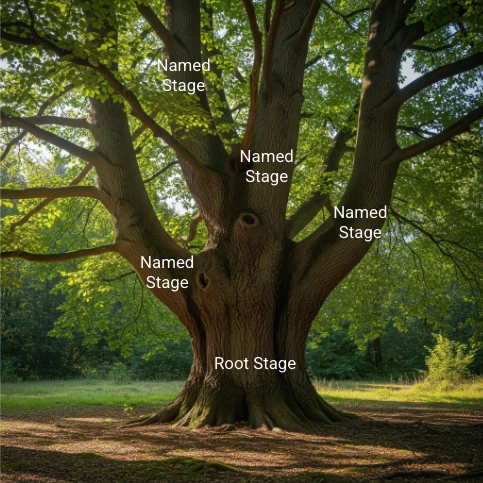
Named stages are used to perform searches, and to aggregate and perform calculations of data. Think of these named stages as statistical searches. There can be up to four named stages in a multi-stage search.
The root stage is the last stage in any search and its contents are the output of the search. Because it is the root, it is processed after all the named stages. It is important to understand that stages that reference other stages must be ordered in such a way that they execute before the stage that requires the information. A good way to think of this is to think about a tree and work from the top down.
Looking at a semantic search, let’s break it down into the kind of search we might build.
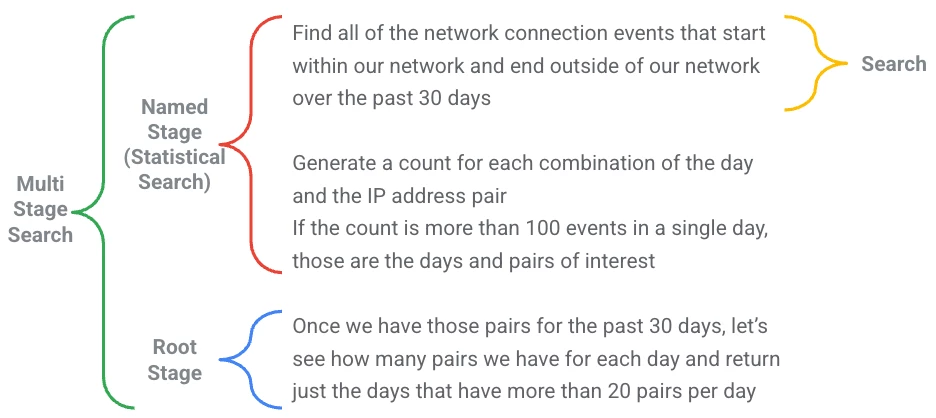
Find all of the network connection events that start within our network and end outside of our network over the past 30 days.
Generate a count for each combination of the day and the IP address pair. If the count is more than 100 events in a single day, those are the days and pairs of interest.
Once we have those pairs for the past 30 days, let’s see how many pairs we have for each day and return just the days that have more than 20 pairs per day.
That first line, find all the network connections… is a search over a time range, basic stuff. When we add the second line, generate a count for each combination…to the first line, it becomes a statistical search. That statistical search is taking the results from the search, and then aggregating the data and counting the number of aggregations. We can even go a step further and filter out output that doesn’t hit a threshold,
The final piece of this is the statistics of the statistic piece. Once we have those pairs for the past 30 days… makes this a multi-stage search. In a multi-stage search this last section is that root stage we mentioned and the statistical search becomes a named stage. Below is a visual of this concept.
Building Our First Multi-Stage Search
I am a little concerned that for a first multi-stage search, we are going a bit deep. However, this concept is a bit more advanced than search or statistical search, so chances are if we are using this technique, we’ve already established that a statistical search isn’t sufficient for our needs.
In fact, I would say that when trying to build searches, try to approach it from a bottom up perspective and try to build it as a statistical search first before moving to a multi-stage search. I can tell you I have built a number of examples that after I looked at my syntax, I said something to the effect of “Argh, I could have collapsed my root stage and built a more robust statistical search.”
With that in mind, the search we are going to build will focus on network connection events and identifying a set of principal IP addresses that have a disproportionate amount of events between themselves and another IP. If there is a disproportionate amount of traffic, we can investigate these IPs further to determine why this is occurring.
To get started, let’s use the following search. Notice that the search is limited to five events. I find that when building these kinds of searches, it’s helpful to start with a small data set that allows me to validate the results first before I broaden the search across multiple days or data sets, so keeping the time window small or applying a limit statement is a good step to test and troubleshoot.
metadata.event_type = "NETWORK_CONNECTION"
$principal_ip = principal.ip
$target_ip = target.ip
match:
  $principal_ip, $target_ip
outcome:
  $event_count = count_distinct(metadata.id)
order:
  $event_count desc
limit:
  5
Over the course of the time window, I have five rows ordered from greatest to least number of events based on aggregating the results by principal and target IP addresses.
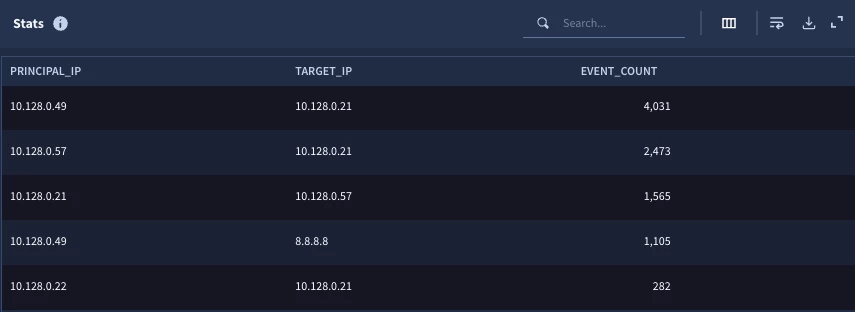
This brings us to another important point when building a multi-stage search. The fields that are available to be used in future stages are those that are outputted from the match and outcome sections. In our example, we have two match variables, the IP addresses and an outcome variable, and the event count. These three variables can be used in future stages.
What are some things we can do with these three columns of data in the data set?
- Create an array of the IPs, target or principal
- Count the number of IPs
- Create a sum of the number of events
- Get a distinct count of IPs, target or principal
With only five rows in the result set, we could do some of these things by hand, but when we broaden the search across an entire day, this gets a bit more difficult. The thing I like about starting with a small row limit is that it creates a quick way for me to test the logic.
To generate a listing of principal IPs and identify event counts that are disproportionately large, we now have a good foundation to do that but we need an additional stage. Let’s build out the multi-stage search.
The first thing we need to do is to encase our initial search within a stage. This is as simple as adding a line at the top of the initial search with the syntax of stage followed by a name for our stage. This stage name will be used in other stages, and in this example we will call the stage net. After the stage name, we will add an open bracket and at the end of the search we will close that bracket.
stage net {
metadata.event_type = "NETWORK_CONNECTION"
$principal_ip = principal.ip
$target_ip = target.ip
match:
  $principal_ip, $target_ip
outcome:
  $event_count = count_distinct(metadata.id)
order:
  $event_count desc
limit:
  5
}
It’s important to note that in the UI, this will generate a syntax error because it is not a complete multi-stage search, but don’t be alarmed when you see that, just know that you need to finish the query. What we just created is a named stage and like I mentioned earlier we can have up to four of these.
The next step is to build out a root stage. The root stage, as mentioned, is the last stage in the search and only match and outcome variables in it will be displayed. To bridge across stages, we need to specify where the data is coming from. This is where the stage name comes into play.
stage net { // named stage
metadata.event_type = "NETWORK_CONNECTION"
$principal_ip = principal.ip
$target_ip = target.ip
match:
  $principal_ip, $target_ip
outcome:
  $event_count = count_distinct(metadata.id)
order:
  $event_count desc
limit:
  5
}
// root stage
$principal_ip = $net.principal_ip
match:
  $principal_ip
outcome:
  $total_uniq_targets = count($net.event_count)
  $max_intensity = max($net.event_count)
  $total_events = sum($net.event_count)
The first item to note in the root stage is that we are creating a variable named principal_ip and we are associating it with the principal_ip in the net stage. We can reuse variable names in different stages but we still need to identify which stage and variable this new variable is associated with. In a search that has a single named stage and a root stage, this might seem obvious, but when we build more extensive searches, it is important to point to the data in the correct stage.
In this example, that principal_ip variable is used as the match variable, so now that we defined it, we can use it to aggregate the results. In the outcome section of the root stage, we are going to use different aggregation functions to generate values based on the same event count that we generated in the named stage. Here we are generating a count of the target IPs, a total count of all events and finally, what we are calling max_intensity, which is the maximum event count value from the initial search and we are getting these values by aggregating the output of the named stage by principal IP address.
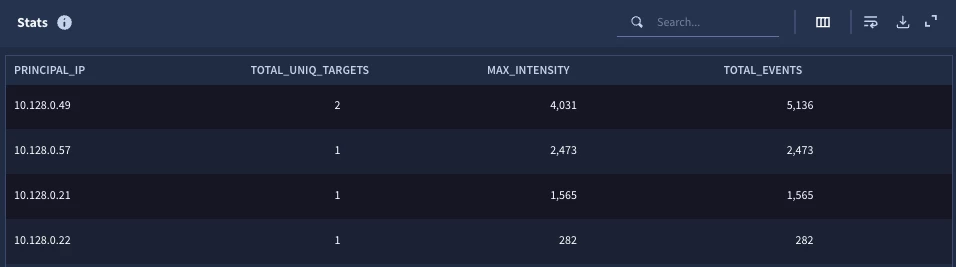
When we run this search, we get four results with four columns which are the single match variable and the three outcome variables of the root stage. From the initial search, we can see one of those principal IPs was the same, so the unique target value is two for that IP, the max intensity is the max event value and the total events is the sum of the events.
If we are happy with the results of the search, we can remove the limit statement in the search and rerun it. When we do this, we get 118 principal IP rows. For ease of viewing, we have a subset sorted by total events.
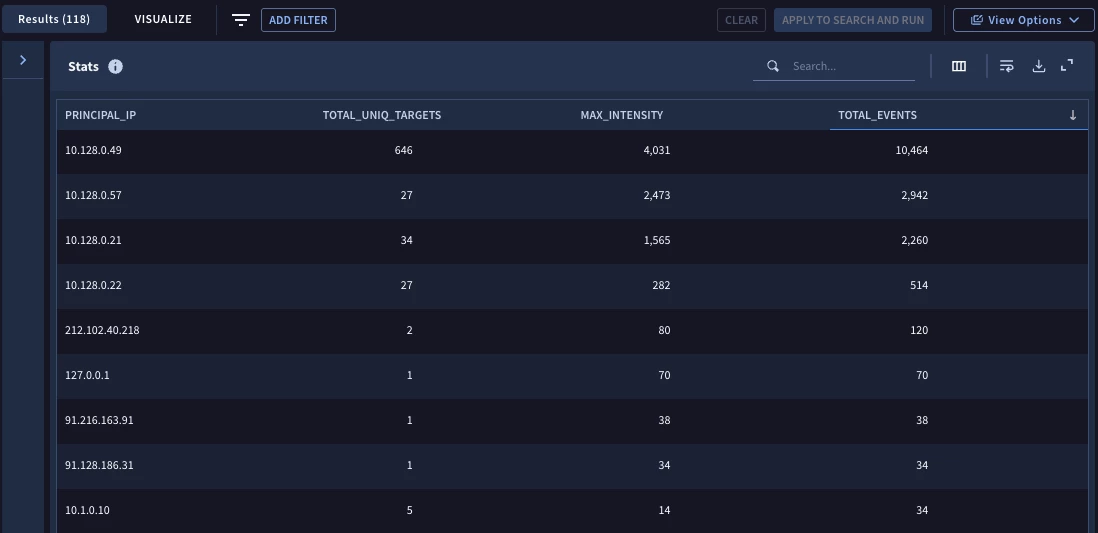
This is shaping up nicely, but rather than getting a listing of all the IP addresses for the specified time range, we should apply some additional logic to surface the IPs that have these disproportionate events going to a single target IP as compared to the total events. The good news is that we don’t have to do anything with our named stage at this point, we are just finessing the data in the root stage to get our desired output.
stage net { // named stage
metadata.event_type = "NETWORK_CONNECTION"
$principal_ip = principal.ip
$target_ip = target.ip
match:
  $principal_ip, $target_ip
outcome:
  $event_count = count_distinct(metadata.id)
order:
  $event_count desc
}
// root stage
$principal_ip = $net.principal_ip
match:
  $principal_ip
outcome:
  $total_uniq_targets = count($net.event_count)
  $max_intensity = max($net.event_count)
  $total_events = sum($net.event_count)
  $ratio = $max_intensity / $total_events
condition:
  $total_uniq_targets > 20 and $ratio > .67
I’ve added one additional line in the outcome section to calculate a ratio of the max intensity to the total events for the IP address. Additionally, I added a condition section where the total unique targets must be more than 20 and the ratio we are calculating must be more than 0.67. Stated another way, if we have IPs that have a low number of targets, it’s possible to have a single IP pair with a disproportionate amount of the events. By bumping this up to IPs with more than twenty targets but have a ratio that exceeds ⅔ of the events going to a single target helps us focus on the outliers.
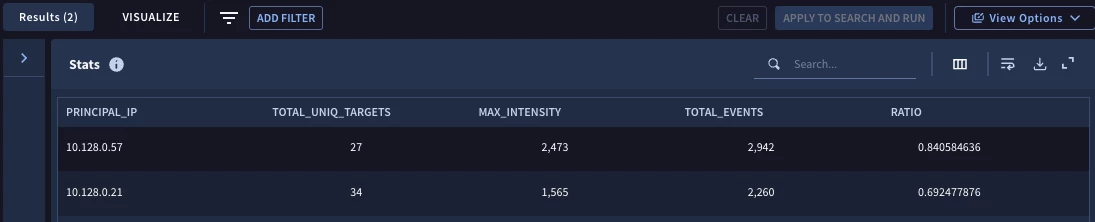
Now when we execute the search, we get two IPs to investigate further.
When I started writing this blog, I didn’t think I was going to get quite this deep for the first multi-stage search but I hope this was helpful and provides you with some ideas how they can be used in your environment.
Here are a few things to keep in mind:
- Statistical search already provides a good deal of functionality, so try to build your search with that first and then move to multi-stage search if statistical alone isn’t sufficient
- Named stages must have the word stage, the name of the stage and brackets enclosing it
- Only match and outcome variables from stages can be used in subsequent stages
- To use values between stages, use the stage name like an event variable followed by the name of the match or outcome variable from that stage
There is more to multi-stage searches than this one example, so in subsequent posts I will highlight using multi-stage searches with time as well as adding additional named stages! Try out this capability and see what it unlocks for you!



