




A few weeks ago, we discussed the timestamp functions, timestamp.get_timestamp and timestamp.as_unix_seconds. This time we are back with the timestamp function timestamp.truncate which can make it much simpler to bucketize events in your searches or rules with Google Security Operations (SecOps).
timestamp.truncate
The truncate function performs a very straightforward task, which is to take a time value and round it down to the specified time unit. What does this allow us to do? Great question. This means we can take timestamps and bucket them in a number of ways and generate statistical outputs on these buckets.
For instance, if I have an event that happened at 11:34:04 and another that happened at 11:34:50 and I wanted to truncate based on the minute, both would be represented as 11:34:00.
When performing searches at the event level, we don’t want to lose precision in our result set, but when bucketing or aggregating on time, we certainly want to be able to perform these kinds of roll-ups.
Before I dive into a few examples, I will preface this by saying the timestamp.truncate function is one method to bucketize timestamps. Depending on the use case, you could leverage other functions including timestamp.get_timestamp, timestamp.get_date, timestamp.get_hour and timestamp.get_minute. There isn’t a single right or wrong way to work with your data, it's about providing options that enable you to choose the best tool for the job.
In fact, in this first example, because we are searching across multiple days, we are going to use the timestamp.get_date function to illustrate the options we have. In the filtering statement of our search, we are gathering the network connection events from a subset of our network and then taking the event timestamp and writing the date to the $timestamp placeholder variable.
We are going to aggregate by this value and generate a count of events and the number of IP addresses. Finally, we will use our truncate function, with the timeframe of day and we can see we get an epoch value of the time for this outcome variable.
metadata.event_type = "NETWORK_CONNECTION"
net.ip_in_range_cidr(principal.ip, "10.0.0.0/8")
timestamp.get_date(metadata.event_timestamp.seconds) = $timestamp
match:
  $timestamp
outcome:
  $event_count = count(metadata.event_type)
  $ip_count = count_distinct(principal.ip)
  $truncate = array_distinct(timestamp.truncate(metadata.event_timestamp.seconds, "DAY"))
order:
  $event_count desc
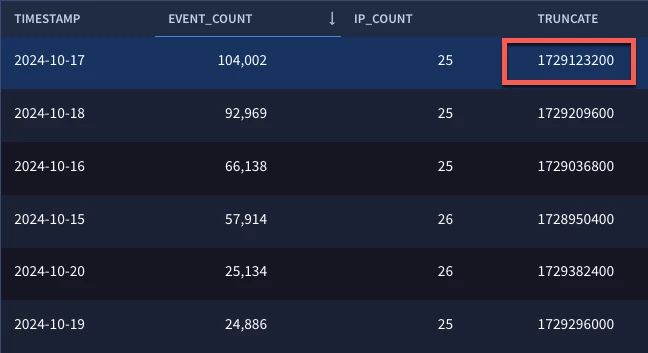
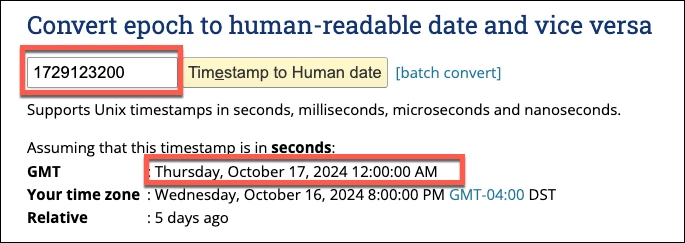
If we take that epoch value to our favorite epoch time converter, we can see that the date in our first row converts to the date October 17.
Now, I will admit that the epoch time is not very pleasant to look at and you probably don’t want to copy and paste epoch timestamps to get nice human readable date formats. To solve this problem, let’s add the timestamp.get_timestamp function that we discussed a few weeks ago to our outcome variable, like this.
$truncate = array_distinct(timestamp.get_timestamp(timestamp.truncate(metadata.event_timestamp.seconds, "DAY")))
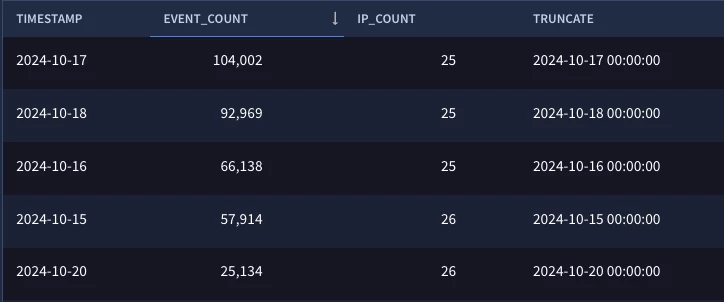
Now when we run our search, notice how we get a nicely formatted date/time value that rolls up. Also keep in mind that the timestamp.get_timestamp function provides a lot of flexibility in the format of that date and time so adding that allows us more control on the formatting than just the timestamp.get_date function alone.
You might be looking at this and saying ok great, I could do that but timestamp.get_date is good enough. That’s great, use what works best for your use case, but let’s look at another example.
This time, we are performing the same basic search but we have a shorter time window and want our data rolled up minute by minute. While we could use timestamp.get_minute, we would then have to figure out a way to deal with searches that are over an hour in length because the timestamp.get_minute function tells us the minute, but it doesn’t tell us which hour it occurred in. This isn’t a showstopper. We can build that timestamp using timestamp.get_hour and timestamp.get_minute and strings.concat, but why go to all that hassle, when you can just do this?
metadata.event_type = "NETWORK_CONNECTION"
net.ip_in_range_cidr(principal.ip, "10.0.0.0/8")
timestamp.get_timestamp(timestamp.truncate(metadata.event_timestamp.seconds, "MINUTE")) = $minute_bucket
match:
  $minute_bucket
outcome:
  $event_count = count(metadata.event_type)
  $ip_count = count_distinct(principal.ip)
order:
  $event_count desc
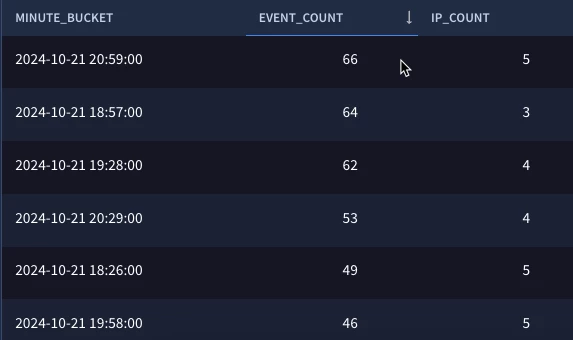
In our filtering statement, we specify our timestamp field and then use the timestamp.truncate function with the MINUTE argument and finally use the timestamp.get_timestamp function to get a nice format, which again, can be modified if you prefer to just display the time or display the day first, or whatever format you would like.
I’ve got this feeling as I write this blog that there are a few skeptics out there about this whole formatting thing, so let’s do one more where we finesse our truncated date in the search. This time we are going to bucket on weeks so we specify the second argument as WEEK. Then, using our handy date/time reference, we are going to format our timestamp to be date month and year with a dash and the week of the year this is.
metadata.event_type = "NETWORK_CONNECTION"
net.ip_in_range_cidr(principal.ip, "10.0.0.0/8")
timestamp.get_timestamp(timestamp.truncate(metadata.event_timestamp.seconds, "WEEK"), "%d %b %Y- Week %U") = $weekly_bucket
match:
  $weekly_bucket
outcome:
  $event_count = count(metadata.event_type)
  $ip_count = count_distinct(principal.ip)
  $week_count = array_distinct(timestamp.get_timestamp(timestamp.truncate(metadata.event_timestamp.seconds, "WEEK"), "%U"))
order:
  $week_count desc
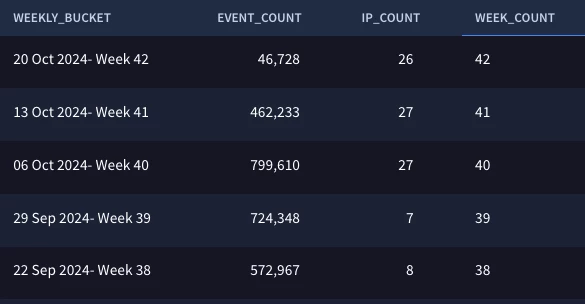
In our results, we can see that we have an event and ip count broken out by week and in a date format that works for the team consuming this information.
timestamp.truncate is another utility function that provides us the ability to roll up events in a number of different time buckets. This isn’t the only way to do this, but another method that may be simpler or more efficient for you, depending upon the use case. While we used searches in our examples today, these techniques can be carried over and used when building rules as well. I hope you take advantage of the timestamp.truncate function and these other timestamp functions when building your rules and searches in Google SecOps!
