Author:
David Nehoda, Technical Solutions Consultant
The 11:47 Ticket
At 11:47 on a Tuesday, a detection engineer opens a P1. A YARA-L rule for AWS root console logins fired 14 hours after the event. The root account had logged in at 21:32 the previous night, performed IAM changes, and logged out. The rule was correct. The logic was tight. The tuning was sound. But the alert landed the next morning, long after the window to contain the session had closed.
The team spends two days on the wrong argument. The SIEM vendor gets blamed. The rule gets rewritten three times. An engineer drafts a. migration plan to a different detection platform. None of that is the problem.
The problem is two timestamps.
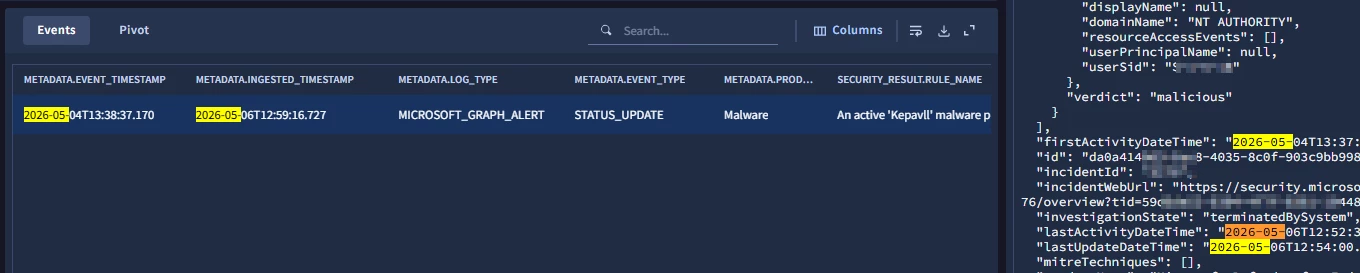
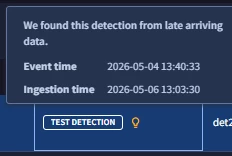
metadata.event_timestamp on that UDM event is 2025-10-13T21:32:04Z. metadata.ingested_timestamp is 2025-10-14T11:29:51Z. Delta: 13 hours, 57 minutes. That rules out the YARA-L engine entirely. The event arrived 14 hours late. What followed was a 60-second check of the AWS CloudTrail feed polling interval. Someone had set it to 12 hours during a rate-limit test six months earlier and never changed it back. Two clicks to restore the 5-minute interval. Rule fires within SLA the next time. Two days of engineering argument wasted.
This article is the deterministic way to rule out the wrong layer fast.
Executive Summary
| Dimension | Undiagnosed Delay | Systematic Timestamp Audit |
|---|---|---|
| Detection Latency | 6 to 24 hours (silent) | Under 5 minutes (near real-time) |
| Root Cause Isolation | Days to weeks of finger-pointing | Under 60 seconds via timestamp comparison |
| Engineering Waste | Weeks rewriting correct rules | Zero. Fix targets the actual bottleneck |
| Attacker Dwell | Extends linearly with delay | Bounded by detection plus response time |
| Breach Exposure | $4.5M+ average with extended dwell | Contained by rapid detection |
Who this is for: Detection engineers, SOC analysts, and security architects who see YARA-L rules fire late in Google SecOps and need to isolate whether the problem is the log source, the ingestion pipeline, or the rule logic itself.
The Three Places Delay Lives
A late-triggering rule is a symptom, not a disease. The delay lives in exactly one of three layers:
-
Origin Delay. The vendor or log source did not generate or deliver the logs in time.
-
Ingestion Delay. The forwarder, feed, or parser pipeline held the log before it reached UDM.
-
Evaluation Delay. The YARA-L rule engine itself is slow due to misconfigured match windows, expensive regex, or state explosion.
The diagnostic process is deterministic. Compare two timestamps, and the layer reveals itself.
Vendor Delivery Latency: The Table You Should Memorize
Before you debug anything, internalize what "on time" actually means. No SIEM configuration can make a log arrive faster than the source will send it.
| Vendor / Source | Typical Delivery Latency | Worst Case |
|---|---|---|
| AWS CloudTrail (S3 polling) | 5 to 15 minutes | 30+ minutes during AWS service events |
| AWS CloudTrail (EventBridge) | Under 1 minute | 2 to 3 minutes |
| O365 Management Activity API | 5 to 30 minutes | Hours during Microsoft outages |
| Azure AD Sign-in Logs | 2 to 15 minutes | 30+ minutes |
| Azure Event Hub streaming | 2 to 5 minutes | 10 minutes |
| Okta System Log | 1 to 5 minutes | 15 minutes |
| GCP Cloud Audit Logs (Pub/Sub) | 1 to 3 minutes | 10 minutes |
| CrowdStrike Streaming API | Under 1 minute | 5 minutes |
| Duo Admin API | 2 to 10 minutes | 30 minutes |
| Salesforce EventLogFile | Up to 24 hours (hourly tier) | 24 hours (daily tier) |
Read this carefully. If your YARA-L rule fires 15 minutes after an AWS CloudTrail event, that is inside AWS's own SLA. The SIEM is working. AWS took 15 minutes to write the log into the S3 bucket the feed polls. Rewriting the rule will not shrink that gap. Switching to EventBridge will.
Step 1: The Timestamp Interrogation
Every UDM event carries two timestamps. Comparing them isolates the delay in under a minute.
| Timestamp | Set By | Meaning |
|---|---|---|
| metadata.event_timestamp | The log source | When the event physically occurred on the endpoint, server, or cloud API |
| metadata.ingested_timestamp | SecOps | When SecOps received, parsed, and indexed the log into UDM |
Running the Comparison
-
Open the SOAR case for the late-firing alert.
-
Navigate to the underlying UDM event that triggered the detection.
-
Inspect the raw JSON and extract both timestamps.
-
Calculate ingested_timestamp - event_timestamp.
Interpreting the Delta
| Delta | Diagnosis | Meaning |
|---|---|---|
| Minutes to hours | Origin or Ingestion Delay | The log arrived late. The YARA-L engine evaluated it promptly. The rule is innocent. The problem is upstream. |
| Seconds or near-zero | Evaluation Delay | The log arrived on time, but the YARA-L rule took hours to fire. The engine is the bottleneck. Match window, regex, or queue pressure. |
| Negative (event > ingested) | Clock Skew | The log source's system clock is ahead of UTC. Fix NTP on the source. Temporal correlation cannot be trusted until you do. |
Most of the time, the delta is large. Most of the time, the rule is innocent. Believe the timestamps.
Step 2: Fixing Upstream Delays
If the interrogation proves the log arrived late, debug the pipeline, not the rule.
2A. Feed Polling Interval
For cloud-to-cloud API feeds (Okta, Azure AD, O365, AWS via S3), SecOps polls on a configured interval.
Diagnostic: Navigate to Settings > Feeds and inspect the polling interval for the affected log type.
| Interval | Effect | When to Use |
|---|---|---|
| 1 minute | Near real-time for API feeds | Critical identity telemetry (Okta, Azure AD) |
| 5 minutes | Standard for most cloud feeds | Default for non-critical sources |
| 15 minutes | Cost-optimized for high-volume, low-priority sources | Network flow logs, verbose audit logs |
| 12 hours | Almost certainly a misconfiguration | Never appropriate for security telemetry |
The most common mistake in the field: an engineer sets the interval to 12 hours during initial testing to avoid API rate limits, forgets to change it back, and the SOC operates with a 12-hour blind spot for months. The opening incident of this article is exactly that mistake.
2B. Switch from Polling to Streaming
For critical detections, stop polling. Subscribe.
| Cloud | Polling Path | Streaming Path | Latency Improvement |
|---|---|---|---|
| AWS | CloudTrail > S3 > SecOps poll | CloudTrail > EventBridge > Lambda > Chronicle Ingestion API | 15 min to under 1 min |
| Azure | Activity Log > Storage account poll | Event Hub > Chronicle Forwarder | 15 min to 2-5 min |
| GCP | Cloud Audit > Storage poll | Cloud Audit > Pub/Sub > Chronicle | Already sub-minute, skip polling entirely |
| O365 | Management Activity API poll | Event Hub via Microsoft Graph connector | 30 min to 2-5 min |
The economics usually favor streaming. The engineering cost of one EventBridge rule and a Lambda is recovered the first time a real incident is detected fast enough to contain.
2C. Overloaded Forwarder
If you run an on-prem Chronicle Forwarder, the host's resources directly impact ingestion latency.
Diagnostic signs:
-
Sustained CPU over 80%
-
Memory pressure causing swap usage
-
Disk I/O saturation on the syslog receiving buffer
-
Network saturation between forwarder and ingestion endpoint
Fix: Allocate more resources, or split the workload across multiple forwarders by log type. High-volume sources (firewall netflow, DNS queries) should not share a forwarder with low-volume, high-priority sources (identity logs, EDR alerts). One noisy neighbor can starve a critical feed.
Step 3: Fixing YARA-L Evaluation Delays
If logs arrived on time but the alert fired late, the rule engine is the bottleneck. Three common causes.
3A. The Sliding Window Trap
A rule with match: $target.ip over 24h forces the engine to maintain running state for every unique $target.ip across 24 hours. With millions of unique IPs, state management consumes massive memory and CPU, delaying evaluation for every rule on the tenant, not just the offending one.
Shrink match windows to the minimum viable timeframe for the actual attack pattern:
| Attack Pattern | Appropriate Window | Why |
|---|---|---|
| Brute force to success | over 1h | The attack completes in minutes, not hours |
| Impossible travel | over 4h | Generous for international travel + VPN lag |
| Low-and-slow data exfiltration | over 24h | Justified. The attack is deliberately slow |
| Malware drop to execution | over 10m | Execution follows drop within seconds |
| Kerberoasting spray | over 1h | Spraying completes in minutes |
Rule of thumb: If the attack completes in minutes, the match window should be minutes. A 24-hour window on a brute force rule wastes engine resources for zero detection benefit.
3B. Unanchored Regex (ReDoS)
Complex, unanchored regex applied to the full UDM dataset consumes exponential compute. The engine can throttle or disable the rule entirely.
// BAD: regex scans every single event in UDM
re.regex($e.target.process.command_line, `(?i).*invoke-mimikatz.*`)

// GOOD: filter narrows the dataset, regex evaluates a tiny subset
$e.metadata.event_type = "PROCESS_LAUNCH"
re.regex($e.target.process.command_line, `(?i).*invoke-mimikatz.*`)
Without the event_type filter, the regex runs against every UDM event including network connections, DNS queries, email transactions, and file creations, none of which will ever contain "invoke-mimikatz" but all of which must still be evaluated. The filter drops the evaluation surface by 95 percent or more.
Additional regex discipline:
-
Anchor patterns when possible. (?i)\\powershell\.exe$ is faster than (?i).*powershell.*.
-
Avoid nested quantifiers. (a+)+ causes catastrophic backtracking.
-
Use exact string operations when an exact match is sufficient. $e.target.process.file.full_path = "/usr/bin/curl" beats any regex.
Catch this before it ships. The YaraL Validator flags unanchored regex and missing event-type filters at commit time, not after a rule goes live and tanks tenant performance. Put it in CI.
3C. Tumbling Windows
YARA-L 2.0 Tumbling Windows segment data into fixed, non-overlapping intervals for deduplication. Unlike sliding windows (continuously evaluated), tumbling windows evaluate once at the end of each interval.
The trap: with a 1-hour tumbling window, an event arriving at 10:01 does not trigger an alert until 11:00 when the window closes.
| Use Tumbling For | Use Sliding For |
|---|---|
| "Alert once per hour if >100 failed logins occur" | "Alert the moment the 10th failed login within 10 minutes arrives" |
| Aggregate statistics, deduplication | Real-time attack chain detection |
| Volumetric alerts with defined cadence | Any detection where time-to-fire matters |
Default to sliding. Reach for tumbling only when batched aggregation is the actual requirement.
Proactive Monitoring: Stop Waiting for Analysts to Complain
Do not wait for a detection engineer to open a ticket. Build automated health monitoring.
Ingestion Latency Dashboard
Schedule a UDM query that calculates the average delta between event_timestamp and ingested_timestamp per log type. Alert the Detection Engineering channel if any log type's average exceeds your threshold (typical: 15 minutes).
Feed Health Check
Use the SecOps v1alpha/feeds API to programmatically verify each feed last polled within its expected interval. If a feed has not polled within 2x its configured interval, it is almost certainly broken. Page someone.
Rule Evaluation Monitor
Track the delta between ingested_timestamp and detection_timestamp. If a specific rule consistently exceeds 5 minutes for this delta, that rule needs performance optimization. Open a ticket automatically.
Production Deploy Checklist
Before calling a late-trigger incident closed:
-
Timestamp interrogation run. Delta calculated. Root cause layer identified.
-
If Origin/Ingestion: polling interval verified under 5 minutes for all identity and critical-auth feeds.
-
If AWS is involved: EventBridge path considered for critical detections.
-
If Evaluation: match window audited against actual attack tempo. Shrunk where justified.
-
If Evaluation: every regex in the offending rule has an event_type or equivalent pre-filter.
-
Ingestion latency dashboard live, alerting on 15-minute threshold breach per log type.
-
Feed health API check scheduled, paging when a feed misses 2x its interval.
-
Rule evaluation monitor live for all CRITICAL-severity detections.
-
Runbook updated: "Every late alert ticket starts with the timestamp interrogation. Not with a rule rewrite."
-
Post-incident: if a feed misconfiguration was the cause, infrastructure-as-code the feed definition so a human cannot set 12-hour polling by hand next time.
The Diagnostic Truth
Late-triggering rules are a three-variable equation.
-
Large delta: upstream delay. Fix the pipeline.
-
Zero delta: evaluation delay. Fix the rule.
-
Negative delta: clock skew. Fix NTP.
Every time a rule fires late, run the interrogation first. Most of the time, the engine is innocent and the delay lives in a vendor's API, a misconfigured feed, or an under-resourced forwarder. The rewrites and vendor-blame sessions you avoid are the real ROI.