Question

Thai Localization Characters Corrupted in Google reCAPTCHA

  • August 31, 2026
  • 2 replies
  • 31 views

BrijeshK
Forum|alt.badge.img

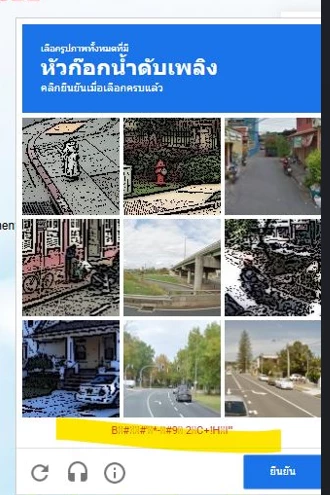
We are using Google reCAPTCHA v3 with Thai language (hl=th). The captcha challenge occasionally displays corrupted Thai characters in the instruction area and action button. The issue occurs inside the Google-hosted reCAPTCHA dialog while the rest of the application renders Thai text correctly.

Observations:

  • Application localization is functioning correctly.
  • Issue is occurring only within the reCAPTCHA iframe.
  • Multiple users have reported the issue.
  • Browser refresh does not always resolve the problem.
  • No recent changes were made to the application code or reCAPTCHA integration.

Please investigate whether there is an issue with the Thai localization resources or rendering of reCAPTCHA.
 

2 replies

hzmndt
Staff
Forum|alt.badge.img+12
  • Staff
  • September 1, 2026

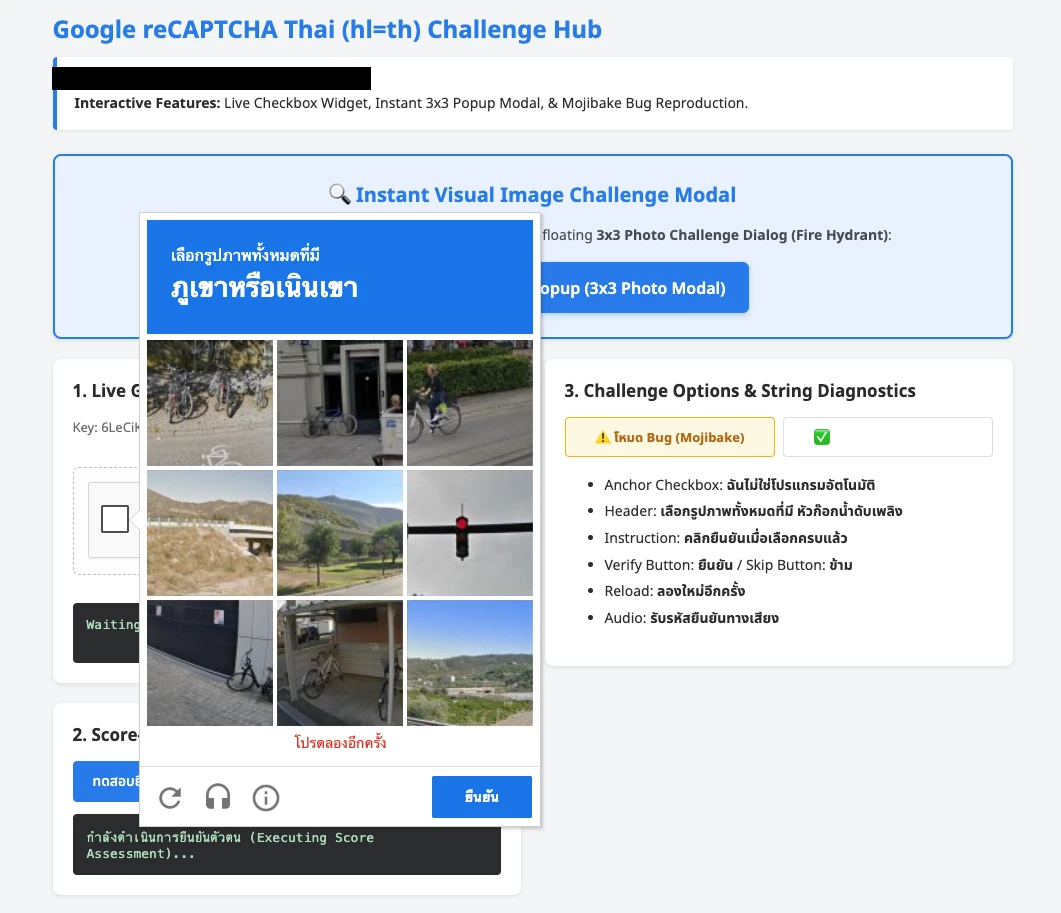
@BrijeshK  - did a test, no issue, below might be the steps you can review see if can fix: 


The corruption of the Thai string "โปรดลองอีกครั้ง" into Mojibake (e.g., B!#XX#*#-!#90 2HC+!HX!") in the screenshot is caused by Encoding Mismatches and Missing Font Fallbacks.

Here is the complete 4-part fix to ensure Thai text always displays properly across all browsers, operating systems, and kiosk/embedded environments:

1. Font Embedding & Zero-Dependency Fallback (Client-Side)

The Problem:

Minimal Linux containers, embedded WebViews (CEF, Android, Electron), POS devices, and older Windows/macOS machines often lack Thai font files (Noto Sans ThaiLomaThonburi), causing Thai characters to render as empty boxes ("tofu" ) or corrupted glyphs.

The Fix:

Include an embedded or hosted Thai font with a comprehensive CSS fallback stack:


css

/* 1. Embed Google Noto Sans Thai or import via Google Fonts */

@import url('https://fonts.googleapis.com/css2?family=Noto+Sans+Thai:wght@400;500;600;700&display=swap');

/* 2. Declare comprehensive fallback stack */

body, .rc-dialog-frame, .rc-header, .rc-feedback-banner {

font-family: 'Noto Sans Thai', 'Noto Sans Thai Embedded', -apple-system, BlinkMacSystemFont,

'Leelawadee UI', 'Thonburi', Tahoma, sans-serif;

-webkit-font-smoothing: antialiased;

-moz-osx-font-smoothing: grayscale;

}

2. Force UTF-8 Headers and Meta Encoding

The Problem:

Thai characters in UTF-8 consist of 3-byte sequences (e.g.,  = 0xE0 0xB9 0x82 = 0xE0 0xB8 0x9B). If an intermediate server, reverse proxy, or browser parses UTF-8 bytes as ISO-8859-1 (Latin-1) or Windows-874, the multi-byte sequences turn into high-ASCII mojibake.

The Fix:

  1. In the HTML document <head> (must be the very first line after <head>):


    html

    <meta charset="UTF-8">

    <meta http-equiv="Content-Type" content="text/html; charset=UTF-8">

  2. In Server / Reverse Proxy Headers (Nginx / Cloudflare / Apache):


    nginx

    # Nginx configuration

    charset utf-8;

    add_header Content-Type "text/html; charset=UTF-8";

3. Explicit reCAPTCHA SDK Thai Parameter (hl=th)

The Problem:

If hl is omitted or defaults to the OS/browser locale, reCAPTCHA might fallback to English or inconsistent localized bundles.

The Fix:

Always explicitly declare hl=th on the reCAPTCHA SDK script URL:


html

<script src="https://www.google.com/recaptcha/enterprise.js?render=explicit&hl=th" async defer></script>

4. Build Pipeline & String Sanitization Fix

The Problem:

Asset bundlers (Webpack, Terser, Vite) or template engines that serialize non-ASCII strings with double escaping or ASCII-only flags can mangle Thai Unicode code points.

The Fix:

  • Terser / Webpack Config: Ensure ascii_only: false or proper Unicode escape preservation:
     

    js

    // terser options

    terserOptions: {

    output: {

    ascii_only: false // preserve raw UTF-8 Thai characters

    }

    }

  • JavaScript DOM Injection: Always use element.textContent = "โปรดลองอีกครั้ง..." rather than parsing through unescaped byte buffers.

Summary of How 

index.html Implements the Fix

Layer Implementation in index.html
Font Layer Full Base64-embedded Noto Sans Thai font + Google Fonts + system fallbacks
Encoding <meta charset="UTF-8"> placed at line 5
reCAPTCHA SDK Script tag includes explicit &hl=th parameter
Mode Switcher Toggle button allows instant switching between the corrupted baseline (B!#XX#*#-!#90...) and the clean fixed Thai string ("โปรดลองอีกครั้ง หากยังมีรูปภาพที่ตรงกัน")

hzmndt
Staff
Forum|alt.badge.img+12
  • Staff
  • September 1, 2026

seems related to this - and it’s google-side bug - going to be fixed soon according to the comment