

Question

Understanding Data tables

  • April 7, 2026
  • 3 replies
  • 18 views

g0wtham
Forum|alt.badge.img+1

n our SecOps platform, we are currently in the process of moving all our reference lists to data tables since lists are on a deprecation path. We currently have a couple of reference lists “known Malicious hashes” which contains 2 lakhs hashes divided into two lists(1 lakh hashes each).  Reference list allow 1 lakhs entries per list. Whereas, Data tables allow only 10,000 entries per table so I have created 20 data tables and somehow moved all of them. I would like to know if there’s anyway we can fix this portion first. This was a time-consuming task to move just 2 lists to 20 tables due to the limitation.

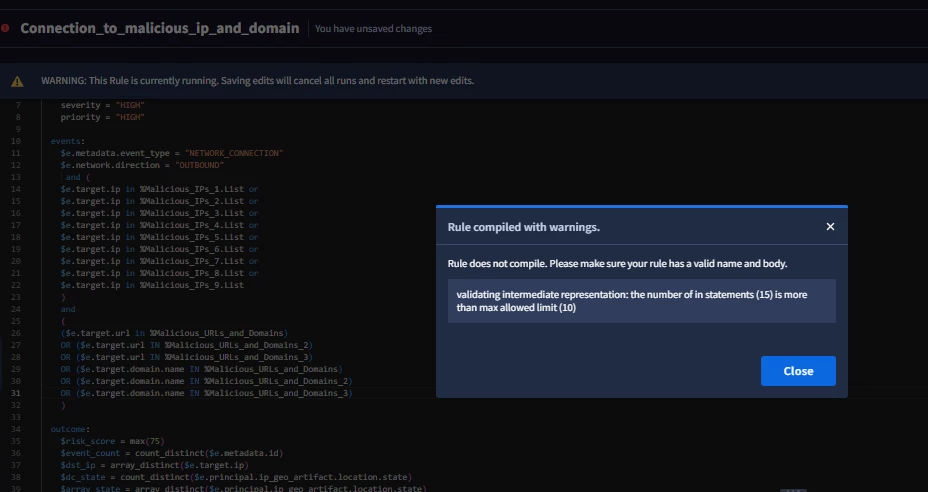
Next up, when I try to use those data tables in a rule, I hit a limitation again “The number of in statements is more than max allowed limit(10). Can you help?

Attached error message
 

3 replies

hzmndt
Staff
Forum|alt.badge.img+11
  • Staff
  • April 7, 2026

Max row per data table is 10M, just UI cannot support more 10K, please use API to create the data table


  • Maximum rows per data table: 10 million.

  • Maximum display limit in web page for data table rows in text and table editor view: 10,000 rows.


https://docs.cloud.google.com/chronicle/docs/investigation/data-tables#limitations


JeremyLand
Staff
Forum|alt.badge.img+7
  • Staff
  • April 7, 2026

The data table itself maxes out at 10 million rows (ref), so will be able to store all of those hashes in a single table.  The trick is that the data table editor UI maxes out at 10k rows; you can create tables larger than 10k using either the ‘import file’ function in the UI or working with the API.  You’ll only see the 10k rows in the UI but the entire table is used by the engine when you use it in any queries.


jstoner
Staff
Forum|alt.badge.img+23
  • Staff
  • April 7, 2026

Check out this blog on loading large data sets, I used the cisco umbrella 1M for reference via the API for tips how to do that.





