



Agentic is a multi-language conversational AI that unlocks Google's vast threat intelligence, letting you chat with specialized agents to accelerate investigations. You can ask questions on any topic, generate summaries, create prompts for recurring analysis, analyze malware, and more.
For more information you can check our official documentation.
The most powerful feature of Agentic is its ability to understand your questions. This guide is built to help you ask the right ones. We will skip the basic definitions and focus on what matters: effective prompts and real-world use cases.
Inside, you'll find best-practice examples for:
- Asking questions on any threat-intel topic and malware analysis.
- Generating summaries and reports.
- Using prompts to automate recurring analysis.
Quick Start Guide
For those who want to get started immediately, follow these three steps for better results:
- State Your Goal Clearly: Don't just provide a name or term. Describe what you want the agent to do.
- Instead of: APT41
- Try: Summarize recent activity from APT41.
- Provide Context: Tell the agent who the output is for.
- Add: ...for a C-level audience.
- Specify the Format: Define how you want the output to look.
- Add: ...as a bulleted list.
Foundations of Prompt Engineering
The practice of prompt engineering refers to the creation of detailed and precise prompts to interact with Large Language Models (LLMs) and create specific outputs. It can be considered as a form of development, where time is invested upfront to design, test, and refine instructions that produce consistent and high-quality outputs.
When you enter a prompt, an orchestrating agent interprets your intent, devises a plan, selects the appropriate tools (internal functions for data retrieval and analysis), and synthesizes the gathered information to answer your query. Think of it like instructing a junior analyst with no prior knowledge of a specific domain how to conduct a task. You provide context, define the desired outcome, and specify clear constraints to obtain a high-quality output. The clearer and more complete your instructions, the better the result.
Good prompts have the following characteristics:
- Clear Intent: Unambiguously state the desired goal or outcome.
- Sufficient Context: Provides necessary background information, constraints, and audience details for the model to perform the task accurately.
- Structural Clarity: Organize the prompt in a way that is easy for the model to parse and understand.
The Anatomy of a High-Performing Prompt: PTCF Framework
A well-structured prompt is composed of several key components that work together to guide the model's response. The PTCF framework is a foundational and highly effective structure for ensuring all critical elements are included: Persona, Task, Context and Format.
| Pillar | Description | AGTI-Specific Example |
|---|---|---|
| Persona | Assigns a role to the agent to focus its knowledge and tone. | "You are a cyber threat intelligence analyst specializing in Russian-nexus threat actors." |
| Task | Clearly defines the primary goal or action the agent is expected to perform. | "Generate a threat brief on the activities of threat actor APT28." |
| Context | Provides necessary background, constraints, audience details, and any other relevant situational data. | "...for an executive audience, covering the last 90 days." |
| Format | Specifies the desired structure of the output. | "Format the output as a markdown table with columns for TTP, Description, and Associated Malware." |
Prompting on AGTI
Built on LLMs and grounded in Google Threat Intelligence's comprehensive security dataset, AGTI simplifies threat intelligence. This conversational interface lets you interact directly with specialized AI agents to quickly analyze threats, accelerate security investigations, and receive immediate, precise answers. AGTI prioritizes curated information from the internal Google Threat Intelligence (GTI) database, supplemented by filtered Open-Source Intelligence (OSINT) and Google Search when necessary.
AGTI Capabilities Overview The platform has the capability to access a wide variety of tools based on your prompts. This includes, but is not limited to:
- Search Threat Intelligence: Query across reports, threat actors, malware, campaigns, and vulnerabilities.
- Analyze Indicators of Compromise (IOCs): Get details on files, domains, IP addresses, and URLs.
- Investigate Entities: Find relationships between different entities (e.g., what malware is associated with a threat actor, what domains does an IP address host).
- Retrieve Vulnerability Data: Look up CVEs and get information on affected products.
- Access Hunting Rules: Search for and retrieve threat hunting rulesets (e.g., YARA, Sigma).
- Leverage Google Search: Access up-to-the-minute information from the open web to supplement internal intelligence.
Selecting An Approach for your Prompt
There are different approaches to prompting, each with a different degree of complexity. Selecting the best approach for your prompt depends on the characteristics of the specific output you require.
- The Conversational Approach (Chaining): Start with a simple, high-level prompt and then refine the results with a series of follow-up questions.
- Pros: Faster for exploratory tasks. Each step focuses the model's full attention on a smaller sub-task, which can sometimes lead to more powerful results.
- Cons: The final output is less deterministic or repeatable and depends on the specific conversation path.
- The Engineered Approach (Complex Prompts): Craft a single, detailed prompt that outlines the entire task, workflow, and output format upfront.
- Pros: Produces highly consistent and more deterministic outputs, making it ideal for recurring reports and automated workflows.
- Cons: Requires more time to develop and can be more brittle if underlying models or tools change.
It is also possible to combine approaches to achieve best results. For instance, engineering a complex prompt that asks follow-up questions for the user to dig into specific aspects of the query.
Crafting Effective Prompts: Examples for Threat Actor Analysis
Depending on your specific needs, you can progress from simple to complex queries in multiple steps. For this you can follow the Crawl, Walk, Run approach which is illustrated below using "Detailed Threat Actor Activity Analysis" as our goal.
1. Crawl: Simple Fact-Finding
This is a basic, conversational query. It's fast but relies heavily on the agent's interpretation and may require follow-up questions to get a complete picture.
Tell me about APT28
2. Walk: Generating a Structured Report
This prompt is more effective because it provides context, defines a task, and specifies the desired format using the PTCF framework. It guides the agent toward a specific outcome without dictating the process.
## Persona
You are a cyber threat intelligence analyst.

## Task
Generate a threat brief on the activities of threat actor APT28.

## Context
The brief is for a technical audience and should cover activity over the last 180 days. Include details on their common TTPs, targets, and any associated malware.

## Output Format
Structure the output with the following sections:
- Executive Summary
- Recent Activity
- Key TTPs (MITRE ATT&CK)
- Associated Malware
- Top Targets by Industry and Country
3. Run: Orchestrating an Agentic Workflow (Generalized)
This advanced prompt defines a repeatable, multi-step workflow. It tells the agent what to investigate and how to structure the final report, giving it the autonomy to select the best tools to achieve each step. This creates a robust and maintainable prompt.
## Role
You are a senior cyber threat intelligence analyst.

## Task
Generate a detailed intelligence report on the threat actor "APT28". Your goal is to gather and synthesize data to create a comprehensive overview of the actor's operations, TTPs, and infrastructure.

## Execution Plan
1.  **Initial Search**: Perform a comprehensive search for the specified threat actor to identify their primary intelligence collection report.
2.  **Entity Relationships**: From the main report, identify all related entities, such as malware families, attack techniques, and vulnerabilities.
3.  **TTP Analysis**: Retrieve detailed descriptions for each identified MITRE ATT&CK technique.
4.  **Malware Analysis**: For each associated malware family, retrieve its dedicated report to gather specific details.
5.  **Synthesize Report**: Compile all gathered information into a structured report using the format below.

## Output Format
Create a Markdown report with the following sections:
- ## Overview
- ## MITRE ATT&CK TTPs (Table)
- ## Malware & Tooling (Table)
- ## Key Infrastructure (Table)
4. Run: Advanced Workflow with Specific Tool Guidance (Expert Level)
This version is for experts who need highly deterministic and repeatable outputs. It explicitly names the tools and workflow for the agent to follow. This provides maximum control but requires more maintenance if the underlying tools change.
### Detailed Threat Actor Activity Analysis

## Role

You are a seasoned cyber threat intelligence analyst in the Google Threat Intelligence Group (GTIG) with extensive experience analyzing complex cyber threats and producing insightful reports for senior stakeholders.
You have a deep understanding of the cyber threat landscape, including current TTPs (Tactics, Techniques, and Procedures) employed by various threat actors, emerging trends, and potential impacts on organizations.
You are an expert at using GTIG's internal intelligence-gathering tools to find relevant data and synthesize it into clear, concise, and actionable reports that adhere strictly to GTIG's analytic and style standards.

## Task

Your primary task is to generate a detailed intelligence report summarizing the activity of one or more specified threat actors.
You will execute a streamlined and systematic discovery workflow using GTI tools to efficiently gather the essential data—including **key chronological events**—needed to populate a clear, well-structured report focused on the actors' operations, including a detailed breakdown of TTPs according to the MITRE ATT&CK framework.

## User Inputs

This task is driven by the following user-provided inputs:
*   ACTOR_NAMES: ${{Please provide the name of the Threat Actor you would like to analyze.}}.
*   TIMEFRAME: ${{Please specify the timeframe (e.g., "last 90 days").}}

## Workflow & Instructions

Execute the following three-phase workflow in order for each specified threat actor.

### Phase 1: Scoping and Query Formulation
1.  **Parse Inputs:** Identify the `ACTOR_NAMES` and `TIMEFRAME` from the user's request.
2.  **Formulate Date Filter:** If a `TIMEFRAME` is provided, construct the appropriate date filter string for tool queries (e.g., `creation_date:90d+`).
If not provided, default to 6 months.

### Phase 2: Structured Discovery (Report-Driven)
1.  **Find Primary Actor Profile:** Use the `search_threat_information` tool to find the actor's canonical profile.
2.  **Get Profile & Targeting Data:** Use `get_collection_report` on the actor's profile to retrieve the description, aliases, origin, motivations, and targeting.
3.  **Get TTPs, Malware, and Campaign Data:** Using the actor's profile, perform the following:
    a.  Retrieve `malware_families` using `get_entities_related_to_a_collection`. For each `malware_family` ID obtained, immediately use `get_collection_report` to fetch its detailed profile.
    b.  Retrieve `attack_techniques` using `get_entities_related_to_a_collection`, ensuring `descriptors_only: False`. The description of how the actor uses these techniques is sourced from the actor's main profile.
    c.  Retrieve `campaigns` using `get_entities_related_to_a_collection`.
4.  **Find Recent Activity Reports:** Perform two `search_threat_information` calls, filtering by the actor's name/aliases and the date filter.
    *   **Query 1 (List A):** `origin:'Google Threat Intelligence'`, `limit: 50`.
    *   **Query 2 (List B):** `origin:'Crowdsourced'`, `limit: 50`.

### Phase 3: Analysis & Synthesis
1.  **Collate Intelligence:** Gather all the information from Phase 2.
2.  **Synthesize and Draft Report:** Assemble the full intelligence report, strictly following the `Output Format`.

## Output Format

Your final response must be only the report, formatted in Markdown exactly as follows.

# **Threat Actor Activity Report: [Actor Names]**
*   **Date:** {todays_date}
*   **Scope:** Activity for [Actor Names] [within Timeframe, if specified].

## Executive Summary
[A concise, 100-word BLUF.]

## Threat Actor Profile: [Actor Name]
*   **Primary Aliases:** [List primary name and key aliases]
*   **Origin / Affiliation:** [Attributed origin]
*   **Motivations:** [Primary objectives]
*   **Targeting:**
*   **Industries:** [List of targeted sectors]
*   **Regions:** [List of targeted geographic regions]

## Recent Activity & Notable Campaigns (Timeframe: [Timeframe])

### Key Activity Timeline
The following table displays up to 10 of the most significant developments for [Actor Name].

| Date | Event |
| :--- | :--- |
| YYYY-MM-DD | Event description from a specific report. |
| YYYY-MM-DD | A new campaign was observed. |

### Summary of Campaigns
[Provide a narrative summary of significant campaigns.]

## MITRE ATT&CK TTPs
| Tactic | Technique | Description & Actor Usage |
| :--- | :--- | :--- |
| **Initial Access** | [T-ID] [Technique Name] | [Specific examples of how the actor uses this technique]. |
| **Execution** | [T-ID] [Technique Name] | [Specific examples of how the actor uses this technique]. |
| *... (continue for all relevant tactics)* | | |

## Malware & Tooling
| Malware | Description |
| :--- | :--- |
| [Malware Name] | [Brief description of the malware's function]. |
| [Tool Name] | [Brief description of the tool's function]. |

### Infrastructure Analysis
[Describe unique aspects of the actor's infrastructure.]

## Critical Constraints

*   **Strict Output Start:** Your response must begin directly with the Markdown report's `# Threat Actor Activity Report:` header. Do not output any text before this header.
*   **Tool Reliance is Absolute:** All factual claims must be directly supported by information retrieved from the GTI toolset.
*   **Strict Categorization:** Ensure that information presented in dedicated tables (e.g., 'MITRE ATT&CK TTPs', 'Malware & Tooling') strictly adheres to its category.
The Principle of Intent Over Tools
Generally, it's best to focus on describing what you want to achieve, not how the agent should achieve it. Avoid specifying internal tool names in your prompts.
- Why? The agent is designed to reason and select the most appropriate tools. Prompts that don't hardcode tool names are more resilient to platform updates.
- Instead: Clearly state your goal, and let the agent's reasoning capabilities select the best tool(s) for the job.
When to Consider Specific Tool Calls
While focusing on intent is the recommended approach, there are scenarios where specifying tool calls in a prompt might be considered:
- Maximizing Determinism: For complex, multi-step workflows where a very specific sequence of operations is required, explicitly calling tools can make the output more consistent.
- Expert Knowledge: Experienced users who know the most efficient query path for the available tools can guide the agent.
- Troubleshooting: If the agent isn't selecting the optimal tools for a task, explicit calls can act as a workaround.
Trade-off: Be aware that prompts with specific tool calls are more brittle and require maintenance if tool names, parameters, or behaviors change.
Creating Reusable Workflows with Saved Prompts
AGTI includes unique features to create powerful, reusable, and dynamic prompts. Save prompts you use frequently, especially complex ones.
Using Dynamic Variables (${{variable_name}})
Variables turn a static prompt into a reusable template. When you run a saved prompt that contains a variable, the interface will ask for a value. This feature is only available in saved prompts and will not function correctly if you paste a prompt with a variable into a new chat window.
How to Create a Prompt with Variables:
- Draft Your Prompt: Start by writing a complete, specific prompt with static values. For example, a prompt to analyze APT28 over the last 180 days.
- Identify Dynamic Elements: Pinpoint the parts of the prompt you want to make reusable. In our example, APT28 and 180 days are the dynamic elements.
- Define Variables: Create a ## User Inputs section at the top of your prompt. Define your variables using the ${{...}} syntax.
- * ACTOR: ${{The threat actor to analyze (required).}}
- * TIMEFRAME: ${{The timeframe in days. Defaults to 180 (optional).}}
- Replace Static Text: Go back through your prompt and replace the original static text (APT28, 180 days) with the variable names (ACTOR, TIMEFRAME).
- Add Logic for Optional Variables: In the main body of your prompt, add instructions for the agent on how to handle a variable if the user leaves it blank.
- If the ACTOR variable is left blank, you must stop and ask the user to provide an actor name before continuing.
- Default to 180 days if no TIMEFRAME is provided.
- Save the Prompt: Save the entire prompt in your library. When you run it, you will be prompted to enter values for the variables you created:
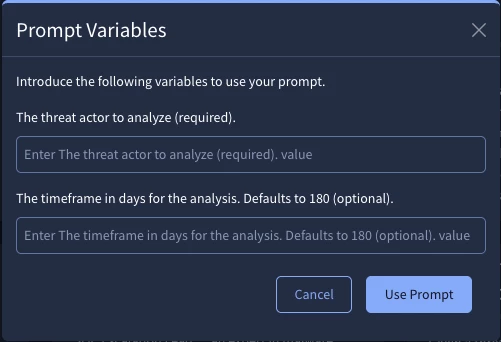
Real-World Example:
Here is the "Walk" level prompt from our earlier example, now modified with variables to make it a reusable template following the steps above.
## Persona
You are a cyber threat intelligence analyst.

## User Inputs
*   ACTOR: ${{The threat actor to analyze (required).}}. If the ACTOR variable is left blank, you must stop and ask the user to provide an actor name before continuing.
*   TIMEFRAME: ${{The timeframe in days for the analysis. Defaults to 180 (optional).}}. Default to 180 days if no TIMEFRAME is provided.

## Task
Generate a threat brief on the activities of the specified ACTOR.

## Context
The brief is for a technical audience and should cover activity over the specified TIMEFRAME. Include details on their common TTPs, targets, and any associated malware.

## Output Format
Structure the output with the following sections:
- Executive Summary
- Recent Activity
- Key TTPs (MITRE ATT&CK)
- Associated Malware
- Top Targets by Industry and Country
Best Practices for Variables:
- Organize: Define variables in a <USER_INPUT> section at the top of a prompt. Then reference those variables throughout the rest of the prompt. This will simplify the prompt and allow you to update a variable in only one location.
- Clarity: Keep the text inside the ${{...}} short and clear. This text becomes the label for the input field shown to the user.
- Optional Inputs: The variable in the prompt will be overwritten with the user input, so it is important to instruct the agent on default behavior for each variable in case it is left blank. You can add (required) to a variable name for user clarity, but you must also add an explicit instruction in the prompt telling the agent how to handle a case where the user leaves it blank.
- Format: The text inside the variable should be a clear "Statement of the input the user should provide (optional or required)."
Injecting Temporal Context ({todays_date})
Use {todays_date} in your prompts to automatically insert the current date at runtime. This is extremely useful for creating time-sensitive reports without having to manually update the date.
Testing, Iterating, and Improving Prompts
Prompt engineering is rarely perfect on the first try. A cycle of testing, analyzing the output, and refining the prompt is crucial for achieving high-quality, reliable results.
1. Test Your Prompt
- Varied Inputs: Test with a range of inputs, not just the most obvious cases. If your prompt uses variables, try different values.
- Edge Cases: Consider inputs that might be ambiguous, empty, or unusual. How does the prompt handle them? For example, what if a threat actor name doesn't exist?
- Real-World Scenarios: Use inputs that reflect the actual tasks you need to accomplish.
2. Analyze the Output
- Accuracy: Is the information factually correct? Check against known intelligence.
- Completeness: Does the output include all the information you requested? Is anything missing?
- Format: Is the output structured as specified in your prompt?
- Relevance: Is the information provided relevant to your task?
- Clarity: Is the output easy to understand?
- Citations: Are sources cited correctly and appropriately?
3. Iterate and Refine
Based on your analysis, modify the prompt to address any issues:
- Vague Output? Make your instructions more specific. Add more context.
- Incorrect Format? Double-check your format specifications. Providing examples (few-shot learning) in the prompt can help.
- Missing Information? Ensure your task description clearly requests all necessary data points. You might need to adjust the "Execution Plan" in complex prompts.
- Wrong Tool Behavior? Clarify the intent. If necessary, consider whether explicit tool guidance is needed as discussed in "When to Consider Specific Tool Calls".
- Inconsistent Results? Adjust the prompt structure, persona, or add more constraints.
4. Adopt a Scientific Mindset
- Change One Thing at a Time: When refining, modify one aspect of the prompt at a time to understand the impact of each change.
- Document: Keep notes on what versions of the prompt you've tried and the results. This is especially helpful for complex prompts.
- Be Patient: Effective prompt engineering is an iterative process that requires experimentation and persistence.
By systematically testing and refining, you can significantly improve the quality and reliability of your prompts.
Best Practices & Quick Reference
| Do ✅ | Don't ❌ |
|---|---|
| Be Specific and Detailed. Provide context. | Use vague or short queries. |
| Clearly State Your Intent. | Generally avoid calling Specific Tools by name. |
| Define the Audience and Format. | Assume the Agent Knows Your Goal. |
| Use Specific Dates or Relative Timeframes. | Use Ambiguous Timeframes. |
| Iterate and Refine. | Start a New Conversation for the same topic. |
| Structure Complex Prompts clearly. | Write a single, long paragraph of instructions. |
| Save and Parameterize Reusable Tasks. | Repeat the Same Complex Query Manually. |
| Ask "Why?" if the output seems incorrect. | Ignore or Discard an Incorrect Answer. |
Common Pitfalls and Solutions
Even with a well-structured prompt, you may sometimes get unexpected results. This section provides a guide to troubleshooting common issues and refining your approach.
| Problem | Potential Cause | How to Fix It |
|---|---|---|
| Vague or Irrelevant Output | The prompt was too short or lacked specific intent (e.g., just FIN7). The agent misinterpreted a broad goal or context. | Be more specific in your Task. Instead of a single term, describe the desired action (e.g., Summarize the primary TTPs of FIN7 for a technical audience.). Refine your Persona and Context to guide the agent's focus. |
| Incorrect or Missing Data | The agent missed a step in a complex plan, or the prompt wasn't specific enough about the data points to retrieve. | Make the corresponding step in your Execution Plan or Task more explicit. Clearly list all the specific data points you require in the output. |
| Formatting Errors | The Markdown is broken, a table is missing columns, or the structure doesn't match your request. | Be more prescriptive in your Format section. For complex formats, providing a "few-shot" example of the desired table structure within the prompt can significantly improve reliability. |
| Output Contains "Hallucinations" or Unverified Claims | The model may have misinterpreted the query or lacked sufficient grounding data for a specific claim, leading it to generate plausible but incorrect information. | Always check the citations. If a claim seems incorrect, ask the agent for its reasoning or to provide the specific source for that piece of information. This helps verify the data and refine the agent's understanding. |
| Inconsistent Results on Reruns | The prompt may have ambiguity that allows the agent to interpret it differently each time. | Add more constraints to the prompt to reduce variability. For mission-critical tasks requiring high consistency, consider using an expert-level prompt with specific tool calls if necessary. |
| Optional Variable in Saved Prompt Fails | The user left an optional variable blank, and the prompt did not tell the agent how to handle the empty input. | Explicitly instruct the agent on the default behavior for each optional variable. For example: If TIMEFRAME is not provided, default to 90 days. |
| Agent Seems to Use the "Wrong" Tool | The intent of a specific step in your prompt may be unclear, causing the agent to select a sub-optimal tool. | Re-word the instruction for that step to be more explicit about the desired outcome. As a last resort for expert users, guide the process directly by calling the specific tool. |
