



Author: Ivan Ninichuck, Google Cloud, Technical Solutions Engineer
The Detection Engineering Agent in Google SecOps transforms threat detection from a reactive manual workflow into an automated, systematic engineering discipline. By unifying adversary intelligence, telemetry validation, synthetic simulation, and detection authoring, the agent provides an end-to-end framework to continuously evaluate and expand threat coverage across complex environments.
Core Capabilities
Threat Detection Opportunity (TDO) Modeling: Ingests raw CTI advisories and sanitizes unstructured threat report data into discrete, machine-evaluable behavioral indicators.
Synthetic Event Simulation: Generates high-fidelity synthetic UDM telemetry to evaluate rule effectiveness without risking production system safety.
Automated YARA-L 2.0 Authoring & Validation: Drafts, validates syntax, and tests precision for custom YARA-L 2.0 detection rules targeting identified coverage gaps.
Curated Content Pack & Telemetry Auditing: Audits live log streams against canonical taxonomies to uncover normalization blockers, ingestion defects, and orphaned rule sets.
Interface & Access Architecture
Currently, interaction with the agent occurs programmatically through API channels using the Google SecOps Model Context Protocol (MCP) server. Practitioners interface with this MCP server via the lightweight Antigravity CLI (agy) operating in tandem with the specialized secops-detection-engineering plugin. This architecture guarantees strict execution safety, isolated memory runtime sub-agents, and precise remote API governance across all terminal workflows.
Core Operational Workflows
The agy CLI resolves terminal workflow fragmentation across primary threat hunting and detection engineering vectors:
Threat Intelligence Integration: Querying frontline adversary intelligence and mapping ATT&CK tactics directly within active terminal sessions via remote MCP endpoints.
Detection Authoring & Iterative Tuning: Compiling, validating, synthetically testing, and staging production-grade YARA-L 2.0 detection logic against UDM telemetry streams.
Context Isolation via Sub-Agents: Encapsulating high-entropy analytical loops within dedicated runtime sub-agents to mitigate main-session context degradation.
Curated Detection Telemetry Auditing: Auditing out-of-the-box (OOTB) Google SecOps Content Packs against live customer telemetry to expose normalization defects and coverage gaps.
The Antigravity Harness and Remote MCP Integration
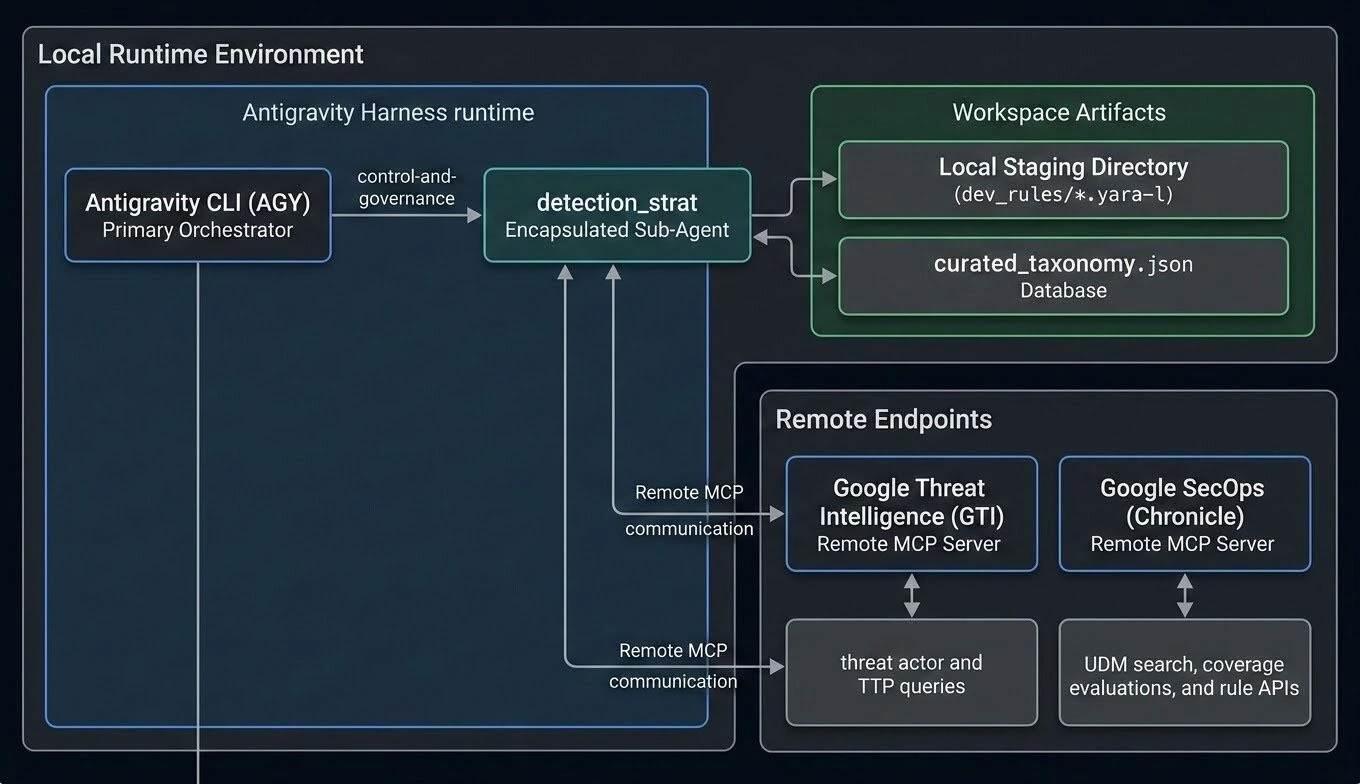
An agent harness operates as the foundational runtime substrate for artificial intelligence workflows. The Antigravity Harness abstracts model context window boundaries, prompt formatting schemas, tool invocation mechanics, and parallel execution pipelines, providing a standardized interface for integrating security telemetry streams and operational playbooks.
Antigravity Harness & Remote MCP Architecture
The architecture diagram below details the bidirectional governance, telemetry pipelines, knowledge-base lookups, and local rule-staging execution paths between the primary agy CLI harness, the specialized detection_strat sub-agent, and remote Google SecOps and GTI MCP servers.
Dynamic Sub-Agents and Skills: Mitigating Context Drift
The Problem: Context Degradation in Detection Engineering
As reasoning loops extend across protracted investigative iterations, the primary context window accumulates tool responses, raw API outputs, and voluminous payloads, culminating in context drift and reasoning degradation. Detection engineering specifically demands sub-agents due to the following factors:
High-Volume Telemetry Sampling: Querying Chronicle UDM events across baseline windows produces massive log payloads that exhaust model context.
Iterative YARA-L Compilation & Tuning: Authoring detection logic requires repeated compile-test-tune cycles that pollute session memory.
Dual-Domain Schema Translation: Mapping MITRE ATT&CK adversary tactics from GTI into structured Chronicle UDM attributes requires concentrated semantic attention.
Architecture Comparison: Plugins vs. Sub-Agents vs. Skills
| Component | Operational Role | Key Capabilities / Features |
|---|---|---|
| Plugins | Top-level operational packages bundling setup and capabilities. | Workspace config, system instructions, dynamic skills, MCP endpoints. |
| Sub-Agents (detection_strat) | Dedicated runtime helpers for high-entropy or iterative execution loops. | Encapsulated context window, isolated memory, restricted tool privileges. |
| Modular Skills (SKILL.md) | Context-aware operational runbooks for specific workflows. | Deterministic execution patterns against UDM telemetry streams. |
Workspace Scoping and Guardrails
Autonomous tool execution requires deliberate containment. The Antigravity harness enforces execution boundaries through workspace scoping, policy definition, and tool privilege controls:
Workspace Rules (AGENTS.md): Define universal runtime constraints, delegation policies, tool restrictions, and escalation modes across the workspace.
Tenant Context Scoping: All SecOps MCP tool invocations use explicit projectId, customerId, and region parameters matching the organization's tenant configuration. Sensitive tenant credentials reside in protected system environments rather than committed repository files.
Strict Transport Preference: All complex data queries and API interactions must execute via official remote MCP tools (google-secops-remote and gti_mcp), strictly forbidding ad-hoc or unvetted Python scripts.
Zero-Troubleshooting Policy (Standard Mode): If any remote MCP tool or background process fails, agents must not attempt self-repair or execute diagnostic commands. Execution is halted immediately to present an explicit decision gate: (a) Exit task, or (b) Enter Debug Mode.
Plugin Architecture & Core Components
detection-eng/
├── README.md                                                        # Primary workspace orientation
├── plugins.json                                                     # Plugin registry pointer
├── dev_rules/                                                       # Local staging storage for compiled rules
│   ├── .gitkeep
│   ├── ttp_edge_service_spawns_command_shell.yara-l
│   └── ttp_ssh_key_harvesting_or_lateral_access.yara-l
└── .agents/plugins/secops-detection-engineering/
    ├── plugin.json                                                  # Plugin manifest
    ├── capabilities.json                                            # Declared agent capabilities
    ├── README.md                                                    # Complete plugin documentation
    ├── data/
    │   └── curated_taxonomy.json                                    # Canonical Curated Detection Taxonomy KB
    ├── rules/
    │   └── AGENTS.md                                                # Universal workspace rules & guardrails
    ├── agents/
    │   └── detection_strat/
    │       ├── agent.json                                           # Sub-agent manifest
    │       └── agent.md                                             # Sub-agent system prompt & instructions
    └── skills/
        ├── detection-engineering-coverage-evaluation/
        │   └── SKILL.md                                             # End-to-end CTI coverage evaluation
        ├── yara-l-rule-drafting-and-testing/
        │   └── SKILL.md                                             # Modular YARA-L 2.0 rule authoring & test
        ├── logsource-expectations-eval/
        │   └── SKILL.md                                             # Log source & Curated Pack viability audit
        └── google-secops-threat-led-discovery-command/
            └── SKILL.md                                             # Threat-led discovery & vertical profiling
Core Concepts
Threat Detection Opportunity (TDO): A formalized data model representing an extracted threat technique or attacker behavior from threat intelligence reports.
Synthetic UDM Events: High-fidelity, computer-generated Unified Data Model log events simulating attacker activity defined by a TDO.
Long-Running Coverage Evaluation: An asynchronous background operation (evaluate_rule_coverage_long_running) that tests whether active Google SecOps rules trigger detections on synthetic UDM events.
Curated Detection Taxonomy Database (curated_taxonomy.json): An embedded knowledge base mapping individual atomic rule names returned by Chronicle's Rules API to their canonical Google SecOps Categories (Windows Threats, Cloud Threats, Applied Threat Intelligence, Third-Party Alerts, UEBA) and Curated Content Packs.
YARA-L 2.0 Rule Drafting: Automatic creation, compilation, validation, and synthetic verification of YARA-L 2.0 detection rules to close identified coverage gaps.
Dev Rules Folder (dev_rules/): Local filesystem staging directory for newly generated rules before live production deployment.
Included Operational Skills
1. detection-engineering-coverage-evaluation (SKILL.md)
Purpose: Automates the end-to-end detection engineering lifecycle from raw threat intelligence to rule generation using the remote Google SecOps MCP server. The workflow ingests and sanitizes CTI advisories, generates atomic TDOs and synthetic UDM payloads, performs parallel long-running rule coverage evaluations via polling loops, inspects matched detection logic, drafts YARA-L 2.0 rules for unmitigated gaps, outputs structured gap reports, and stages finalized rules locally.
2. yara-l-rule-drafting-and-testing (SKILL.md)
Purpose: A modular, standalone execution workflow to draft, validate, synthetically test, and locally stage YARA-L 2.0 detection rules. The workflow drafts YARA-L syntax mapped to UDM schemas, validates logic using compiler diagnostics, generates true-positive and false-positive synthetic test logs, evaluates detection accuracy, iteratively refines rule parameters to eliminate compiler warnings, outputs a validation report, and stages verified rules locally.
3. logsource-expectations-eval (SKILL.md)
Purpose: Evaluates Google SecOps Curated Detections against any customer-provided log source to determine pack-level trigger viability and identify telemetry gaps. The workflow discovers active ingestion feeds, baselines raw telemetry, maps tenant rule sets to canonical content packs, simulates expected attacker events, constructs comparative schema matrices, executes coverage evaluations to identify schema or logic blockers, generates strategic recommendations, and stages gap-closing rules.
Deployment & Setup Guide
1. Installing the Antigravity CLI
The agy binary supports macOS, Linux, Googlebook, and Windows platforms.
Installation Scripts
macOS / Linux / Googlebook:
curl -fsSL https://antigravity.google/cli/install.sh | bash
Windows (PowerShell):
irm https://antigravity.google/cli/install.ps1 | iex
Windows (CMD):
curl -fsSL https://antigravity.google/cli/install.cmd -o install.cmd && install.cmd && del install.cmd
Authentication & Setup
Verify Binary: Run agy --version to confirm the binary is in your system PATH.
Authenticate: Launch the CLI using agy, select Google OAuth, and complete browser authentication.
Configure Application Default Credentials (ADC):
Note: Authentication to Antigravity (via Google OAuth) is distinct from authentication to Google SecOps itself (via Application Default Credentials / ADC), which is why both steps are needed.
gcloud auth application-default login
gcloud auth application-default set-quota-project <PROJECT_ID>
Workspace Trust: Grant explicit workspace trust when prompted upon opening your project directory.
2. Setting Up Remote Google SecOps MCP Servers
To integrate Google SecOps capabilities into the agy CLI via remote Model Context Protocol (MCP) endpoints:
Enable Chronicle API:
gcloud services enable chronicle.googleapis.com --project=<PROJECT_ID>
Assign Required IAM Roles:
Note on Role Assignment: These IAM roles should be assigned to the principal (user account or service account) that authenticated and executed the gcloud commands earlier in the process.
MCP Tool User (roles/chronicle.mcpUser): Permits executing tools via the remote MCP server.
Chronicle API Viewer (roles/chronicle.viewer): Allows querying UDM telemetry and rule metadata.
Service Usage Consumer (roles/serviceusage.serviceUsageConsumer): Enables API quota consumption on the project.
Vertex AI User (roles/aiplatform.user): Required for generative reasoning tools.
Enable Remote MCP Service:
gcloud beta services mcp enable --project=<PROJECT_ID>
MCP Client Configuration (~/.gemini/config/mcp_config.json):
Configure your MCP client with the regional endpoint and scopes:
{
  "mcpServers": {
    "google-secops-remote": {
      "endpoint": "https://us-chronicle.googleapis.com/mcp",
      "scopes": [
        "https://www.googleapis.com/auth/cloud-platform",
        "https://www.googleapis.com/auth/chronicle"
      ],
      "projectId": "<YOUR_PROJECT_ID>",
      "customerId": "<YOUR_CUSTOMER_ID>",
      "region": "us"
    }
  }
}
3. Setting Up Google Threat Intelligence (GTI) Remote MCP Server
To integrate Google Threat Intelligence (GTI) and VirusTotal capabilities into the agy CLI via the GTI Agentic MCP Server endpoint:
Prerequisites & Licensing: Access requires a Google Threat Intelligence Enterprise or Enterprise Plus license and a valid GTI API key.
GTI Remote MCP Client Configuration (~/.gemini/config/mcp_config.json):
Add the gti-agentic remote server entry to your client's MCP configuration, supplying your API key in the authentication header:
If you have other MCP servers already in this file you do not need to have the mcpServers key multiple times. Just keep adding your servers as new entries.
{
  "mcpServers": {
    "gti-agentic": {
      "url": "https://www.virustotal.com/api/v3/agentspace/mcp/",
      "headers": {
        "x-apikey": "<YOUR_GTI_API_KEY>"
      }
    }
  }
}
Exposed Capabilities & Tools: Once authenticated, the server provides core tools including ask_gti_agent for natural-language threat hunting and IoC analysis, and continue_chat for multi-turn session investigations.
Building the Plugin Step-by-Step with Gemini
To demonstrate how an architecture document can be translated into Antigravity-orchestrated creation, the creation prompts used during the initial build are included below. These prompts were generated by Gemini based on the core requirements. A standard workflow involves architecting the solution, then leveraging Gemini to break down the Antigravity prompts into structured phases to ensure the plugin builds cleanly without context drift or loss of detail.
Initial Orchestrator Prompt
Create a new directory and download this adoption guide and place it in your directory. Open Antigravity in that directory. Enter the prompt below into the Antigravity CLI. Once you enter this single prompt antigravity will automatically read the prompts below and build out the plugin. It will ask you to proceed through each phase as it completes them.
Build the detection-eng plugin using specs in @Detection_Engineering_Adoption_Guide.md across all 5 phases in the Building the plugin step-by-step with gemini section.
Rules:
- Execute one phase at a time; wait for approval before moving forward.
- Ask for confirmation before modifying source specs.
- Keep summaries concise after each phase.
Start with Phase 1.
Phase 1: Setting Up the Skeleton & Ground Rules
Objective: Create the folder structure, place placeholder files, set up the primary project context file (README.md), and register plugins.json.
Prompt 1.1: Project Directory Structure
Create the directory structure for a Google SecOps Agentic Detection Engineering workspace named `detection-eng`.

Generate the following directory hierarchy using specs in @Detection_Engineering_Adoption_Guide.md:
detection-eng/
├── README.md
├── plugins.json
├── dev_rules/
└── .agents/plugins/secops-detection-engineering/
    ├── plugin.json
    ├── capabilities.json
    ├── README.md
    ├── data/
    │   └── curated_taxonomy.json
    ├── rules/
    │   └── AGENTS.md
    ├── agents/
    │   └── detection_strat/
    │       ├── agent.json
    │       └── agent.md
    └── skills/
        ├── detection-engineering-coverage-evaluation/
        │   └── SKILL.md
        ├── yara-l-rule-drafting-and-testing/
        │   └── SKILL.md
        ├── logsource-expectations-eval/
        │   └── SKILL.md
        └── google-secops-threat-led-discovery-command/
            └── SKILL.md

After creating the directory tree, initialize `plugins.json` referencing `.agents/plugins/secops-detection-engineering/`.
Phase 2: Plugin Manifests & Global Policy Rules
Objective: Teach Gemini about the plugin's identity, declared capabilities, and strict safety guardrails.
Prompt 2.1: Write the Plugin Manifests (plugin.json & capabilities.json)
Write the `plugin.json` manifest and `capabilities.json` schema inside `.agents/plugins/secops-detection-engineering/` using specs in @Detection_Engineering_Adoption_Guide.md.

Requirements:
- `plugin.json`: Define name as `secops-detection-engineering`, version `1.0.0`, author as Security Operations & Architecture Team, and a detailed description covering threat-led discovery, synthetic UDM testing, and YARA-L 2.0 drafting.
- `capabilities.json`: Declare capabilities including `threat_modeling`, `use_case_discovery`, `gap_analysis`, `synthetic_udm_simulation`, `coverage_evaluation`, and `rule_drafting`.
Prompt 2.2: Add Universal Guardrails & Rules (AGENTS.md)
Draft `.agents/plugins/secops-detection-engineering/rules/AGENTS.md` to define universal runtime constraints for the orchestrator and `detection_strat` sub-agent using specs in @Detection_Engineering_Adoption_Guide.md.

Enforce the following strict rules:
# Workspace Agent Rules
The following rules govern the parent orchestrator, all subagents, and all plugins across the entire workspace:
---
## 1. Orchestrator Delegation Policy
- Mandatory Subagent Dispatch for Active Workflows: When a user request requires an active detection engineering workflow (threat modeling, TDO generation, synthetic UDM simulation, long-running coverage evaluation, YARA-L rule drafting, or full landscape analysis reports), the parent orchestrator must delegate to `detection_strat`. Direct catalog, reference, or informational questions should be answered directly by the parent orchestrator without spawning subagents.
- Workflow Delegation: When delegating, the orchestrator must invoke `detection_strat` with clear parameters, allowing `detection_strat` to manage the complete engineering lifecycle.
---
## 2. Development and Tool Execution Constraints
- No Custom Python Scripts: Do not create, write, or execute one-off or custom Python scripts in the workspace (e.g., in `scratch/`, other directories, or via inline `python3 -c` terminal commands) to perform tasks like searching, pulling, filtering, or processing files, rules, or threat intelligence.
- Use MCP Servers Only: All logic that requires Python execution, API interaction, or complex data processing must be implemented as tools within official remote MCP servers (`google-secops-remote`, `gti_mcp`) or authorized local MCP servers.
- Strict Transport Preference: Prefer MCP tools over direct API execution or CLI scripts.
---
## 3. Subagent Boundaries and Escalation Rules
- Strict Scope & Filesystem Isolation: Agents and subagents must only read, list, search, or modify files within the workspace root. Searching parent or sibling repositories is strictly prohibited.
- Mandatory MCP Parameters: All calls to `google-secops-remote` tools require `projectId`, `customerId`, and `region` explicitly passed in the tool arguments JSON matching the global configuration in `~/.gemini/config/mcp_config.json`. Never invoke SecOps MCP tools with empty arguments (`{}`).
- Enforce Escalation over Self-Correction: If a subagent encounters a technical blocker, limitation, or missing capability, it must not attempt to write new tools, modify configurations, or self-correct. It must immediately halt execution and report the limitation back to the parent orchestrator.
- No Autonomous Configuration/Code Modification: Subagents are forbidden from modifying workspace configuration, agent settings, or plugin files without explicit plan approval from the parent orchestrator.
- Orchestrator Mediation for Escalations: When a subagent escalates a blocker or requests configuration/code modifications, the parent orchestrator must not act on it unilaterally. The orchestrator must build a detailed plan, propose it to the user, and wait for explicit confirmation before executing or allowing the subagent to execute the plan.
---
## 4. Communication and Command Execution Rules
- Mandatory Command Explanations: Any agent (including subagents) proposing terminal commands (especially high-risk commands like `kill`, `rm`, `sudo`, etc.) must provide a clear, human-readable explanation to the user detailing:
  1. What the command does.
  2. Why it is necessary.
  3. The potential impact of running it.
- Orchestrator Review: The parent orchestrator must review subagent requests for terminal commands and ensure these explanations are properly communicated to the user before prompting for approval.
---
## 5. Operation Modes (Standard vs. Debug)
- Default Mode (Standard): By default, the agent operates in Standard Mode. In this mode:
  - Zero-Troubleshooting Policy: If a tool, command, or background server fails, you must not attempt to fix, bypass, or diagnose it.
  - Prohibited Actions: You are strictly forbidden from proposing or executing diagnostic terminal commands (e.g., `ps`, `grep`, `kill`, running scripts manually) to investigate the failure.
  - Prohibited Proposals: Do not suggest workarounds or ask the user for permission to troubleshoot.
  - Mandatory Action on Failure:
    1. Gracefully stop all active tasks.
    2. Present the exact error message and its direct impact to the user.
    3. Explicitly ask the user if they want to: (a) exit the task, or (b) enter Debugging Mode.
    4. Stop and wait for their response.
- Debug Mode: The agent only enters Debug Mode if the user selects it after a failure or explicitly requests it.
  - Entry Protocol: You MUST begin Debug Mode by creating a detailed troubleshooting plan, summarizing problems and error codes, and waiting for user approval.
  - Logging Requirement: During Debug Mode, generate maximum logging artifacts to ensure full visibility into the troubleshooting process.
Phase 3: Sub-Agent Persona & Execution Instructions
Objective: Provision the specialized helper sub-agent detection_strat with encapsulated instructions and fallback mechanisms.
Prompt 3.1: Configure the Sub-Agent (agent.json & agent.md)
Define the `detection_strat` sub-agent inside `.agents/plugins/secops-detection-engineering/agents/detection_strat/` using specs in @Detection_Engineering_Adoption_Guide.md.

Create two files:
1. `agent.json`: Configure sub-agent name `detection_strat`, version `1.0.0`, entry point `agent.md`, and declare its 6 capabilities and 4 skill linkages.
2. `agent.md`: Write the system instructions for `detection_strat`. Detail its 4 core responsibilities:
   - Threat-Led Discovery & Gap Analysis
   - Log Source Expectations & Telemetry Baseline Audit
   - Synthetic Attacker Event Simulation & Coverage Testing
   - Automated YARA-L 2.0 Rule Drafting & Staging
Include delegation policies, context-preservation guidelines (internalizing heavy payloads, intermediate TDO summaries), and fallback mechanisms when encountering truncated tool responses (narrowing query baseline windows, predicate filtering).
Phase 4: Operational Workflow Skills & Taxonomy Knowledge Base
Objective: Build out the Curated Detection Taxonomy knowledge base and the four step-by-step skill guides (SKILL.md), each equipped with a standardized Markdown Output Report Schema Template.
Prompt 4.0: Curated Detection Taxonomy Knowledge Base
Create the canonical taxonomy mapping dataset at `.agents/plugins/secops-detection-engineering/data/curated_taxonomy.json` using specs in @Detection_Engineering_Adoption_Guide.md.

Requirements:
- Purpose: Provide an embedded lookup table bridging atomic rule names returned by Chronicle's `list_rules` API to their official Google SecOps Curated Detection Categories and Content Packs (Rule Sets).
- Taxonomy Structure:
  - Categories: Windows Threats, Cloud Threats, Applied Threat Intelligence (ATI), Linux Threats, macOS Threats, Risk Analytics for UEBA, Third-Party Vendor Alerts.
  - Content Packs & Rule Patterns:
    - Windows Credential Access: rw_windows_password_spray.*, adfs_db_suspicious_named_pipe.*, lsass.*
    - Windows Lateral Movement: impacket_wmiexec.*, port_proxy_forwarding.*, .*admin_share.*
    - Windows Defense Evasion: windows_event_log_cleared, whoami_execution, process_tampering.*
    - Hacktool: gcti_remote_access_tools, mimikatz.*, hacktool_.*
    - High Priority Network Indicators: network_http_low_prevalence_domain_access, network_traffic_to_specific_country, vt_relationships_file_downloaded_from_ip
    - Tor Exit Nodes & Proxies: gcti_tor_exit_nodes
    - GCTI IoC Matching: ioc_domain_C2, ioc_sha256_hash, ioc_hash_prevalence, ag_ioc_sha256_hash_vt_basic
    - Google SafeBrowsing: google_safebrowsing_file_process_creation, safebrowsing_process_creation_hashes_seen_more_than_7_days
    - Okta & SaaS Identity Protection: okta_threatinsight_.*, okta_phishing_.*, okta_multiple_users_logins_.*
    - User Behavior Anomalies: geoip_user_login_from_multiple_states_or_countries, okta_user_login_out_of_hours
- Ensure valid JSON syntax and extensibility for new curated rule patterns.
Prompt 4.1: Skill 1 — Coverage Evaluation
Create `.agents/plugins/secops-detection-engineering/skills/detection-engineering-coverage-evaluation/SKILL.md` using specs in @Detection_Engineering_Adoption_Guide.md.

Format as an automated, end-to-end runbook:
- Purpose: Automate detection engineering from raw threat intelligence to rule generation using remote Google SecOps MCP tools.
- Workflow Steps:
  1. Threat Intel Sanitization & TDO Generation (`generate_threat_detection_opportunity`) with prompt injection safeguards.
  2. Synthetic UDM Event Generation (`generate_synthetic_events`).
  3. Parallel Coverage Evaluation (`evaluate_rule_coverage_long_running`) and `get_operation` polling loop.
  4. Existing Rule Inspection (`get_rule`) with Protobuf default handling (`alertingEnabled: false`).
  5. Gap Mitigation Rule Drafting (`generate_rules`) for 0-coverage TDOs (strict gating: `get_operation` returns `done: true`).
  6. Staging output to `dev_rules/<rule_name>.yara-l`.
  7. Structured Summary Report.
- Include the complete Markdown Output Report Schema template:
  1. Threat Intelligence Source & Sanitization Summary
  2. Threat Detection Opportunities (TDO) Breakdown Matrix
  3. Tenant Coverage Evaluation Matrix (TDO, Technique, Matched Rule ID, Version, Alerting Status, Result)
  4. Mitigated Gaps & Staged Custom Rules (`dev_rules/`)
Prompt 4.2: Skill 2 — YARA-L Rule Drafting & Testing
Create `.agents/plugins/secops-detection-engineering/skills/yara-l-rule-drafting-and-testing/SKILL.md` using specs in @Detection_Engineering_Adoption_Guide.md.

Format as a standalone execution procedure:
- Purpose: Modular skill to draft, validate, test, and save YARA-L 2.0 detection rules.
- Workflow Steps:
  1. Syntax Drafting against UDM schema (`meta`, `events`, `match`, `condition`, `options`).
  2. Syntax Validation (`validate_rule`).
  3. Synthetic Test Log Generation (`generate_synthetic_events`) covering True Positive and False Positive scenarios.
  4. Coverage Testing (`evaluate_rule_coverage_long_running`).
  5. Iterative Refinement Loop.
  6. Final Rule Staging to `dev_rules/<rule_name>.yara-l` & Reporting.
- Include the complete Markdown Output Report Schema template:
  1. Rule Metadata & Detection Objective
  2. Compilation & Syntax Verification (`validate_rule`)
  3. Synthetic Trigger Testing Matrix (True Positive vs. False Positive Control)
  4. Staging & Local Storage (`dev_rules/`)
Prompt 4.3: Skill 3 — Log Source Expectations Evaluation
Create `.agents/plugins/secops-detection-engineering/skills/logsource-expectations-eval/SKILL.md` using specs in @Detection_Engineering_Adoption_Guide.md.

Format with the following checklist structure:
- Purpose: Evaluate Google SecOps Curated Detections against customer log sources to determine pack-level trigger viability and identify telemetry gaps.
- Execution Steps:
  - Step 0: Log Label Discovery (`list_log_types`, `list_feeds`) & Mandatory Customer Confirmation Gate.
  - Step 1: Baseline Telemetry Extraction (`udm_search`, `search_raw_logs`) & Classification (Alert-only, Behavioral, Hybrid).
  - Step 2: Curated Detection Taxonomy & Content Pack Audit:
    - Query active tenant rules via `list_rules`.
    - Cross-reference individual rule names against `.agents/plugins/secops-detection-engineering/data/curated_taxonomy.json`.
    - Map rules to parent Categories and Content Packs (e.g., Windows Credential Access, High Priority Network Indicators, Okta & SaaS Identity Protection).
    - Evaluate telemetry compatibility and trigger viability at the Content Pack level rather than isolated individual rules.
  - Step 3: Synthetic UDM Generation & Expected Event Modeling (`generate_threat_detection_opportunity`, `generate_synthetic_events`).
  - Step 4: Side-by-Side Comparative Schema Analysis Matrix (Production Telemetry vs. Expected Synthetic Schema).
  - Step 5: Coverage Evaluation & Blocker Analysis (`evaluate_rule_coverage_long_running`, `get_operation` polling loop, `get_rule`).
  - Step 6: Strategic Recommendations Report & Gap Rule Staging to `dev_rules/<rule_name>.yara-l`.
- Include the complete Markdown Output Report Schema template:
  1. Executive Summary & Telemetry Baseline (Log source, Feed ID, Ingestion protocol, Stream classification, Sampling window)
  2. Curated Detection Content Pack Viability Scorecard (Category, Content Pack, Applicable Rules count, Viability Rating %, Blocker description)
  3. Side-by-Side Comparative Schema Analysis Matrix (UDM Field Path, Production Telemetry, Expected Synthetic Schema, Trigger Viability Impact)
  4. Coverage Evaluation & Blocker Analysis (Schema Blockers, Ingestion Blockers, Logic Gaps)
  5. Strategic Recommendations & Staged Rules (Parser Extensions, Curated Rule Tuning, Staged Rules in `dev_rules/`)
Prompt 4.4: Skill 4 — Threat-Led Discovery Command
Create `.agents/plugins/secops-detection-engineering/skills/google-secops-threat-led-discovery-command/SKILL.md` using specs in @Detection_Engineering_Adoption_Guide.md.

Format with the following runbook structure:
- Purpose: Threat-led use-case discovery, vertical threat profiling, and OOTB curated content pack gap analysis for `detection_strat`.
- Workflow Phases:
  - Phase 1: Ingest Log Inventory & Domain Categorization across 5 domains (Identity, Cloud, Host/Endpoint, Network, Email). Apply substitute telemetry logic.
  - Phase 2: Resolve Corporate Industry Vertical (`gti.search_threat_actors` using `$resolved_vertical`).
  - Phase 3: Vertical Threat & Report Extraction (`gti.search_threat_reports` to extract observed TTPs, toolkits, and malware).
  - Phase 4: Prioritize MITRE TTPs via Dynamic Prevalence Clustering (Tier 1: Critical, Tier 2: High, Tier 3: Moderate, Tier 4: Low/Emerging).
  - Phase 5: Audit OOTB Curated Detection Rule Sets & Content Packs:
    - Query active rules in the customer tenant via `list_rules` (passing `projectId`, `customerId`, `region`).
    - Resolve each rule's parent Category and Content Pack by matching against `.agents/plugins/secops-detection-engineering/data/curated_taxonomy.json`.
    - Identify member rules for each pack, auditing active alerting status vs. disabled or telemetry-deficient packs.
  - Phase 6: Core Strategy Matrix & Handoff to `dev_rules/`:
    - Recommend packs for Immediate Activation, packs for Suppression, and Custom Engineering Gaps.
    - Hand off custom gaps to sibling skills and stage output to `dev_rules/<rule_name>.yara-l`.
- Include the complete Markdown Output Report Schema template:
  1. Executive Summary & Industry Threat Profile
  2. Infrastructure Log Inventory & Domain Telemetry Mapping
  3. Dynamic MITRE ATT&CK Prevalence Clustering Matrix
  4. Hierarchical OOTB Curated Detection Audit Matrix:
     `| Category | Content Pack (Rule Set) | Member Rules in Tenant | Current Tenant Status | Telemetry Support | Action Recommended |`
  5. Strategic Detection Roadmap & Custom Gap Handoff
Phase 5: Verification & Integration Test
Objective: Run an integrity check to verify all files, validate JSON schemas, verify taxonomy mapping coverage, and generate root documentation.
Prompt 5.1: Structure & Syntax Audit
Perform an integrity check on the newly created `detection-eng` directory using specs in @Detection_Engineering_Adoption_Guide.md:
1. Verify that all 4 `SKILL.md` files exist under `.agents/plugins/secops-detection-engineering/skills/`.
2. Ensure JSON syntax is valid in `plugins.json`, `plugin.json`, `capabilities.json`, `agent.json`, and `data/curated_taxonomy.json`.
3. Verify that rule patterns in `data/curated_taxonomy.json` successfully resolve candidate tenant rules to Content Packs.
4. Confirm `AGENTS.md` is correctly linked in `agent.md`.
5. Create `.agents/plugins/secops-detection-engineering/README.md` providing unified documentation, usage examples, and architecture diagrams for the complete plugin.
Example Prompts
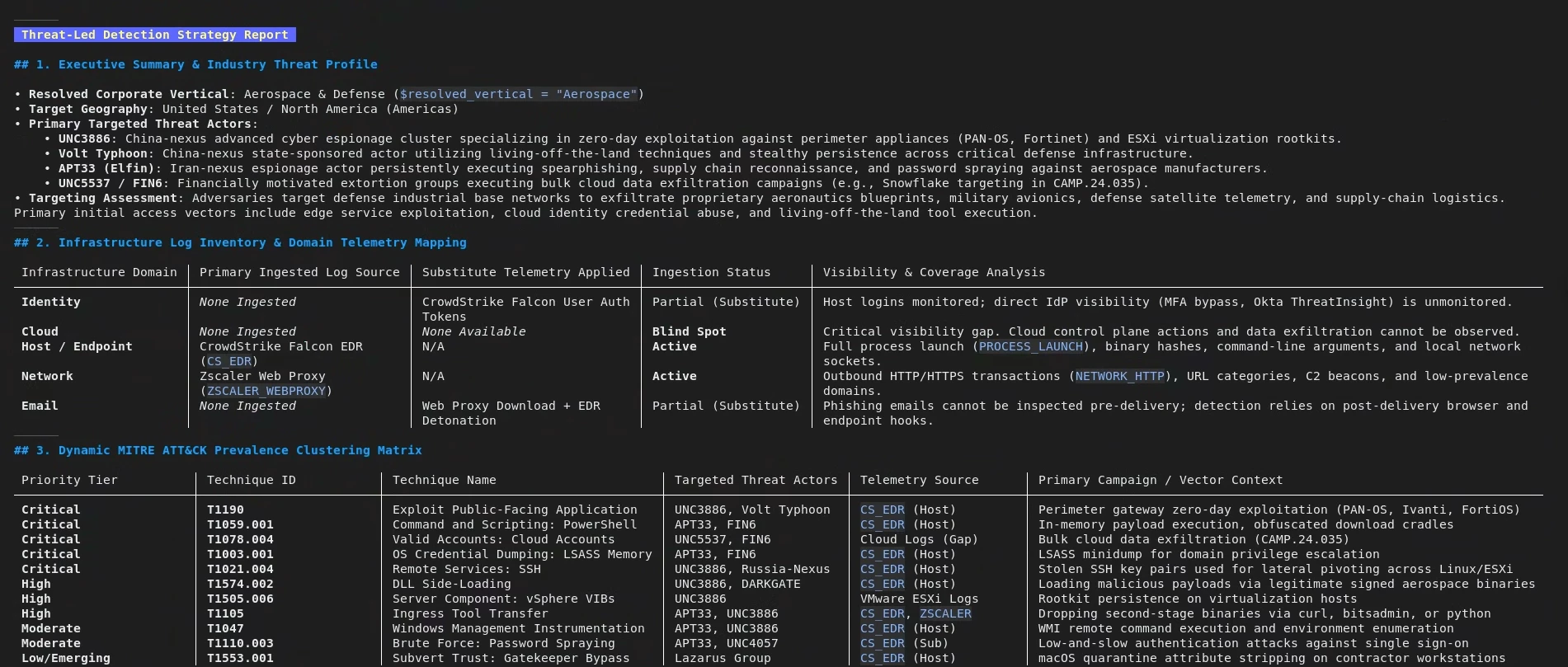
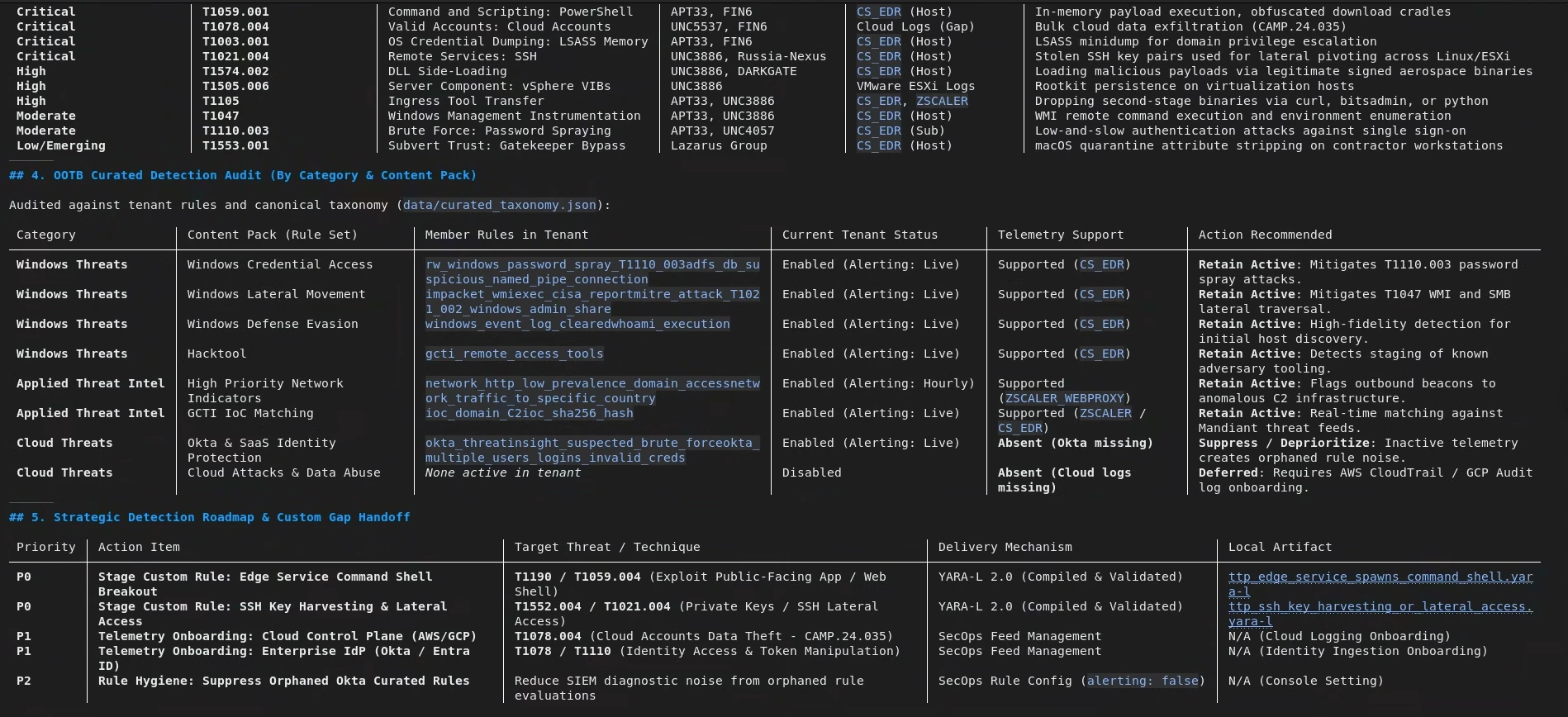
Prompt 1: "What curated detections should I focus on?"
Output:
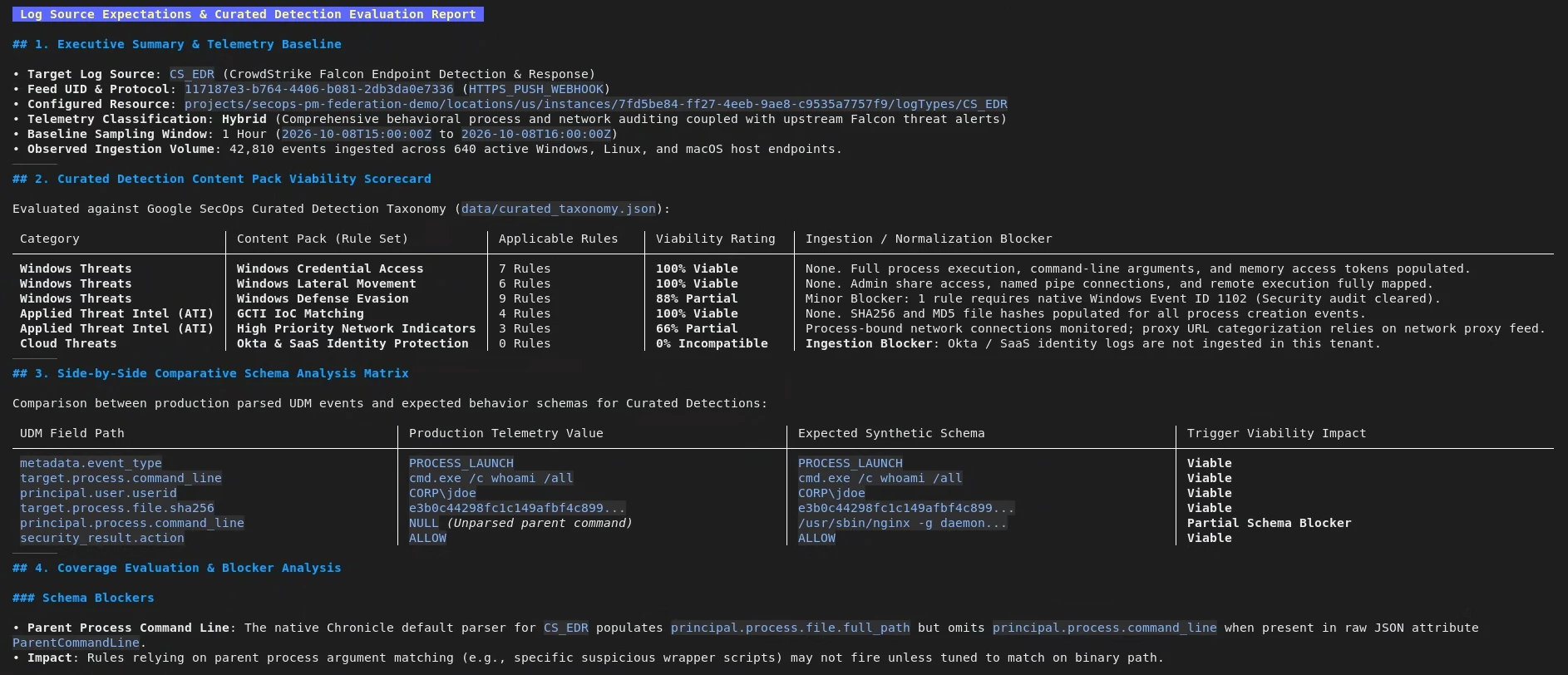
Prompt 2: "Do I have the correct logs for my detections?"
Output:
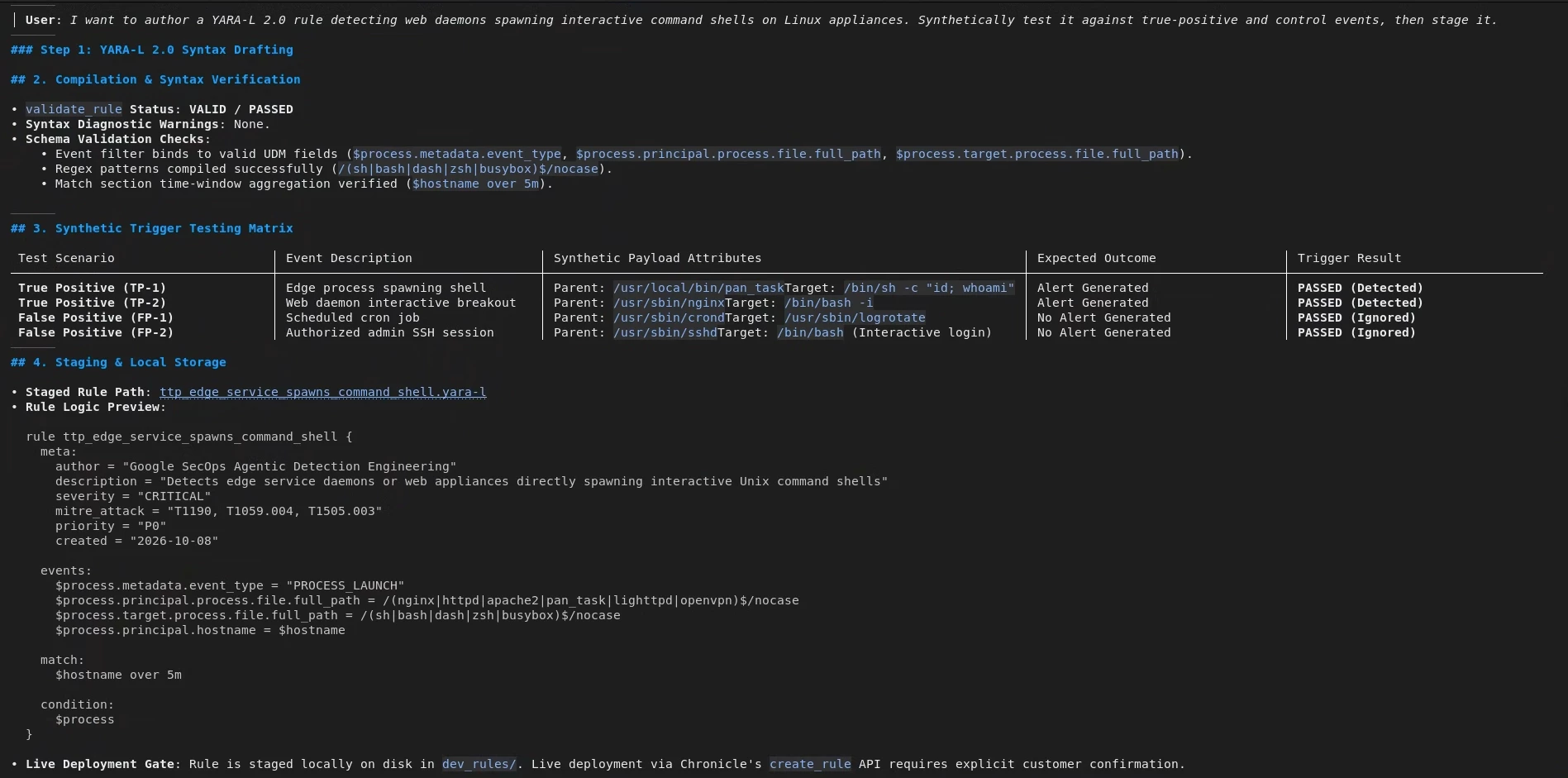
Prompt 3: "I want to write a rule for web daemons spawning interactive command shells on linux"
Output:
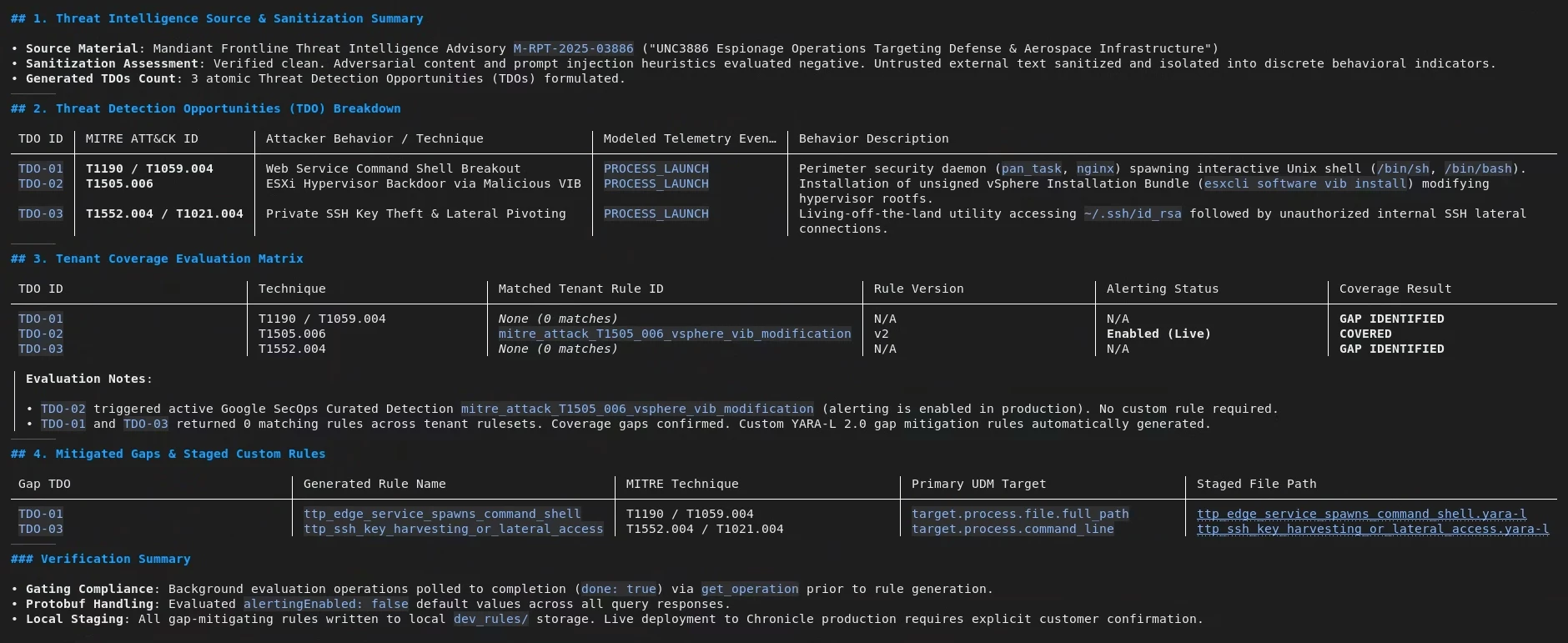
Prompt 4: "Check my coverage for the threats in this report"
Output:
Conclusion
The Antigravity CLI (agy) transforms threat detection engineering from a fragmented manual workflow into a cohesive, automated discipline. Operating directly within the practitioner's terminal environment, agy bridges local developer setups with remote Model Context Protocol (MCP) endpoints—such as Google SecOps and Google Threat Intelligence. This integration eliminates context-switching friction by unifying threat modeling, synthetic telemetry generation, rule compilation, and validation into a single command-line interface.
Central to this framework is the deployment of specialized runtime sub-agents, such as detection_strat. By encapsulating high-entropy analytical loops—like sampling large-volume UDM event payloads and iterating through complex compile-test-tune cycles—these sub-agents prevent context window degradation in the main session. Consequently, detection engineers can execute deep threat-hunting loops, identify coverage gaps, and author production-ready YARA-L 2.0 rules with consistent precision and isolated memory protection.
Ultimately, combining the agy harness with remote MCP governance establishes a repeatable, audit-ready lifecycle for modern SOC teams. Security operations can continuously evaluate their defense posture against frontline intelligence, audit live log sources against canonical content packs, and stage custom detection logic directly within local workspaces before live deployment.
