Author: Ayman Abdelaziz, Intervention Outcome Customer Engineer
⚠️ Important Notice: Legacy GTI ASM Deprecation
The legacy Google Threat Intelligence (GTI) Attack Surface Management (ASM) scanning engine and backend API endpoints are currently in their deprecation window as of September 28, 2026.
-
End of June 2027: GTI will launch a native baseline ASM feature to replace non-authenticated external asset discovery workflows.
-
September 28, 2027: Legacy GTI ASM will reach End-of-Life (EOL). The console will be decommissioned, and the API endpoints covered in this guide will return 410 Gone errors.
Why use this guide now? This guide remains fully applicable until September 2027. We highly recommend using the API scripts provided below to operationalize your current data and prepare your environment for a seamless export and migration to the new native ASM features coming in June 2027.
The Need for API-Driven Attack Surface Management
As organizations expand their global infrastructure and scale their external network footprint, keeping a continuous, automated pulse on exposed assets, open ports, and infrastructure vulnerabilities is paramount. Managing this via a user interface is excellent for ad-hoc analysis, but at an enterprise scale, relying on manual dashboard interactions creates operational bottlenecks and visibility blind spots.
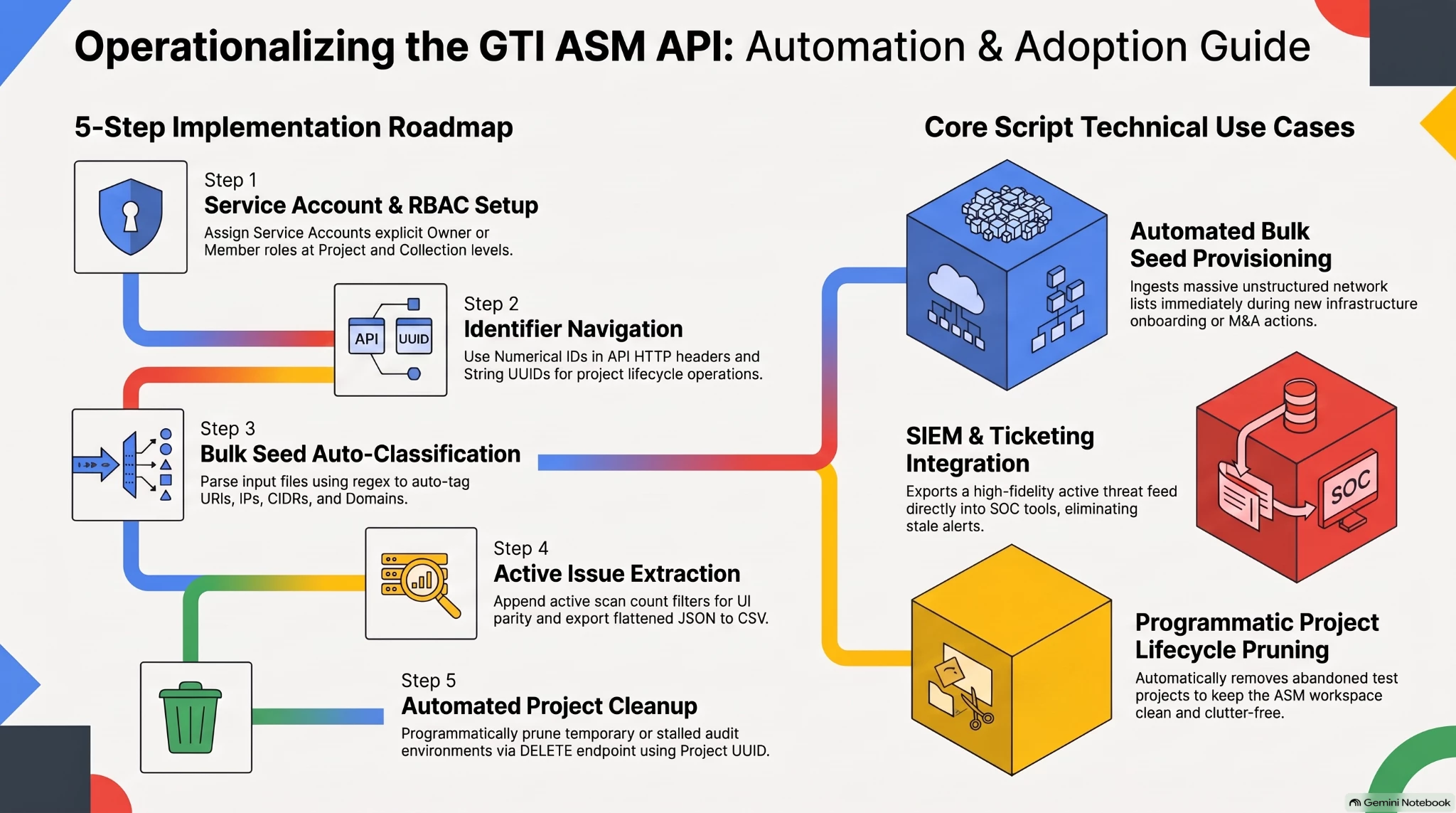
We created this guide to help network and infrastructure security engineers bridge the gap between manual UI discovery and fully automated security operations. By operationalizing the Google Threat Intelligence (GTI) Attack Surface Management (ASM) API, teams can seamlessly ingest massive lists of subnets, sync active network exposures directly into continuous monitoring workflows, and programmatically manage the lifecycle of targeted infrastructure audits.
Concept & Use Cases
Automating the ASM API unlocks several high-value workflows tailored specifically for network and infrastructure security teams:
-
Bulk Seeds Ingestion: When acquiring a new company or integrating a new data center, infrastructure security teams often receive massive, unstructured lists of IPs, CIDR blocks, and domains. Automating seed ingestion with auto-classification eliminates days of manual spreadsheet sorting and immediately initiates discovery scans on the newly acquired perimeter.
-
Continuous Monitoring & SIEM Integration: Infrastructure engineers need active network exposures piped directly into their SIEMs, ticketing systems, or SOC dashboards. By automating issue extraction and aligning the API filters with the ASM UI, security teams receive a high-fidelity feed of genuinely active threats without the noise of stale, historical data from decommissioned servers.
-
Automating Stalled Projects Deletion: Over time, security teams can accumulate temporary or stalled ASM projects that were created for one-off audits, testing, or abandoned initiatives. By leveraging the API, administrators can programmatically identify and delete these inactive projects, ensuring the Attack Surface Management environment remains clean, organized, and free of clutter without requiring manual cleanup.
-
Data Export & Migration Readiness: With the legacy ASM platform approaching End-of-Life in September 2027, security teams need reliable ways to extract their active vulnerability data and seed lists. The scripts provided in this guide allow you to programmatically export your active network exposures into standardized CSVs, ensuring your data is safely backed up and ready to port into the new GTI native ASM baseline feature.
Instruction: Step-by-Step Implementation Guide:
Step 1: Authentication & Role-Based Access Control (RBAC) setup
When automating GTI workflows, a common stumbling block is authentication and role-based access control (RBAC). GTI categorizes premium users into two primary group roles: Users (standard) and Admins (group administrators).
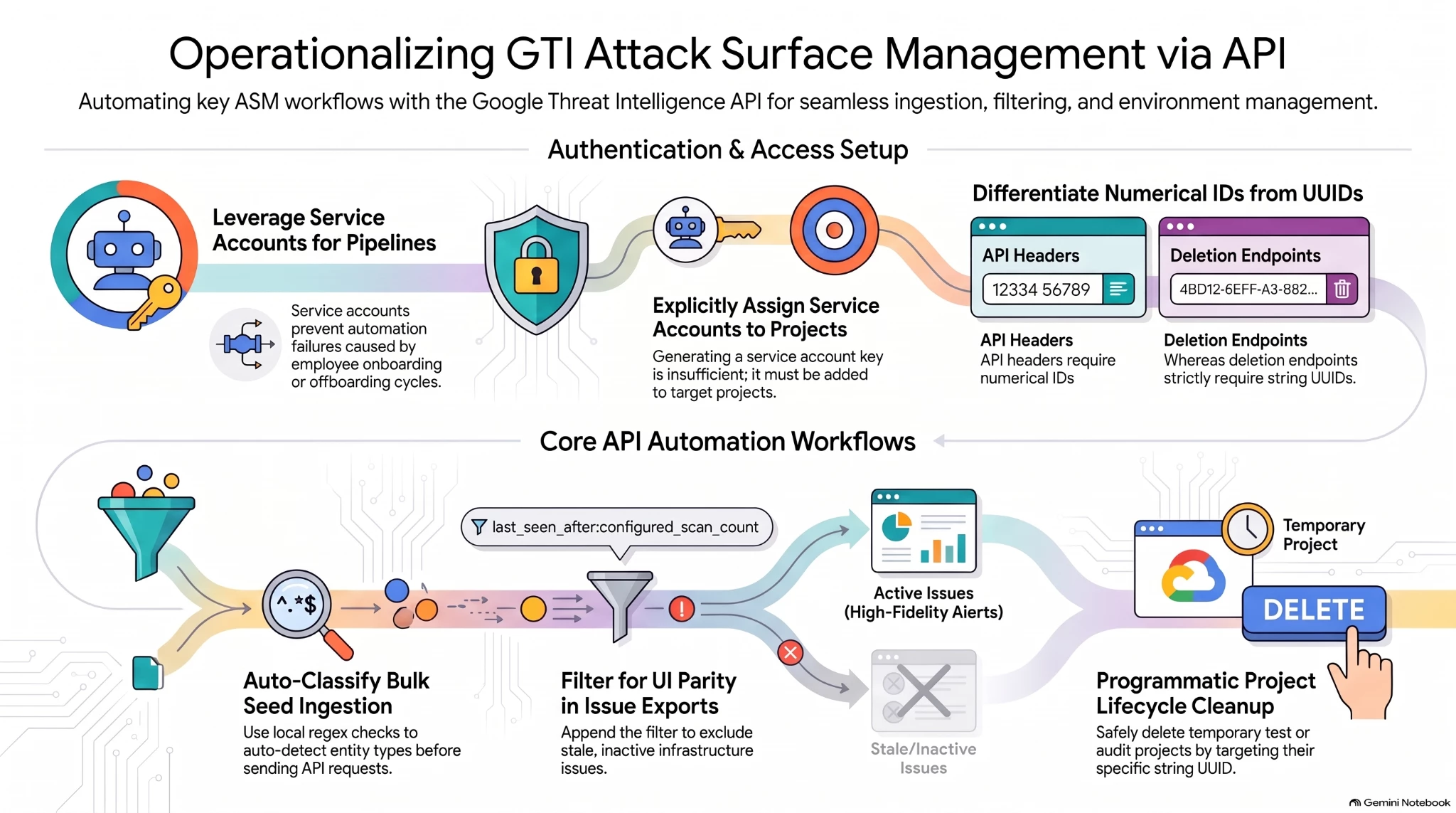
For automation pipelines, it is highly recommended to use Service Accounts rather than tying scripts to a specific individual’s standard API key. Service accounts ensure that critical automation is unaffected by personnel changes or onboarding/offboarding cycles.
Critical Setup Step for ASM:
If you are using a Service Account API key to interact with ASM endpoints, the service account must be explicitly added as an owner/member to the target ASM Project. It must also be assigned the appropriate roles (e.g., Admin, Analyst, Viewer) to grant it the necessary permissions to access collections data. Simply generating a service account key is not enough; the RBAC mapping to the ASM Project is required for the API requests to succeed.
-
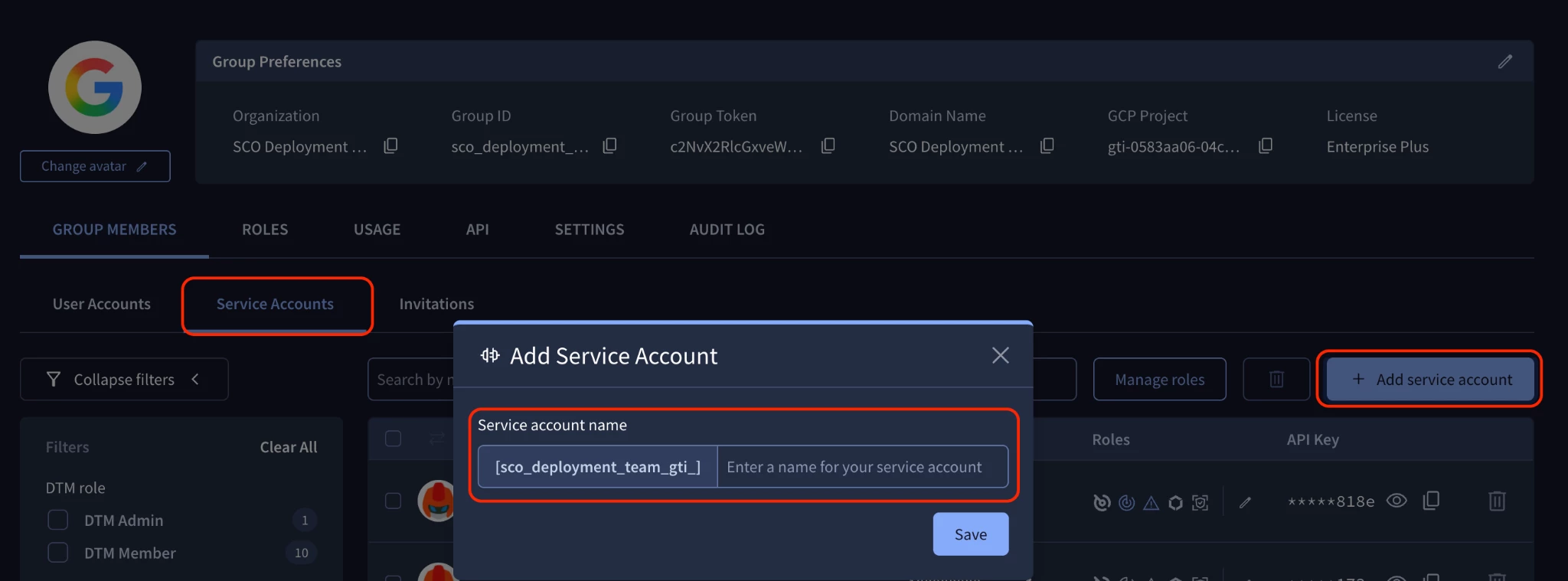
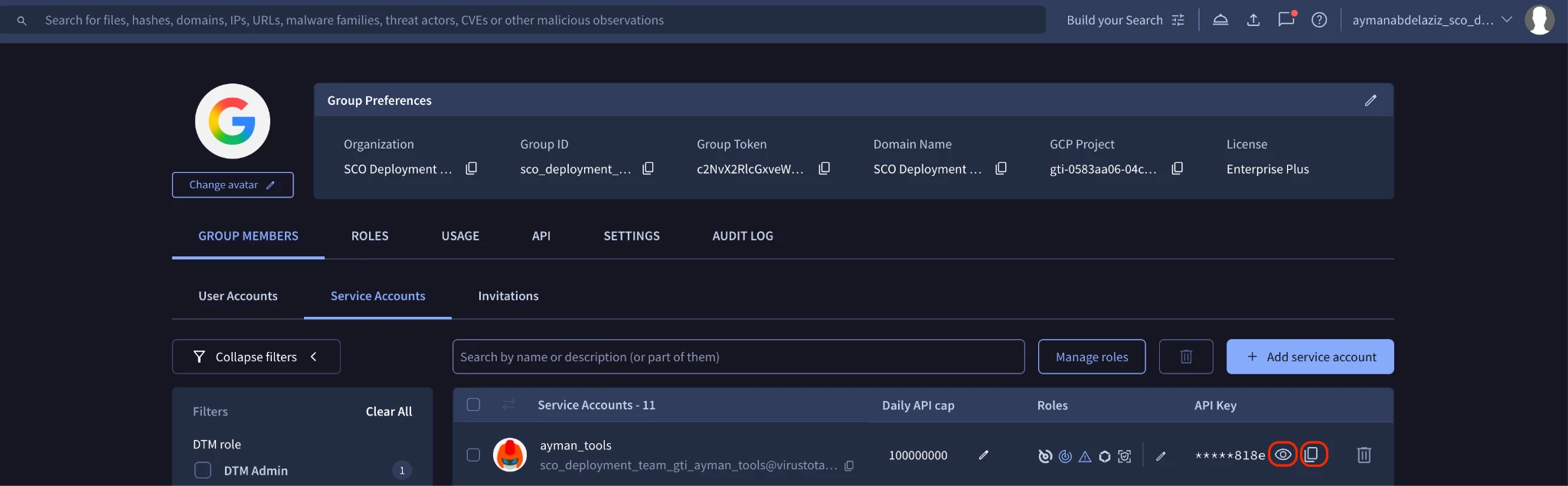
Group Administrators must create a Service Account under: My group > Service accounts > Add Service Account
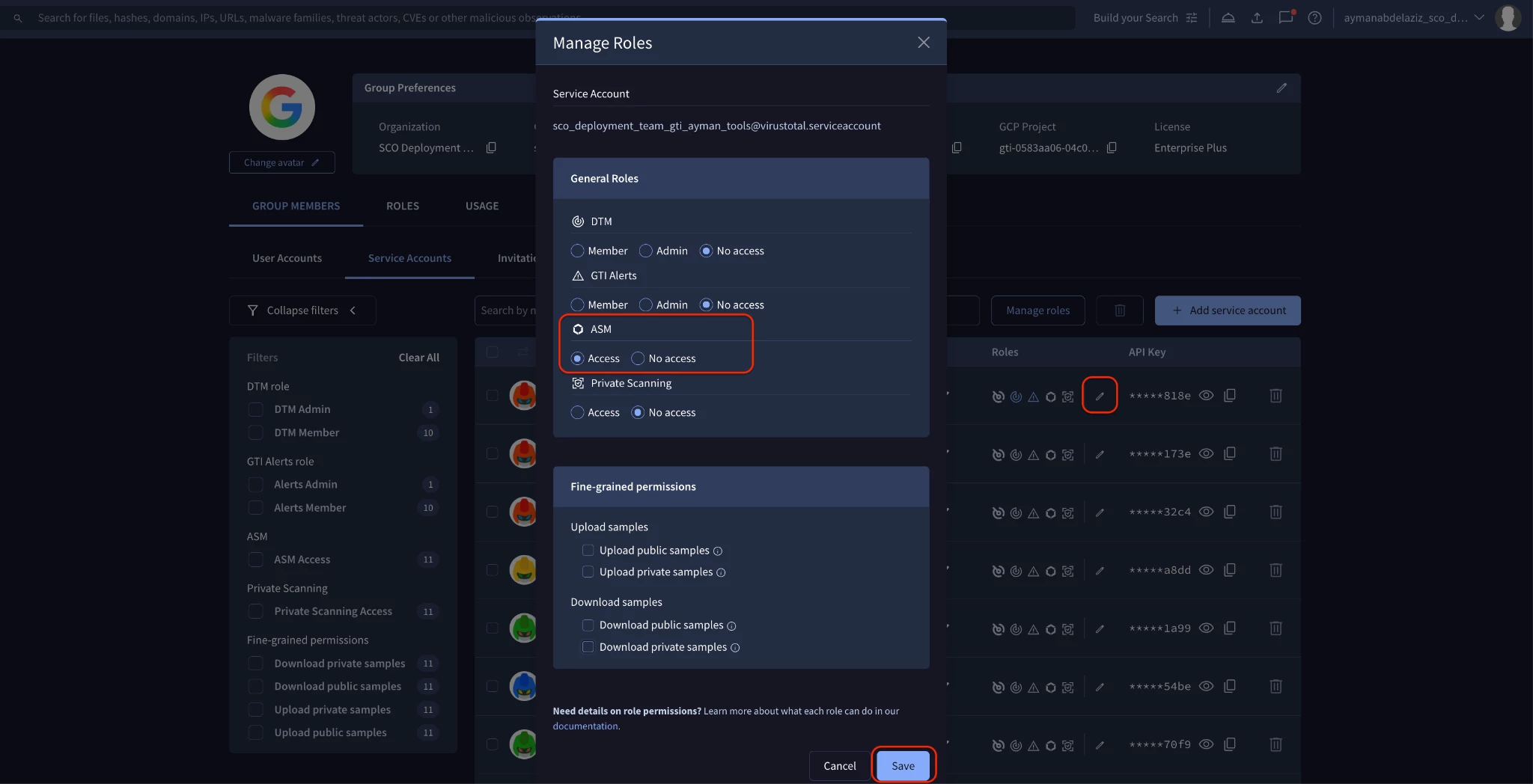
- On the created service account -> Click “Edit Roles” > and Select the ASM “Access” checkbox > Then Click “Save”
- Get the Service Account API Key by clicking the visibility icon to reveal it, or click the copy icon to copy it to your clipboard.
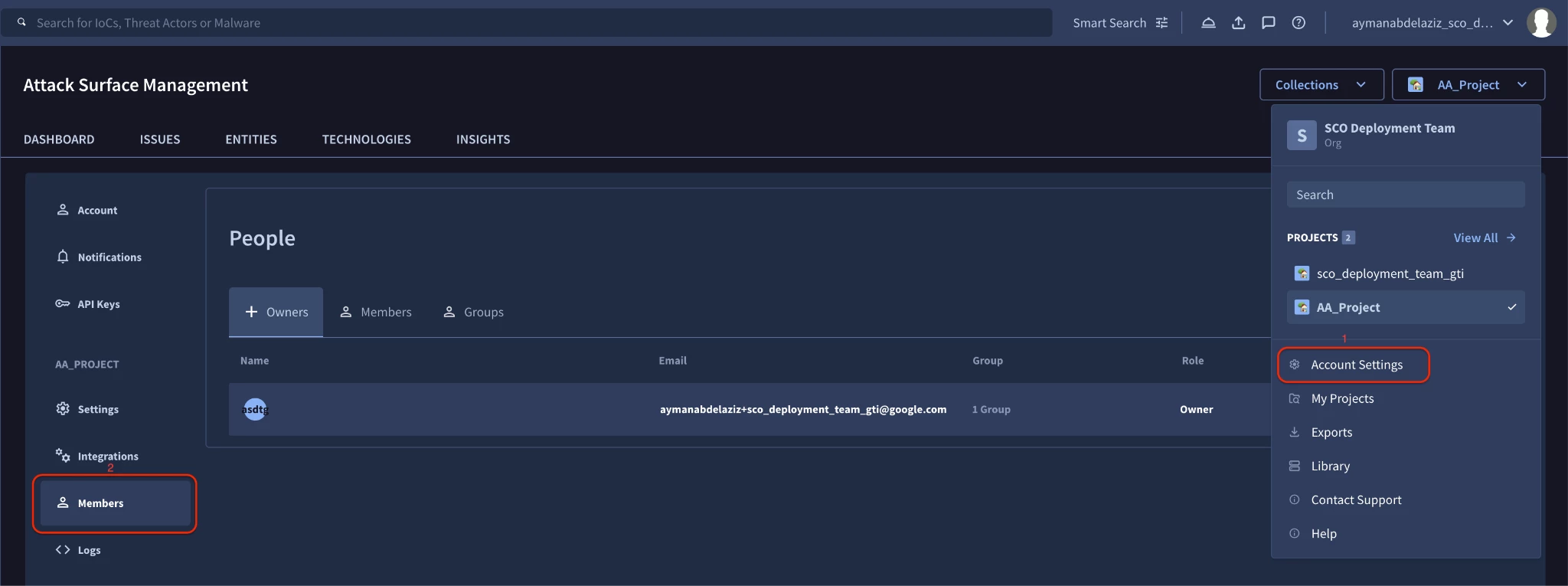
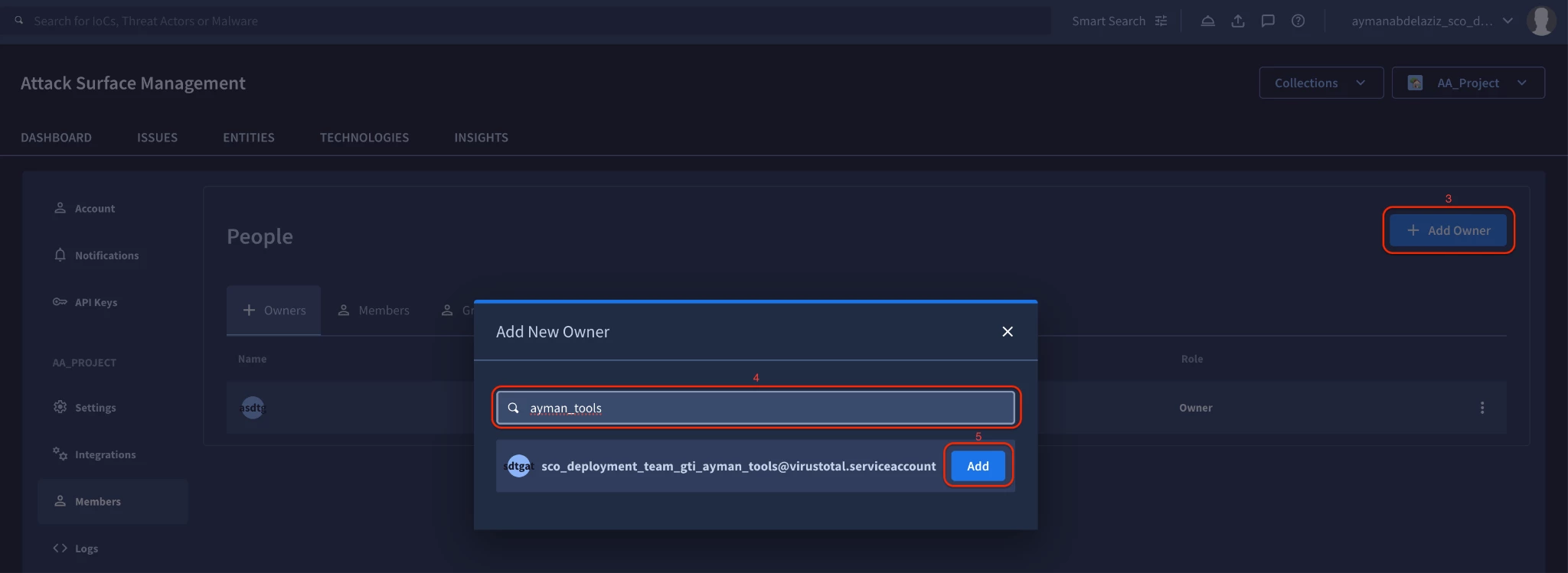
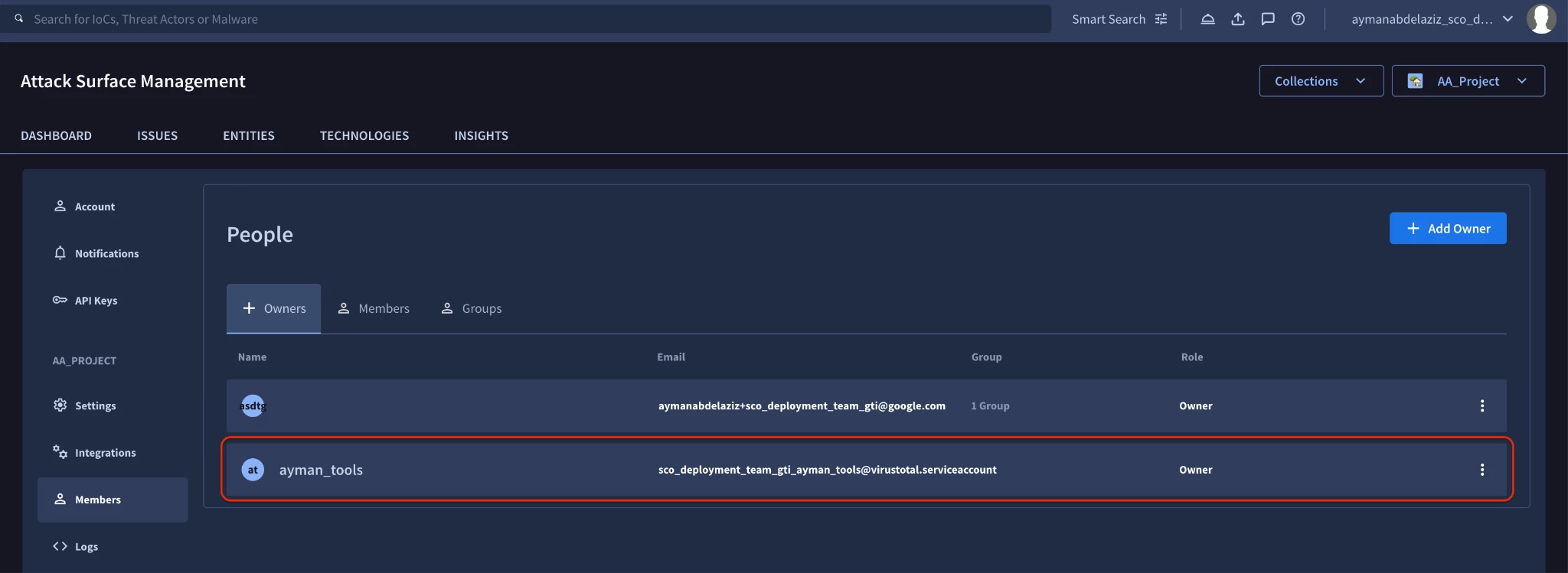
- Critical Step: You must explicitly add the Service Account to your ASM Project. Go to your Project Dashboard > Account Settings (Gear Icon) > Members > Add Owner > Click the “Add” button on the service account name.
Important Note on "Owner" vs. "Member" Roles:
If you choose to add the Service Account as a "Member" at the Project level rather than an "Owner", you will need to perform additional RBAC configurations at the individual
Collection level depending on the script you are running:
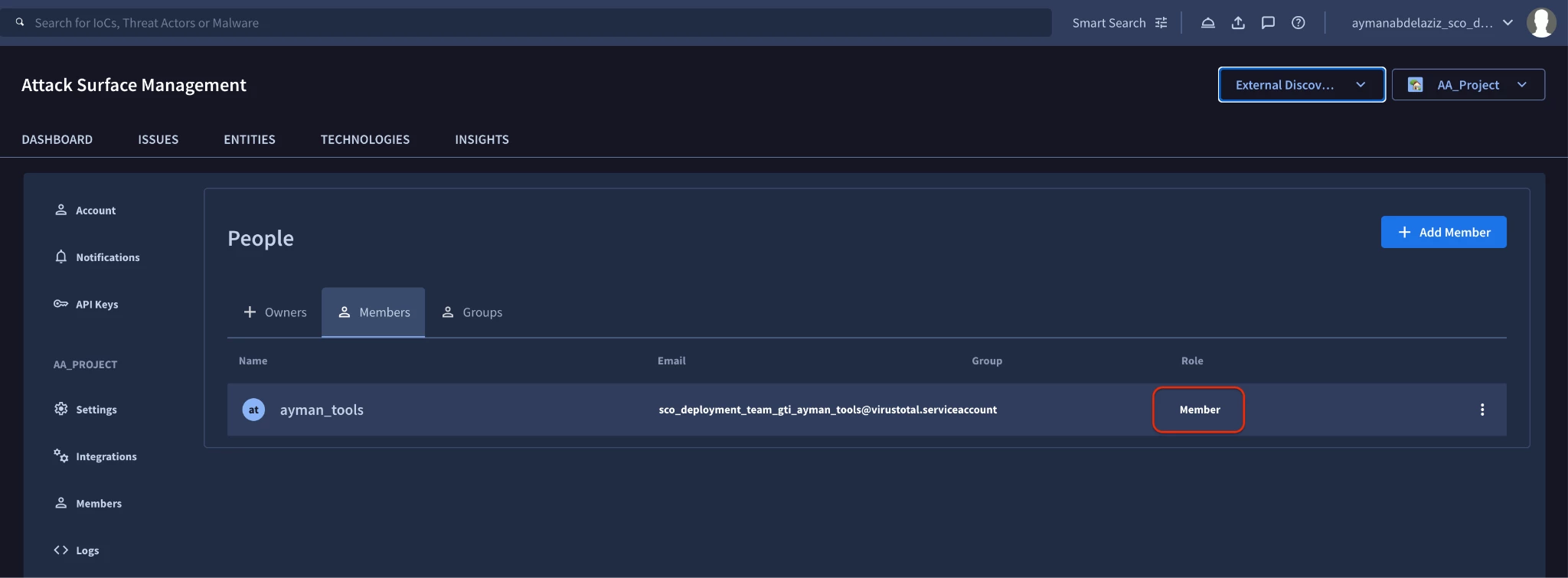
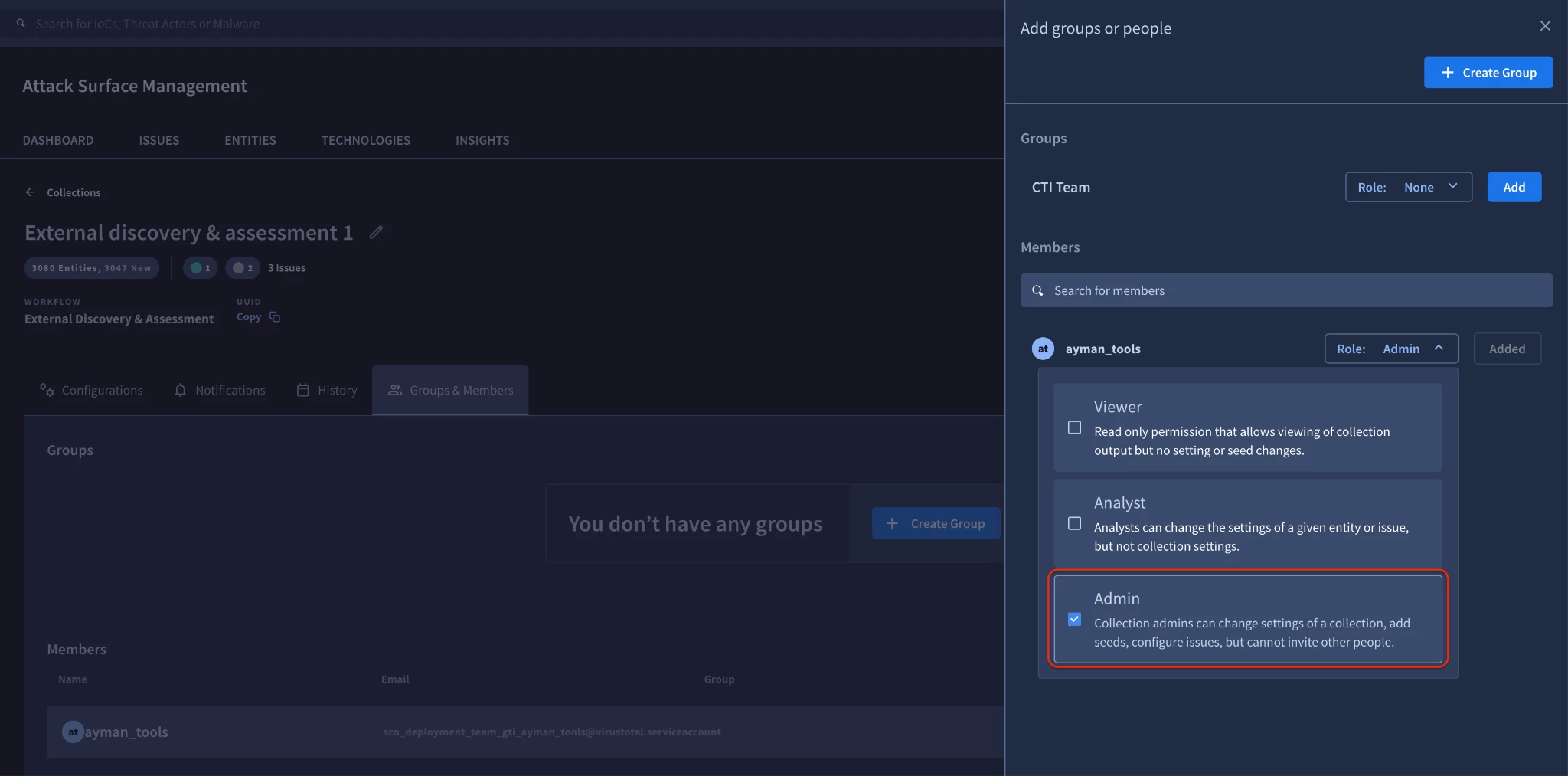
- To run the Bulk Seed Provisioning script (Step 3), a "Member" Service Account must also be explicitly added as an "Admin" on the specific Collection.
-
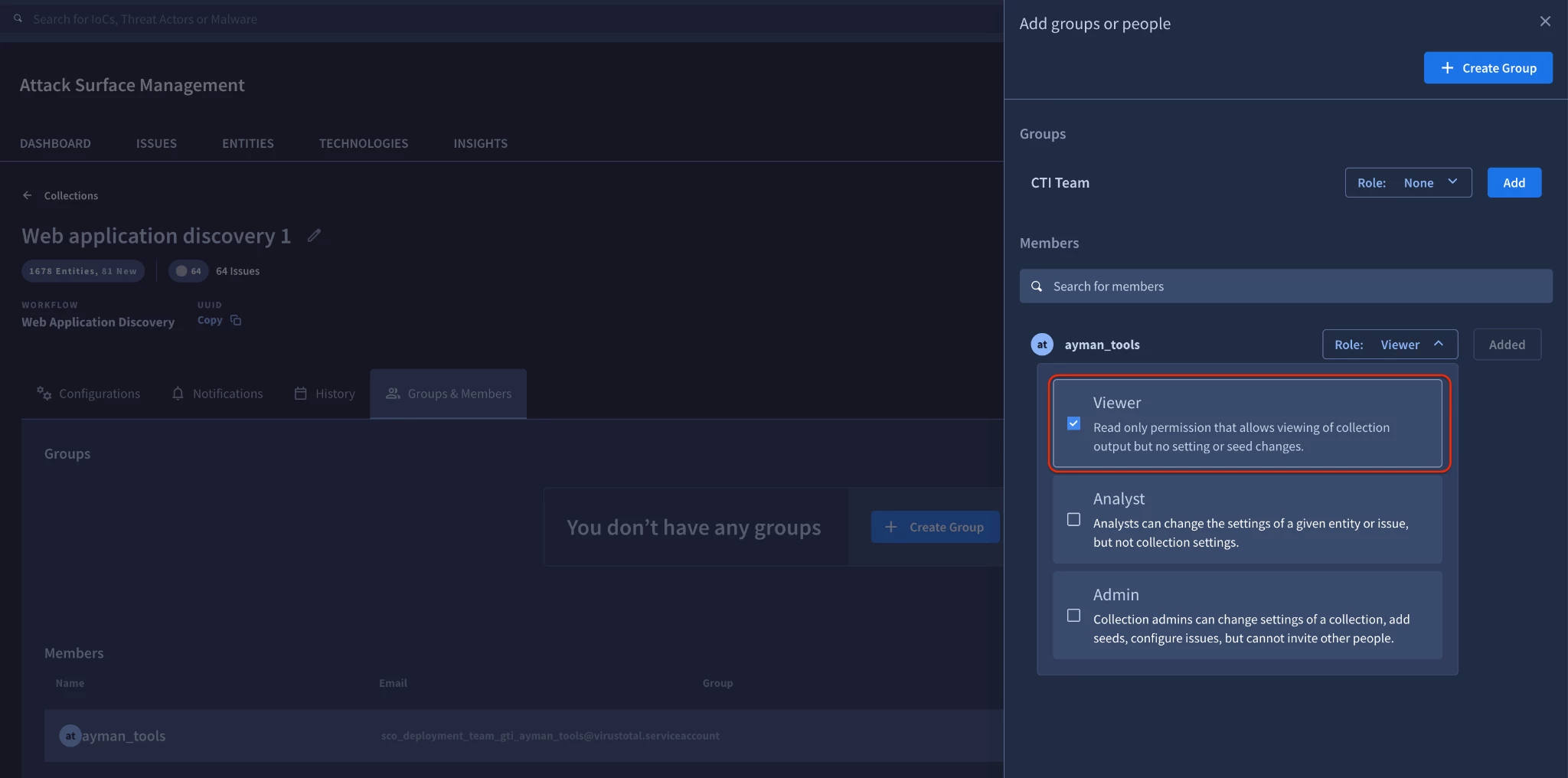
To run the Automating Issue Extraction script (Step 4), a "Member" Service Account must be explicitly added as a "Viewer" at least on the specific Collection.
-
To run the Automated Project Cleanup script (Step 5), the Service Account must be an "Owner" at the Project level. A "Member" cannot delete a project.
Step 2: Navigating Project Identifiers: Numerical ID vs. UUID
A frequent point of confusion when interacting with the ASM API is identifying which format of the "Project ID" to use in API headers.
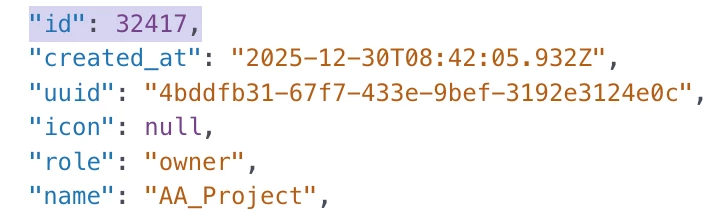
When you query the /api/v3/asm/projects endpoint, the JSON response returns several identifiers for a project, including a numerical id (e.g., 1234) and a string uuid (e.g., be884e25-a0bb-4836...).
Key Takeaway: The PROJECT-ID header required by most ASM endpoints (like collections, issues, and entities) expects the numerical identifier (id), NOT the string uuid or the project name. If you receive an empty response indicating the project cannot be found, ensure you are passing the right numerical id value in your headers.
Step 3: Bulk Seed Provisioning (Auto-Detecting Entity Types)
When bootstrapping a new ASM collection, analysts often possess a massive list of unclassified domains, IP addresses, CIDR blocks, and URIs. The /user_entities endpoint requires explicitly declaring the entity type upon creation.
To eliminate manual sorting, the following script reads from a flat text or CSV file, leverages Regex to automatically detect the appropriate GTI entity classification (Uri, IpAddress, NetBlock, or Domain), and uploads them in bulk.
import csv
import logging
import requests
import re
import ipaddress
from typing import Optional, List, Dict, Any

# Configure logging
logging.basicConfig(level=logging.INFO, format="%(asctime)s - %(levelname)s - %(message)s")

# --- Configuration Section ---
API_KEY: str = "YOUR_API_KEY"
PROJECT_ID: str = "YOUR_NUMERICAL_PROJECT_ID"  # Must be numeric string
COLLECTION_UUID: str = "YOUR_COLLECTION_UUID"  # E.g., "c1b502fe-1020..."
INPUT_FILE: str = "seeds.csv"                  # Or .txt
# -----------------------------

def detect_entity_type(seed: str) -> Optional[str]:
    """Auto-detects the GTI entity type based on common string patterns.

    Args:
        seed: The input string (e.g., IP, domain) to analyze.

    Returns:
        A string representing the GTI entity type ('Uri', 'IpAddress', 'NetBlock',
        'Domain'), or None if the pattern cannot be identified and should be discarded.
    """
    seed = seed.strip()
    if not seed:
        return None

    # 1. Check if it's a URI
    if re.match(r"^https?://", seed):
        return "Uri"

    # 2. Check if it's an IP Address (IPv4 or IPv6)
    try:
        ipaddress.ip_address(seed)
        return "IpAddress"
    except ValueError:
        pass # Not a single IP address

    # 3. Check if it's a NetBlock/CIDR (IPv4 or IPv6)
    if "/" in seed:
        try:
            # strict=False allows netmasks to affect the network address part
            ipaddress.ip_network(seed, strict=False)
            return "NetBlock"
        except ValueError:
            pass # Not a valid CIDR

    # 4. Check if it's a Domain Name using a strict Regex
    # Matches common domain structures like "example.com" or "sub-domain.example.co.uk"
    domain_regex = re.compile(
        r"^(?:[a-zA-Z0-9](?:[a-zA-Z0-9-]{0,61}[a-zA-Z0-9])?\.)+[a-zA-Z]{2,}$"
    )
    if domain_regex.match(seed):
        return "Domain"

    # 5. If it doesn't match any of the above, return None to discard
    return None

def upload_seeds(
    api_key: str,
    project_id: str,
    collection_uuid: str,
    filepath: str
) -> None:
    """Reads seeds from a file, auto-detects their type, and uploads them in bulk to ASM.

    Args:
        api_key: The Service Account API key for authentication.
        project_id: The numerical ID of the target ASM Project.
        collection_uuid: The UUID of the target ASM Collection.
        filepath: The path to the input text or CSV file containing the seeds.

    Returns:
        None. Logs the outcome (success, skipped items, or errors).
    """
    url: str = f"https://www.virustotal.com/api/v3/asm/user_collections/{collection_uuid}/user_entities"
    headers: Dict[str, str] = {
        "x-apikey": api_key,
        "PROJECT-ID": project_id, # numerical id must be used in headers
        "accept": "application/json",
        "content-type": "application/json"
    }

    # Structure of entities for payload: [{"name": "seed", "type": "detected_type"}, ...]
    entities: List[Dict[str, str]] = []
    discarded_count: int = 0
    total_processed: int = 0

    try:
        logging.info(f"Reading seeds from {filepath}...")
        with open(filepath, 'r', encoding='utf-8') as f:
            # Simple iteration handles raw text (one per line) or single-column CSV
            for line in f:
                # Remove spaces and common trailing delimiters like commas
                seed: str = line.strip().strip(',').strip()
                if not seed:
                    continue

                total_processed += 1
                entity_type: Optional[str] = detect_entity_type(seed)

                if entity_type:
                    entities.append({
                        "name": seed,
                        "type": entity_type
                    })
                else:
                    logging.warning(f"Discarding invalid or unidentifiable seed: {seed}")
                    discarded_count += 1

    except FileNotFoundError:
        logging.error(f"Input file {filepath} not found.")
        return
    except Exception as e:
        logging.error(f"Error reading file {filepath}: {e}")
        return

    if not entities:
        logging.info("No valid seeds found in file to upload.")
        return

    logging.info(f"Preparing to upload {len(entities)} valid seeds. Skipping {discarded_count} invalid items.")
    payload: Dict[str, Any] = {"entities": entities}

    try:
        response: requests.Response = requests.post(url, headers=headers, json=payload)

        # Check HTTP status code
        if response.status_code == 200:
            logging.info(
                f"Successfully queued {len(entities)} seeds to collection {collection_uuid}. "
                "ASM Discovery scans will initiate shortly."
            )
        elif response.status_code == 403:
            logging.error(
                "Failed to upload (HTTP 403 Forbidden). Ensure the Service Account "
                f"is added as an 'Owner' to the target ASM Project (ID: {project_id})."
            )
        else:
            logging.error(f"Failed to upload seeds (HTTP {response.status_code}): {response.text}")

    except requests.exceptions.RequestException as req_err:
        logging.error(f"Network error trying to contact ASM API: {req_err}")

if __name__ == "__main__":
    # Validate required parameters are set
    if "YOUR_API_KEY" in API_KEY or "YOUR_NUMERICAL_PROJECT_ID" in PROJECT_ID:
        logging.critical("Please set your API key, Project ID, and Collection UUID in the configuration section.")
    else:
        upload_seeds(API_KEY, PROJECT_ID, COLLECTION_UUID, INPUT_FILE)
Step 4. Automating Issues Extraction:
Security Operations Centers (SOCs) frequently need to ingest active ASM issues into external SIEMs or ticketing systems like Jira. However, teams often notice a discrepancy: querying the API for "Open" issues often returns significantly more results than the ASM UI displays.
Why does this happen?
In GTI ASM, an issue is defined not just by its open/closed status, but by when it was last observed. Administrators configure a threshold of recent scans to determine if an asset is currently "alive" or "stale."
-
The UI actively filters out "stale" issues to reduce alert fatigue. If a vulnerability was detected 6 months ago on a server that is no longer responding to ASM scans, it is still technically "Open", but functionally "Inactive."
-
To match the UI's "Active" dashboard, you must append the last_seen_after:configured_scan_count filter to your API query. This restricts results to issues present on infrastructure that is actively responding to recent scans.

The script below queries the API for genuinely active issues within a specific collection, applies the correct scan count filter, paginates through the results, and flattens the nested JSON into a uniform CSV for easy ingestion.
import csv
import logging
import requests
import urllib.parse
from typing import Any, Dict, List, Optional

# Configure logging
logging.basicConfig(level=logging.INFO, format="%(asctime)s - %(levelname)s - %(message)s")

# --- Configuration Section ---
API_KEY: str = "YOUR_API_KEY"
PROJECT_ID: str = "YOUR_NUMERICAL_PROJECT_ID"  # E.g., "1234" (Must be numeric string)
COLLECTION_NAME: str = "your_collection_name"
OUTPUT_FILE: str = "active_issues.csv"
# -----------------------------

def flatten_json(nested_json: Dict[str, Any], separator: str = "_") -> Dict[str, Any]:
    """Recursively flattens a nested dictionary, compiling keys for CSV DictWriter.

    Args:
        nested_json: The dictionary payload (e.g., an individual ASM issue record).
        separator: Character used to separate nested keys in the flattened result.

    Returns:
        A dictionary with a single layer of keys, suitable for flat CSV export.
    """
    out: Dict[str, Any] = {}

    def flatten(x: Any, name: str = "") -> None:
        """Recursive internal function."""
        if isinstance(x, dict):
            for a in x:
                flatten(x[a], name + a + separator)
        elif isinstance(x, list):
            i: int = 0
            for a in x:
                flatten(a, name + str(i) + separator)
                i += 1
        else:
            # Base case: reach a scalar value (string, int, float, None)
            out[name[:-1]] = x # name[:-1] removes trailing separator

    flatten(nested_json)
    return out

def export_active_issues(
    api_key: str,
    project_id: str,
    collection_name: str,
    output_csv: str
) -> None:
    """Queries, paginates, flattens, and exports open/active ASM issues to CSV.

    Aligned with the 'Active' UI dashboard view.

    Args:
        api_key: Service Account API key for authentication.
        project_id: Numerical ID of the target ASM Project.
        collection_name: Name of the collection to search within.
        output_csv: Filename for the output CSV.

    Returns:
        None.
    """
    # The critical filters for UI parity:
    # 1. status_new:open -> finds unresolved issues
    # 2. last_seen_after:configured_scan_count -> finds issues present in recent scans
    search_string: str = f"collection:{collection_name} status_new:open last_seen_after:configured_scan_count"

    # Ensure search string is properly URL-encoded
    encoded_search: str = urllib.parse.quote(search_string)
    base_url: str = f"https://www.virustotal.com/api/v3/asm/search/issues/{encoded_search}"

    headers: Dict[str, str] = {
        "x-apikey": api_key,
        "PROJECT-ID": project_id, # numerical id required in headers
        "accept": "application/json"
    }

    all_issues: List[Dict[str, Any]] = []
    page_token: Optional[str] = None

    logging.info(f"Starting extraction for genuinely active issues in collection '{collection_name}'...")

    while True:
        # Request 100 items per request (maximum allowed)
        params: Dict[str, Any] = {"page_size": 100}
        if page_token:
            params["page_token"] = page_token

        try:
            response: requests.Response = requests.get(base_url, headers=headers, params=params)
            response.raise_for_status() # Raise exception for 4xx/5xx status

            payload: Dict[str, Any] = response.json()
            data: Dict[str, Any] = payload.get("result", {})
            hits: List[Dict[str, Any]] = data.get("hits", [])

            # Base case: no more results
            if not hits:
                break

            all_issues.extend(hits)
            logging.info(f"Fetched {len(hits)} issues. Current total collected: {len(all_issues)}...")

            # Check for next page token
            page_token = data.get("next_page_token")
            if not page_token:
                break

        except requests.exceptions.RequestException as e:
            logging.error(f"Error communicating with ASM API: {e}")
            break

    if not all_issues:
        logging.info("No active issues found matching criteria (Open + last_seen_after scan window).")
        return

    logging.info(f"Collected {len(all_issues)} active issues. Flattening records...")
    flattened_records: List[Dict[str, Any]] = [flatten_json(issue) for issue in all_issues]

    # 3rd Peer Review Recommendation: Compile all unique headers from all records
    # ASM payloads are dynamic; different issues contain different proofs/data.
    logging.info("Compiling CSV fieldnames from dynamic payload...")
    unique_headers: Set[str] = set()
    for record in flattened_records:
        for key in record.keys():
            unique_headers.add(key)
    all_csv_headers: List[str] = sorted(list(unique_headers))

    # Standard encodings ensure UTF-8 characters in proof details are preserved
    logging.info(f"Writing data to {output_csv}...")
    try:
        with open(output_csv, 'w', newline='', encoding='utf-8') as csv_file:
            writer: csv.DictWriter = csv.DictWriter(csv_file, fieldnames=all_csv_headers)
            writer.writeheader()
            writer.writerows(flattened_records)

        logging.info(f"Successfully exported {len(all_issues)} issues to {output_csv}.")

    except Exception as e:
        logging.error(f"Error writing to CSV file: {e}")

if __name__ == "__main__":
    if "YOUR_API_KEY" in API_KEY or "YOUR_NUMERICAL_PROJECT_ID" in PROJECT_ID:
        logging.critical("Please set your API key and Project ID in the configuration section.")
    else:
        export_active_issues(API_KEY, PROJECT_ID, COLLECTION_NAME, OUTPUT_FILE)
Step 5. Automated Project Cleanup: Deleting ASM Projects
During rapid onboarding and continuous integration testing, you may generate test projects that eventually clutter your environment. The script below interacts with the DELETE /projects/{uuid} endpoint to safely prune unneeded ASM projects.
Note that unlike the collection and issue endpoints which require the numerical PROJECT-ID header, deleting a project requires passing the project's string uuid directly into the path parameter.
- Using curl command line:
Run the following curl command to get the project uuid.
   curl --request GET \
     --url https://www.virustotal.com/api/v3/asm/projects \
     --header 'accept: application/json' \
     --header 'x-apikey: {x-apikey}'
Using this uuid, run the following command to delete the project.
   curl --request DELETE \
     --url https://www.virustotal.com/api/v3/asm/projects/{uuid} \
     --header 'accept: application/json' \
     --header 'x-apikey: {x-apikey}'
- Using a Python script:
import logging
import requests
from typing import Dict

# Configure logging
logging.basicConfig(level=logging.INFO, format="%(asctime)s - %(levelname)s - %(message)s")

# --- Configuration Section ---
API_KEY: str = "YOUR_API_KEY"
# The delete endpoint strictly requires the PROJECT UUID, NOT the numerical ID
PROJECT_UUID_TO_DELETE: str = "YOUR_PROJECT_UUID" # E.g., "bbc7b1dc-0d9f-4e3f..."
# -----------------------------

def delete_asm_project(api_key: str, project_uuid: str) -> None:
    """SAFELY deletes an existing ASM Project. Use with caution.

    ASM Projects rely on the string UUID for deletion lifecycle events.

    Args:
        api_key: Service Account API key for authentication.
        project_uuid: String UUID of the project to be destroyed.

    Returns:
        None.
    """
    url: str = f"https://www.virustotal.com/api/v3/asm/projects/{project_uuid}"
    headers: Dict[str, str] = {
        "x-apikey": api_key,
        "accept": "application/json"
    }

    logging.info(f"Attempting to SAFELY delete ASM Project Lifecycle Event: {project_uuid}...")

    try:
        # Standard DELETE request method
        response: requests.Response = requests.delete(url, headers=headers)

        # ASM API returns 200 OK upon successful queuing for deletion
        if response.status_code == 200:
            logging.info(f"ASM Project Lifecycle command '{project_uuid}' queued successfully. Project deleted.")
        elif response.status_code == 404:
            logging.error(f"Failed to delete (HTTP 404): Project UUID {project_uuid} not found.")
        elif response.status_code == 403:
            logging.error(
                f"Failed to delete (HTTP 403 Forbidden). Ensure Service Account is added "
                "as an 'Owner' or 'Admin' specifically to this targeted ASM Project."
            )
        else:
            logging.error(f"Failed to delete lifecycle event (HTTP {response.status_code}): {response.text}")

    except requests.exceptions.RequestException as e:
        logging.error(f"Network error trying to contact ASM deletion API: {e}")

if __name__ == "__main__":
    if "YOUR_API_KEY" in API_KEY or "YOUR_PROJECT_UUID" in PROJECT_UUID_TO_DELETE:
        logging.critical("Please set your API key and target Project UUID in the configuration section.")
    else:
        delete_asm_project(API_KEY, PROJECT_UUID_TO_DELETE)
Step 6: Data Export & Migration Readiness (Backing Up All Project Seeds)
With the legacy GTI ASM platform entering its deprecation window (End-of-Life scheduled for September 28, 2027), security teams must prepare to port their existing attack surface perimeters to the new native ASM baseline feature launching in June 2027.
Manually documenting every seed across multiple collections is prone to human error and risks leaving critical infrastructure unmonitored during the transition. The following script automates this backup process. By simply providing your Project ID, the script dynamically enumerates every Collection within the project, extracts the full list of monitored entities (seeds), and compiles them into a single, unified CSV file.
This output serves as a perfect backup file, allowing your team to easily audit your current footprint and programmatically import these seeds into the new native ASM feature when it becomes available.
import csv
import logging
import requests
from typing import Dict, List, Any, Optional

# Configure standard logging
logging.basicConfig(level=logging.INFO, format="%(asctime)s - %(levelname)s - %(message)s")

# ==========================================
# CONFIGURATION INPUTS
# ==========================================
API_KEY: str = "YOUR_API_KEY"
PROJECT_ID: str = "YOUR_NUMERICAL_PROJECT_ID"  # Must be the numerical ID, e.g., "32417"
OUTPUT_FILENAME: str = "asm_seeds_migration_backup.csv"
# ==========================================

def get_collections(api_key: str, project_id: str) -> List[Dict[str, str]]:
    """
    Retrieves the list of all ASM collections under a specific project.

    This function parses the legacy 'result' array format returned by
    the ASM user_collections endpoint.

    Args:
        api_key (str): The Service Account API key for authentication.
        project_id (str): The numerical ASM Project ID.

    Returns:
        List[Dict[str, str]]: A list of dictionaries, each containing the 'uuid'
                              and 'printable_name' of a collection.
    """
    url: str = "https://www.virustotal.com/api/v3/asm/user_collections"
    headers: Dict[str, str] = {
        "x-apikey": api_key.strip(),
        "PROJECT-ID": project_id.strip(),
        "accept": "application/json"
    }

    collections: List[Dict[str, str]] = []
    params: Dict[str, Any] = {"limit": 100}

    logging.info(f"Fetching collections for Project ID: {project_id}")

    while True:
        response: requests.Response = requests.get(url, headers=headers, params=params)

        if response.status_code != 200:
            logging.error(f"API Error {response.status_code}: {response.text}")
            break

        payload: Dict[str, Any] = response.json()

        # Parse the legacy ASM format using 'result' instead of 'data'
        data: List[Dict[str, Any]] = payload.get("result", [])

        if not data and not collections:
            logging.warning("No collections found for this Project ID.")
            break

        for item in data:
            coll_uuid: str = item.get("uuid", "")
            coll_name: str = item.get("printable_name", item.get("name", "Unknown Collection"))

            if coll_uuid:
                collections.append({"uuid": coll_uuid, "printable_name": coll_name})

        # Handle Pagination (Legacy ASM uses next_page_token)
        cursor: Optional[str] = payload.get("next_page_token") or payload.get("meta", {}).get("cursor")
        if not cursor:
            break

        if payload.get("next_page_token"):
            params["page_token"] = cursor
        else:
            params["cursor"] = cursor

    return collections


def get_seeds(api_key: str, project_id: str, collection_uuid: str) -> List[Dict[str, str]]:
    """
    Retrieves all configured seeds for a given ASM collection.

    Args:
        api_key (str): The Service Account API key for authentication.
        project_id (str): The numerical ASM Project ID.
        collection_uuid (str): The unique identifier for the collection.

    Returns:
        List[Dict[str, str]]: A list of dictionaries containing 'seed_name' and 'type'.
    """
    url: str = f"https://www.virustotal.com/api/v3/asm/user_collections/{collection_uuid}/user_entities"
    headers: Dict[str, str] = {
        "x-apikey": api_key.strip(),
        "PROJECT-ID": project_id.strip(),
        "accept": "application/json"
    }

    seeds: List[Dict[str, str]] = []
    params: Dict[str, Any] = {"limit": 100}

    while True:
        response: requests.Response = requests.get(url, headers=headers, params=params)

        if response.status_code != 200:
            logging.error(f"Failed to fetch seeds for collection {collection_uuid}: {response.text}")
            break

        payload: Dict[str, Any] = response.json()

        # Parse the legacy ASM format using 'result'
        data: List[Dict[str, Any]] = payload.get("result", [])

        for item in data:
            seed_name: str = item.get("name", item.get("value", ""))
            seed_type: str = item.get("type", item.get("entity_type", "Unknown"))

            if seed_name:
                seeds.append({"seed_name": seed_name, "type": seed_type})

        # Handle Pagination
        cursor: Optional[str] = payload.get("next_page_token") or payload.get("meta", {}).get("cursor")
        if not cursor:
            break

        if payload.get("next_page_token"):
            params["page_token"] = cursor
        else:
            params["cursor"] = cursor

    return seeds


def export_migration_backup() -> None:
    """
    Main execution function. Discovers all collections, extracts all seeds,
    and writes them to a single CSV file for migration backup.
    """
    if "YOUR_API_KEY" in API_KEY or "YOUR_NUMERICAL_PROJECT_ID" in PROJECT_ID:
        logging.critical("Please set your API_KEY and PROJECT_ID in the configuration section.")
        return

    logging.info("Starting ASM Seed Migration Backup...")
    collections: List[Dict[str, str]] = get_collections(API_KEY, PROJECT_ID)

    if not collections:
        logging.info("No collections found to export.")
        return

    logging.info(f"Successfully found {len(collections)} collections.")
    all_seeds_data: List[Dict[str, str]] = []

    for coll in collections:
        logging.info(f"Extracting seeds from collection: {coll['printable_name']} ...")
        seeds: List[Dict[str, str]] = get_seeds(API_KEY, PROJECT_ID, coll["uuid"])

        for seed in seeds:
            all_seeds_data.append({
                "seed name": seed["seed_name"],
                "type": seed["type"],
                "collection printable_name": coll["printable_name"],
                "collection uuid": coll["uuid"]
            })

    if not all_seeds_data:
        logging.warning("No seeds found in any collection.")
        return

    # Write output to CSV
    csv_headers: List[str] = ["seed name", "type", "collection printable_name", "collection uuid"]

    try:
        with open(OUTPUT_FILENAME, mode='w', newline='', encoding='utf-8') as f:
            writer: csv.DictWriter = csv.DictWriter(f, fieldnames=csv_headers)
            writer.writeheader()
            writer.writerows(all_seeds_data)
        logging.info(f"Migration Backup Complete! {len(all_seeds_data)} seeds saved to {OUTPUT_FILENAME}")
    except IOError as e:
        logging.error(f"Failed to write to file {OUTPUT_FILENAME}: {e}")

if __name__ == "__main__":
    export_migration_backup()
Applicable Best Practices
-
Strict Validation Over Catch-Alls: Always validate your network seed inputs locally before making API calls. Using built-in modules like
ipaddressand strict Regex prevents malformed data from polluting your ASM collections. -
Pagination is Mandatory: Always implement
page_tokenloops when querying issues or assets. The API limits responses to 100 items per request; failing to paginate will result in incomplete datasets. -
Filter High-Fidelity Data First: Leverage native server-side filters like
last_seen_after:configured_scan_countto reduce network overhead and ensure your SIEM or ticketing tools only process actionable alerts.
Common Pitfalls to Avoid
⚠️ The 403 Forbidden Service Account Error: Generating a Service Account key is not enough. You must add the Service Account as an Owner to the ASM Project via the UI.
⚠️ Project ID vs UUID Mismatches: Passing a string UUID into the PROJECT-ID HTTP header will result in a an empty respose. Always use the numerical ID for headers.
⚠️ UI vs API Issue Discrepancy: If your API script returns hundreds more issues than your UI dashboard, you forgot to append the active scan count filter.
Conclusion
By implementing the automation scripts and RBAC best practices outlined in this guide, network and infrastructure security teams will successfully transition from reactive, UI-bound vulnerability discovery to a fully programmatic Attack Surface Management lifecycle. Users will achieve immediate alignment between API data exports and UI representations, eliminate manual data cleaning for complex subnet auditing, and maintain a pristine operational environment free of authorization bottlenecks.