


Author: Shreja Rangarajan, Google Cloud, Technical Solutions Engineer
Compliance Manager in Security Command Center (SCC) provides a comprehensive library of built-in cloud controls to monitor your environment against industry standards and best practices. However, your organization might have unique security requirements, internal policies, or compliance needs that go beyond standard checks.
Custom Cloud Controls (the modern evolution of Custom SHA detectors) bridge this gap. They empower you to define your own rules using Common Expression Language (CEL) to scan your Google Cloud assets and identify specific conditions you consider risky or non-compliant. This allows you to tailor security monitoring precisely to your organization's needs, enforce custom governance policies, and enhance your overall cloud security posture.
Note: Custom Cloud Controls are exclusive to Premium and Enterprise service tiers.
Quick Reference: Custom Cloud Controls in Compliance Manager
| Core Objective | Tailor security monitoring by defining custom detection logic using CEL. |
|---|---|
| Action Types |
|
| Implementation Checklist |
|
| Best Practices |
|
Understanding Custom Cloud Controls
Custom Cloud Controls evaluate the properties of a resource against a rule defined in Common Expression Language (CEL). Unlike rigid legacy checks, CEL provides a flexible and powerful way to inspect resource configurations stored in Cloud Asset Inventory.
A Custom Cloud Control consists of the following components, including optional configuration for categorization tags and finding categories to help organize your security alerts:
-
Target Resource Type: The specific asset type (e.g., compute.googleapis.com/Instance).
-
Detection Logic (CEL): The boolean expression that evaluates the resource (e.g., checking if a specific field is true).
-
Severity: The criticality of a finding (Critical, High, Medium, Low).
-
Remediation Steps: Instructions for resolving violations.
How Custom Cloud Controls Differ from Custom SHA Modules
Custom Cloud Controls (powered by the Compliance Evaluation Service - CES) are the modern evolution of Custom Security Health Analytics (SHA) Modules. While both allow you to create custom detections for misconfigurations, they differ significantly in their architecture and capabilities.
Here is a breakdown of the key differences between them:
1. Language: CEL vs. Rigid YAML/JSON
-
Custom SHA: Used a proprietary, more rigid YAML/JSON structure specific to the legacy SHA scanner. Expressing complex logic or conditional checks was difficult.
-
Custom Cloud Controls: Leverage the Common Expression Language (CEL). CEL is a powerful, flexible, and industry-standard expression language that allows you to write highly specific, complex, and granular boolean logic to evaluate resource properties.
2. AI-Powered Creation: Gemini-Assisted Definitions
-
Custom SHA: Required manual, expert knowledge of the proprietary security module schema and asset properties to write any detection logic.
-
Custom Cloud Controls: Offer Gemini-assisted definitions. You can describe your security requirement in natural language (e.g., "Find all compute instances that don't have an internal IP address"), and Gemini will automatically generate the corresponding CEL expression for you. This significantly lowers the barrier to entry and speeds up the creation of custom governance rules.
3. Holistic Integration: Compliance Manager
-
Custom SHA: Existed primarily as standalone custom detectors within the SHA scanner view.
-
Custom Cloud Controls: Are first-class citizens in the new Compliance Manager. They integrate seamlessly into custom security frameworks, allowing you to track your custom requirements alongside built-in regulatory benchmarks (like CIS or NIST) in a unified dashboard.
4. Action Modes: Multi-Modal vs. Detective Only
-
Custom SHA: Limited strictly to Detective mode (identifying violations after resources were deployed).
-
Custom Cloud Controls: Support Detective and Audit actions. You can use the same logic to detect existing issues or generate evidence for audits.
Real-World Scenarios: Think Like a Security Architect
To understand the power of Custom Cloud Controls, imagine you are stepping into the shoes of a Security Architect. Here are the challenges you face on Day 1, and how Custom Cloud Controls help you solve them:
Scenario 1: "The Data Sovereignty Lockdown"
-
Your Challenge: The CISO calls. A new compliance regulation requires that all sensitive data in BigQuery and GCS must be encrypted using keys that your organization controls, not Google. You have 500 projects. How do you verify this instantly?
-
The Custom Control Solution: You write a CEL expression that targets BigQuery tables and GCS buckets, checking for the presence of a Customer-Managed Encryption Key (CMEK). If a developer spins up a storage bucket without it, Compliance Manager flags it immediately.
Scenario 2: "The Shadow IT Budget Buster"
-
Your Challenge: Your CFO notices compute costs are ballooning. You discover developers are spinning up massive, high-cost GPU instances (like a3-highgpu-8g) for "experimental" projects and leaving them running over the weekend.
-
The Custom Control Solution: You create a control that creates findings for these instance types. They can then deploy it in Monitor Mode for the folders/projects where there is experimental testing happening and this will stop the budget bleed before it starts.
Scenario 3: "The Custom Audit Nightmare"
-
Your Challenge: Your internal audit team has a strict custom security baseline that goes beyond standard CIS or NIST benchmarks. For example, they mandate that no default service accounts can be attached to Compute instances.
-
The Custom Control Solution: Standard frameworks don't cover this specific internal rule. You write a Custom Cloud Control that inspects the IAM bindings of compute instances and flags any use of the default Compute Engine service account, maintaining your custom governance posture.
Scenario 4: "The Hardened VM Mandate"
-
Your Challenge: You want to ensure your entire fleet is hardened against bootkits and rootkits. The directive is clear: Secure Boot must be enabled on every new VM.
-
The Custom Control Solution: You define a control that evaluates the shieldedInstanceConfig of compute instances. You can monitor compliance across your entire organization and provide clear remediation steps for any VM found in violation.
Step-by-Step Configuration
Using the Google Cloud Console
-
In the Google Cloud console, go to the Compliance page.

- Select your organization or project.
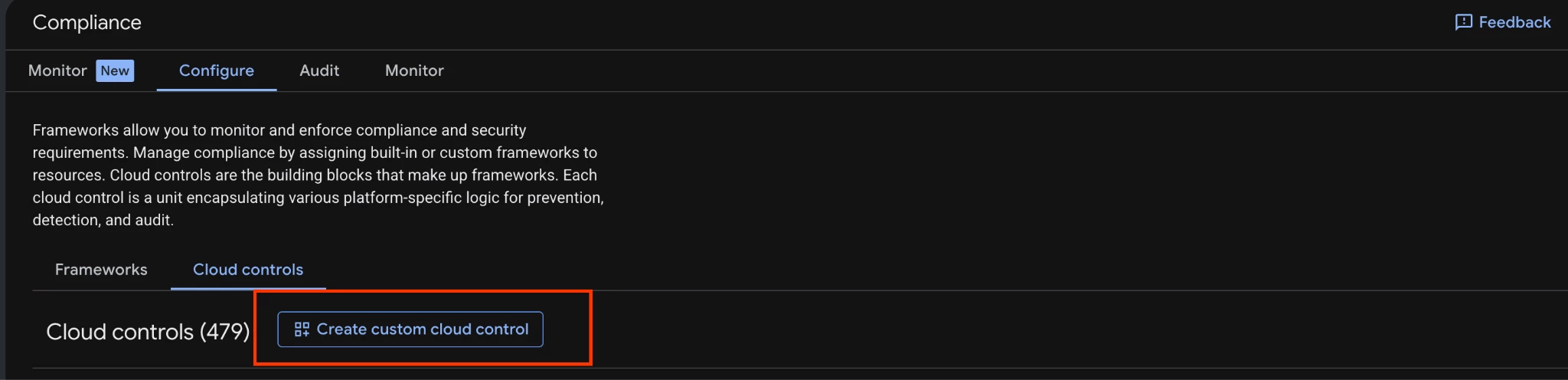
- Navigate to the Configure tab and click Cloud Controls.
-
Click Create Cloud Control.
-
- Manually: In the Detection logic section, select the target resource types and enter your custom CEL expression directly into the editor. Use this method if you have specific logic ready or need precise control over the rule definition.
-
- Define Control Details: Enter a unique Cloud control ID, a descriptive Display name, and a detailed Description to help others understand the purpose of this rule.
- Select Resource Types: In the Resource types dropdown, browse or search for the specific Google Cloud assets (e.g., compute.googleapis.com/Instance) that this control will evaluate.
- Enter CEL Expression: Within the code editor, write your boolean logic using Common Expression Language (CEL). Ensure the expression correctly references the resource data fields you intend to inspect.
- Configure Severity & Remediation: Assign a Finding severity (Critical, High, Medium, or Low) and provide actionable Remediation steps to guide users on how to resolve non-compliant findings.
- Review and Create: Verify all configurations in the summary and click Create to activate the new custom cloud control.
-
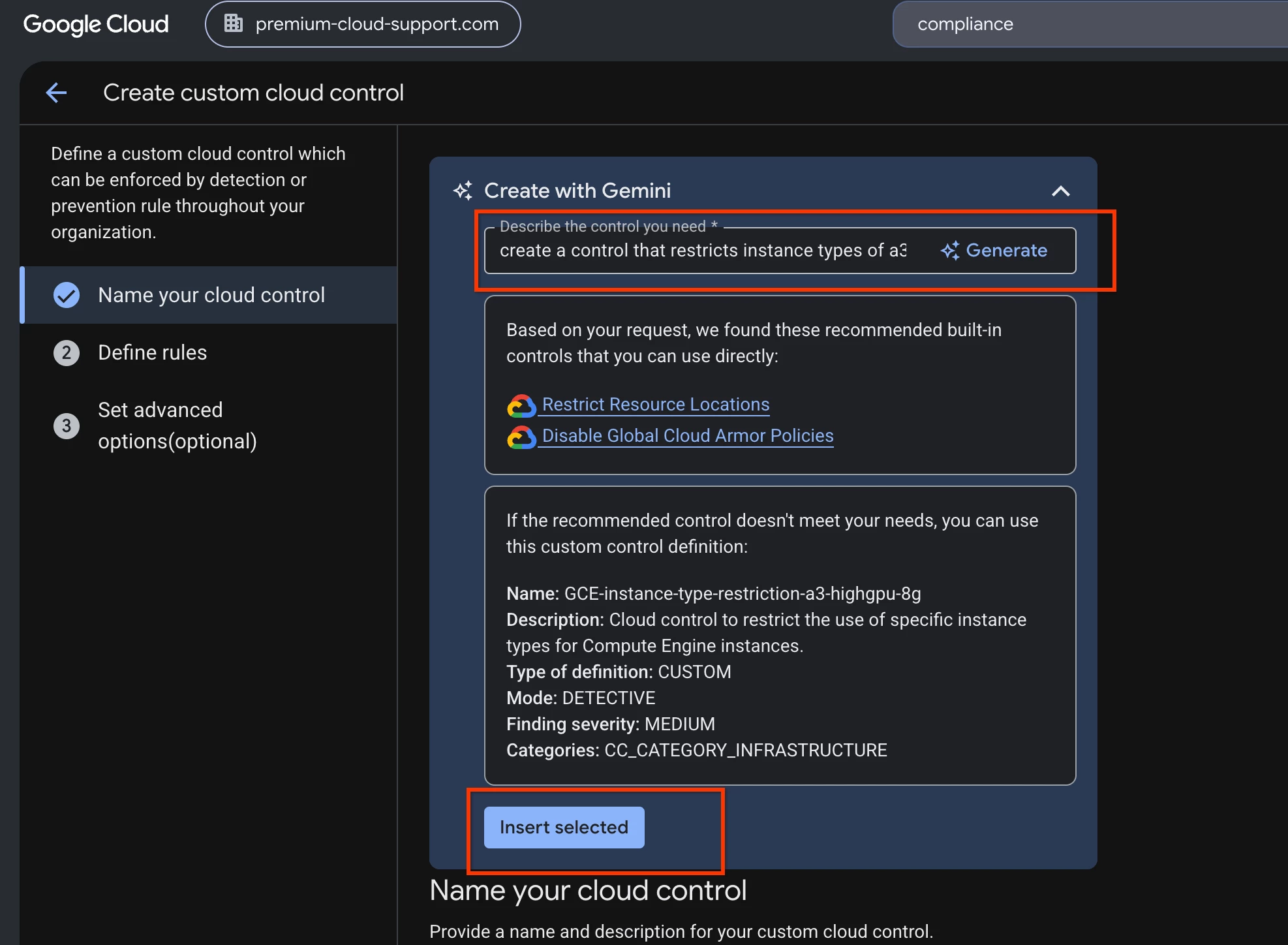
- Gemini Assisted (Preferred): Use the Gemini side panel or inline prompt to describe your security requirement in natural language. Gemini will analyze your request and generate the appropriate CEL expression and resource selection for you. Let's define a custom cloud control for Scenario 2: "The Shadow IT Budget Buster":
i. Write your scope statement in “Describe the control you need” dialog box and click on “Insert Selected”
- Gemini Assisted (Preferred): Use the Gemini side panel or inline prompt to describe your security requirement in natural language. Gemini will analyze your request and generate the appropriate CEL expression and resource selection for you. Let's define a custom cloud control for Scenario 2: "The Shadow IT Budget Buster":
In the example below the scope statement we gave was: "Create a control that restricts instance type of a3-highgpu-8g from being created"
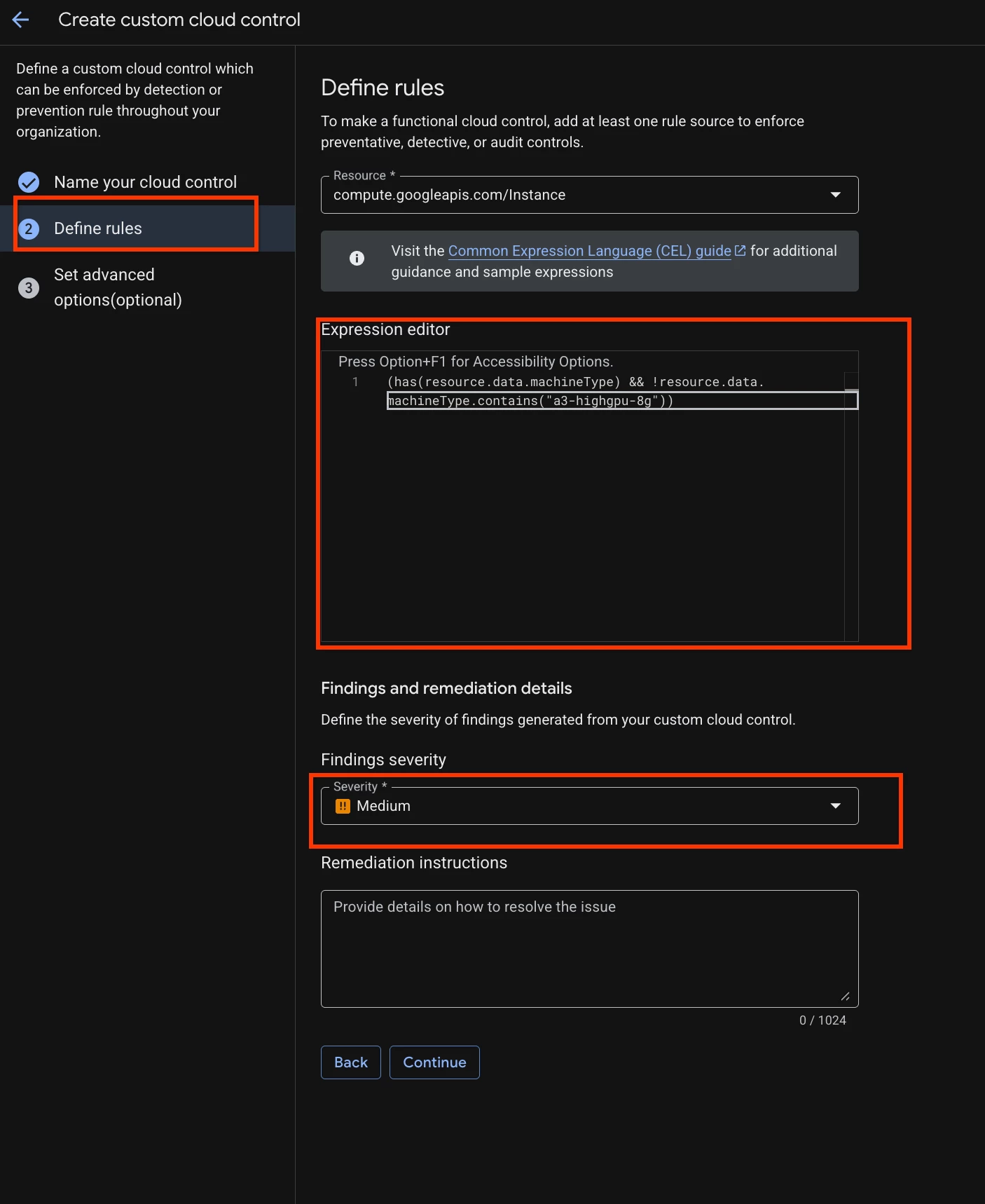
- Move to the Define rules section and you should see the pre-filled CEL expression, choose the severity and write remediation steps if any.
- Move to “Advanced options” where you can set Category tags, these tags are for group controls into categories of resource types.
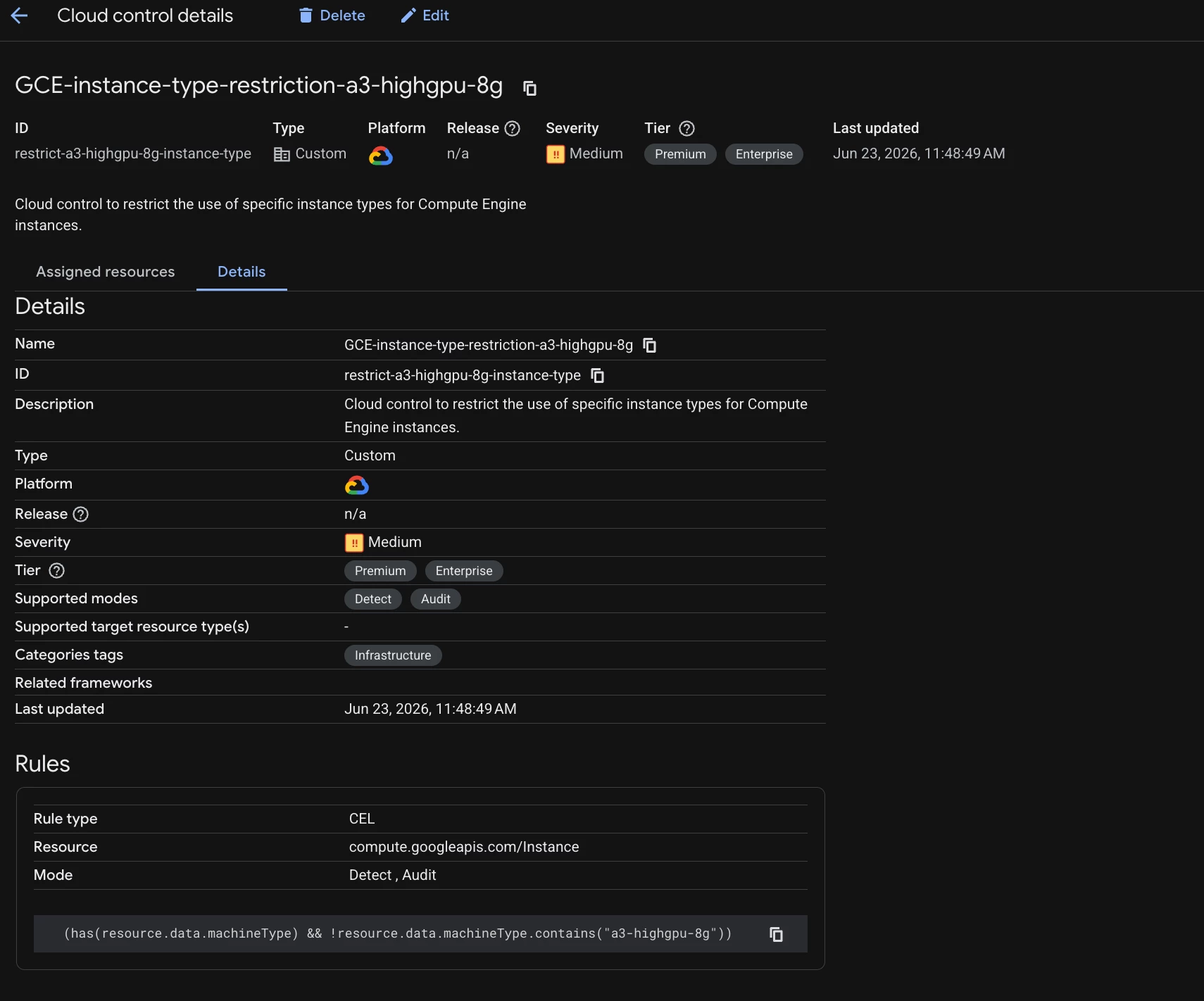
- Your control should look like below:
- After creating a custom control, it must be assigned to a custom framework. To activate the control, you must first assign it to a framework and then attach it to a resource.
- Below are the steps to assign it to the custom framework:
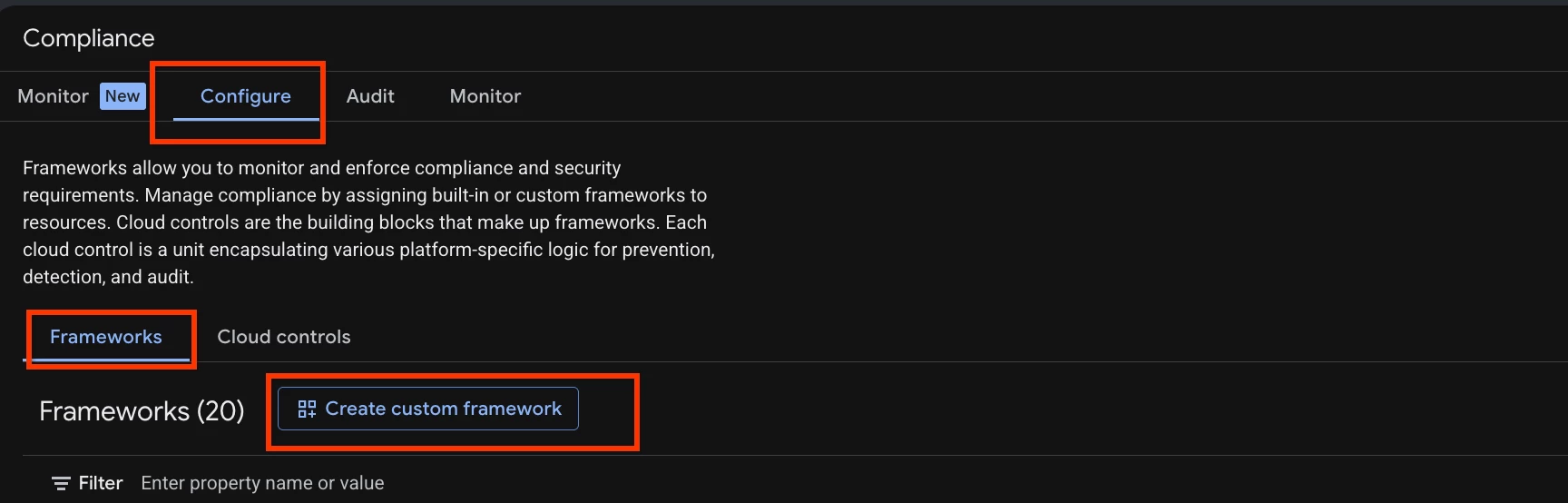
a. Navigate to Configure > Frameworks > Create custom framework:
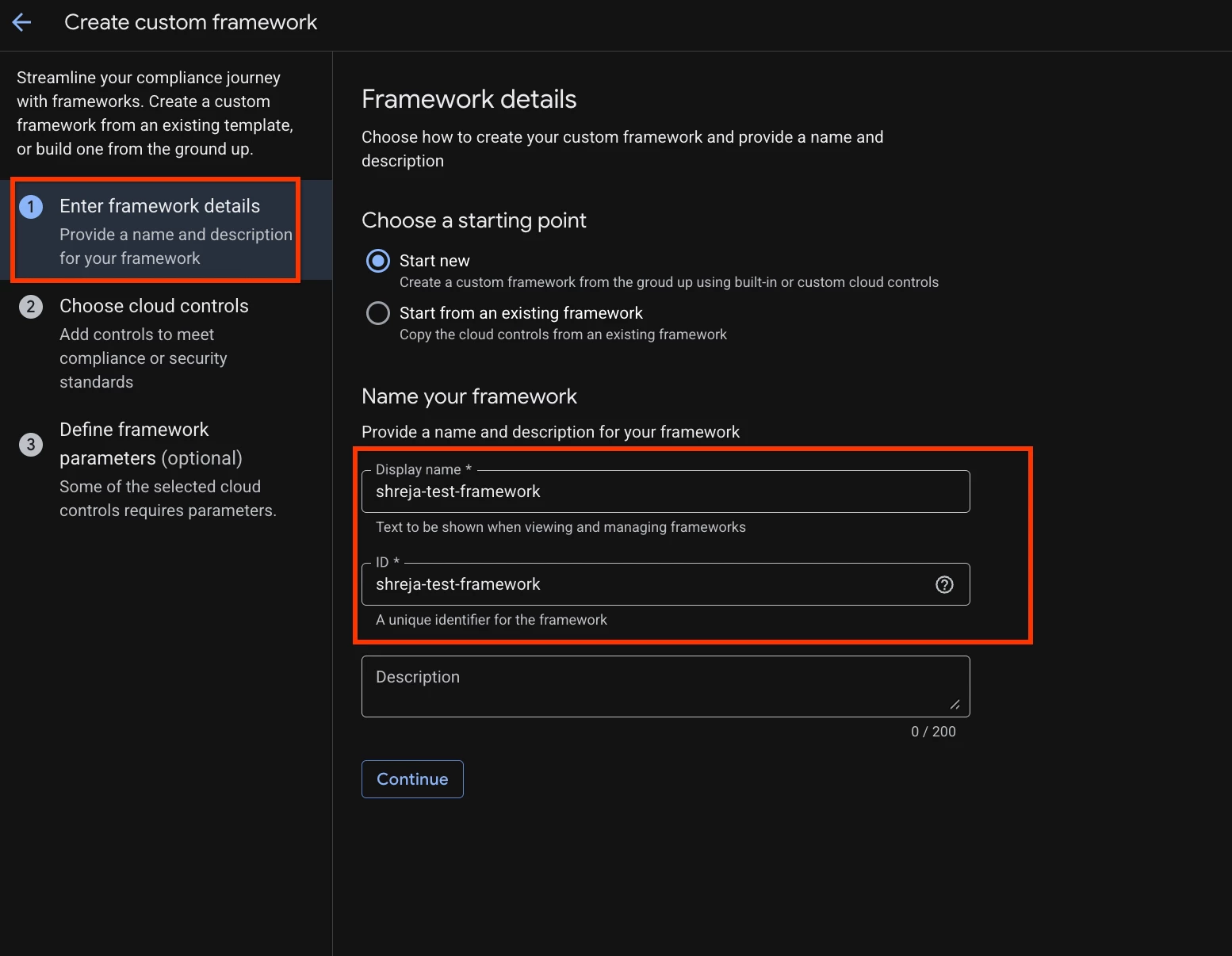
- Define the Framework:
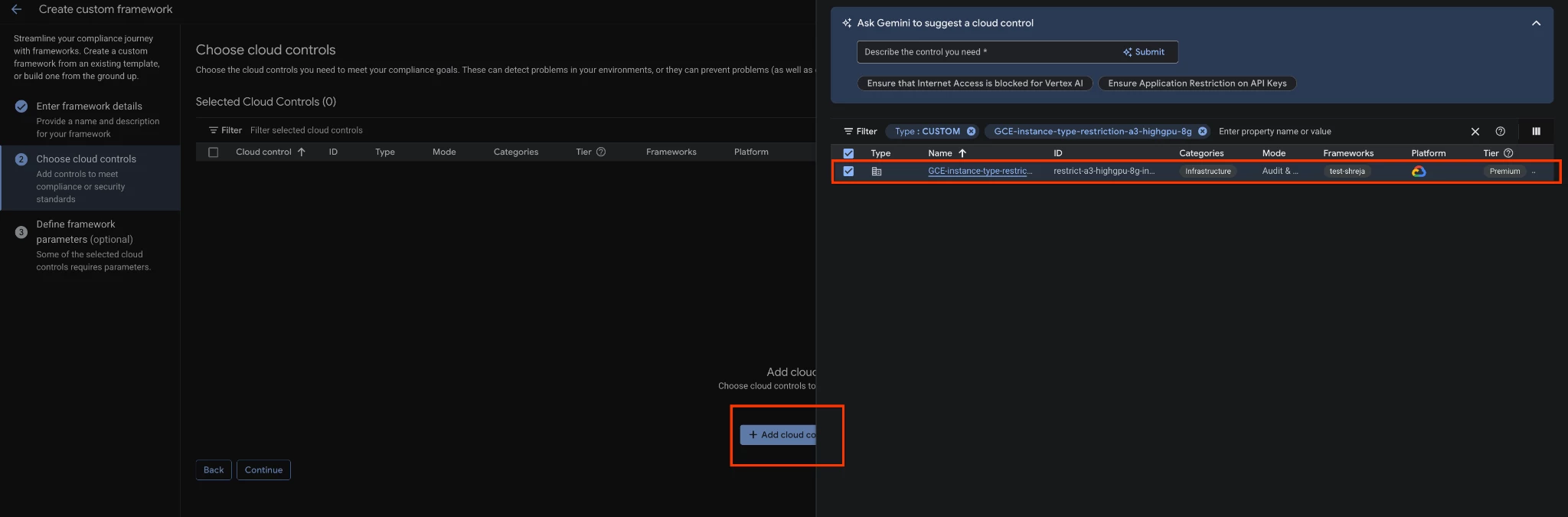
- Select the cloud controls to include in this framework, which can be either built-in or Custom (in this instance, we will select the custom control we previously created).
- After creating your custom framework, you must link it to a target resource, such as an organization, folder, or project. It can be attached only “Monitor” mode. In “Monitor” mode, the framework identifies and flags policy violations.
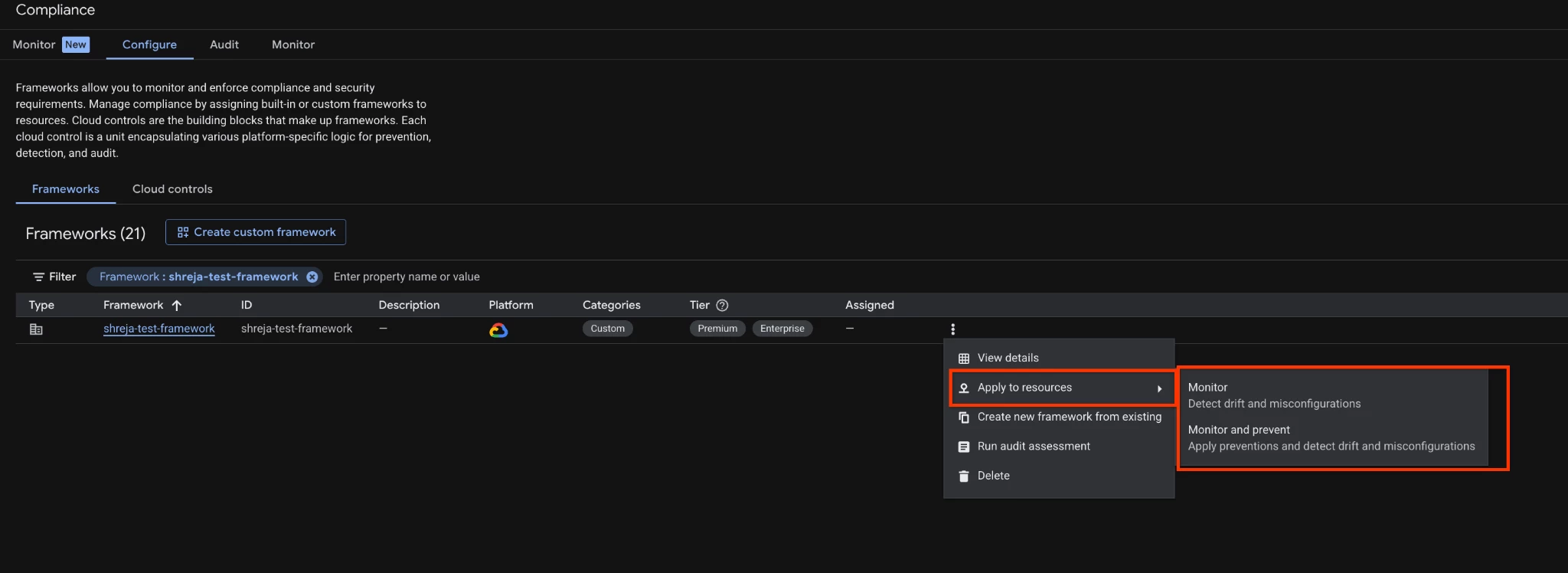
- Browse the resource hierarchy to select the specific organization, folder, or project you want to assign the control to. Choose the "Monitor" mode, and click submit to apply the framework.
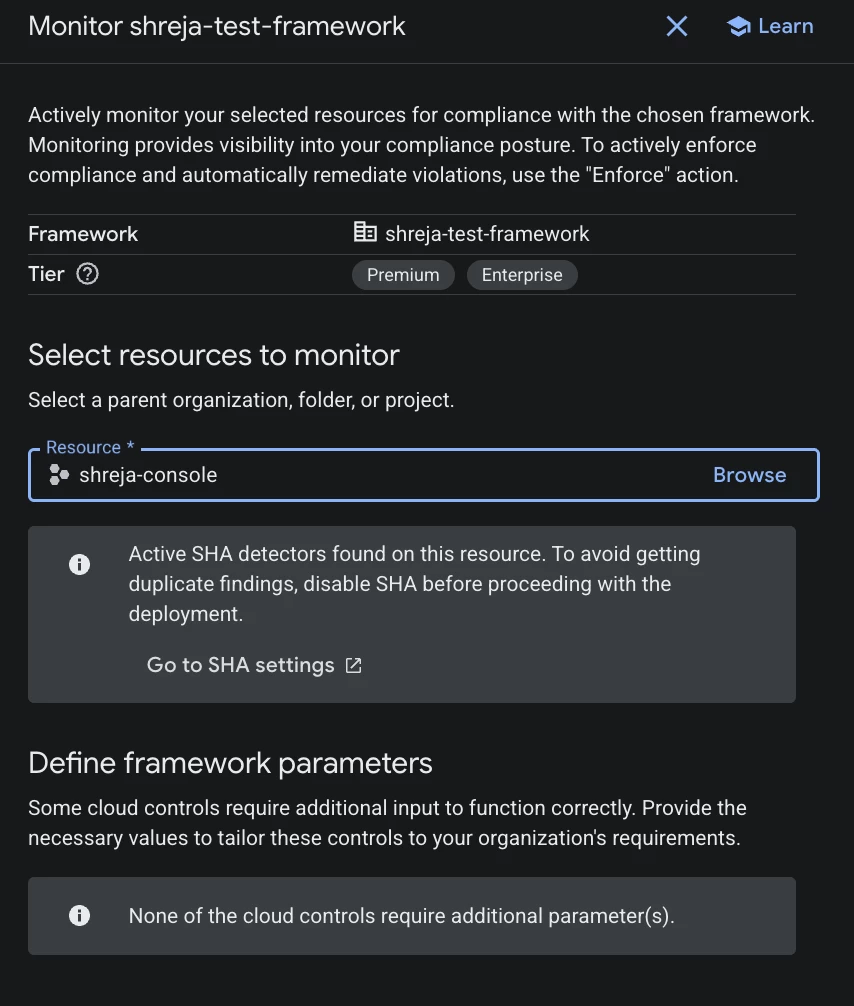

You should be now able to see the resource in the assigned column in the custom framework page.
-
In Monitor Mode the below is what you observe:
-
The framework acts in a Detective capacity, continuously scanning your resources for compliance.
-
Policy violations are identified, flagged, and displayed as findings in the Compliance Summary dashboard.
-
No actions are blocked; this mode provides visibility and auditing without interrupting workflows.
-
Best Practices for Custom Cloud Controls
-
Principle of Specificity: Use resourceTypesValues or selectors to limit evaluation to only the necessary resource types to optimize performance.
-
Reusable Parameters: Use parameter-spec to allow users to customize values (like allowed locations or maximum retention periods) without rewriting the control logic.
-
Iterative Testing: Before full deployment, test controls in a non-production environment by creating both compliant and non-compliant assets to verify correct finding generation, or alternatively, initialize the Custom Cloud Control in monitor mode
-
Clear Remediation: Although the remediation-steps field is an optional component of a custom cloud control definition, providing clear, actionable instructions ensures incident responders know precisely how to resolve the finding.
Implementing with Infrastructure as Code
Using gcloud CLI
You can manage controls programmatically. For example, to check if a KMS key rotation period is under 60 hours:
gcloud compliance-manager cloud-controls create check-kms-rotation \
--location=global \
--organization=YOUR_ORG_ID \
--display-name="Check KMS Key Rotation" \
--severity=high \
--finding-category="KMS_ROTATION_VIOLATION" \
--rules="[{\"celExpression\": {\"expression\": \"has(resource.data.rotationPeriod) && resource.data.rotationPeriod < duration('60h')\", \"resourceTypesValues\": {\"values\": [\"cloudkms.googleapis.com/CryptoKey\"]}}, \"description\": \"Check KMS key rotation period\", \"ruleActionTypes\": [\"rule-action-type-detective\"]}]"
Troubleshooting
-
No Findings Generated?:
-
Ensure the control is active and assigned to a deployed framework.
-
Verify the CEL expression syntax and logic against test assets.
-
Check IAM permissions; the service agent requires read permissions on the target resources.
-
-
Evaluation Delays: Propagation times can vary. Allow time (potentially up to a few hours) for the service to evaluate assets.
-
Parameter Substitution Errors: Double-check the substitutionRules syntax if using parameterized controls to ensure values are injected at the correct path.
Conclusion
Custom Cloud Controls represent a significant advancement in cloud security governance, shifting from rigid, legacy configurations to a flexible, policy-as-code model. By leveraging the Common Expression Language (CEL), security architects can design granular rules that precisely align with their organization's unique compliance frameworks and operational requirements.
The key takeaways from this guide include:
-
Multi-Modal Capabilities: Unlike detective-only tools, Custom Cloud Controls support Detective and Audit modes, allowing you to catch issues post-deployment or block non-compliant resources actively.
-
Unified Compliance: Integration with Compliance Manager enables tracking custom requirements alongside industry standards (like CIS or NIST) in a single, cohesive dashboard.
-
AI-Assisted Efficiency: Gemini-assisted definitions lower the barrier to entry by translating natural language security requirements into valid CEL expressions automatically.
Implementing these controls iteratively, starting in non-production environments with clear remediation steps, ensures robust and scalable cloud security posture management.
