


Author: Hari Prasath, Technical Solutions Engineer
Effectively managing your security posture in Security Command Center (SCC) requires a precise understanding of a finding's lifecycle. Security and compliance teams often struggle with calculating remediation Service Level Agreements (SLAs) or tracking how long a vulnerability has been active because they rely on the wrong timestamp.
By decoupling and mastering two critical timestamps—create_time and event_time—you can build highly accurate aging calculations, ensure proper compliance SLA tracking, and investigate the true lifecycle of active threats. This guide explores these timestamps, advanced lifecycle states, and how to configure your console to extract precise metrics.
Quick Reference: Timestamps and the Finding Lifecycle
| Concept | Description |
| Availability | A finding usually becomes available to query in SCC less than a minute after it is stored in the Security Command Center findings database |
| Create Time | Represents the exact moment the finding was created in the Security Command Center. Use this to anchor SLA tracking, as this timestamp is static and serves as an immutable "Day 0". |
| Event Time | Represents when the security event actually occurred or when the finding record was last updated. Use this for operational triage and recent activity tracking. |
| Finding States | Findings transition between Active (the issue persists) and Inactive (the issue is resolved). |
| UI Defaults | The console's default time range filter is set to 7 days, and it evaluates the event_time attribute. |
Understanding Finding Timestamps, States, and Muting
To accurately track finding aging, it is critical to distinguish between when a finding was initially born in the system, when it was last observed, and its current workflow state.
Create Time: The create_time attribute indicates exactly when the finding was created in Security Command Center. Because it marks the permanent generation of the record, it acts as a static, immutable anchor. It should always be used as "Day 0" for aging and retention calculations.
Event Time: The event_time attribute is dynamic. It reflects either when the finding was first detected or when it was last updated. Because event_time updates whenever a scanner re-detects an active vulnerability or modifies its metadata, relying on it for SLAs will slide the clock forward, potentially making older vulnerabilities appear brand new.
Time Ranges and Console Defaults: When querying findings in the console, you should note that the time range is based on the value of the eventTime attribute of the findings, which reflects the time at which the finding record was last updated. Be aware that the default time range is the last 7 days.
Timestamps must be viewed in the context of the finding's state and visibility:
- Active vs. Inactive: An Active state means the security issue identified by the finding persists in your environment as a potential threat or vulnerability. Conversely, a state of Inactive means that the security issue has been addressed.
- Muted Findings: Sometimes a finding is an accepted risk. Muted findings are hidden and silenced, but continue to be logged for audit and compliance purposes.
Data Retention (TTL) and Timestamps
Because finding retention policies (Time to Live) dictate how long a finding is stored, it is critical to know that SCC calculates the retention period using the event_time, not the create_time.
Retention periods vary by finding class and state. For example, inactive vulnerabilities are retained for 7 days, while inactive misconfigurations are retained for 30 days. Active findings are generally retained much longer (e.g., up to 13 months for the Premium tier). Every time an active finding is detected again and its event_time slides forward, the TTL clock is reset, preserving the finding in your console.
Visualizing the Decoupled Lifecycle
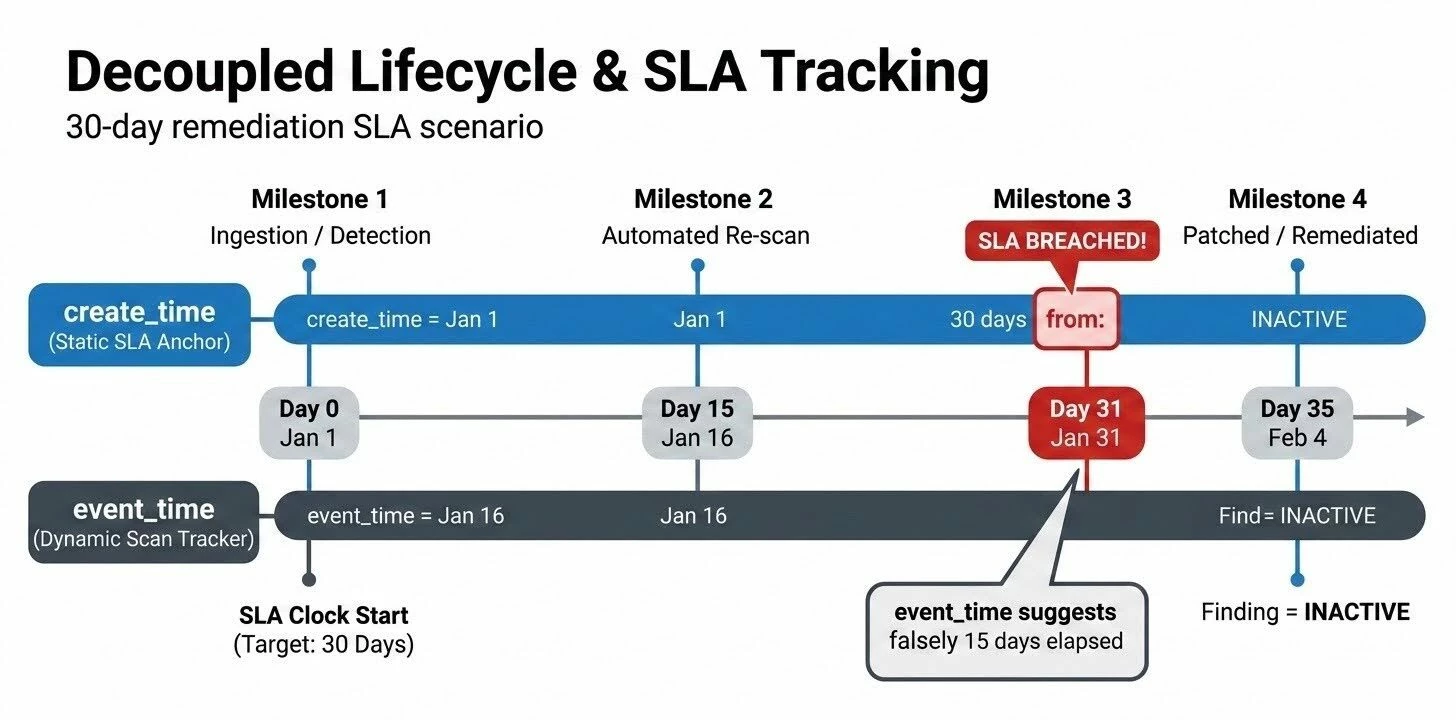
To understand how these timestamps diverge, consider a finding with a 30-day remediation SLA:
-
Day 0 (Jan 1): A misconfiguration is detected and ingested into SCC. create_time and event_time are both recorded as Jan 1. (The SLA Clock Starts based on create_time).
-
Day 15 (Jan 16): An automated scanner re-evaluates the environment and sees the issue persists. event_time is updated to Jan 16 to reflect this recent observation. create_time statically remains Jan 1.
-
Day 31 (Jan 31): (SLA Breached). The finding is 30 days old based on its create_time. If you mistakenly calculated age using the dynamic event_time of Jan 16, the finding would falsely appear to be only 15 days old and well within the SLA.
-
Day 35 (Feb 4): A patch is applied. The finding transitions to an Inactive state.
Real-World Scenarios
Scenario 1: "The Compliance Aging Audit"
Your Challenge: Internal auditors require a report showing all high-severity vulnerabilities that have breached a 30-day remediation SLA.
The Timestamp Solution: You must anchor your calculation using create_time. This guarantees you are calculating the time elapsed since the issue was first securely logged in SCC, ensuring the SLA clock hasn't been artificially reset by a recent scanner update.
Scenario 2: "The Active Threat Investigation"
Your Challenge: A potential compromise occurred over the weekend, and the Incident Response (IR) team wants to see all threat alerts that updated or fired during that 48-hour window.
The Timestamp Solution: You filter the console using the event_time field to isolate findings that were active, detected, or updated during the weekend. Filtering by create_time would incorrectly exclude older findings that were re-triggered or updated during the attack window.
Scenario 3: "Finding the Dormant Misconfigurations"
Your Challenge: You want to identify misconfigurations that have been ignored for months but are still actively being detected by daily scans.
The Timestamp Solution: You look for active findings where the create_time is older than 90 days (confirming it is severely aged) but the event_time is within the last 24 hours (confirming it is still actively present in the environment).
Scenario 4: "The Resurrected Vulnerability"
Your Challenge: A vulnerability was successfully patched, causing the finding to transition to an INACTIVE state. Two weeks later, an engineer rolls back the patch, re-introducing the exact same vulnerability. What happens to the timestamps?
The Timestamp Solution: The behavior depends on the finding's data retention period (TTL). If the vulnerability is reintroduced before the INACTIVE finding is purged from the database, SCC reactivates the existing finding. Its state flips back to ACTIVE, and the event_time updates to the moment of reactivation. However, the create_time remains locked to its original Day 0 date.
Alternatively, if the issue is reintroduced after the inactive finding was purged by the retention policy, SCC treats it as a brand new issue and generates a new finding record, meaning both create_time and event_time will be brand new.
Step-by-Step Configuration: Managing Lifecycles in the Console
To effectively analyze finding lifecycles, you must configure the Security Command Center UI to expose the right data.
1. Expose Both Timestamps Side-by-Side
-
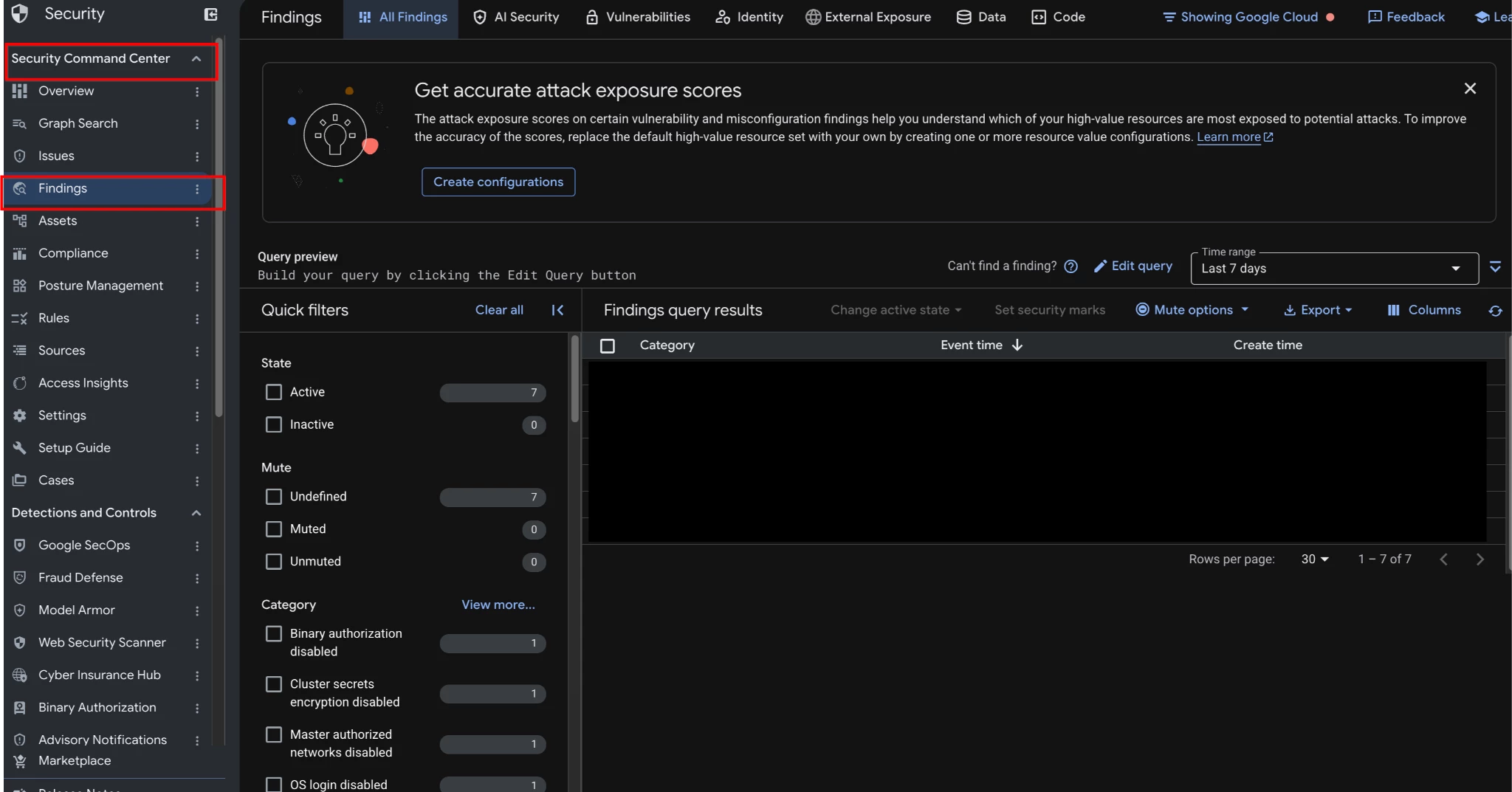
In the Google Cloud console, navigate to the Findings page. In the findings query results, you can hide any column except for Category.
-
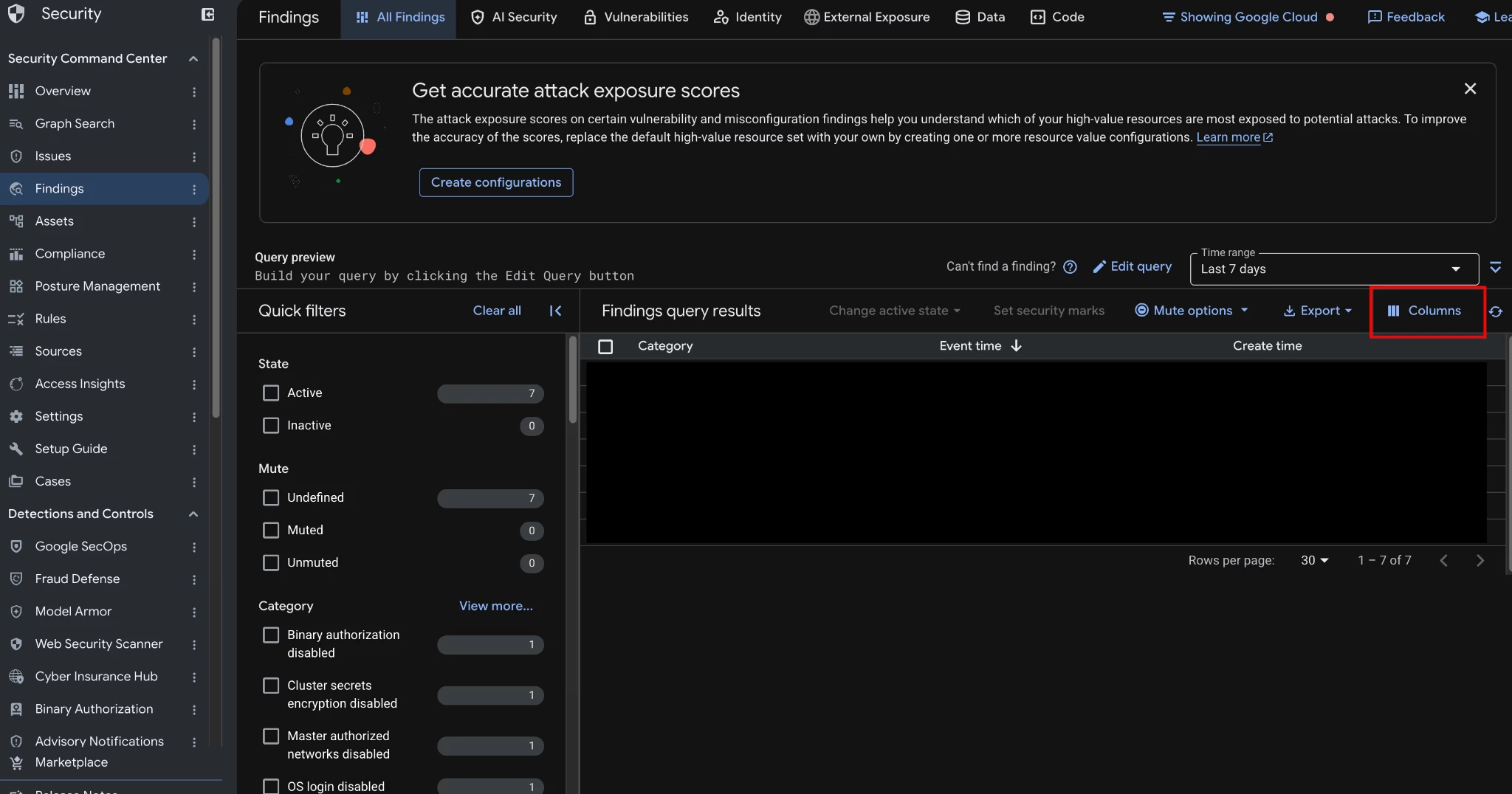
On the right of the Findings query results action bar, click Columns.
-
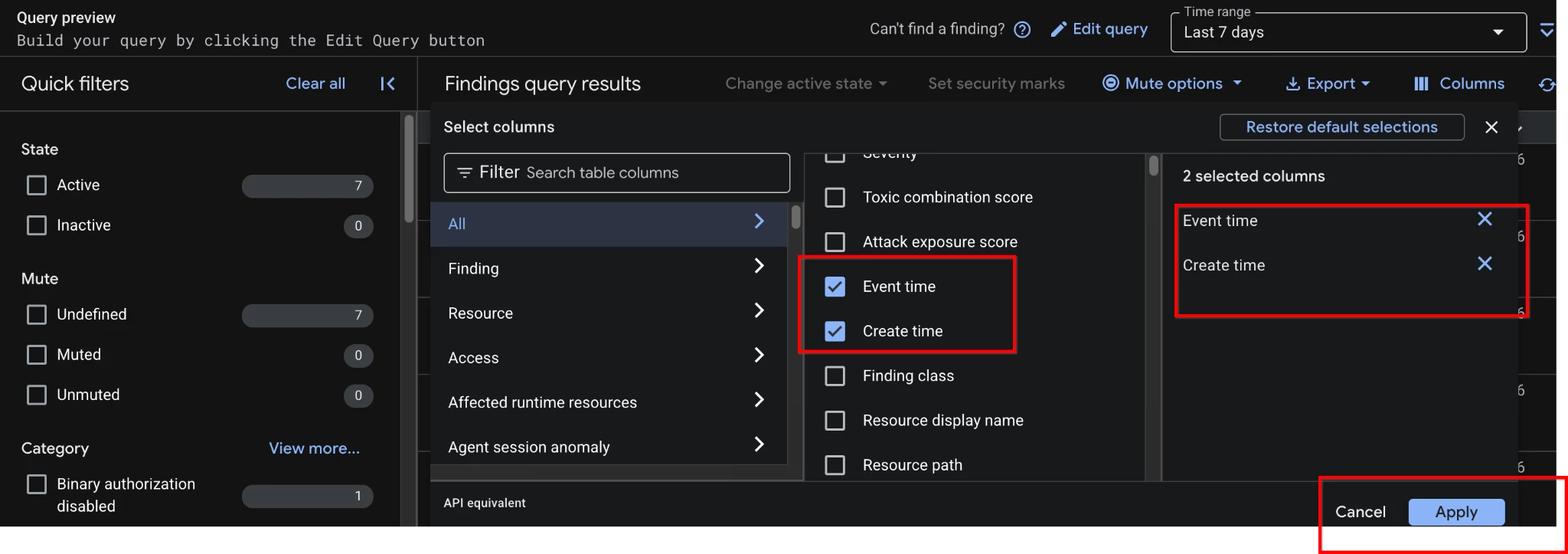
Select the columns that you want to display, ensuring you check both Event time and Create time.
-
Click Apply to apply the changes to the Findings query results panel.
2. Manually Change the Finding State
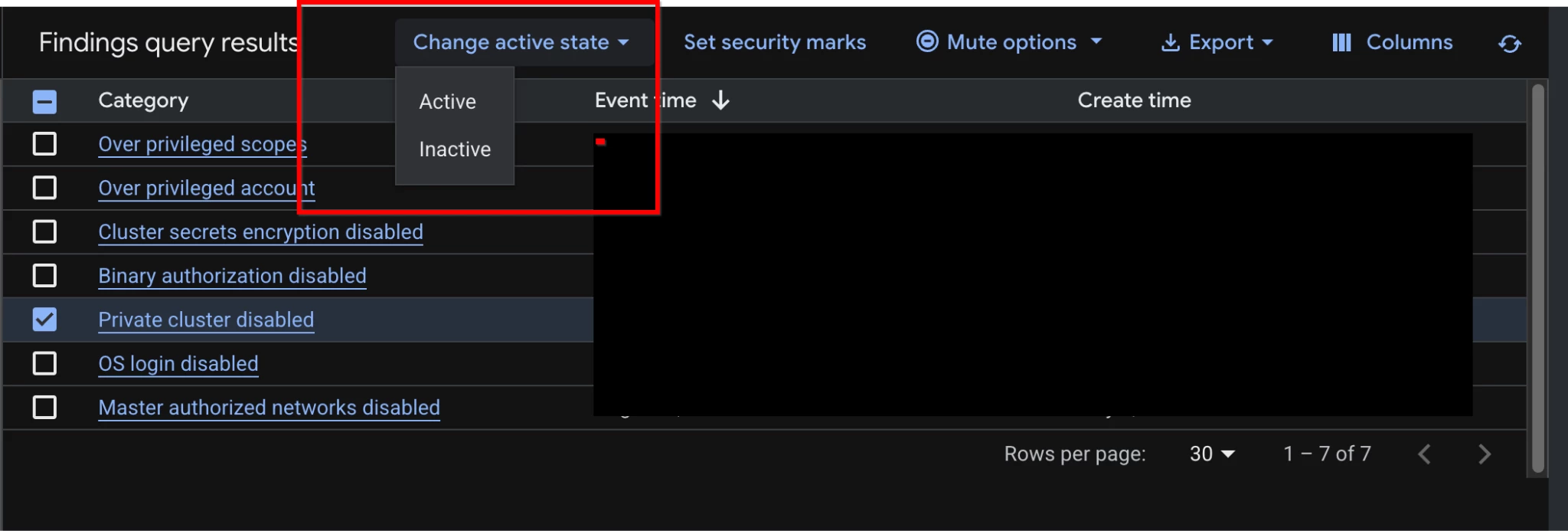
In the action bar of the Findings query results panel, click Change active state. In the Change active state menu, select either Active or Inactive.
3. Inspect API Timestamps via the JSON Tab
-
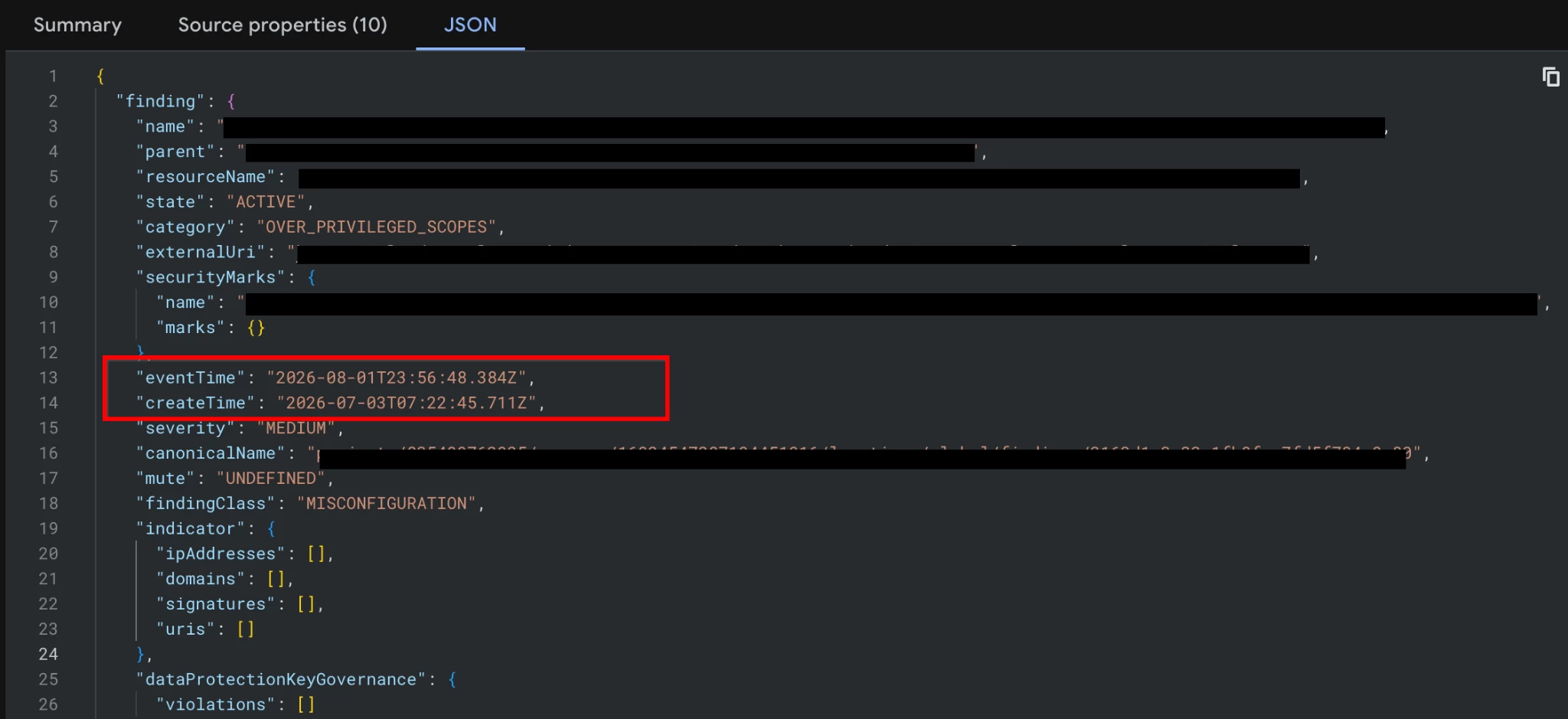
If you are building custom queries or scripts, click a finding name to view its details. The JSON tab contains the complete JSON structure of the finding. This allows you to view the raw create_time and event_time API fields.
Best Practices
-
Standardize SLA Metrics on create_time: Always use create_time as the benchmark for SLAs and compliance reporting. This establishes a true and immutable "Day 0".
-
Use event_time for Operational Triage: When SOC analysts begin their shift, they should sort their queues by event_time to see the most recently detected or updated threats, ensuring they don't miss re-activated alerts.
-
Annotate SLA Workflows with Security Marks: A security mark is a custom key-value label that you can use to annotate a finding. Use them to label specific SLA deadlines alongside your timestamp tracking.
-
Manually Transition States to Stop the SLA Clock: If an issue is verified as fixed, you can change the state of a finding to Inactive as soon as it is addressed, so you don't have to wait for the next scan to change the state for you.
-
Beware the Default Filter: Remember that missing findings are often just hidden by the default 7-day event_time filter. Always adjust the time range when hunting for older, static alerts.
Troubleshooting & Common Pitfalls
| Symptom | Cause & Fix |
| "Old vulnerabilities keep looking like new ones in our compliance SLA reports." | Cause: Your reporting tool, script, or custom query is mistakenly anchored to the finding's event_time, which slides forward whenever the vulnerability is rescanned.
Fix: Audit your scripts and ensure they extract the create_time field to establish an immutable "Day 0" for your SLAs. |
| "I know we have older vulnerabilities in our environment, but my SCC console is empty." | Cause: The UI is hiding them. The default console view only looks back a short period and evaluates the last update time (event_time).
Fix: Adjust the default 7-day time range filter in the console to a wider window to reveal dormant findings. |
| "We just applied the patch, but the finding is still Active and our SLA clock is still ticking." | Cause: Finding states do not update instantly; they rely on the cadence of the next automated scan.
Fix: Do not wait for the next scan. Use the console action bar to manually transition the state to Inactive as soon as you verify the fix to stop the SLA clock immediately. |
Conclusion
Treating event_time and create_time interchangeably can lead to missed SLAs, skewed compliance metrics, and confused incident responders. By explicitly decoupling these timestamps in your workflows, queries, and reports—and treating the immutable create_time as the source of truth for the age of a threat—you can build a highly accurate, timeline-driven approach to vulnerability and threat management.
Documentation Links
