


Table of Contents
Below you'll find a table of contents for the Integrations journey.
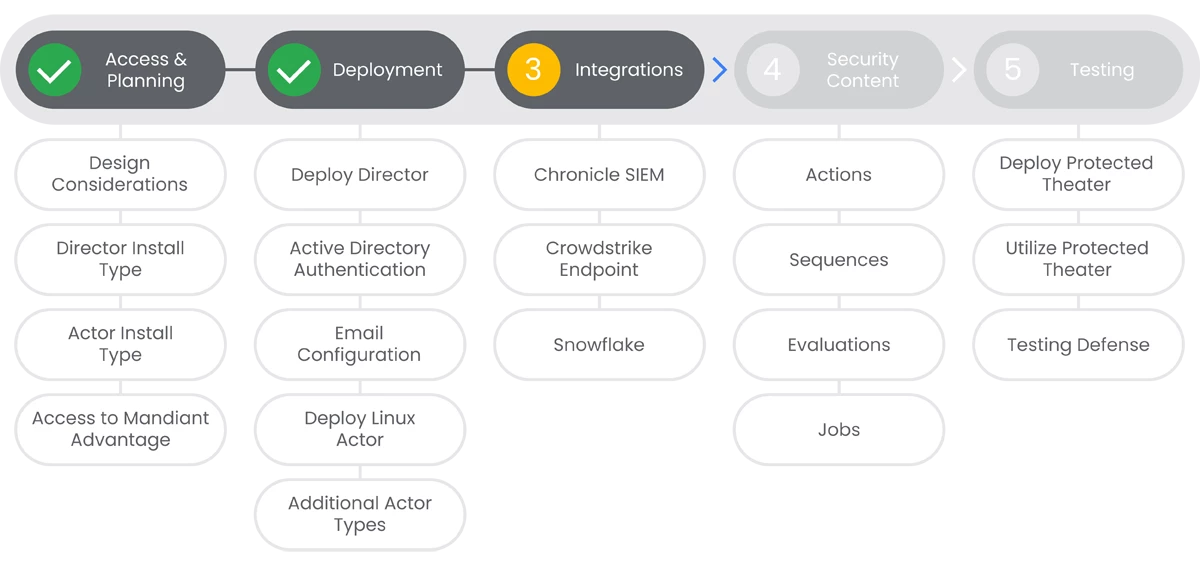
One of the best ways to ensure you get holistic security ation for your environment is to utilize some of the many Integrations that Mandiant Security Validation has to offer. In this section, we will introduce you to some of the most common integrations. To see a list of all of our available 3rd party integrations that support MSV, please see the following MSV Integrations Overview page.
Prerequisites
- Administrative access to MSV Director.
- Administrative access to the integrating platform.
Actions
 Chronicle SIEM
 CrowdStrike
Crowdstrike is a leading endpoint protection platform that can be integrated with Mandiant Security Validation to provide a more holistic view of your security posture, inclusive of your endpoint devices.
Prerequisites
See the Relevant Links section for more documentation regarding the prerequisites.
- Administrative access to MSV Director.
- Administrative access to CrowdStrike.
Steps
-
Configure Crowdstrike, by logging into your Crowdstrike console and generating an API Key from Falcon. | Docs
-
Configure Security Validation, by navigating to Settings > Integrations > Add Integration > Crowdstrike. Fill out the required fields as described in the linked documentation. | Docs
-
Test the integration by clicking the Test button.
Relevant Links
- All Steps: https://docs.mandiant.com/home/msv-crowdstrike-integration-with-security-validation
- 1: https://docs.mandiant.com/home/msv-crowdstrike-integration-with-security-validation#configure-crowdstrike
- 2: https://docs.mandiant.com/home/msv-crowdstrike-integration-with-security-validation#configure-security-validation
 Snowflake
Snowflake is a leading cloud-based data warehousing platform that can be integrated with Mandiant Security Validation to provide a more holistic view of your security posture, while also providing assurance of compliance with your security policies and regulations.
Prerequisites
See the Relevant Links section for more documentation regarding the prerequisites.
- Administrative access to MSV Director.
- Administrative access to Snowflake.
Steps
-
Configure Snowflake, by logging into your Snowflake console and collecting the information necessary, outlined in the linked documentation. | Docs
-
Configure Security Validation, by navigating to Settings > Integrations > Add Integration > Snowflake. Fill out the required fields as described in the linked documentation. | Docs
-
Test the integration by clicking the Test button.
Relevant Links
- All Steps: https://docs.mandiant.com/home/snowflake-integration-with-security-validation
- 1: https://docs.mandiant.com/home/snowflake-integration-with-security-validation#before-you-begin
- 2: https://docs.mandiant.com/home/snowflake-integration-with-security-validation#configure-security-validation
