


Table of Contents
Below you'll find a table of contents for the Security Content journey.
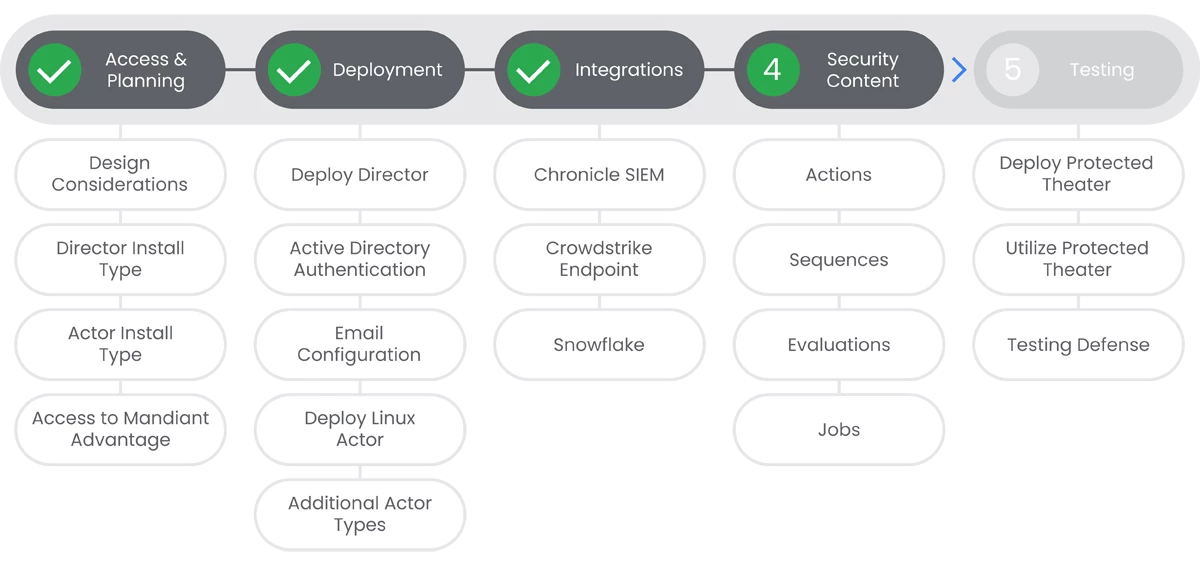
To better support the Security Validation user community and to enhance the platform's capabilities, users can create new Actions, Sequences, and Evaluations. You can create File Transfer and Email Actions from the File Library, but other Action types must be created from the Action Library. Sequences and Evaluations are often created by selecting Actions from the Action Library and adding them to the Action Queue. However, you can also clone existing security content and create Sequences & Evaluations from a file.
Prerequisites
- Administrative access to MSV Director.
Actions


Sequences
Sequences are a collection of Actions that are run in a specific order. In this section, we will walk through the process of creating an example Sequence that will run a TCP Port Scan (created in the last step). If you have other Actions that you would like to include in the Sequence, you can add them as well.
Prerequisites
See the Relevant Links section for more documentation regarding the prerequisites.
- Administrative access to MSV Director.
Steps
-
Review how sequences work within MSV to gain an understanding of their capabilities. | Docs
-
In the MSV Director Console, navigate to Library > Actions.
-
Select Two or more Actions to add to the Queue, follow the instructions in the linked documentation for more selection criteria.
-
Click Queue and select New Sequence from All
-
Fill out the required fields as described in the linked documentation.
Relevant Links
- All Steps: https://docs.mandiant.com/home/msv-creating-sequences-and-evaluations
- 1. https://docs.mandiant.com/home/msv-map-running-sequences-and-evaluations
- 2. https://docs.mandiant.com/home/msv-running-sequences

Evaluations
Similar to Sequences, Evaluations are a collection of Actions that are run in a specific order. The main difference between sequences and evaluations is how MSV responds when a particular action is blocked in a sequence. For a sequence, if MSV encounters a block from a security technology, or the action is unsuccessful in completing, then the sequence in the attack killchain stops. With an Evaluation, if an action is prevented by a security technology, the block is noted as a result, and the remaining actions in a sequence continue to run.
In this section, we will walk through the process of creating an example Evaluation that will run a TCP Port Scan (created in the first step). If you have other Actions that you would like to include in the Evaluation, you can add them as well.
Prerequisites
See the Relevant Links section for more documentation regarding the prerequisites.
- Administrative access to MSV Director.
Steps
-
In the MSV Director Console, navigate to Library > Actions.
-
Select Two or more Actions to add to the Queue, follow the instructions in the linked documentation for more selection criteria.
-
Click Queue and select New Evaluation from All.
-
Fill out the required fields as described in the linked documentation.
Relevant Links
- All Steps: https://docs.mandiant.com/home/msv-creating-sequences-and-evaluations
- 1. https://docs.mandiant.com/home/msv-running-evaluations

Jobs
Jobs are the resulting act from running an Action. You can manually run Actions, Sequences, and Evaluations, or you can schedule them to run at a specific time. In this section, we will walk through the process of creating an example Job that will run an Evaluation (created in the last step).
Prerequisites
See the Relevant Links section for more documentation regarding the prerequisites.
- Administrative access to MSV Director.
Steps
-
Review how jobs work within MSV to gain an understanding of their capabilities. | Docs
-
In the MSV Director Console, navigate to Library > Actions. You can use filters to find the actions you want to run.
-
Select the Action you want to run, then click Run.
-
Select a Source Actor, then select or accept the Destination Actor
-
Click Run Now or Schedule to run the Job.
Relevant Links
- All Steps: https://docs.mandiant.com/home/msv-running-actions
- 1. https://docs.mandiant.com/home/msv-job-results
- 1. https://docs.mandiant.com/home/msv-job-status
Next Step: Mandiant Security Validation: Step 5 - Testing
Previous Step: Mandiant Security Validation: Step 3 - Integrations
