


As of today, the MSV action library has over eight thousand actions. (Wow, I remember when we had a little over 2k!) Figuring out which actions to run (because we don’t have time to run ALL of them) can seem like a daunting challenge. When asked by customers to show them which actions to run, I tend to go through the following questions:
- Has a baseline been completed? (If not, baselines need to be done. We have recommendations on how to do that here.)
- Are we only interested in the actions newly released from the Validation Research Team? Or are historical actions of interest as well?
- What actors are in the environment? (It’s very hard to do egress network testing without an actor outside the network, as an example.)
- Do we want to run actions that have never been ran in the environment before?
- Which areas of the environment is of most concern to the customer?
- What security technologies exist in the environment that is successfully configured in MSV?
Once these questions are answered, it is time to work inside the Security Validation library. One thing we want to do is sort through those 8k actions as quickly as possible. We do that by using the filters on the left side of the Action Library. (Library → Actions)
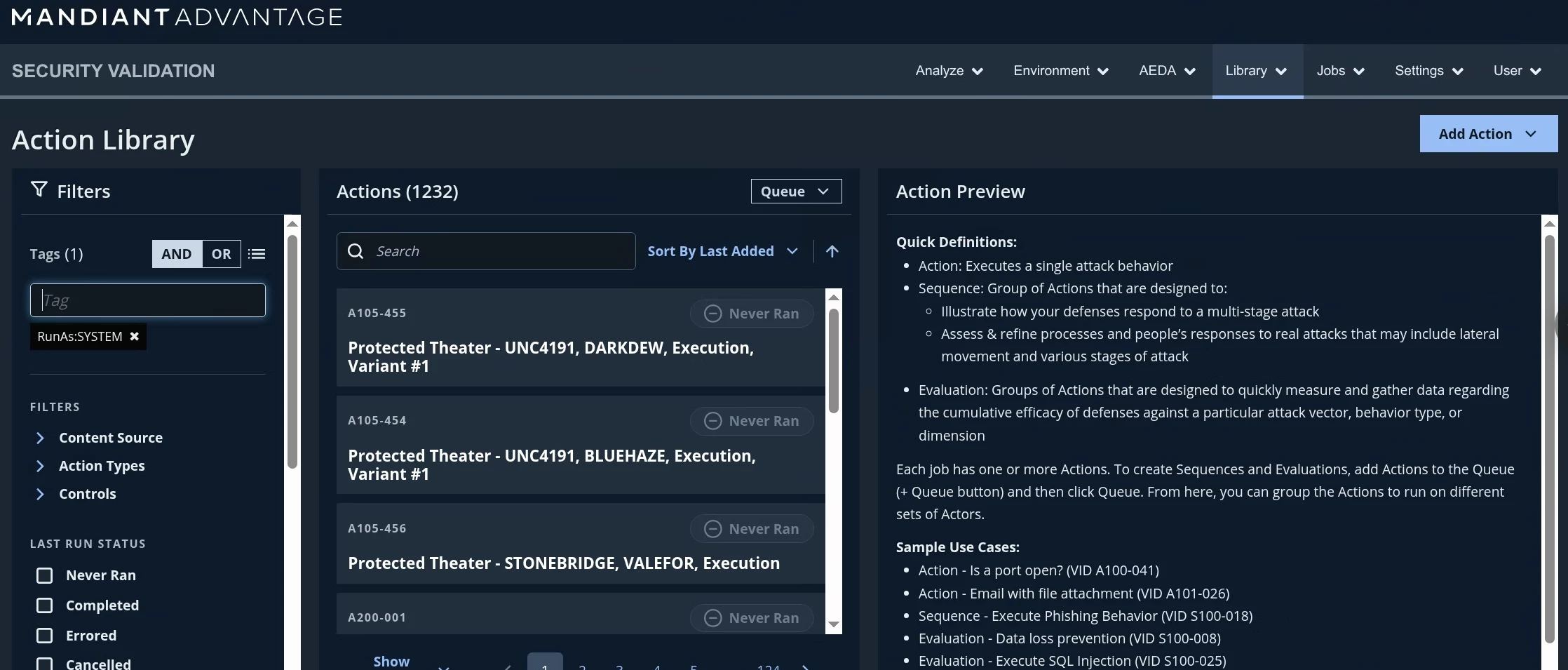
As we can see in the screen capture above, I have used a tag to help limit actions that are expected to run as the ‘SYSTEM’ user. (This tag primarily relates to Endpoint actions on a Windows operating system.)
Using these filters greatly reduces the actions that one has to process before selecting what may be best for your environment.
Below are some recommended filters and tags for common use cases:
- Endpoint Actions (Initial)
- Action Types: Endpoint. Protected (for environments with Protected Theaters)
- Tags: RunAs:SYSTEM, OS:<OS Title>:Version (I.e. OS: Windows:11)
- Endpoint Actions (Refresh)
- Action Types: Endpoint. Protected (for environments with Protected Theaters)
- Tags: RunAs:SYSTEM, OS:<OS Title>:Version (I.e. OS: Windows:11)
- Content Packs: Select “NEW” flags for the last content packs going back at least 2 months
- Network (Lateral)
- Action Types: Network
- Tags: Src:Internal:Trusted+Dst:Internal:Trusted
- Sort By: Last Added
- Network (Egress)
- Action Types: Network
- Tags: Src:Internal:Trusted+Dst:External:Untrusted
- Sort By: Last Added
- DNS Testing
- Action Types: DNS
- Sort By: Last Added
- Email
- Action Types: Email
- Sort By: Last Added
It is highly recommended to add actions that you find interesting into evaluations (with a good naming convention!) so that the job results are easier to view instead of running a single action in multiple jobs.
Happy Testing!
