


Author: Andre Mohr, Cloud Security Consultant
Co- Author: Vesselin Tzvetkov, Principal Security Engineer and Security Advisor
In Part 1 of this series, we explored how to leverage the Google SecOps BigQuery Export feature alongside BigQuery ML (BQML) to perform automated time-series forecasting using ARIMA_PLUS models. We focused on quantifying telemetry activity volume to detect statistical spikes and drop-offs across enterprise endpoints. BQML is not limited to predictive forecasting models but can also be used for other types of machine learning to detect threat actors.
In this Part 2, we shift our focus from volume-based metric anomaly detection to semantic and structural path analysis. Adversaries frequently attempt to evade detection by placing malicious Dynamic Link Libraries (DLLs) or binaries in non-standard execution paths, sideloading malicious DLLs alongside legitimate applications, or executing code out of temporary, user-writable directories.
Use Case: Anomaly Detection in Launch Paths
The machine model detects a launch of an application or library loading (DLL) from an abnormal location (file path) considering expected variability due to GUIDs, user IDs etc. The model should be built based on historical data for the company available in Google SecOps for a class of machine types. Additionally, the abnormal file path detection should not require manual data labeling (unsupervised model training). When an outlier to the expected path is detected, the solution will create an alert in Google SecOps to trigger automatic response.
For example: Launch from C:\Windows\System32\ or C:\Users\john_doe\AppData\Local\Programs\ABC\current\, where john_doe can be every username, is normal location. If a few users are loading DLL from a directory ,which is less common in the organization (e.g. C:\Temp\cde\), an alert in Google SecOps should be raised.
Implementation
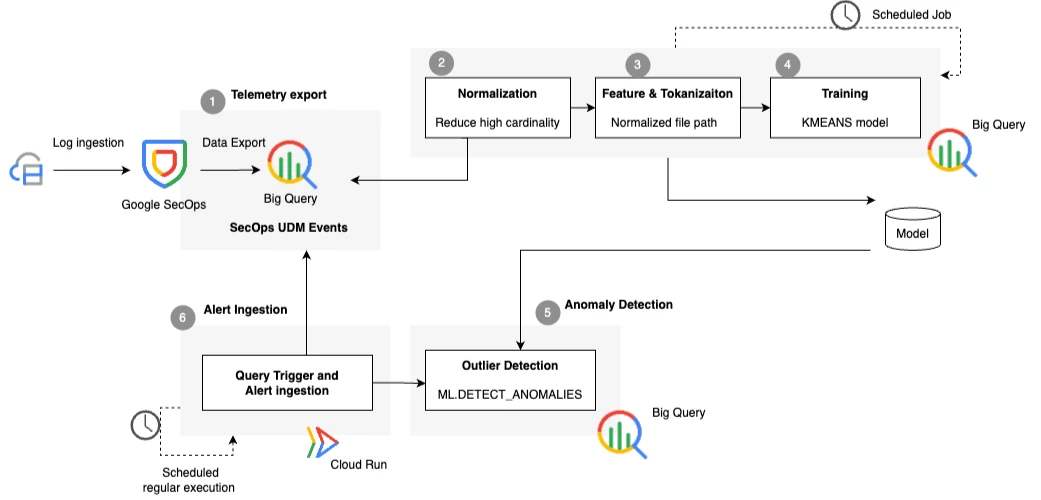
The following steps were used to build a holistic architecture, to implement custom machine learning alerts and feed them back to Google SecOps.
-
Telemetry Export: Continuously streaming structured enterprise log data from the core security platform into dedicated analytics tables.
-
Normalization. Filter high-cardinality tokens (like Usernames, GUIDs, IDs, Drive letters) with normalized place-holders.
-
Feature Extraction & Tokenization: Deconstruct file paths into path tokens and character/token N-grams.
-
Training: Apply Term Frequency-Inverse Document Frequency (TF_IDF) transformation and train a KMEANS model to cluster legitimate path behaviors across hosts of a similar class (e.g. across production linux servers, employee endpoints, etc).
-
Anomaly Detection: Score live telemetry using ML.DETECT_ANOMALIES based on distance to nearest cluster centroids and forward significant anomalies back to Google SecOps.
-
Alert Ingestion: Using Cloud Run Functions to trigger periodic evaluation of events against models to identify outliers and to route them to Google SecOps to trigger downstream SOAR playbooks for automatic response.
The Cardinality Problem
Raw file paths inherently suffer from high cardinality. Session IDs, user profile names, temporary folder GUIDs, and numeric process IDs create millions of statistically unique path strings for what is functionally the same path structure:
C:\Users\Alice\AppData\Local\Temp\7f8e3a2b\file.dll
C:\Users\Bob\AppData\Local\Temp\1a2b3c4d\file.dll
Without transformation, standard machine learning algorithms treat these as entirely distinct entities, diluting cluster density and generating high false-positive rates.
1. Telemetry Export
This step is the same as described in Part 1 of the blog
2. Normalization
To eliminate high-cardinality noise, we first create a SQL User-Defined Function (UDF) named NormalizePath. This function applies sequential regular expressions to mask dynamic variables.
CREATE OR REPLACE FUNCTION `demo-project-1`.ml_poc.NormalizePath(raw_path STRING)
RETURNS STRING AS (
  REGEXP_REPLACE(
    REGEXP_REPLACE(
      REGEXP_REPLACE(
        REGEXP_REPLACE(
          REGEXP_REPLACE(
            REGEXP_REPLACE(
              REGEXP_REPLACE(
                REGEXP_REPLACE(
                  LOWER(raw_path),
                  -- Mask GUID folder names
                  r'[\\/][0-9a-f]{8}-[0-9a-f]{4}-[0-9a-f]{4}-[0-9a-f]{4}-[0-9a-f]{12}[\\/]', '/[guid]/'
                ),
                -- Normalize Windows drive letters
                r'^[a-z]:', '[drive]'
              ),
              -- Mask usernames across Windows and Unix paths
              r'(\\users\\[^\\]+\\)|(/home/[^/]+/)', r'\\users\\[user]\\'
            ),
            -- Mask GUIDs formatted in braces
            r'\{[0-9a-f]{8}-([0-9a-f]{4}-){3}[0-9a-f]{12}\}', '[guid]'
          ),
          -- Mask temporary subfolders
          r'(\\temp\\[0-9]+\\)|(/tmp/[0-9]+/)', r'\\temp\\[id]\\'
        ),
        -- Mask email addresses embedded in paths
        r'[a-z0-9._%+-]+@[a-z0-9.-]+\.[a-z]{2,}', '[email]'
      ),
      -- Mask isolated numeric IDs
      r'([^a-z]|^)([0-9]{4,})([^a-z]|$)', r'\1[id]\3'
    ),
    -- Normalize multiple slashes or backslashes
    r'[\\/]+', '/'
  )
);
3. Feature Extraction & Tokenization
Next, we construct a feature dll_tokenized_features that filters for targeted DLL execution events, extracts folder paths, applies normalization, and generates token N-grams:
CREATE OR REPLACE VIEW `demo-project-1.ml_poc.dll_tokenized_features` AS
WITH base AS (
  SELECT
    TIMESTAMP_SECONDS(metadata.event_timestamp.seconds) AS event_timestamp,
    principal.hostname AS host_id,
    -- Extract folder path and file name
    REGEXP_EXTRACT(target.file.full_path, r'^(.*)\\[^\\]+$') AS folder_path,
    REGEXP_EXTRACT(target.file.full_path, r'([^\\]+)$') AS target_dll_name,
    `demo-project-1`.ml_poc.NormalizePath(
      REGEXP_EXTRACT(target.file.full_path, r'^(.*)\\[^\\]+$')
    ) AS normalized_path
  FROM `enterprise_secops_dataset.datalake.events`
  WHERE metadata.product_event_type IN ('4663', '4670')
    AND REGEXP_CONTAINS(target.file.full_path, r'(?i)\.dll$')
)
SELECT
  event_timestamp,
  host_id,
  folder_path,
  target_dll_name,
  normalized_path,
  -- Split normalized path into structural components
  SPLIT(normalized_path, '/') AS path_tokens,
  -- Generate 1-gram and 2-gram token combinations for vectorization
  ML.NGRAMS(SPLIT(normalized_path, '/'), [1, 2], '_') AS path_ngrams
FROM base;
4. Training
With structured token N-grams prepared, we train an unsupervised KMEANS clustering model directly in BQML. We incorporate an inline TRANSFORM clause leveraging ML.TF_IDF. This automatically converts variable-length token arrays into numerical feature vectors weighted by their rarity across the dataset.
CREATE OR REPLACE MODEL `demo-project-1.ml_poc.dll_path_clustering`
TRANSFORM(
  ML.TF_IDF(path_ngrams, 20000) OVER () AS path_features
)
OPTIONS(
  MODEL_TYPE = 'KMEANS',
  NUM_CLUSTERS = 10,
  STANDARDIZE_FEATURES = TRUE,
  KMEANS_INIT_METHOD = 'KMEANS++'
) AS
SELECT
  path_ngrams
FROM
  `demo-project-1.ml_poc.dll_tokenized_features`
WHERE
  event_timestamp <= TIMESTAMP_SUB(CURRENT_TIMESTAMP(), INTERVAL 1 DAY)
  AND event_timestamp >= TIMESTAMP_SUB(CURRENT_TIMESTAMP(), INTERVAL 15 DAY);
Training Parameters Key Summary:
-
ML.TF_IDF: Evaluates path token frequencies. Common folder structures (e.g., system32) receive lower weights, while uncommon directory arrangements receive higher significance vectors.
-
NUM_CLUSTERS = 10: Groups standard enterprise execution patterns into 10 distinct topological clusters. This value is to be modified per enterprise context. For homogenous device classes, a smaller number of clusters might be applicable than for a heterogeneous set.
-
KMEANS_INIT_METHOD = 'KMEANS++': Ensures optimal initial cluster seed selection to speed up model convergence.
5. Anomaly Detection
Once trained, the baseline model is used to evaluate live, incoming log feeds from the past 24 hours. The ML.DETECT_ANOMALIES function measures the normalized Euclidean distance between a new execution path's vector and its closest cluster centroid. The distance (in the code example as 0.00009) can be used to further reduce false positives. A higher distance allows more variety in the path but might also increase the number of False-Negatives.
CREATE OR REPLACE TABLE `demo-project-1.ml_poc.dll_daily_alerts` AS
SELECT
*
FROM
ML.DETECT_ANOMALIES(
 MODEL `demo-project-1.ml_poc.dll_path_clustering`,
 STRUCT(0.00009 AS contamination), -- the sensitivity to be decided and tuned
(
-- The Input Data: New logs from the last 24 hours
SELECT
event_timestamp,
host_id,
target_dll_name,
normalized_path,
path_ngrams
FROM
`demo-project-1.ml_poc.dll_tokenized_features`
WHERE
event_timestamp > TIMESTAMP_SUB(CURRENT_TIMESTAMP(), INTERVAL 24 HOUR)
))
WHERE
  	is_anomaly = TRUE
ORDER BY
normalized_distance DESC
6. Alert Ingestion
As detailed in Part 1, alerts generated in `dll_daily_alerts` can be polled periodically using Cloud Run Functions and pushed directly into the Google SecOps Ingestion API as unstructured log entries. These alerts trigger automated YARA-L detection rules and SOAR playbooks for analyst triaging and automated host containment. An example how to use Cloud Run Functions to ingest findings into Google SecOps can be found in Part 1.
Wrap-up
By pairing Google SecOps BigQuery Export with BigQuery ML's native clustering and text transformation capabilities, security teams can construct behavioral anomaly detection pipelines without exporting data out of their cloud analytics warehouse or managing external ML infrastructure.
Additional improvements can be done by integrating the solution into the corporate change management systems to automatically allow-list detections that are caused by, e.g. expected updates.
This two-part series demonstrates that custom AI/ML pipelines do not require dedicated data science platforms. By using SQL natively inside BigQuery ML, security operations can scale targeted detection models across massive volumes of telemetry seamlessly.
