



Author: Simone Bruzzechesse, Strategic Cloud Engineer
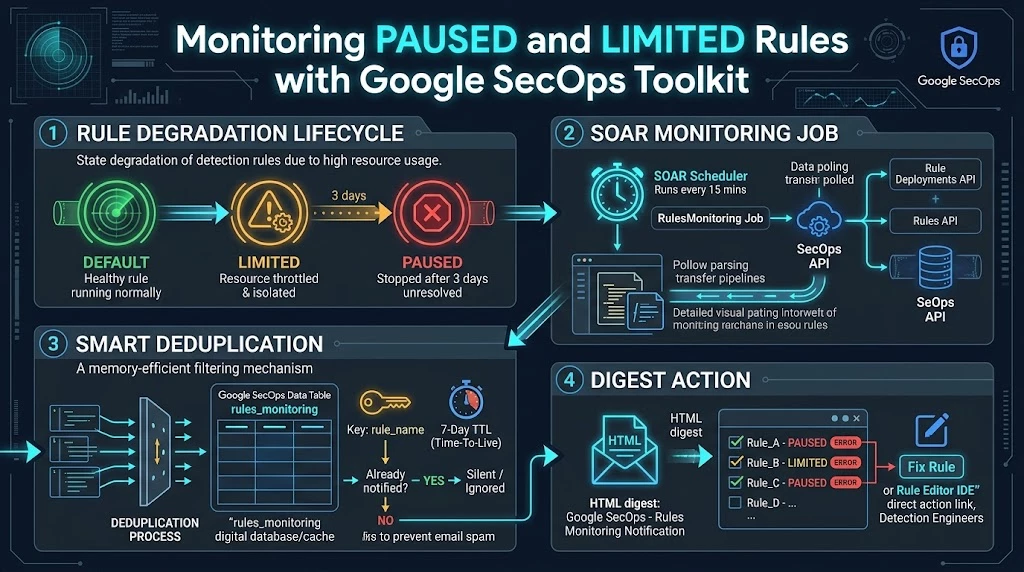
Detection engineering teams put a lot of effort into writing, tuning and deploying YARA-L rules in Google SecOps. Once a rule is live, it is easy to assume it keeps running. That isn't always true. To keep the platform stable for every tenant, Google SecOps watches how much each live rule costs to run. When a rule uses unusually high resources, the platform can move it to a LIMITED execution state, where its executions are no longer guaranteed. If its performance doesn't improve within three days, the rule is moved again, this time to PAUSED, and it stops running.
This protects the platform. For the SOC, though, it creates a quiet failure: a rule that stopped running raises no errors in the case queue, sends no page and produces no alert. It just stops producing detections. The first sign may be a missed incident or a coverage review days later. The state change is visible in the console, but only if someone opens the Rules Dashboard and checks the rule deployment state.
In this article, we'll look at how to close that gap. First, we'll cover rule execution states and the Rule Deployments API that exposes them. Then we'll introduce the RulesMonitoring job, part of the official SecOpsToolkit SOAR Integration available in the open-source secops-toolkit repository. It turns those state changes into de-duplicated email notifications, using a SecOps Data Table as its memory. Finally, we'll walk through deploying and testing it in your environment.
Rule execution states in Google SecOps
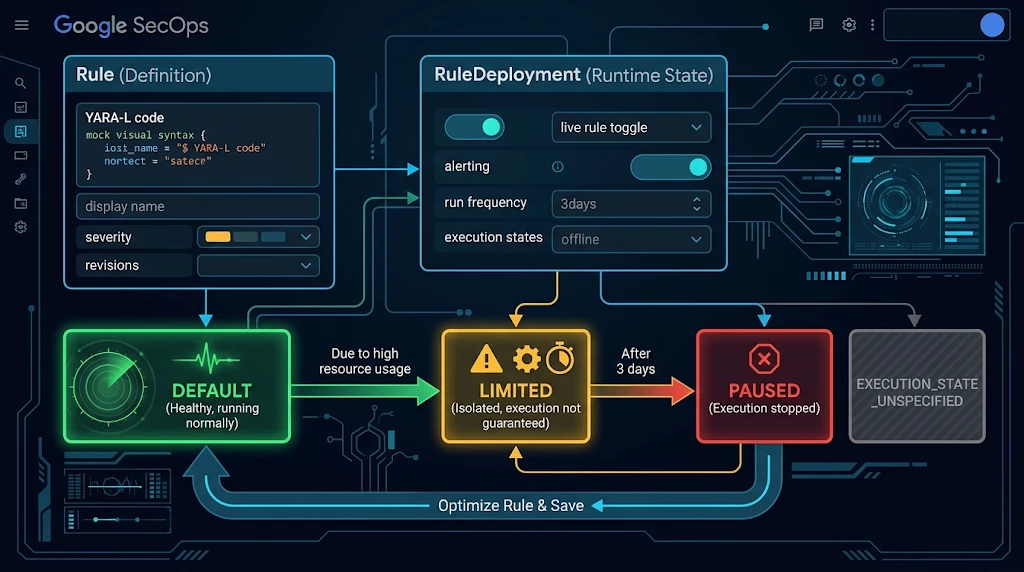
Every rule in Google SecOps has two related resources. The Rule holds the YARA-L definition: its text, display name, severity and revisions. The RuleDeployment describes how that rule runs: whether it is enabled as a live rule, whether it generates alerts, its run frequency, whether it is archived, and its current execution state.
The four execution states
| State | Meaning |
|---|---|
| DEFAULT | The rule is enabled and working normally. |
| LIMITED | The rule showed unusually high resource usage and is isolated from other live rules. Its executions are not guaranteed. Detections from runs that do succeed are kept, and the rule reports errors with suggestions for improving performance. |
| PAUSED | The rule stayed LIMITED for 3 days without improving and is no longer executed. Error messages suggest how to optimize it. |
| EXECUTION_STATE_UNSPECIFIED | Unknown or unspecified state (for example, a rule that has never been deployed). |
The recovery path is also worth knowing. To bring a rule back to DEFAULT, you have to optimize the rule and save it. Saving a modified rule resets its status to enabled. Changing only the run frequency (for example, from 10 minutes to hourly) does not reset the state. So a notification is only useful if it reaches the people who own the rule logic, which is why RulesMonitoring sends email to a configurable list of detection engineers.
Reading Execution States Through the API
When auditing rule execution health across a large enterprise environment, querying each rule endpoint individually is inefficient and inefficiently uses your API quota. To solve this, Google SecOps supports bulk deployment retrieval. By placing the wildcard character - in the rule segment of the resource path, you can request and enumerate the deployment settings and execution statuses of every rule across the instance through a single paginated API request:
HTTP Request Endpoint:
GET
https://{region}-chronicle.googleapis.com/v1alpha/projects/{project}/locations/{location}/instances/{instance}/rules/-/deployments
Required IAM Permission:
chronicle.ruleDeployments.list
Below is an example JSON response structure showing rule deployments in various execution states:
{
  "ruleDeployments": [
    {
      "name": "projects/PROJECT_NUMBER/locations/LOCATION/instances/INSTANCE_ID/rules/ru_3b4c5d6e-xxxx-xxxx-xxxx-xxxxxxxxxxxx/deployment",
      "enabled": true,
      "alerting": true,
      "runFrequency": "LIVE",
      "executionState": "LIMITED"
    },
    {
      "name": "projects/PROJECT_NUMBER/locations/LOCATION/instances/INSTANCE_ID/rules/ru_9f8e7d6c-xxxx-xxxx-xxxx-xxxxxxxxxxxx/deployment",
      "enabled": false,
      "archived": true,
      "executionState": "DEFAULT"
    }
  ],
  "nextPageToken": "..."
}
A deployment's name is its rule's resource name with the suffix /deployment added. Remove that suffix and you get the key you need to join each deployment to the matching entry from the companion call:
HTTP Request Endpoint:
GET
https://{region}-chronicle.googleapis.com/v1alpha/projects/{project}/locations/{location}/instances/{instance}/rules?view=FULL
Required IAM Permission:
chronicle.rules.list
The rules call returns the human-readable displayName for each rule, which is what you want in a notification instead of an opaque ru_... identifier. Put the two calls together and you have a complete view of the tenant's detection health in two paginated requests.
Why polling is not enough on its own
A scheduled job that reads execution states and emails whatever it finds would work, but it would quickly get noisy. A rule can stay PAUSED for days while its owner works on a fix. If the job runs every 15 minutes, a naive implementation sends close to 100 identical emails per rule per day, and people start ignoring them. The job has to remember what it already reported, and it has to forget it again after a while, so that a rule nobody fixes gets flagged again.
Google SecOps already provides that kind of memory: Data Tables with key columns and a per-table row time-to-live (TTL). A row keyed by the rule's resource name with a 7-day TTL answers the question "have we told someone about this rule in the last week?" without any external database.
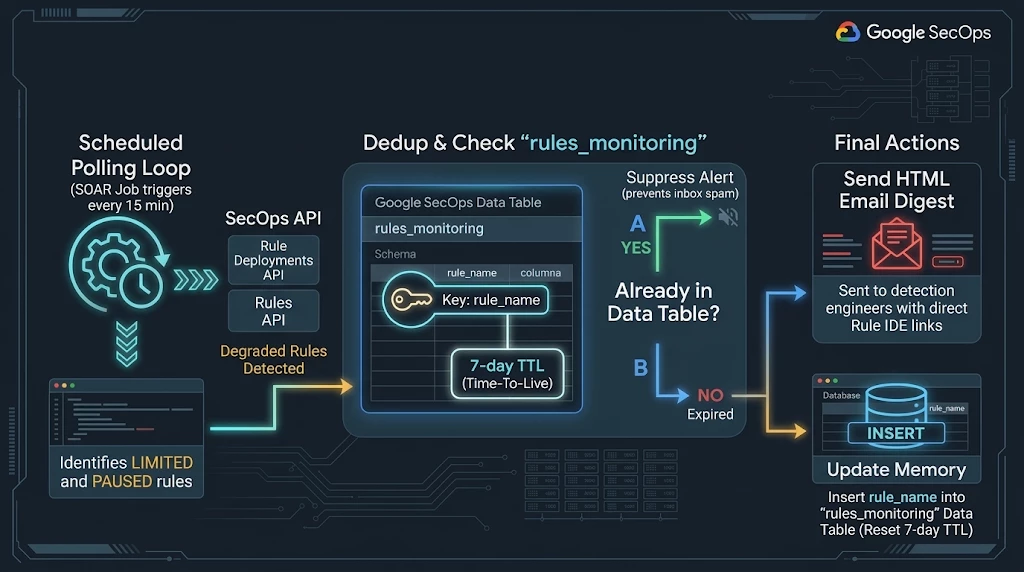
The platform provides the state and the storage. What it doesn't provide is the scheduler and the notification logic, and that's the gap the SecOps Toolkit fills.
SecOps Toolkit Official SOAR integration
The secops-toolkit is an open-source repository from the Google Cloud Professional Services team with blueprints and automation for Google SecOps environments. Its integrations/ directory ships SecOpsToolkit, a custom SecOps SOAR integration with utilities for Google SecOps platform administrators.
The integration has a single Ping action for connectivity and authentication testing, plus three jobs: RulesMonitoring, which is our subject here, ScheduledQueryJob (which runs saved UDM searches on a schedule and writes the results into Data Tables through the Asynchronous Search API, covered in our previous article).
The integration needs only a few settings:
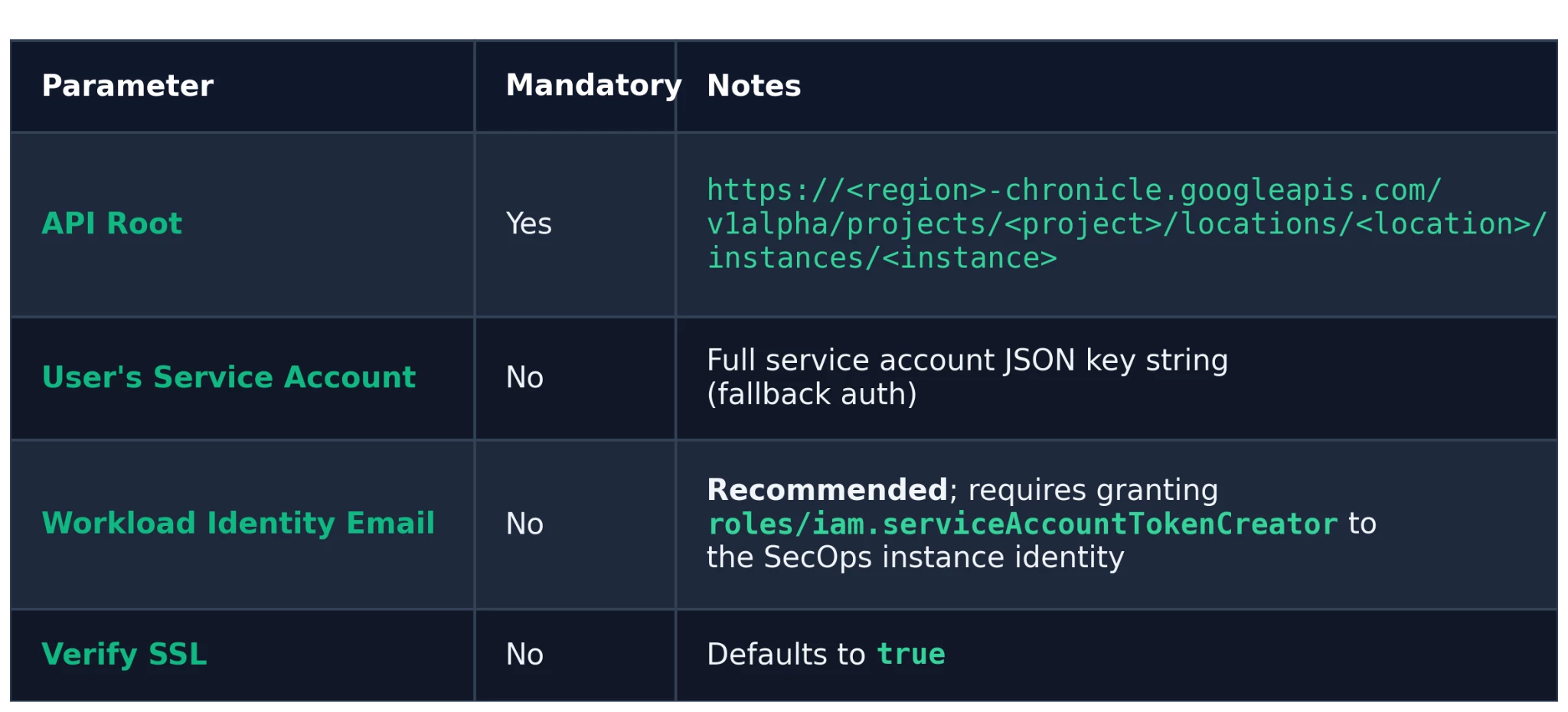
Workload Identity Federation is the recommended authentication method. It issues short-lived tokens through impersonation, so you don't store a long-lived private key in the integration configuration. A service account JSON key is still available as a fallback. If you set neither parameter, the SecOps instance default service account is used.
For IAM, a custom least-privilege role is better than a broad grant. The permissions this job uses are:
-
chronicle.instances.get
-
chronicle.rules.list
-
chronicle.ruleDeployments.list
-
chronicle.dataTables.get
-
chronicle.dataTables.create
-
chronicle.dataTables.update
-
chronicle.dataTableRows.list
-
chronicle.dataTableRows.bulkCreate
If you run into permission issues while setting up the integration, you can fall back to roles/chronicle.admin and then later evaluate the custom role with least privileges required for making this Integration/Job works.
Once the integration is configured, all the monitoring logic lives in the job.
Inside the RulesMonitoring job
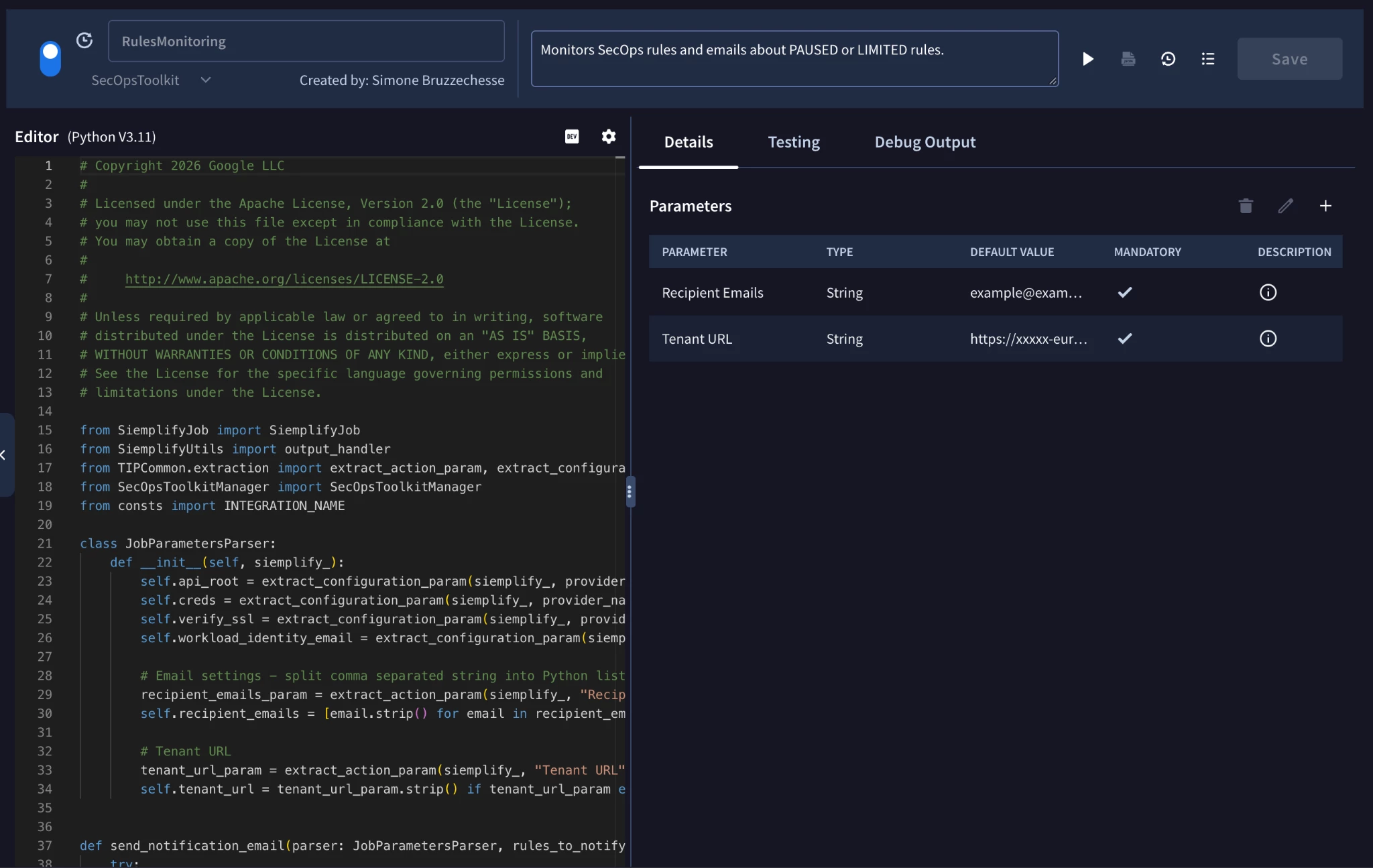
The RulesMonitoring job checks every detection rule in the tenant and notifies a distribution list when rules enter a degraded state. Its job definition describes it as "Monitors SecOps rules and emails about PAUSED or LIMITED rules". The actual cadence is whatever you configure when you schedule the job in SOAR (e.g. every 15 minutes).
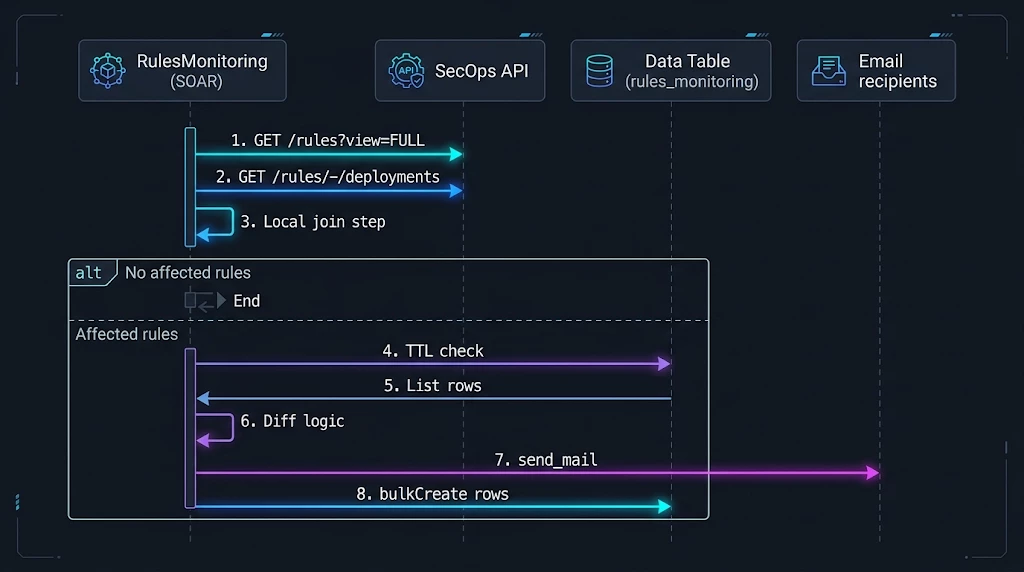
The execution flow works like this:
-
Bootstrap. Parse the integration configuration (API Root, credentials or WIF, Verify SSL) and the two job parameters. Recipient Emails are split on commas into a clean list, and Tenant URL is trimmed.
-
Collect state. Enumerate rules and their corresponding rule deployment to get current rules status. Both follow pagination with 1,000 items per page, so large rule sets are fully covered.
-
Evaluate affected rules. The job will later iterate through the rules and rule deployments lists:
-
Archived rules are skipped. They are retired on purpose and aren't expected to run.
-
Rules without a deployment default to UNSPECIFIED.
-
Rules in LIMITED or PAUSED are collected as affected.
-
-
Short-circuit. If nothing is affected, the job logs "No affected rules found" and exits successfully without touching the Data Table.
-
Load memory. Look up the rules_monitoring Data Table.
-
If it exists, read all rows and collect the first column, rule_name, into a set of already-notified rules.
-
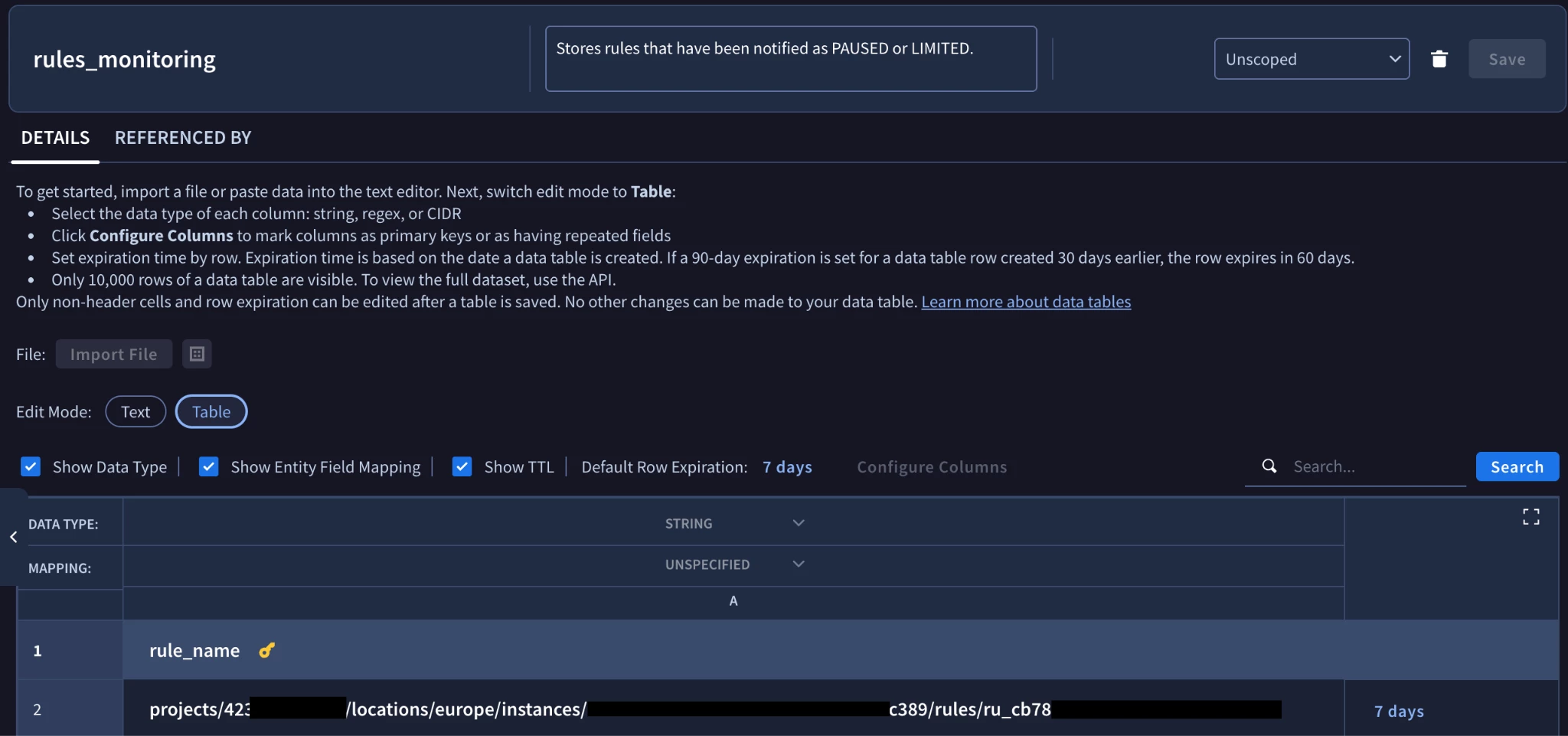
If it doesn't exist, create it with one STRING column rule_name marked as the key column, then PATCH it to set rowTimeToLive = 604800s (7 days).
-
-
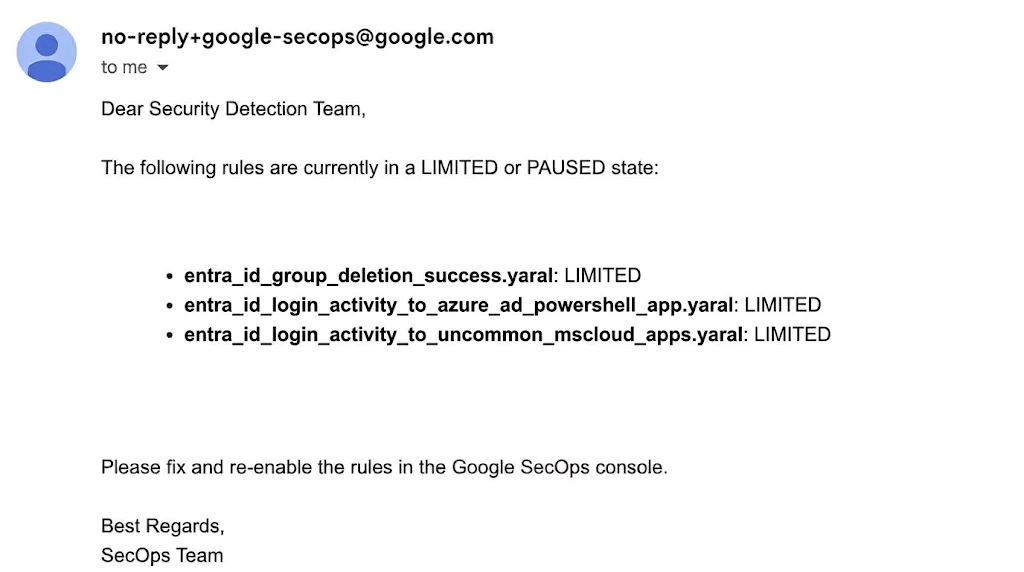
Notify and remember. If there's anything new, send a single HTML email that lists each rule's displayName and state in red, with a link to the tenant. Then bulk-create one Data Table row per newly notified rule. If everything was already reported, log "All affected rules were already notified recently. No email sent."
This is what recipients see:
A few design notes to understand before you run this in production:
-
The Data Table is the dedup state, and the TTL is the reminder interval. Because each row expires after 7 days, a rule that is still LIMITED or PAUSED a week later gets reported again. This gives you a built-in weekly reminder for unresolved rules without flooding anyone in between. If you want a different reminder interval, change the rowTimeToLive of the rules_monitoring table (in the console or through the API). Keep in mind that the job only sets the TTL when it creates the table.
-
Dedup is per rule, not per state. The key is the rule's resource name. If a rule is reported as LIMITED and moves to PAUSED during the same 7-day window, no second email is sent. If you want the LIMITED → PAUSED escalation to trigger a new notification, you'd need to extend the key to include the state.
-
Fixing a rule doesn't clear its row. Once a rule is saved and back in DEFAULT, it drops out of the affected list, and its row simply expires. If the rule degrades again before the TTL runs out, it won't be reported until the row has expired. You can delete the row manually to re-arm notifications right away.
-
One email per run, not one per rule. All newly affected rules are grouped into a single message. A tenant-wide event, such as a bad bulk rule deployment, produces one digest instead of an inbox storm.
-
Monitor the job too. Run every 15 minutes, the job is cheap (two list calls and, only when needed, one Data Table read). Also use SOAR job failure visibility, so that an authentication or permission regression doesn't silence the monitor itself.
With the mechanics covered, let's deploy it.
Getting Started with the SecOps Toolkit integration
The Google SecOps Toolkit Integration in the SecOps Toolkit repository is an open-source framework that helps security teams automate operational workflows and simplify environment administration.
Prerequisites
Git, Python 3, a Google Cloud service account within the Google SecOps project to use with Workload Identity Federation, SecOps SOAR admin access, outbound email working in your SecOps SOAR environment, and a distribution list for your detection engineering team. You don't need to create a Data Table in advance: the job creates rules_monitoring on its first run that finds an affected rule.
If you already deployed SecOpsToolkit for the ScheduledQueryJob, skip to Step 4.
Step 0: Clone the Repository
To begin, you need the SecOps Toolkit integration code locally or in your Cloud Shell or terminal. So please run:
git clone https://github.com/GoogleCloudPlatform/secops-toolkit.git
cd secops-toolkit/integrations
pip install -r requirements.txt
Step 1: Deploy the integration — Method 1 (recommended)
The upload_integration.py script packages the integration and pushes it via the Integrations Import API. First update the .env file used to load target instance details such as Customer ID, Region and Project for Google SecOps.
cp .env.example .env
Set SECOPS_PROJECT_ID, SECOPS_LOCATION and SECOPS_INSTANCE_ID in .env, plus GOOGLE_APPLICATION_CREDENTIALS if you are not using Application Default Credentials (which is the case if you are using the Cloud Shell).
Then:
python upload_integration.py --integration SecOpsToolkit
Use python upload_integration.py --list to see everything available in the repo. You can also bypass .env entirely with explicit flags:
python upload_integration.py \
  --integration SecOpsToolkit \
  --project my-secops-project \
  --location europe \
  --instance xxxxx-xxx-xxxx-xxxx-xxxxxxxxxx \
  --service-account /path/to/sa-key.json # optional
Step 2: Deploy the integration — Method 2 (manual)
Zip the contents of the integration directory — the archive root must contain Integration-SecOpsToolkit.def — then upload it through SOAR Settings → Integrations → Upload Integration.
cd SecOpsToolkit
zip -r ../SecOpsToolkit.zip . -x "*.DS_Store" "*__pycache__*" "*.pyc"
Step 3: Configure the integration instance
Set API Root (https://eu-chronicle.googleapis.com/v1alpha/projects/xxxx-prod-secops-0/locations/eu/instances/xxxxxxx-xxxx-xxxx-xxxx-xxxxxxxx), either Workload Identity Email (recommended) or User's Service Account, and Verify SSL. Save, then run the Ping action to confirm authentication works before going further.
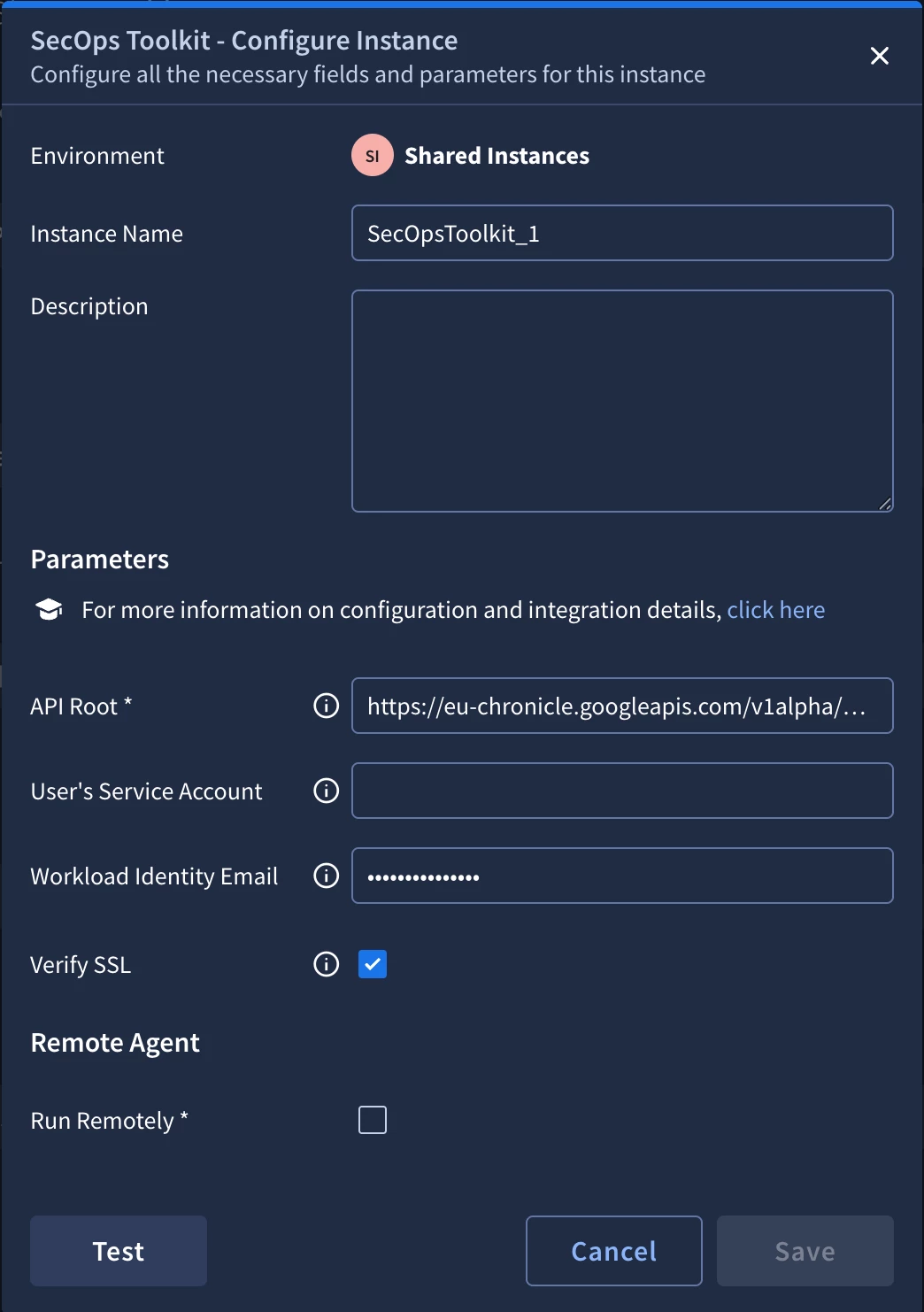
Step 4: Schedule the job
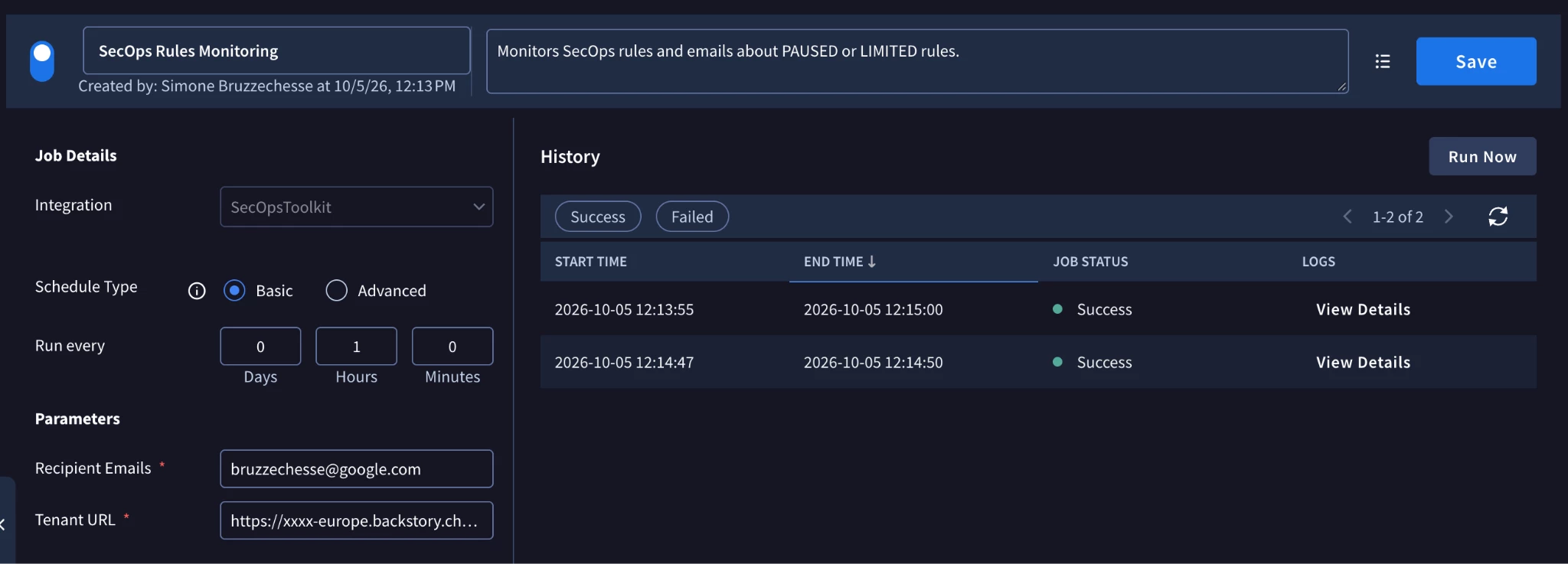
In SOAR Settings → Jobs, add RulesMonitoring, select your SecOpsToolkit integration instance and fill in the two parameters:
| Parameter | Mandatory | Example | Description |
|---|---|---|---|
| Recipient Emails | Yes | Comma-separated list of recipients. Spaces around commas are trimmed. | |
| Tenant URL | Yes | https://<tenant_id>.backstory.chronicle.security/ide | Console URL included as a link in the email. Pointing it at the rules editor (/ide) takes engineers straight to where they can fix the rule. |
Set the run interval (15 minutes, the shipped default, is a good starting point) and enable the job.
Step 5: Test and verify
Run the job on demand and read the logs. A healthy run on a tenant with degraded rules looks like this:
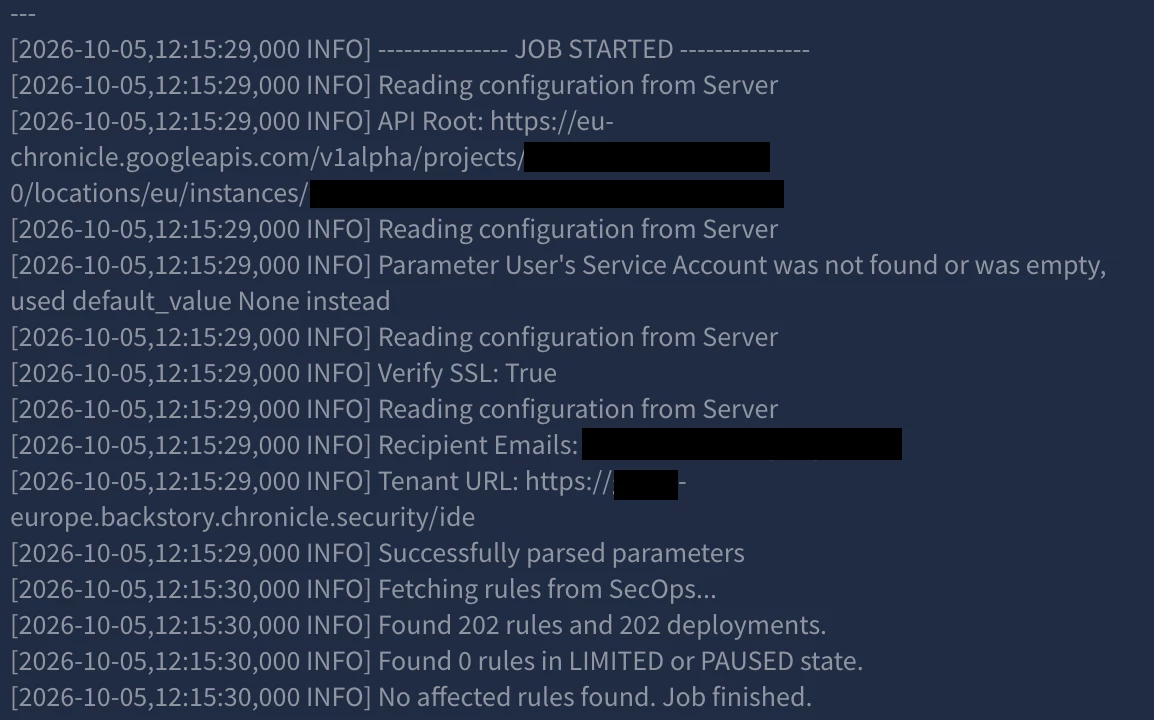
Then open SIEM Settings → Data Tables → rules_monitoring and confirm there's one row per notified rule. Run the job a second time: it should log "All affected rules were already notified recently. No email sent.", which shows that de-duplication works.
If the tenant currently has no degraded rules, the job logs "No affected rules found. Job finished." and doesn't create the table yet. That's expected. You can check the state of your rules at any time in Detections → Rules Dashboard.
Troubleshooting
Below are common issues you may run into when deploying and running the RulesMonitoring job, with their likely causes and fixes:
| Symptom | Likely cause | Fix |
|---|---|---|
| 403 on Failed to list rules / rule deployments | Missing chronicle.rules.list or chronicle.ruleDeployments.list | Add the permissions to the custom role, or fall back to roles/chronicle.admin |
| Failed to create data table in logs, and the same rules are emailed on every run | Missing chronicle.dataTables.create / update, so there's nowhere to record notifications | Grant the Data Table permissions, or create rules_monitoring manually with a key column rule_name (STRING) and a 7-day TTL |
| Job succeeds and rows are written, but no email arrives | Email delivery failed (the error is logged and doesn't fail the job) | Check the log for Failed to send email notification, validate the SOAR email configuration and the recipient addresses, then delete the affected rows to re-trigger |
| A rule that is still PAUSED is not re-notified | Its row is still within the 7-day TTL | Expected behavior; lower the table TTL or delete the row to re-arm |
| A known degraded rule is never reported | The rule is archived, or its deployment state is DEFAULT/UNSPECIFIED | Archived rules are skipped by design; check the rule's execution state in the Rules Dashboard |
Conclusions
Automatic throttling of expensive rules keeps Google SecOps stable, but without visibility it turns into silent detection gaps: rules that look deployed and aren't running. RulesMonitoring makes those state changes visible. It reads the execution state of every rule in two paginated API calls, uses a Data Table with a 7-day TTL as de-duplication memory, and sends a single, actionable digest to the people who can fix the rules. There's no extra infrastructure to run, no external database, and no one has to remember to check the Rules Dashboard.
Rule health monitoring is one example of reducing platform toil. The open-source secops-toolkit repository also includes ScheduledQueryJob (to keep Data Tables up to date from saved UDM searches through the Asynchronous Search API). These modular jobs automate routine SecOps maintenance. Explore the repository, try the deployment, and share your feedback with the community!
