




We’re back this week with another SQL pipe operator! The first two pipe operators we covered, WHERE and SELECT focused on constraining the columns and rows in the result set. Today, we will introduce the AGGREGATE pipe which allows us to start performing statistical analysis with our dataset in Google Security Operations (SecOps).
For those familiar with YARA-L, the AGGREGATE pipe is used in lieu of match and outcome sections. AGGREGATE is used to group like events together and generate calculated outputs using aggregate functions, like count, sum and more.
This means that a statistical search using YARA-L that looks like this:
principal.hostname = "win-server.lunarstiiiness.com"
match:
   metadata.event_type
outcome:
   $count = count(metadata.id)
Becomes this in SQL pipe syntax:
FROM events
|> WHERE principal.hostname = "win-server.lunarstiiiness.com"
|> AGGREGATE count(*) as event_count GROUP BY metadata.event_type
For those users who enjoy using traditional SQL, that same query would be:
SELECT metadata.event_type, count(*) AS event_count
FROM events
WHERE principal.hostname = "win-server.lunarstiiiness.com"
GROUP BY metadata.event_type
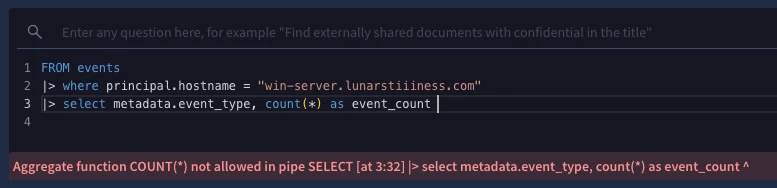
This brings us to the first important point about the AGGREGATE pipe. In traditional SQL, the sum, count and other aggregate functions resided in the SELECT statement and a separate GROUP BY statement is used to aggregate like values. With SQL pipe syntax, AGGREGATE is where both the grouping and aggregate function calculation occurs. When using SQL pipe syntax, if you attempt to use aggregate functions like count or sum within a SELECT pipe, it will throw a syntax error.
Aggregate Functions
SQL has a number of aggregate functions to use with the AGGREGATE pipe. I already mentioned sum and count but here is a link to the aggregate functions.
One thing you may notice in the aggregate functions list is that there aren’t functions for distinct count or distinct array. Users who have worked with YARA-L are familiar with these functions and users of other tools may be as well. Rather than having a specific function for distinct count or distinct array, a keyword is available that provides a way to calculate a distinct value. Unsurprisingly, that keyword is DISTINCT.
So, if we wanted to generate a count of a data set, the query could look like this:
FROM events
|> WHERE metadata.event_type = "USER_LOGIN"
|> AGGREGATE count(target.user.userid) as user_count
And if we wanted to generate a distinct count, the keyword DISTINCT appears within parenthesis. SQL is getting a listing of distinct userids and then counting the number of distinct values returned.
FROM events
|> WHERE metadata.event_type = "USER_LOGIN"
|> AGGREGATE count(DISTINCT target.user.userid) as distinct_user_count
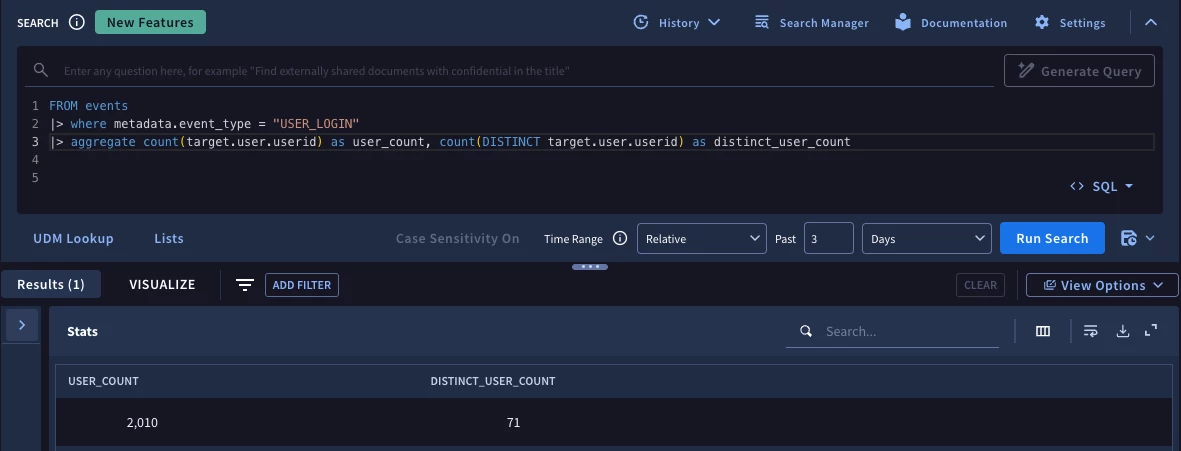
Here is the combined query where both calculations are handled within a single AGGREGATE pipe along with their output.
ARRAY_AGG or STRING_AGG?
Another important point to mention is that in addition to an aggregate function that generates an array of values (ARRAY_AGG), there is another function that will concatenate non-null string or byte values called STRING_AGG. For those who have built statistical searches in YARA-L, the ARRAY_AGG function will feel very familiar. It supports any data type except an array and outputs the results in an array. STRING_AGG only accepts string or bytes data and outputs the same data types.
In the UI, the output of both of these functions may look very similar, but depending on what you are doing with the data, will likely drive which function you use. If you want to use STRING_AGG on data types that are not string, like enumerated or numeric fields, you will need to use a cast function to convert them to strings first. On the other hand, if you want to preserve the data types, ARRAY_AGG will do that.
Another key decision point is that if you use STRING_AGG, the output will be a delimited set of strings, which can be great if you are just viewing the output in the UI. However, if you are planning to manipulate the data further, ARRAY_AGG provides greater flexibility for subsequent pipe operators to work with the contents of an array.
If you attempt to use STRING_AGG on a non-string data type, the syntax checker will let you know. Like the example using the function of COUNT, we can add the DISTINCT keyword to ensure that the output is consolidated to only include distinct values for aggregated string or array outputs.
FROM events
|> WHERE network.sent_bytes > 0
|> AGGREGATE array_agg(distinct network.application_protocol),
       string_agg(distinct metadata.product_name),
       count(*),
       sum(network.sent_bytes)

Aliasing, Grouping and Ordering
Within the AGGREGATE pipe, we can rename these calculated fields on the fly using aliasing, like we did with the SELECT pipe. In the previous query, we didn’t alias any of the values in the AGGREGATE pipe and the result is a set of column names that are not very helpful for the consumer of the query.
In an earlier example, I mentioned GROUP BY being part of the AGGREGATE pipe. As we can see in the previous example, it isn’t mandatory if I am generating an output based on the entire data set. That said, most of the time we will want to group the results by at least one column. Notice I just said column and not field. That was purposeful because once a column is aliased or transformed and has a name assigned to it, that name is used through the rest of the query unless it is changed again.
When you add a GROUP BY to the AGGREGATE pipe, the result set will start with the columns in the GROUP BY followed by the aggregate functions. If you want to group by more than one column, just make sure to separate them with a comma.
We can use ORDER BY to sort the output directly within the AGGREGATE pipe. In the following example, this isn’t crucial but for other use cases being able to sort within data that is being transformed is important, rather than waiting until the end of a query to sort.
Here is the previous query with aliasing, grouping and ordering added within the AGGREGATE pipe.
FROM events
|> WHERE network.sent_bytes > 0
|> AGGREGATE array_agg(distinct network.application_protocol) as app_protocol,
       string_agg(distinct metadata.product_name) as product_name,
       count(*) as total_count,
       sum(network.sent_bytes) as sum_sent
       GROUP AND ORDER BY principal.hostname as hostname asc
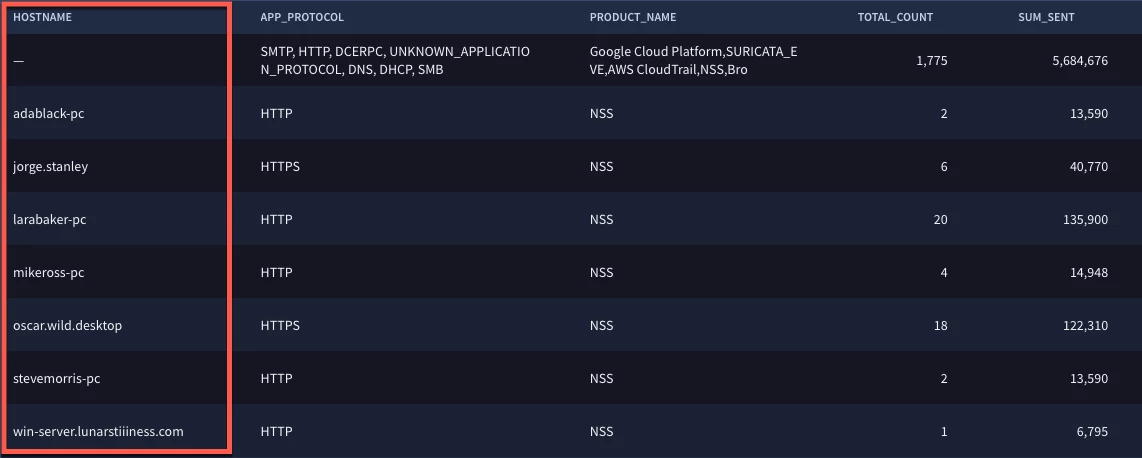
Notice that we have the network application protocols and product names, the sum of the bytes and the count grouped by the hostname. The column names are descriptive using the aliasing and the order by statement provides us with the hostnames in ascending order.
One final callout in this query is that we used parenthesis star (*) to indicate that we are counting all rows in the result set to generate a total_count column. This makes generating a count very streamlined and will be used in many, but not all cases.
Counting Repeated Fields
Let’s take a look at how we handle repeated fields with aggregation. UDM contains repeated fields such as principal.ip and security_result.action. To use these fields in a query beyond just viewing their values, we need to unnest them. Think of this as flattening. The tricky thing is that when we flatten them, the result can be, depending on the data set, two rows with the same metadata.id value, each with its own IP address or other repeated field that is being unnested.
To illustrate this, let’s take two UDM events in the dataset:
- One event has a metadata.id of evt_101 (not its real id) with the principal.ip containing both 10.0.0.5 and 192.168.0.5.
- A second event with the metadata.id of evt_102 also originates from the same host with the principal.ip (10.0.0.5 and 192.168.0.5).
| metadata.id | principal.ip (ARRAY) | target.ip (ARRAY) | network.sent_bytes |
|---|---|---|---|
| evt_101 | ["10.0.0.5", "192.168.0.5"] | ["8.8.8.8"] | 500 |
| evt_102 | ["10.0.0.5", "192.168.0.5"] | ["1.1.1.1"] | 300 |
If we unnest these events using the following syntax:
FROM events, unnest(principal.ip) as principal_ip, unnest(target.ip) as target.ipUNNEST flattens the arrays into 4 intermediate rows:
| Unnested Row # | metadata.id | principal_ip | target_ip | network.sent_bytes |
|---|---|---|---|---|
| 1 | "evt_101" | "10.0.0.5" | "8.8.8.8" | 500 |
| 2 | "evt_101" | "192.168.0.5" | "8.8.8.8" | 500 |
| 3 | "evt_102" | "10.0.0.5" | "1.1.1.1" | 300 |
| 4 | "evt_102" | "192.168.0.5" | "1.1.1.1" | 300 |
If we then use the AGGREGATE pipe and group by the principal_ip and target_ip, here is what we get, depending on how we apply the aggregate function.
| principal_ip | target_ip | event_count (COUNT(*)) | distinct_count (COUNT(DISTINCT metadata.id)) | Why? |
|---|---|---|---|---|
| "10.0.0.5" | "8.8.8.8" | 1 | 1 | 2 unnested rows, both came from "evt_101" |
| 192.168.0.5" | "8.8.8.8" | 1 | ||
| "10.0.0.5" | "1.1.1.1" | 1 | 1 | 2 unnested rows, both came from "evt_102" |
| "192.168.0.5" | "1.1.1.1" | 1 |
If we use count(*) in this case, we find that we are counting some events twice. Depending on what you are attempting, this may not be ideal. Instead, we can use COUNT(DISTINCT metadata.id) in the AGGREGATE pipe to count the number of distinct events after the unnesting has occurred.
In the following query, we are generating an event count and a distinct event count using the two techniques. To eliminate any rows where the counts are the same, we’ve added the WHERE pipe at the end of the query to remove those results.
FROM events, unnest(principal.ip) as principal_ip, unnest(target.ip) as target_ip
|> WHERE network.sent_bytes > 0
|> AGGREGATE count(*) as event_count,
       count(distinct metadata.id) as distinct_count
       GROUP BY principal_ip, target_ip
|> WHERE event_count <> distinct_count
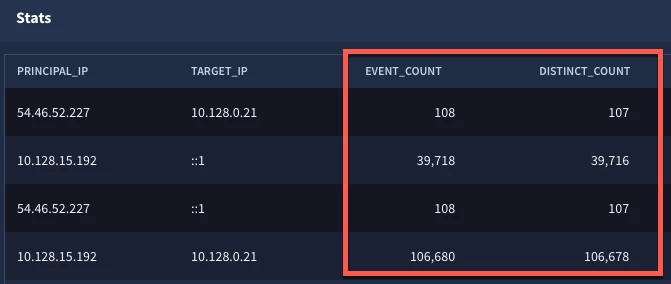
Here we can see that there are a few events where the unnesting has caused two events to be created but by counting the distinct ID field, we only count the event once.
We covered a good deal of fundamentals, but this blog doesn’t cover all the possible use cases that AGGREGATE can enable. We didn’t even talk about the idea of being able to string multiple AGGREGATE pipes together to generate a “stat of a stat”. However, I hope you found this to be a helpful blog to get you started with AGGREGATE.
Here are a few things to keep in mind:
- AGGREGATE is used in place of the match and outcome sections in YARA-L
- There are a number of aggregate functions that can be used, but if you want distinct values, like in a count or an array, add the keyword DISTINCT within the parentheses
- We can perform multiple aggregation calculations on the same set of grouped by columns in a single pipe operator, just make sure to separate the functions and the group by fields with commas
- Renaming the calculated columns using AS in the pipe is considered a best practice so that those column names are available for the next pipe
- Sorting can also be performed within the AGGREGATE pipe if desired
Try some of these concepts out in your next search and let us know how it goes. I’ll be back with more tips, more pipes and the concepts we covered today will be leveraged as we go deeper into SQL pipes!
