
We’ve spent plenty of time building searches in Google Security Operations (SecOps), but previously we focused on building searches for events and entities. Today I want to highlight how we can use search to find detections and how this can be used in your workflow.
Detections or Alerts?
When we talk about searching for detections, we are covering both detections and alerts. For those not familiar with the broader data flow and the nuance here, stick with me for a moment.
Traditionally, events are processed by the rules engine and if events matched conditions laid out in a rule, a finding would be created. This finding could be made available in a queue to an analyst to triage and investigate and flow into a case. These types of findings are considered alerts. On the other hand, you might have a finding that does not merit this additional workflow. These are then classified as detections. Within the rules engine, it is possible to detect but not alert.
Both detections and alerts are stored in the same datastore and can be accessed via the same schema. If we are trying to understand more about a specific host or user, for instance, we may want to search the corpus of detections AND alerts to understand what has transpired beyond what is in the events.
Composite Rules
Another reason why searching detections is important is that oftentimes a search interface is great for exploring the data we have available to us, particularly as we build rules. This leads to a slight change to that process flow mentioned above. With the introduction of composite rules, not only could rules be built based on entities and events but they could also be built on detections (and alerts). If you want to learn more about composite rules, here is a series of blogs that will quickly get you up to speed on this capability.
- Composite Rule Fundamentals
- Building Your First Composite Rule
- Building a Rule Using Detection Descriptors
- Building a Rule Using Meta Labels
- Building a Rule Using Match and Outcome Variables
- Building a Rule Using Custom and Curated Detections
- Building a Rule To Monitor for Risky Behavior
- Building Rules Usings Detections and an Event or Three
- Building Rules Usings Detections and Entity Graph
Building a detection search
To get started, we are going to build a very simple search to find all of the detections and alerts for the past seven days that are part of the curated rule pack named Mandiant Frontline Threats. This rule pack contains rules that are derived from M-Trends research and incident response engagements.
The structure of the search may look a little odd at first glance, so let me explain. The term detection at the start of the search is best thought of as the dataset where this data exists. In the case of the entity graph, these fields start with graph. In the case of detections, they start with detection.
Within the detection dataset the same type of tree structure exists as it does for events, so detection data has metadata fields but also a leaf called detection. Within that leaf, the rule set display name resides, so we can search for detections that are part of the rule pack using the following syntax.
detection.detection.rule_set_display_name = "Mandiant Frontline Threats"
The results of this search yield both detections and alerts. I won’t go through the different components of the search interface, suffice to say aggregations, histograms, column selectors and so forth are available. What I do want to call out is the detection viewer on the right side of the page and the data available in it which we can review and use these fields to build additional searches with.
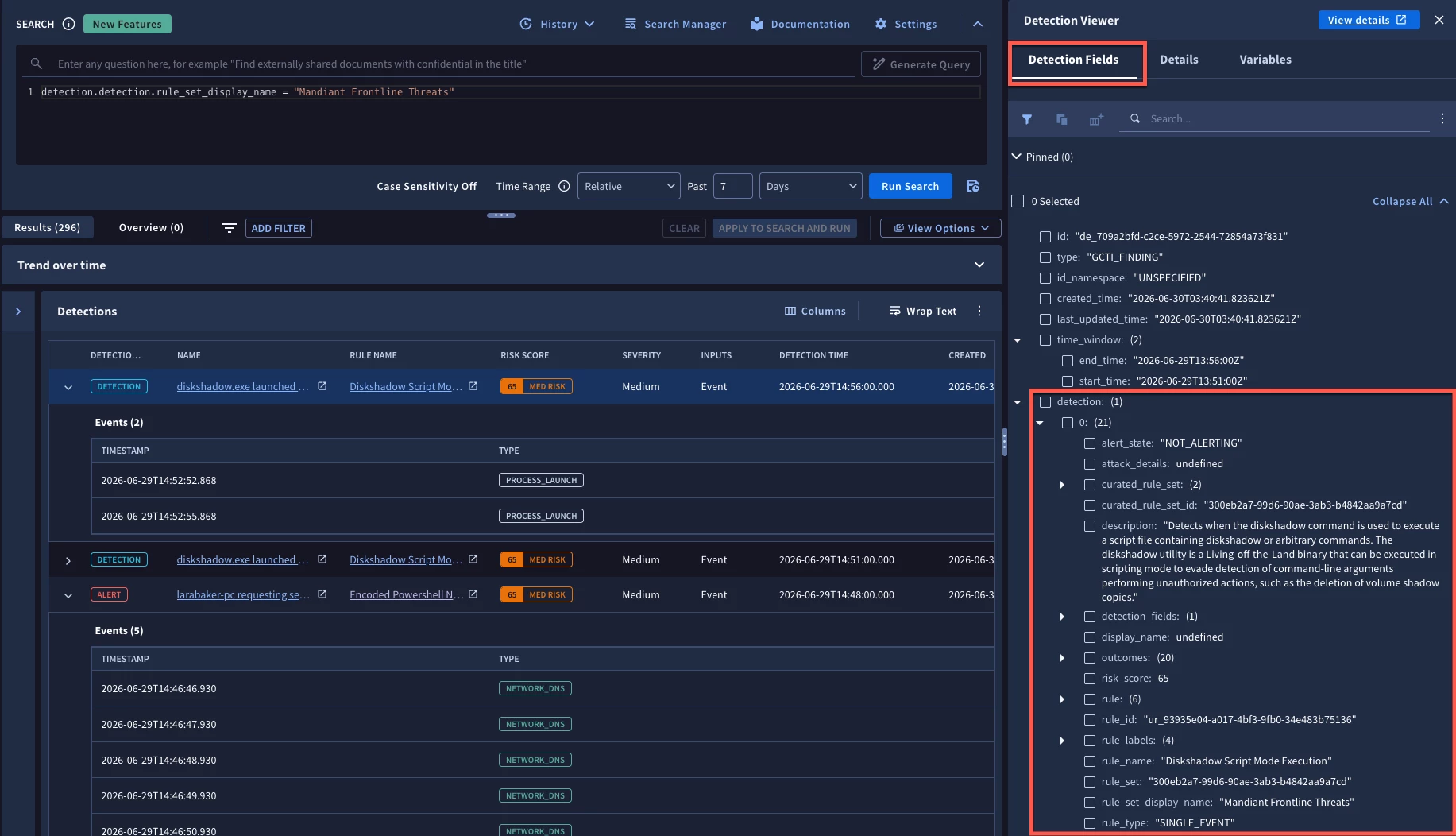
Notice within that detection leaf that we can see the alert state for the highlighted detection is NOT_ALERTING. If we had clicked on a row that had the red alert flag associated with it, we would see the value for this same field as ALERTING.
Let’s assume that if the detection is generating an alert, these are being handled, so let’s change the search to only return rows from this rule pack that are just detections, that is they are not alerting. We could add the following statement to the query.
detection.detection.alert_state = "NOT_ALERTING"
The listing now contains only detections; there are no alert flags to be found.
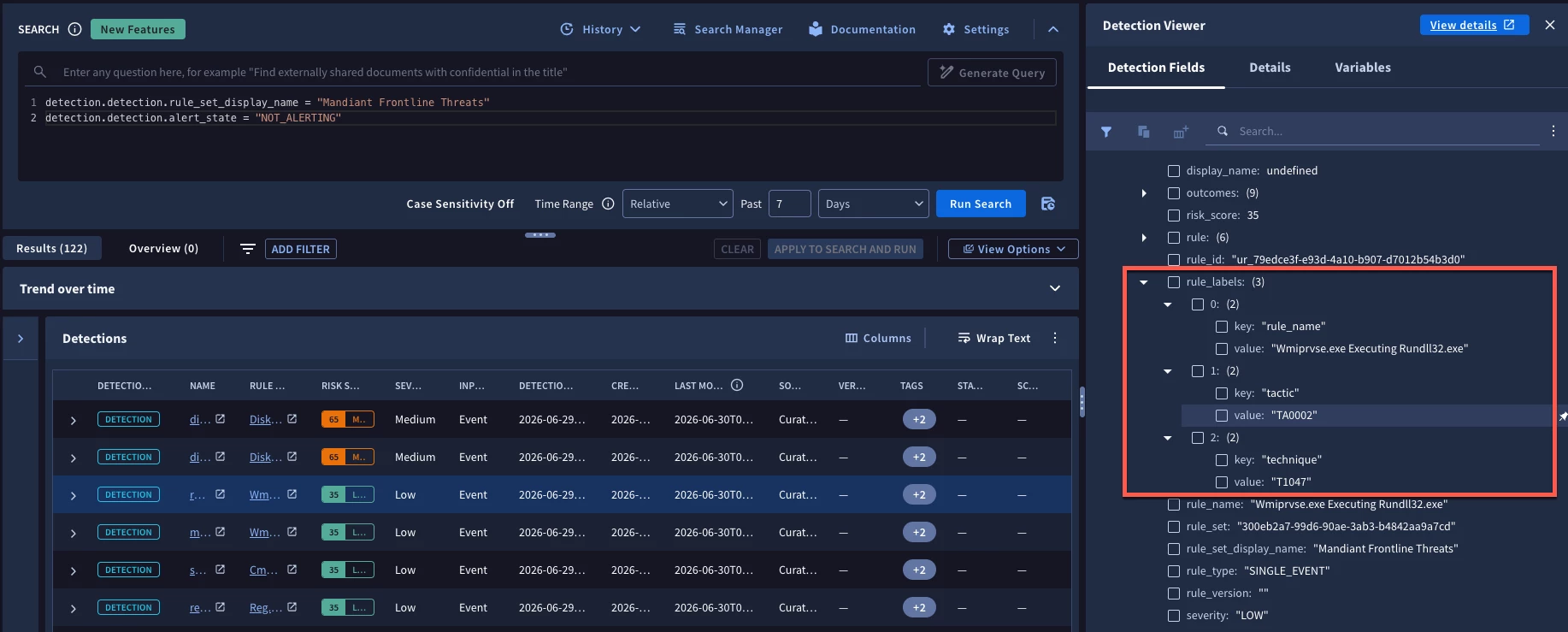
Additional information within all of these detections include metadata from the rule that triggered it. This information is stored as key/value pairs and here we can see that the MITRE ATT&CK tactic associated with the rule that triggered this detection is TA0002 and the technique is T1047.
If we wanted to continue to refine this query and only wanted to see detections associated with the tactic now called Stealth, formerly Defense Evasion, we could use the following syntax and run the search.
detection.detection.rule_labels["tactic"] = "TA0005"
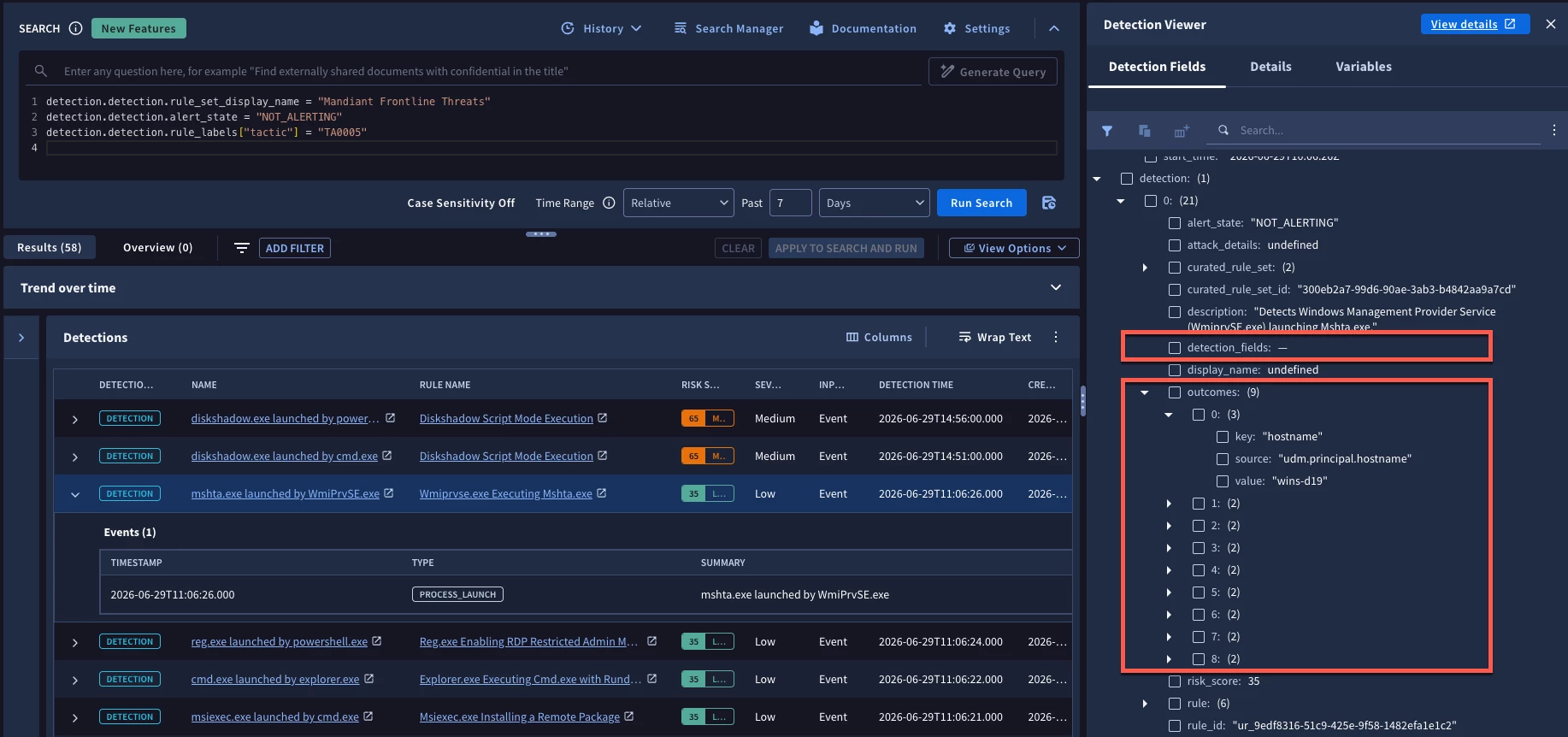
The other fields that I want to draw your attention to are the values under detection_fields and outcomes. These are also stored as key/value pairs and contain the values when the rule triggers for the variables found in the match section of the rule in the case of detection_fields and in the outcome section in the case of outcomes. This specific detection does not have a match section which is why there are no values in the detection_fields portion of the schema.
If we wanted to hone in on the hostname of wins-d19 based on the value in the outcome section, we could add the following to the search:
detection.detection.outcomes["hostname"] = "wins-d19"
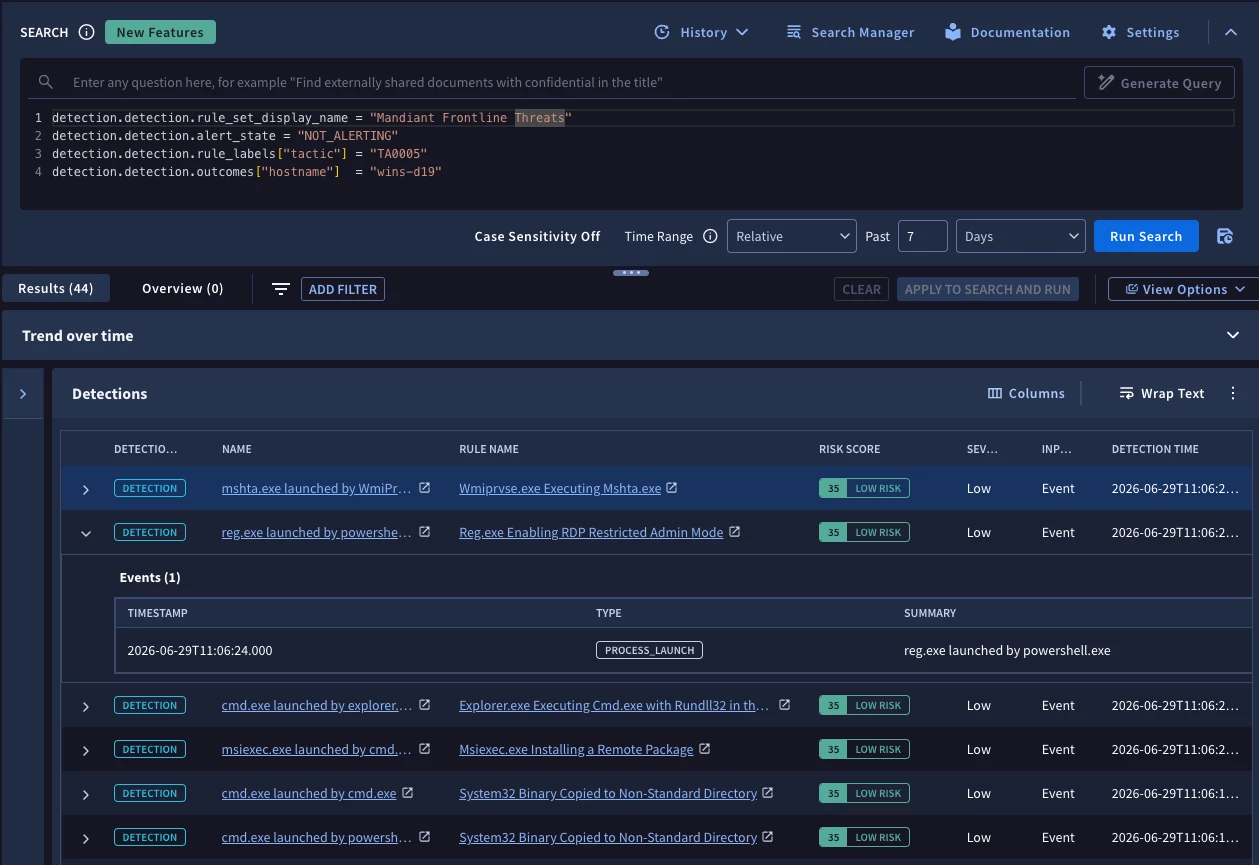
With that, we have a listing of detections (not alerting) that were created from rules in the Mandiant Frontline Threat pack that use the MITRE ATT&CK tactic of Stealth where the system wins-d19 was observed for the past seven days.
This is a basic search that could be further enhanced by leveraging additional YARA-L functions, but hopefully this provides you an idea how the data is structured and how it can be applied. We can also leverage this in the rules engine as a starting point for a composite rule that identifies when multiple detections against a common host are triggered within a specific time window.
Finally, we can leverage statistical search functionality to generate aggregated outputs of detection data like we do with events. This can then be used to build dashboards around detection coverage.
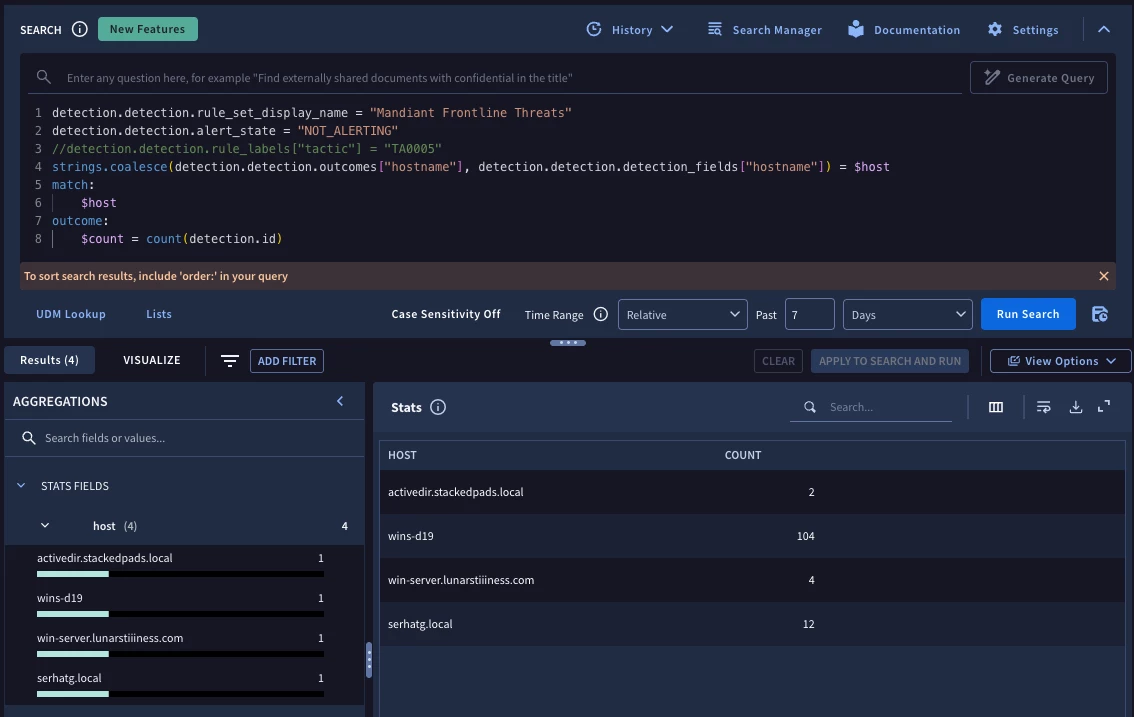
The ability to search detections like events and entities provides users with another method to get closer to their data. As you use this, here are a few things to keep in mind:
- When searching the detection dataset, make sure the fields in the search are prepended with detection. followed by the field name
- The value in the detection.detection.alerting_state drives whether the output is a detection (NON-ALERTING) or an alert (ALERTING) which drives where the finding is used within SecOps
- Alerts have their own queue and are become part of a case
- Values from the meta, match and outcome sections of a rule are all available in a detection and can be referenced as a key/value pair, like this detection.detection.rule_labels["tactic"] = "TA0005"
Using the search interface, users can gain greater visibility into the fields available to them as part of a detection which can then be used to hunt across the historical data more efficiently, explore the detections to more easily build composite rules and to develop dashboards for detections!