




Last time, we introduced the concept of using data tables in conjunction with the entity graph in our YARA-L rules. Both the entity graph and data tables provide additional flexibility for detection engineers as they craft their rules and while these capabilities won’t be used in every rule, it’s important to understand that they can be used in concert for specific use cases.
Today, we will take a look at the first command that uses the entity graph and data tables in concert with one another. This command is graph_override.
graph_override
This option provides detection engineers with the ability to use the contents of the data table in lieu of entity graph values for a specific set of entities. You might be thinking, couldn’t we just use a data table with our rule? In some cases that might be sufficient, but you may have a use case where you want to use entities that exist in the entity graph, and then override those values with a data table, if they exist.
Let’s start by writing a simple search to view the entity frank.kolzig. This entity information was ingested from Windows Active Directory and when we review our results, we can see information about this user entity including contextual fields like department, user name, address and much more.
graph.entity.user.userid = "frank.kolzig"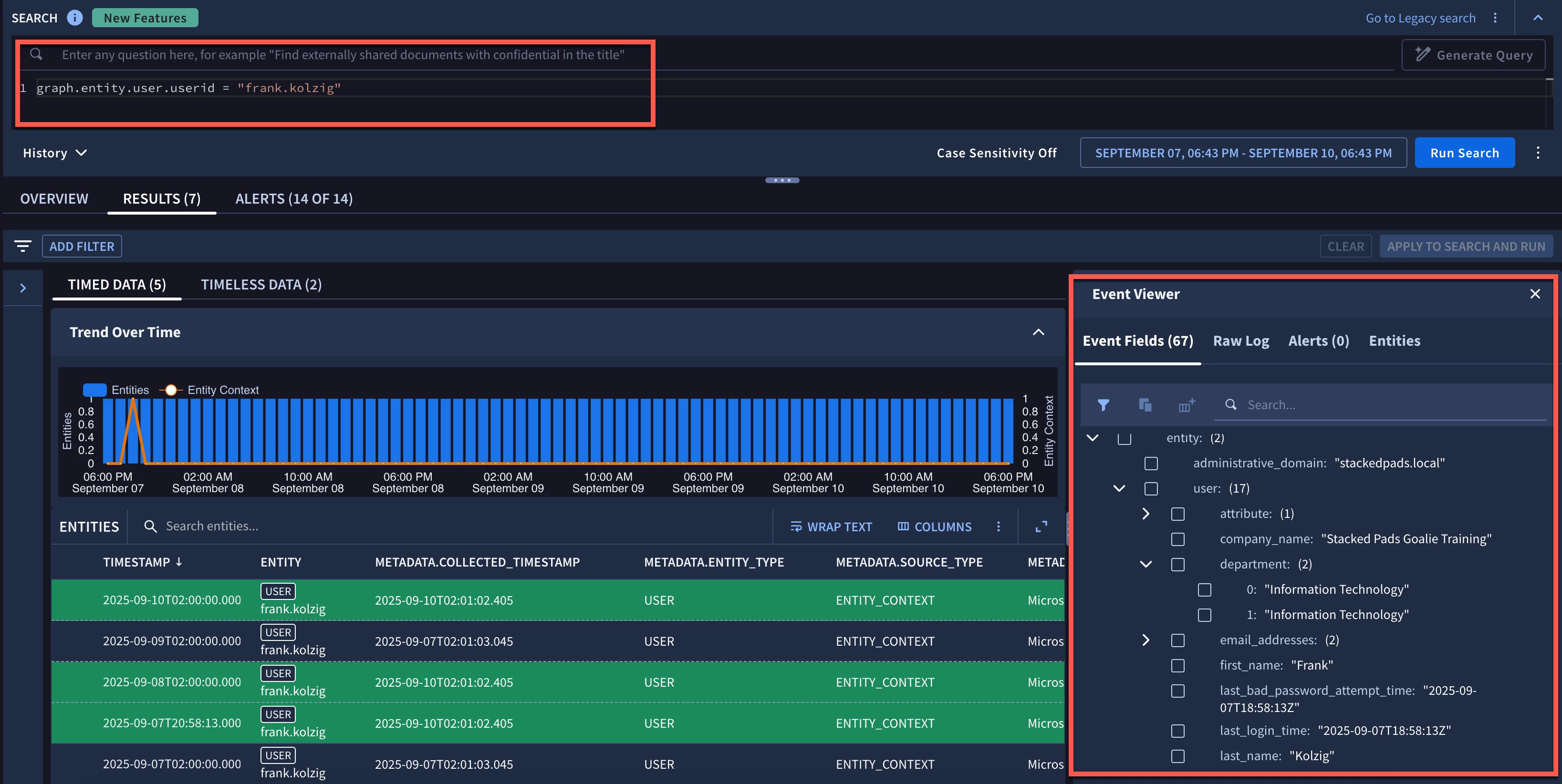
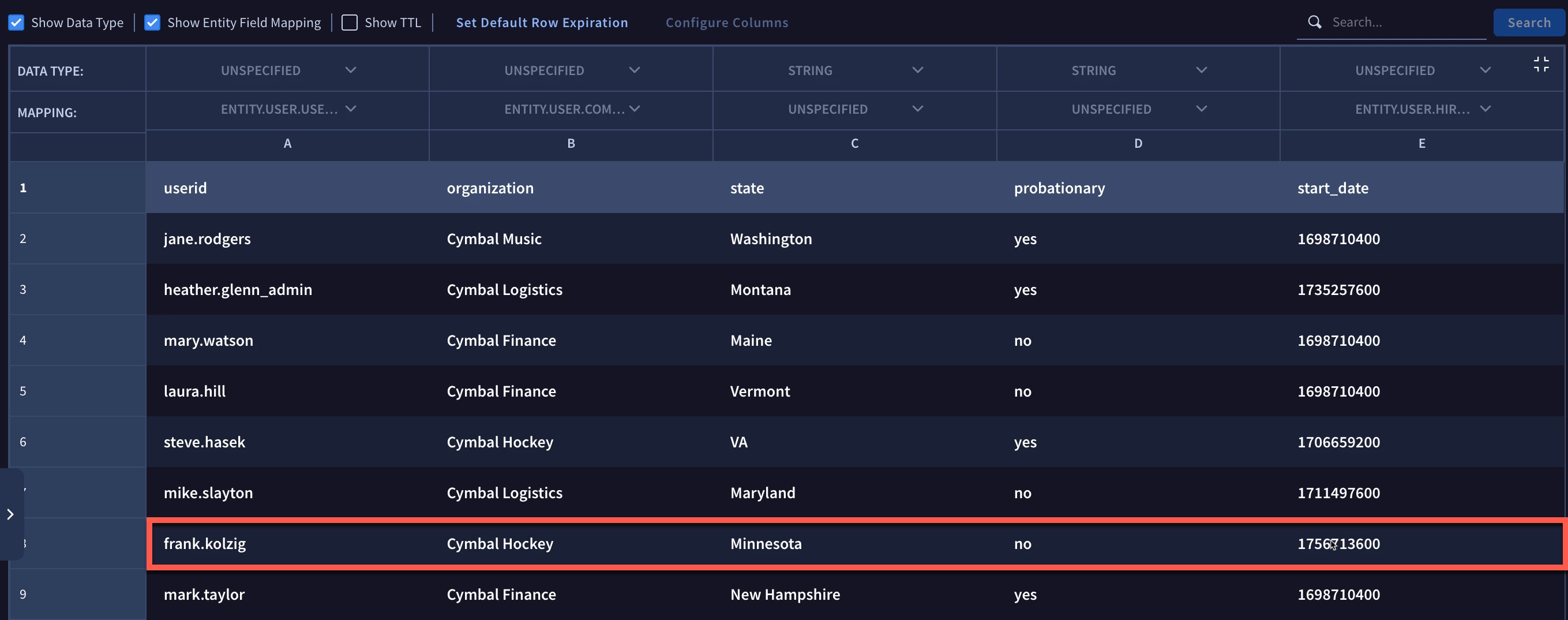
In the previous blog, we created a data table that mapped the userid to the entity.user.userid entity graph field. We also mapped the organization to the entity.user.company_name and the start_date to the entity.user.hire_date.seconds. This data table is below with frank.kolzig highlighted for reference.
Because this is a new concept and to help visualize this, I created a consolidated view of the values that we will work with. The entity graph has many more columns of course, but this provides a nice view of our mapping between the data table and the entity graph.

The arrows in red denote the fields that have a direct mapping between the data table and the entity graph. The yellow arrow is an example of a field that exists in both the entity graph as well as the data table. However, we didn’t map this field. The probationary field does not exist within the entity graph. While we could find a spot to represent this field in the entity graph, we haven’t placed that value there, and instead will use the data table to convey the contents of this field. Finally, we have a department field in the entity graph that is a repeating field.
To get started, we are going to set aside additional rule logic for the moment to ensure we nail the concepts of entity graph and data table integration first. After the meta and before the events section of the rule, we are going to create our setup section.
Within the setup section, we will add the graph_override command and map the entity.user.userid field in the entity graph where $graph is the event variable in the rule, to the userid in the subsidiary_users data table.
setup:
   graph_override($graph.graph.entity.user.userid = %subsidiary_users.userid)
This means that if the entity.user.userid in the entity graph matches the userid in the subsidiary_users data table, the mapped values in the data table will override what is in the entity graph, in the context of the rule that it is running within.
Because of this, the value in organization will be presented within the field entity.user.company_name. So, Stacked Pads Goalie Training will be overridden by the organization Cymbal Hockey. Similarly the value of 0 in entity.user.hire_date.seconds will be overridden by the epoch value in the data table column start_date.
Other data table values in the rule that are not mapped to the entity graph have data types of string, number, regex and cidr. They are referenceable as key/value pairs. For fields that exist in the entity graph but are not mapped, they are represented by their entity graph field names.
Based on the setup command we just used, here are the fields and values available using the graph_override command.
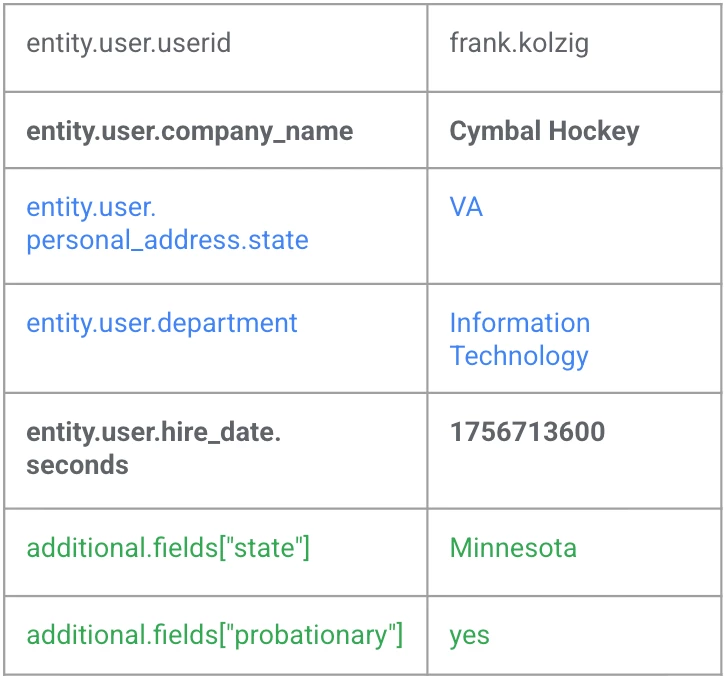
Notice the entity.user.personal_address.state and entity.user.department from the entity graph are available (i.e. the values in these fields were not overridden by values from the data table). However, because of the override, the values in the data table are displayed for entity.user.company_name and entity.user.hire_date.seconds. Finally, the two fields that only exist in the data table and were not mapped to the entity graph can still be addressed using additional.fields with the key being the column name from the data table, in quotes and within square brackets.
What if we wanted to compare the entity graph and data table by more than one column? We could do that. Let’s change our graph_override command to map both the userid and company name.
setup:
   graph_override($graph.graph.entity.user.userid = %subsidiary_users.userid and $graph.graph.entity.user.company_name = %subsidiary_users.organization)
If both values match, other mapped fields will return values from the data table. In our example however, the user and the organization/company do NOT match. Here is the visualization of the data table and entity graph.
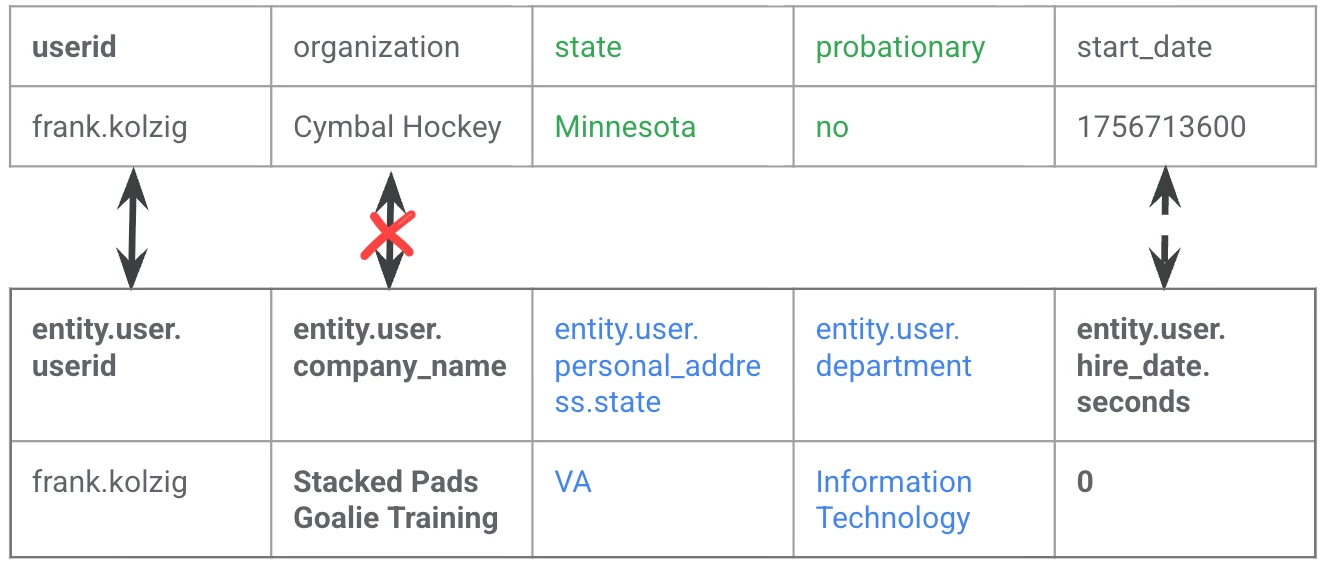
Because the relationship between the entity graph and the data table don’t align with what was defined in the setup section of the rule, the graph values are not overridden and only the fields and their corresponding value that exist in the entity graph are available as the rule is being executed.
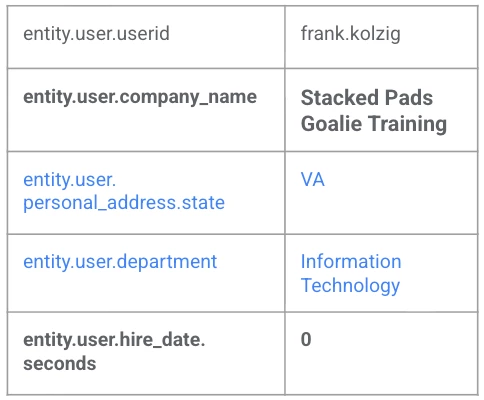
Notice that there are no additional fields like probationary available for the rule to leverage and a field like entity.user.hire_date.seconds, which had a value in the data table, would now default to its null value of 0 because this value is not populated in frank.kolzig’s entity in the entity graph.
A few things to remember:
- The graph_override command accepts a boolean expression and comparing one or more fields from the entity graph and the data table with one another, but for the override to occur, the expression must return true
- Unmapped fields in the data table can be accessed if the override exists by specifying additional.fields["data_table_column_name"]
- Unmapped fields are not accessible if the override fails; in that case, the only fields and values that are available for the rule are those that exist in the entity graph
We’re going to stop here for the moment, but we will pick up again next week by putting this into practice and using the graph_overrride command within a rule.
