




We left off last time by calculating a Median Absolute Deviation (MAD). Normally, I’d provide a quick summary that would lock us all in, but I can’t really summarize 1900 words and images, so I’ll wait while you take a few minutes to read the last blog.
OK, with the foundation we built last time, this blog is going to cover the practical application based on the work we put in calculating MAD last time and using it to calculate a Robust Z-score.
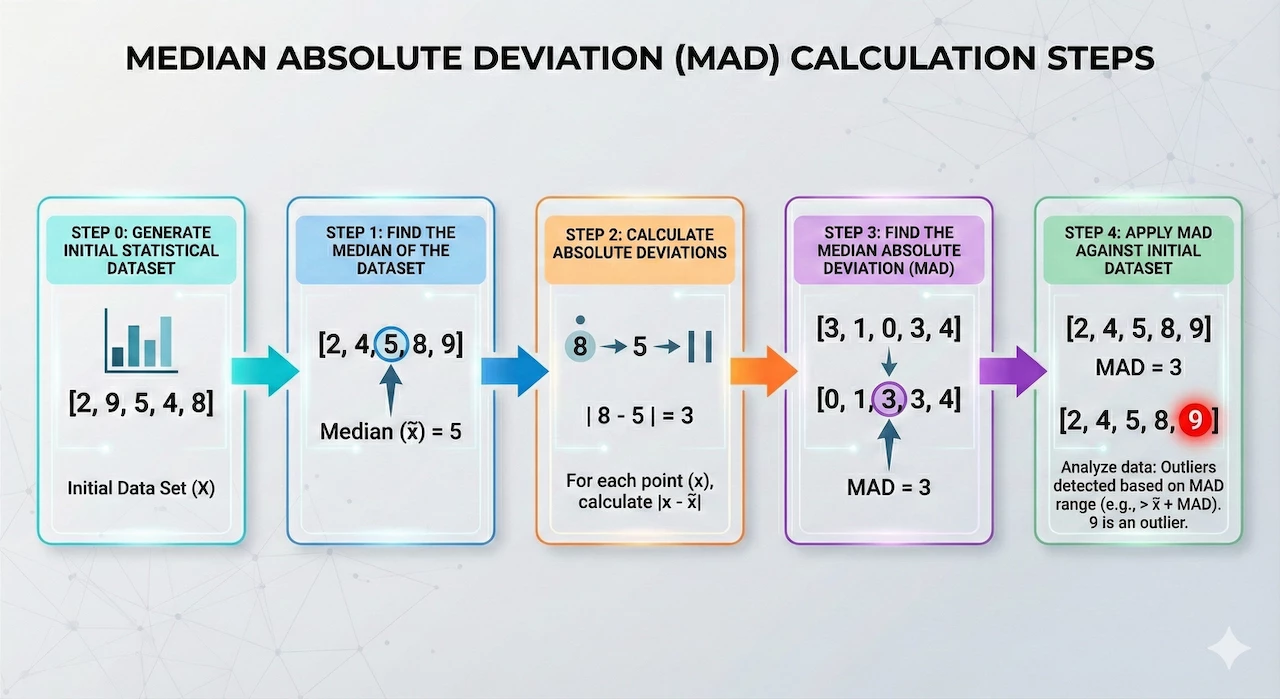
The multi-stage search that we constructed last time contains hourly buckets of IPs and a sum of total network sent bytes. We’ve calculated a median for that data and then used that median to calculate the absolute deviations. Finally, we calculated the median of the absolute deviations to get a MAD. These steps needed to be performed in this order within the multi-stage search because each stage has a dependency on the previous stage. Those are the items that we’ve covered in steps zero to three. Now we need to identify the outliers in the initial data set using our calculated MAD.
Step 4: Identifying Outliers in the Data Set Using Median Absolute Deviation
Let’s apply MAD to the original data buckets in step zero and identify which IP pairs and their associated time buckets are outliers. The first thing we want to do is to place the calculation for MAD into its own stage by enclosing it in curly brackets.
stage hourly_stats {
metadata.event_type = "NETWORK_CONNECTION"
net.ip_in_range_cidr(target.ip, "10.128.0.21/32")
net.ip_in_range_cidr(principal.ip, "10.128.15.193/32")
network.sent_bytes > 0
$ip = principal.ip
$target = target.ip
match:
  $ip, $target by hour
outcome:
  $total_bytes_sent = sum(cast.as_int(network.sent_bytes))
  $count = count(network.sent_bytes)
}
stage agg_stats {
$ip = $hourly_stats.ip
$target = $hourly_stats.target
match:
  $ip, $target
outcome:
  $median_bytes_sent = window.median($hourly_stats.total_bytes_sent, false)
}
stage deviations {
$hourly_stats.ip = $agg_stats.ip
$hourly_stats.target = $agg_stats.target
$ip = $hourly_stats.ip
$target = $hourly_stats.target
$bucket = $hourly_stats.window_start
match:
  $ip, $target, $bucket
outcome:
  $abs_deviation = max(math.abs($hourly_stats.total_bytes_sent - $agg_stats.median_bytes_sent))
}
stage median_ad {
$ip = $deviations.ip
$target = $deviations.target
match:
  $ip, $target
outcome:
  $mad = window.median($deviations.abs_deviation, false)
}
//root stage
$hourly_stats.ip = $agg_stats.ip
$hourly_stats.target = $agg_stats.target
$hourly_stats.ip = $deviations.ip
$hourly_stats.target = $deviations.target
$hourly_stats.window_start = $deviations.bucket
$hourly_stats.ip = $median_ad.ip
$hourly_stats.target = $median_ad.target
$ip = $hourly_stats.ip
$target = $hourly_stats.target
$time_bucket = timestamp.get_timestamp($hourly_stats.window_start)
match:
  $ip, $target, $time_bucket
outcome:
  $event_count = max($hourly_stats.count)
  $total_bytes_sent = max($hourly_stats.total_bytes_sent)
  $median = max($agg_stats.median_bytes_sent)
  $abs_dev = max($deviations.abs_deviation)
  $mad = max($median_ad.mad)
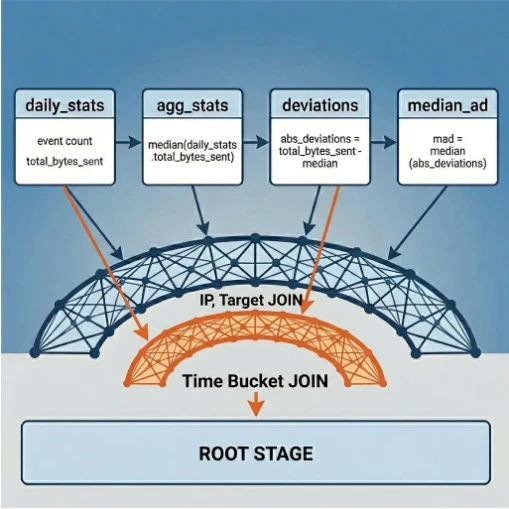
Now the fun begins! Because there are a number of values that we want to be represented in the final output, a set of joins is needed to connect the named stages to the root stage. Here we have the IP pairs being joined between stages. We are aggregating by the IP pairs and the time bucket so our output will start with these three columns.
From there, we need to determine which fields we want to include in the output. Since I like to show my math, I’m going to add a number of columns that we’ve calculated during the other stages including the event count, total bytes sent, median, absolute deviation, and MAD.
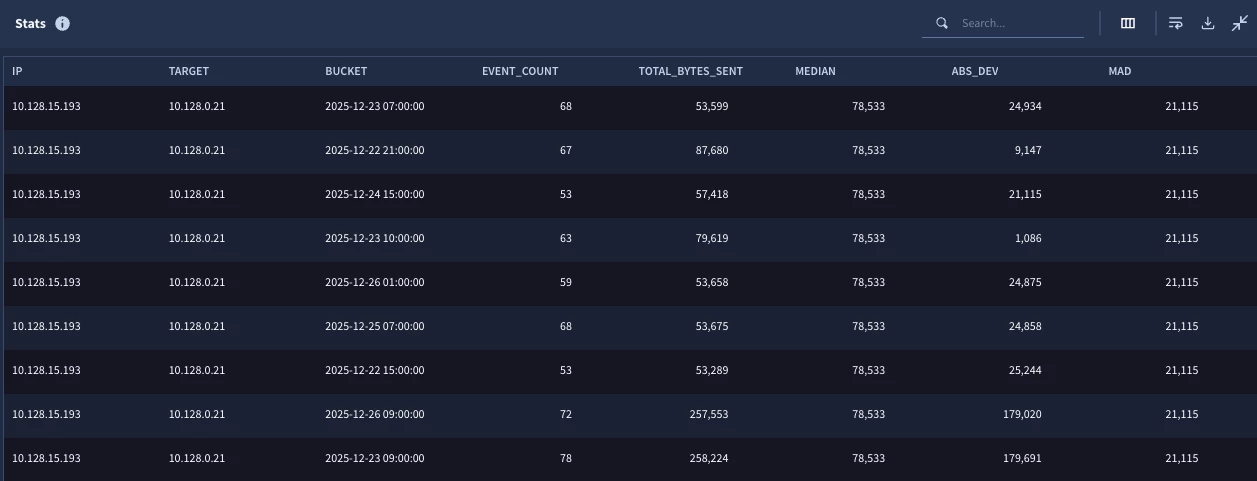
These are some nice metrics that we’ve pulled together, but we still haven’t flagged the outliers. This is now where you have some decisions to make. You could craft your own metric and define a threshold by taking the sum of the median and N multipliers of the MAD. This could be compared to the value for the total_bytes in each time bucket.
$outlier_option_1 = if($total_bytes_sent > $median + (8 * $mad) , "Extreme", if($total_bytes_sent > $median + (5 * $mad), "Alert", if($total_bytes_sent > $median + (3 * $mad) , "Warning", "No")))
In the outcome variable above, we are using conditional logic to output a value based on comparison of the total_bytes_sent and that calculated threshold. These multipliers align very roughly to standard deviations but they aren’t exact as MAD is smaller than the standard deviation. I’ve gone back and forth as I wrote this to determine if I should include the math and how this is arrived at and I landed on providing a link instead.
Alternatively, we could “force” the MAD to act a bit like a standard deviation and calculate a Robust (or Modified) Z-score. As previously discussed, if our data fit a nice bell curve and had a normal distribution, we could just use standard deviations and call it a day. If that was the case, we could use the scaling factor of 1.4826 in our Robust Z-score calculation or we could use the Z-score we previously calculated and they would essentially be the same. The reason for this is that a Robust Z-score estimates the inner 50% of the distribution curve using the median and the MAD.
However, if the data has outliers, which is entirely likely in a security data set, Z-scores as previously discussed, can get a little rocky. To overcome this, we can use that scaling factor in our Robust Z-score calculation to provide a number of standard deviations away from a point as if the distribution hadn’t been impacted by an outlier.
To calculate the Robust Z-score using MAD, we can use the equation:

We’ve already calculated the median and MAD in the earlier stages, so we just need to incorporate the formula into the search:
$robust_zscore = max(($hourly_stats.total_bytes_sent - $agg_stats.median_bytes_sent)/($median_ad.mad * 1.4826))
From there, we need to make an assessment of what we want to define as being an outlier. Using the same conditional logic technique, we are going to apply the same scale but with different Robust Z-scores.
$outlier_option_2 = if($robust_zscore > 3.0, "Extreme", if($robust_zscore > 2.0, "Alert", if($robust_zscore > 1.0, "Warning", "No")))
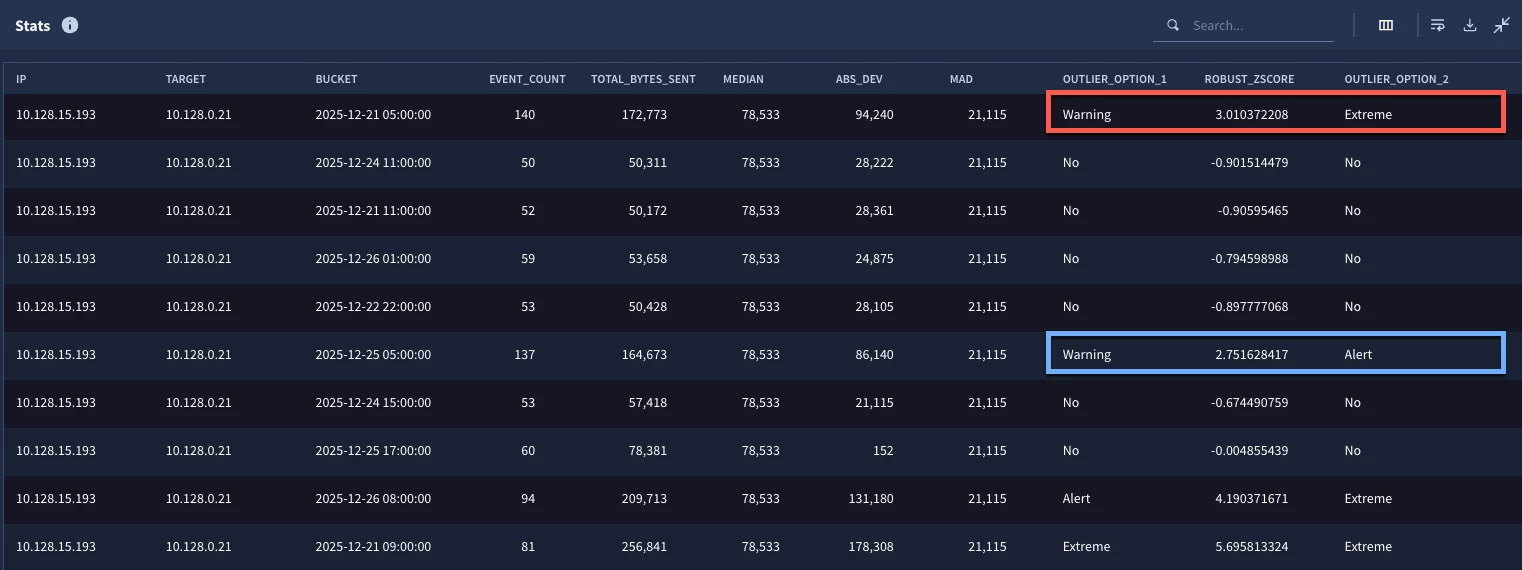
When we test the search, we can see that the outlier formula in some cases aligned with the Robust Z-score and in other places, it was off slightly. Again, there isn’t a right or wrong answer on how you approach the outlier component of this, it’s just important to understand that there are options.
For now, we are going to leave our calculations alone and narrow the results down to just outliers.
condition:
  NOT ALL OF [$outlier_option_1 = "No", $outlier_option_2 = "No"]
order:
  $time_bucket asc
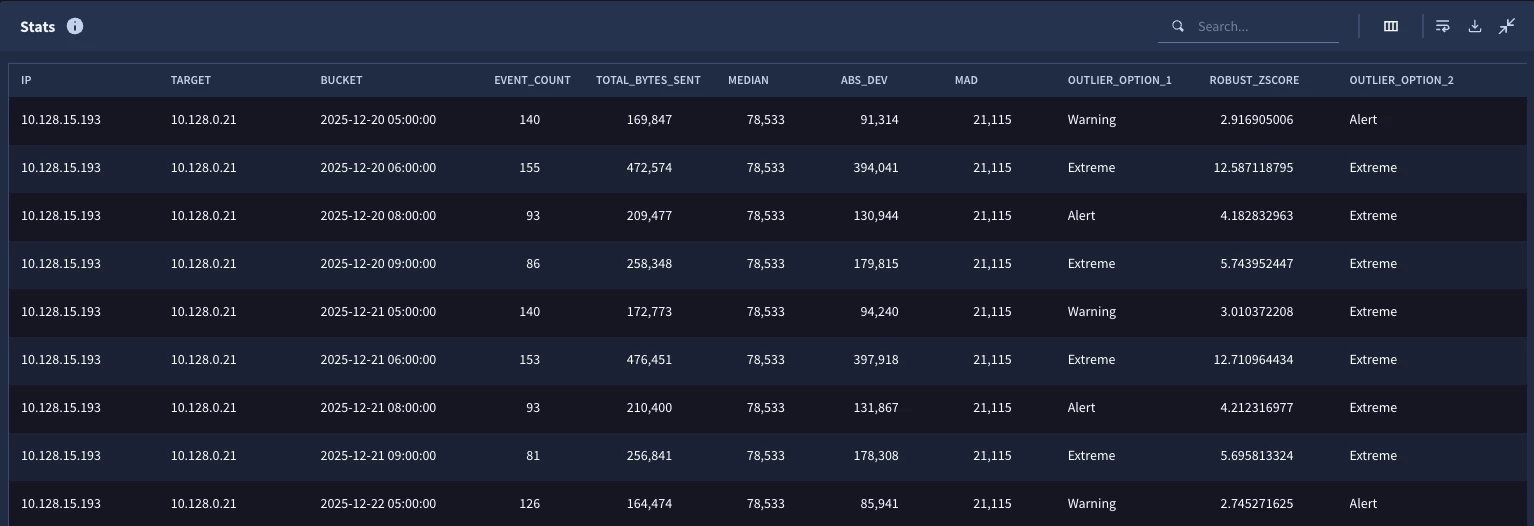
If we are generally happy with the results, we can go back to the top of the search and within the first stage, change the IP blocks from single IP ranges to a wider range.
net.ip_in_range_cidr(target.ip, "10.128.0.0/16")
net.ip_in_range_cidr(principal.ip, "10.128.0.0/16")
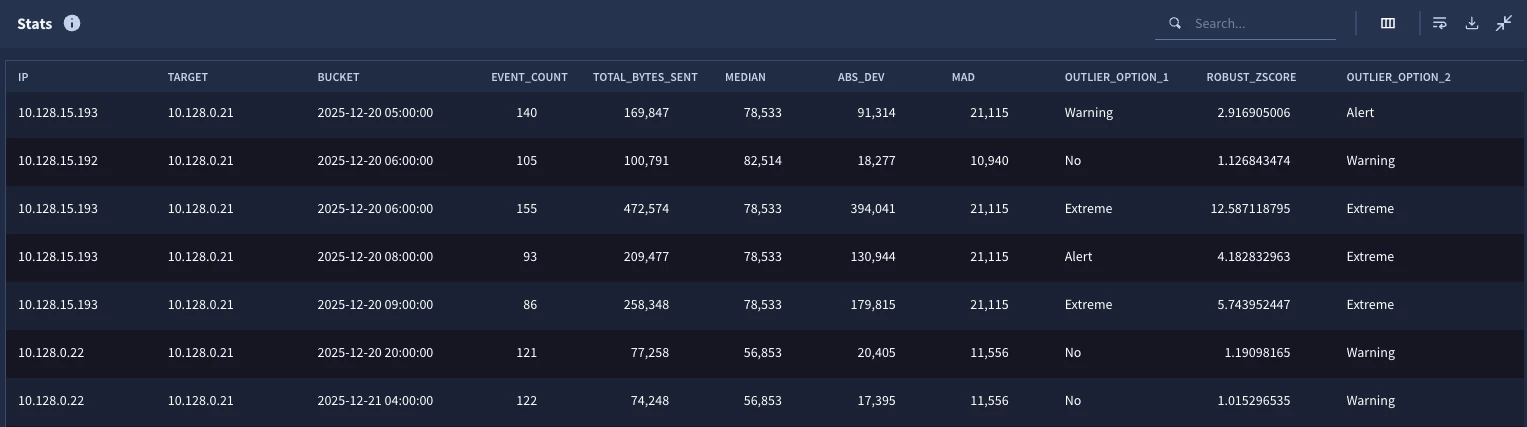
Now when we run it, we can see outliers from other pairs as well. One important point that I want to highlight here is that the median and the MAD for each IP pair is unique. Remember the match section in the stages made the median and MAD specific to the IP pair, not the entire population for the entire search window.
For reference, here is the final version of the search that we built. Some of the outcome variables were removed from stages like deviation because once we calculated them in the hourly_stats and agg_stats stages, they weren’t needed until we built the root stage.
stage hourly_stats {
metadata.event_type = "NETWORK_CONNECTION"
net.ip_in_range_cidr(target.ip, "10.128.0.0/16")
net.ip_in_range_cidr(principal.ip, "10.128.0.0/16")
network.sent_bytes > 0
$ip = principal.ip
$target = target.ip
match:
  $ip, $target by hour
outcome:
  $total_bytes_sent = sum(cast.as_int(network.sent_bytes))
  $count = count(network.sent_bytes)
}
stage agg_stats {
$ip = $hourly_stats.ip
$target = $hourly_stats.target
match:
  $ip, $target
outcome:
  $median_bytes_sent = window.median($hourly_stats.total_bytes_sent, false)
}
stage deviations {
$hourly_stats.ip = $agg_stats.ip
$hourly_stats.target = $agg_stats.target
$ip = $hourly_stats.ip
$target = $hourly_stats.target
$bucket = $hourly_stats.window_start
match:
  $ip, $target, $bucket
outcome:
  $abs_deviation = max(math.abs($hourly_stats.total_bytes_sent - $agg_stats.median_bytes_sent))
}
stage median_ad {
$ip = $deviations.ip
$target = $deviations.target
match:
  $ip, $target
outcome:
  $mad = window.median($deviations.abs_deviation, false)
}
//root stage
$hourly_stats.ip = $agg_stats.ip
$hourly_stats.target = $agg_stats.target
$hourly_stats.ip = $deviations.ip
$hourly_stats.target = $deviations.target
$hourly_stats.window_start = $deviations.bucket
$hourly_stats.ip = $median_ad.ip
$hourly_stats.target = $median_ad.target
$ip = $hourly_stats.ip
$target = $hourly_stats.target
$time_bucket = timestamp.get_timestamp($hourly_stats.window_start)
match:
  $ip, $target, $time_bucket
outcome:
  $event_count = max($hourly_stats.count)
  $total_bytes_sent = max($hourly_stats.total_bytes_sent)
  $median = max($agg_stats.median_bytes_sent)
  $abs_dev = max($deviations.abs_deviation)
  $mad = max($median_ad.mad)
  $outlier_option_1 = if($total_bytes_sent > $median + (8 * $mad) , "Extreme", if($total_bytes_sent > $median + (5 * $mad), "Alert", if($total_bytes_sent > $median + (3 * $mad) , "Warning", "No")))
  $robust_zscore = max(($hourly_stats.total_bytes_sent - $agg_stats.median_bytes_sent)/($median_ad.mad * 1.4826))
  $outlier_option_2 = if($robust_zscore > 3.0, "Extreme", if($robust_zscore > 2.0, "Alert", if($robust_zscore > 1.0, "Warning", "No")))
condition:
  NOT ALL OF [$outlier_option_1 = "No", $outlier_option_2 = "No"]
order:
  $time_bucket asc
We’ve used a whole lot of words to cover MAD and so it’s important to mention that the calculation of median in Google Security Operations (SecOps) returns “the median of the input values. If there are 2 median values, only 1 will be non-deterministically chosen as the return value.” This means that in some cases you may not get the true median in the data set. However, this non-deterministic median value in most cases will provide a better center point of the data set than an average with an outlier that dramatically skews it. I will also mention there is likely additional tuning and filtering that you may need to do to get additional value out of this type of hunting search. For instance, time buckets with very small amounts of data may not be helpful and if you have too few buckets that you are comparing within your population, the median could be skewed as well.
That all having been said, MAD, along with Robust Z-scoring provides another tool in your toolbelt to uncover anomalous activity within your environment. Here are a few things to be mindful of when using a multi-stage search to build this type of analytic.
- Each stage is it’s own search, think about what data you want to come away with from each stage
- Stages need to be ordered - this means that if I want to calculate the absolute deviation which requires a sum of the sent bytes and the median, I need stages for these values to be in place before I can calculate the absolute deviation
- Building a stage and outputting it using a root stage is a good iterative process
- If you are happy with the root stage and its output, it can easily become another named stage
- While multi-stage searches provide a good deal of flexibility, just be mindful that there are limits in place to ensure a good query performance so make sure you reference them!
These last two blogs have covered a lot of ground but I hope you can appreciate the power and flexibility that Google SecOps brings to your hunts using multi-stage search. Whether measuring Z-scores or MAD, there is more you can do within your own hunts and investigations. Use the tips and guidance and examples here and let us know how it goes!
