




In our last blog, we built a series of searches that joined successful and failed login events to uncover the relationship between them and identify suspicious activity. Today, we are going to build another set of searches, only this time, we will be joining events to the entity graph.
The entity graph is a separate dataset within Google Security Operations (SecOps) that is a repository for contextual data, like asset and user data, that is ingested from Windows Active Directory, ServiceNow CMDB or Google Workspace, to name a few options. In addition to storing contextual data, it’s a place where prevalence calculations are stored as well as local threat intelligence, like STIX and MISP IOCs that you ingest into SecOps, and global threat intelligence that Google makes available.
We will build on the concepts in the previous blog around event variables and join syntax, so if you missed the last blog, take a few minutes and check it out!
The examples today will focus on event data from process launch events and using the join syntax to identify matches within the threat intelligence that is available to us. While we are focusing on file hashes in this example, these concepts can easily be applied to other threat intelligence data in the entity graph as well as other data sets like prevalence or metric calculations.
Searching Your Own (Local) Threat Intelligence
The first search we are going to review identifies process launch events that have a SHA256 hash that also exists within the STIX data that has been ingested into SecOps.
The first portion of the search has an event variable of $process and is filtering the events to just those with the event type of PROCESS_LAUNCH that contain a SHA256 hash. Aside from creating placeholder variables for a number of fields, which we will get to in a moment, the only other field we are manipulating is the event time and we are formatting that into a standard YYYY-MM-DD HH:MM:SS format using the timestamp.get_timestamp function.
$process.metadata.event_type = "PROCESS_LAUNCH"
$process.target.process.file.sha256 != ""
$hostname = $process.principal.hostname
$hash = $process.target.process.file.sha256
$cmd = $process.target.process.command_line
$user = $process.principal.user.userid
$time = timestamp.get_timestamp($process.metadata.event_timestamp.seconds)
The entity graph side of the join has an event variable of $ioc and here we are searching for file hash entity types with a specific source type of ENTITY_CONTEXT. This context indicates that the entity data has been provided by the user. The other filtering we are applying is to narrow the entities to just those that have a product and vendor name of STIX. For both sides of this join, I highly recommend that you build them in their own search tabs before combining them.
$ioc.graph.metadata.entity_type = "FILE"
$ioc.graph.metadata.source_type = "ENTITY_CONTEXT"
$ioc.graph.metadata.product_name = "STIX"
$ioc.graph.metadata.vendor_name = "STIX"
Remember, when you build searches with joins, you have two really large mountains of data that you are connecting. To get the best search performance, taking all the events and reducing them to just process launches that have SHA256 values is a great way to reduce that side of the mountain. Similarly, if we can take all the data in the entity graph and filter on file hashes that are just local threat intelligence and specifically STIX, millions of rows can become thousands in an instance and will greatly improve performance.
With both sides filtered, we can create the join statement between them. There are a few different methods to build that join but here is the one I am using today. We are going to return only events that have a corresponding file hash in the entity graph.
inner join $process.target.process.file.sha256 = $ioc.graph.entity.file.sha256
Because searches with joins in them are treated like a statistical search, we need either a match or outcome section, or both. For this example we are going to use a match section to aggregate results by the five fields that we created placeholder variables for in the $process portion of the search. We could add a time window to this aggregation but that is not required.
match:
  $time, $hostname, $user, $cmd, $hash
In this case, I would like the events ordered by time so I will add an order section to the search and sort by the placeholder variable named $time in ascending order.
order:
  $time asc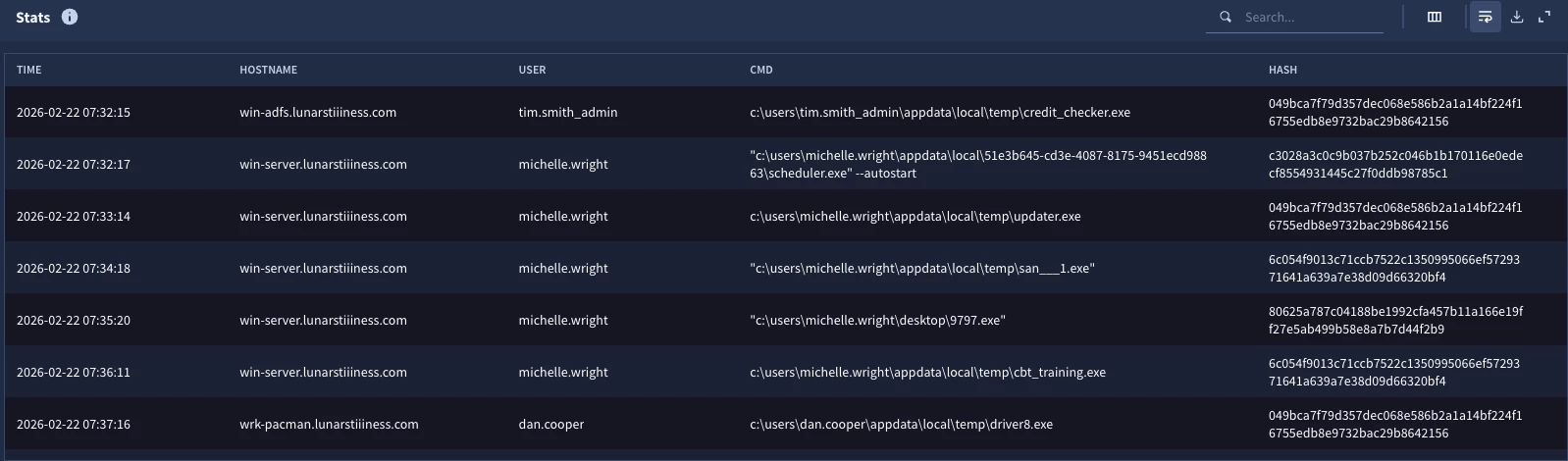
When we run the search, we get a result set with the five columns specified in the match section. These events are the ones that have values in the STIX data that is stored in the entity graph and serve as a jumping off point to investigate these users, hosts and the files that are matching our threat intelligence.
Searching Global Threat Intelligence
The first search we performed was based on threat intelligence you ingested into Google SecOps and is unique to your tenant. I freely acknowledge that I chopped up the search into parts to show how the components come together. This time we are going to examine another search that uses global threat intelligence that Google provides, specifically the Mandiant Fusion IOC data, and provide the full search holistically.
$process.metadata.event_type = "PROCESS_LAUNCH"
$process.target.process.file.sha256 != ""
$hostname = $process.principal.hostname
$hash = $process.target.process.file.sha256
$cmd = $process.target.process.command_line
$user = $process.principal.user.userid
$time = timestamp.get_timestamp($process.metadata.event_timestamp.seconds)

inner join $process.target.process.file.sha256 = $ioc.graph.entity.file.sha256

$ioc.graph.metadata.entity_type = "FILE"
$ioc.graph.metadata.source_type = "GLOBAL_CONTEXT"
$ioc.graph.metadata.vendor_name = "MANDIANT_FUSION_IOC"

match:
  $time, $hostname, $user, $cmd, $hash

order:
  $time asc
The only change we are making to this search is the logic within the $ioc event variable. The source type is now GLOBAL_CONTEXT which indicates this is threat intelligence that Google provides and the specific feed we are using is the Mandiant Fusion IOC based on the value in the vendor name field.
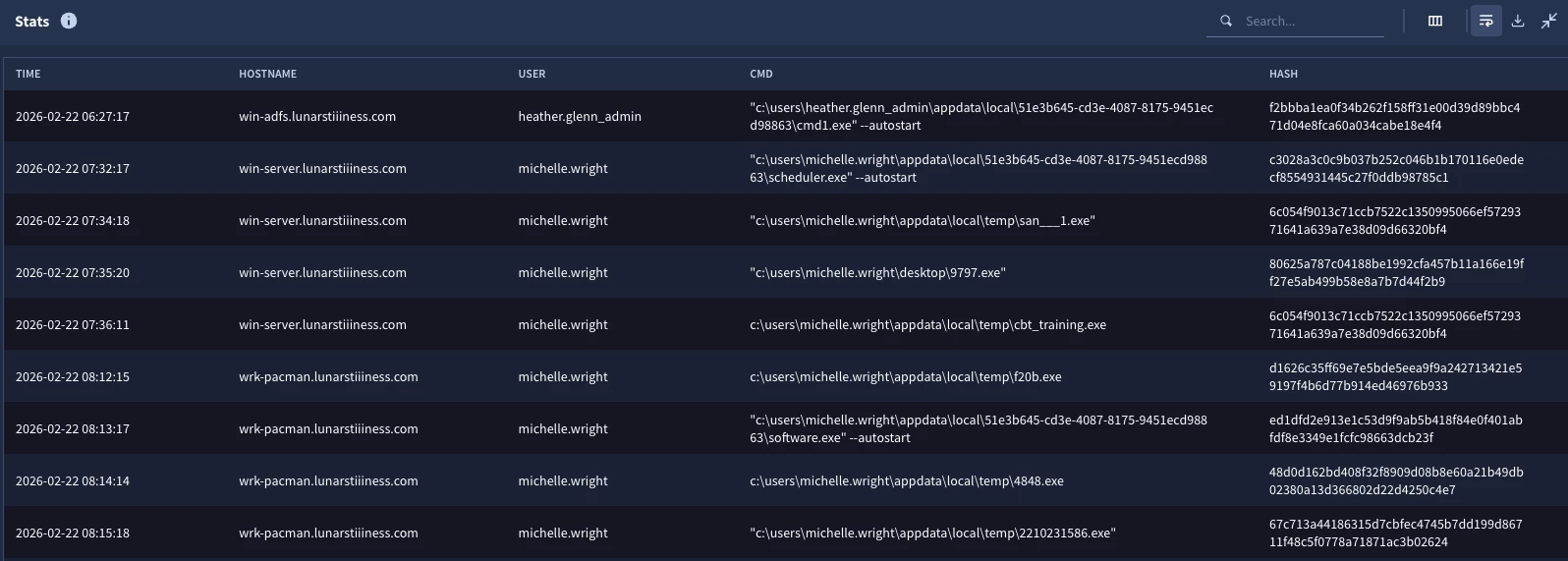
This results in the same five column format with the events that have SHA256 matches with values in the Mandiant Fusion IOC feed.
Adding Threat Intelligence Context to Events
Being able to identify events that are associated with IOCs listed in threat intelligence repositories is good, but chances are we want to gather additional context around this threat intelligence in the search rather than just match the IOC.
Here is our previous search with one change. We have added an outcome section.
$process.metadata.event_type = "PROCESS_LAUNCH"
$process.target.process.file.sha256 != ""
$hostname = $process.principal.hostname
$hash = $process.target.process.file.sha256
$cmd = $process.target.process.command_line
$user = $process.principal.user.userid
$time = timestamp.get_timestamp($process.metadata.event_timestamp.seconds)

inner join $process.target.process.file.sha256 = $ioc.graph.entity.file.sha256

$ioc.graph.metadata.entity_type = "FILE"
$ioc.graph.metadata.source_type = "GLOBAL_CONTEXT"
$ioc.graph.metadata.vendor_name = "MANDIANT_FUSION_IOC"

match:
  $time, $hostname, $user, $hash, $cmd

outcome:
  $ioc_confidence = array_distinct($ioc.graph.metadata.threat.confidence)
  $ioc_assoc_name = array_distinct($ioc.graph.metadata.threat.associations.name)
  $ioc_severity = array_distinct($ioc.graph.metadata.threat.severity_details)
  $ioc_risk = array_distinct($ioc.graph.metadata.threat.risk_score)

order:
  $time asc
This section adds additional columns to the results that provide a confidence score, any associations that the hash has with malware or threat actors as well as a severity and risk score. Because we are using a match section and aggregating the output, we need to use aggregation functions in the outcome section.
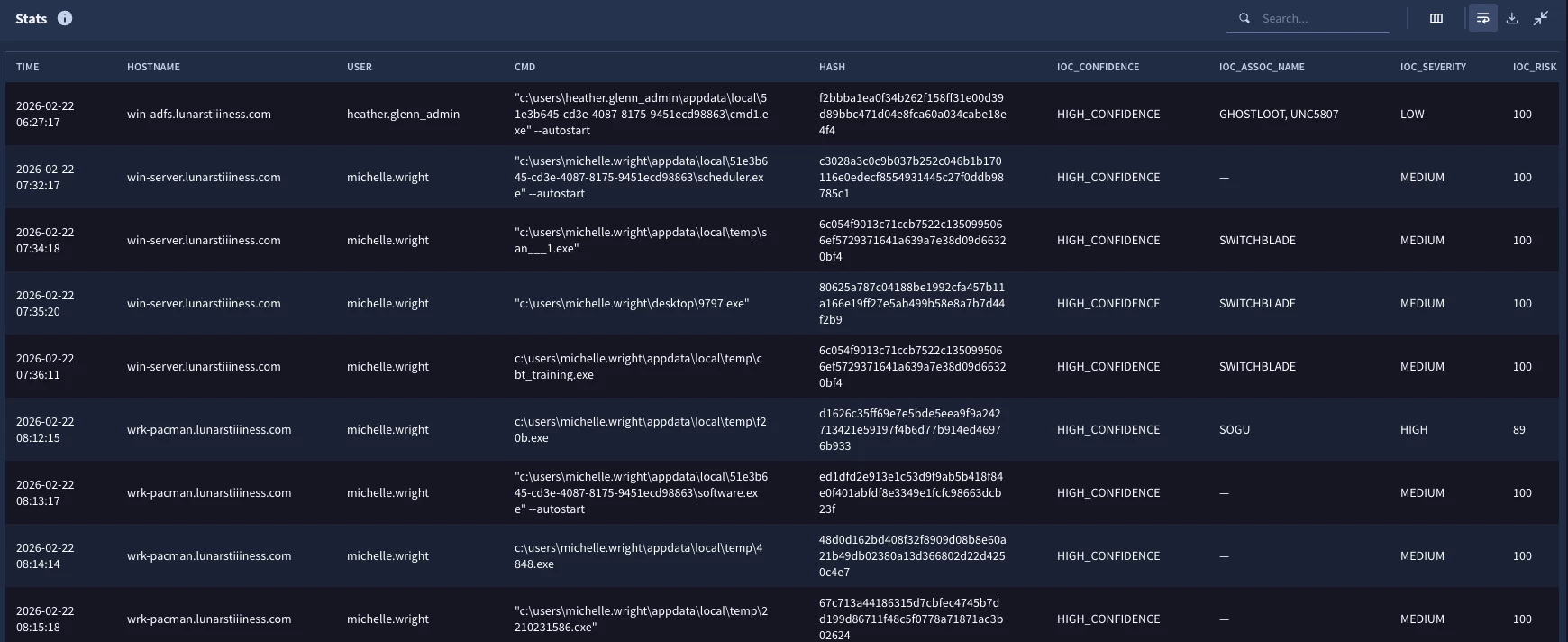
When we run the search, the output now includes these additional pieces of context around the hashes identified. I could now make a decision on which events to prioritize response to based on severity and the user and host, for instance. We could also modify the search and use these additional fields to narrow the result set further.
Combining Local and Global Threat Intelligence in a Single Search
At this point you might be thinking great, we can search our threat intel and Google provided threat intel, but do I need to run separate searches? The answer is no, you could combine these into a single search. Let’s build one final search which brings these two portions of the entity graph together and join them to the process launch events.
$process.metadata.event_type = "PROCESS_LAUNCH"
$process.target.process.file.sha256 != ""
$hostname = $process.principal.hostname
$hash = $process.target.process.file.sha256
$cmd = $process.target.process.command_line
$user = $process.principal.user.userid
$time = timestamp.get_timestamp($process.metadata.event_timestamp.seconds)

inner join $process.target.process.file.sha256 = $ioc.graph.entity.file.sha256

$ioc.graph.metadata.entity_type = "FILE"
(
  (
     $ioc.graph.metadata.source_type = "ENTITY_CONTEXT" and
     $ioc.graph.metadata.product_name = "STIX" and
     $ioc.graph.metadata.vendor_name = "STIX"
  )
  or
  (
     $ioc.graph.metadata.source_type = "GLOBAL_CONTEXT" and
     $ioc.graph.metadata.vendor_name = "MANDIANT_FUSION_IOC"
  )
)
$ioc.graph.metadata.vendor_name = $feed

match:
  $time, $hostname, $user, $hash, $cmd, $feed

outcome:
  $ioc_confidence = array_distinct($ioc.graph.metadata.threat.confidence)
  $ioc_assoc_name = array_distinct($ioc.graph.metadata.threat.associations.name)
  $ioc_severity = array_distinct($ioc.graph.metadata.threat.severity_details)
  $ioc_risk = array_distinct($ioc.graph.metadata.threat.risk_score)

order:
  $time asc
The events with the $process event variable have not changed, but we can see a change in the $ioc entity logic. The logic that applies to both local and global threat intelligence stays outside of the parentheses, but then within each parenthesis is logic that specifies the IOCs we want from the local threat intelligence and the logic we want from the global threat intelligence. We then have outer parentheses around both pieces of logic with an OR separating them. Keep in mind that within parentheses you must specify AND and OR operators. Lastly, we have added a placeholder variable named $feed where we are extracting the vendor name from the IOC and adding it to the match section.
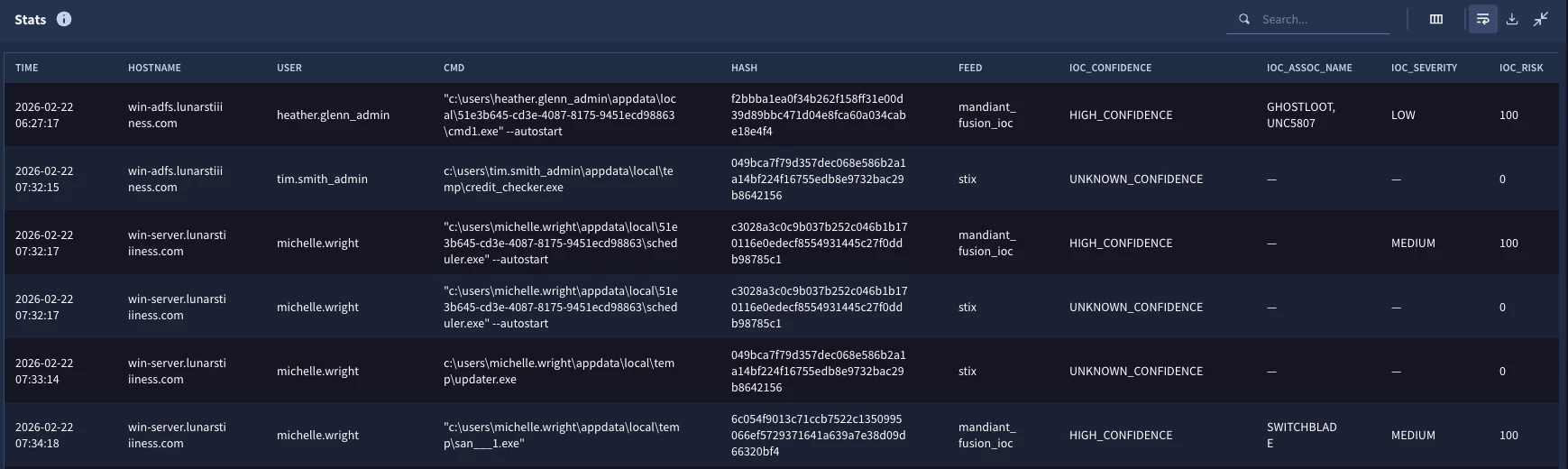
When we run the search, we now have six columns with the addition of $feed to the match section as well as the four outcome variables. Now I can see that we have at least one event in the results that has a hash in both the STIX data and the Mandiant Fusion IOC.
With that, let’s draw this blog to a close. Being able to create joins between events and the entity graph provide users with insight into specific events, their associated entities and additional metadata about those entities that can be used in the course of investigations and threat hunts.
Here are a few things to keep in mind as you build searches with event to entity graph joins:
- Both data sets are very large so use filtering logic on fields like metadata.event_type in the events data and graph.metadata.entity_type and graph.metadata.source_type in the entity graph to quickly reduce large amounts of data
- Build separate searches for each side of the join to determine which data you want in the search and then bring them together
- If you want the events to have a timestamp in the result set, consider using the timestamp.get_timestamp function to format the value into a nice readable format
While we focused on two specific threat intelligence feeds in this blog, these concepts scale to other entity types, other threat intelligence feeds and other contents of the entity graph like prevalence and metrics. I hope you give these concepts a try and use them in your own hunts and investigations!


