



Author: Jaswant Chajed, Senior Product Manager, Backup and DR
The Challenge (The "Why")
Regular backups–-- like such as persistent disk snapshots and, Cloud SQL standard backups–-- are excellent for operational continuity, like recovering an accidentally deleted file, rolling back a botched update, or weathering a localized hardware failure. However, in today's digital landscape, threat vectors have fundamentally evolved as shown in the 2026 M-Trends report.
Cyber-attacks are on the rise, and relying on traditional backups to protect against active, hostile adversaries is what we, at Google Cloud Backup and DR team, call the “The Rresilience Iillusion.”. If an administrative account or project is compromised, both production workloads and standard backups can be erased in seconds—a risk further compounded by emerging threats like rogue autonomousAI agents.
The critical distinction every IT leader must keep in mind is that operational resilience is not the same as cyber resilience.
-
Operational resilience focuses on non-malicious disruptions like data corruption, fat-finger delete or hardware failure. In these scenarios, a regular backup strategy may suffice.
-
Cyber resilience is an active battle against motivated adversaries—such as ransomware groups or rogue insiders. These threat actors do not just target production workloads; they also go after your backups. They know that if they can encrypt or delete your recovery points, they reduce your leverage and increase their chances of a payout. Furthermore, as AI rapidly advances, rogue AI agents present another emerging threat vector against which organizations must safeguard their data.
If your backup infrastructure is managed using the regular storage, same identity context and/or the same access boundaries as your production environment, it is not a recovery plan—it is a single point of failure.
Take a moment to consider the below vital question:
If an attacker or rogue AI agent compromised an administrative project tomorrow, encrypting your critical production data and wiping regular backups — could you still recover the business applications?
If you hesitate to answer any of those, it is time to reassess your current backup strategy to see how protected you truly are and determine your readiness when an attack strikes. This blog outlines a multi-layered defense strategy to provide comprehensive and enhanced protection for your Google Cloud workloads against various threat vectors like cyberattacks, malicious insider data deletion, and compromised credentials.
Best practices & Recommendations (The "What")
🔰 The 6-Layer Cyber Resilience Defense-in-depth Strategy
A resilient backup architecture relies on a multi-layered defense to keep your data secure. By facing attackers with multiple independent, hardened security layers, this approach provides enhanced protection at every step. Even if one boundary is breached, attackers must still break through several more defense layers before they can destroy your recovery path.
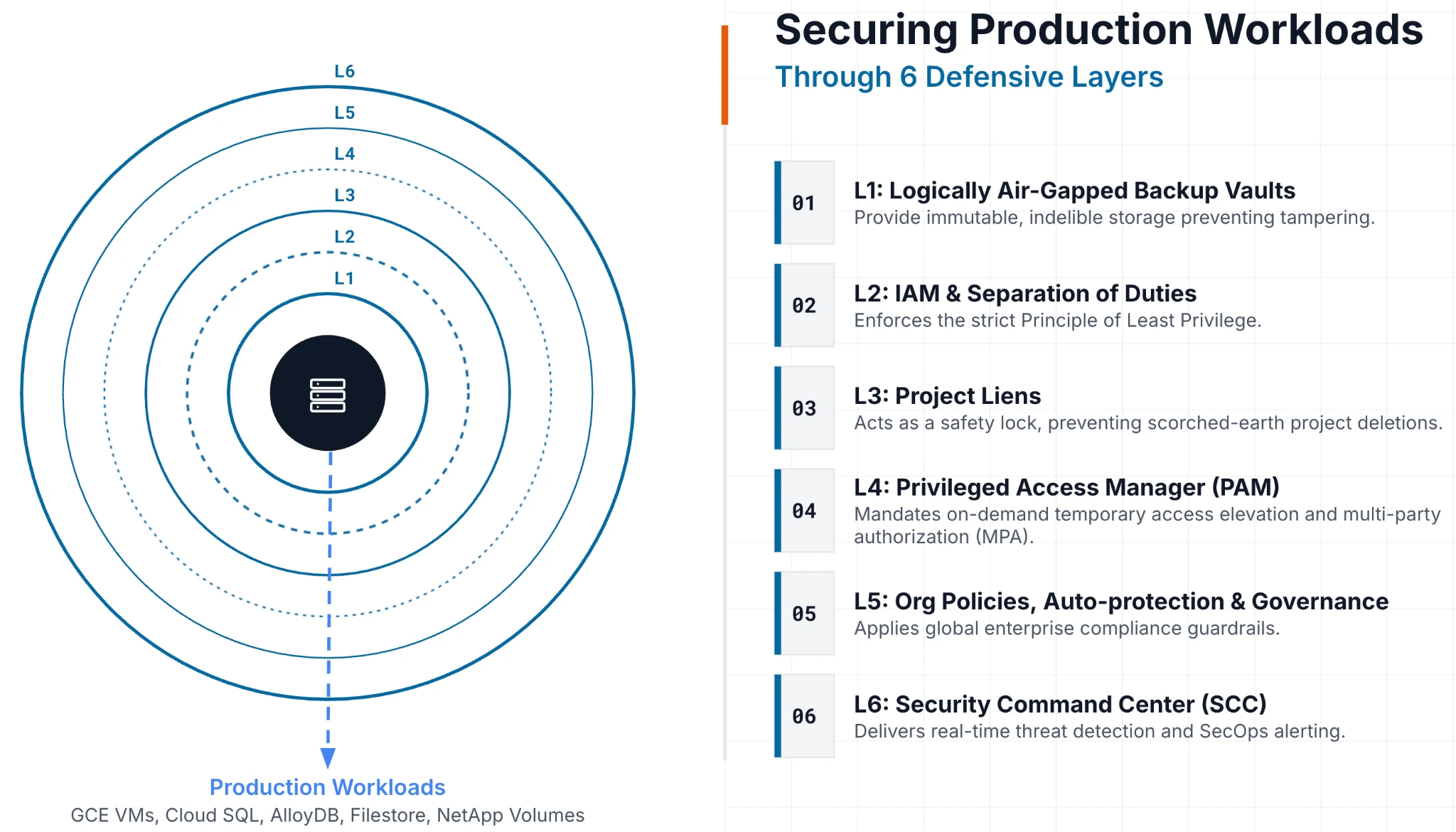
Layer 1: Logically Air-Gapped, Immutable & Indelible Backup Vaults
At the core of a defense-in-depth architecture sits the Backup Vault. Normal backups are inherently vulnerable if production credentials are stolen. Google Cloud Backup and DR (GCBDR) Backup Vaults provides a secure, logically isolated, and air-gapped storage purpose built for backups and provides
-
Immutability and Indelibility: Once backup data is written to a vault under an enforced retention policy, it is locked. It cannot be modified, overwritten, or deleted by any user—including administrators, billing owners, or compromised credentials—until the retention clock expires.
-
Data Encryption: By default, vault data is encrypted using Google-managed encryption keys, with the option to use your own encryption keys (CMEK) if required.
-
Centralized Management for Governance: Offers a unified control plane to manage, monitor, and enforce consistent backup policies across projects.
-
Monitoring and Reporting for Audit and Compliance: Provides comprehensive monitoring, audit trials and reporting to demonstrate compliance.
-
Broad Workload Coverage: Seamlessly protects Google Compute Engine (GCE) VMs, Persistent Disks, Hyperdisks, Cloud SQL, AlloyDB, Filestore, and NetApp Volumes.
-
Zonal & Regional Resilience: Backup vault allows you to store backups within the same region as the source resource, in a separate region, or across multi-regional vaults for geographic survival.
Real-World Scenario: The Ransomware Extortion
The Threat: Attackers gain initial access via a phishing, steal credentials to elevate their privileges, and run a script to wipe out production VMs, databases and delete all local backups.
The Defense: Because the backups are stored inside a Backup Vault and are fully immutable, attackers cannot delete them. Even with administrative rights, the enforced-retention period cannot be bypassed. The business restores production workloads directly from the backups in the vault within minutes.
For more information on the backup vault, watch this video.
Layer 2: Hardened Permission Control via IAM & Separation of Duties
The second layer establishes a strict security boundary between managing your active production workloads (such as live databases and virtual machines) and managing your backup recovery environments. This concept—known as Separation of Duties—is vital. If a production administrator uses the same credentials or has the same level of access to backups, a single compromised account gives an attacker the master keys to destroy your live systems and your backup safety net simultaneously.
Best Practices:
-
Strict Separation of Duties: A Cloud SQL database administrator or a VM user should never have the permission to delete or alter the backups of that database.
- The Principle of Least Privilege (PoLP): Transition away from broad roles like
roles/editororroles/owner. Leverage specialized, fine-grained backup roles (or permissions) based on the users job:-
roles/backupdr.backupUserAllows the user to only backup resources by applying existing backup plans. This role cannot create backup plans or restore from a backup. -
roles/backupdr.restoreUserAllows the user to only restore from a backup. This role cannot create a backup plan or perform other operations. - roles/backupdr.userv2 Allows full access to Backup and DR resources (creating backup plans, vaults, protecting and unprotecting resources etc). They cannot delete backups.
-
roles/backupdr.viewerProvides read-only access to all Backup and DR resources. Useful for audit compliance teams.
-
For detailed guidance on mapping roles, refer to the Google Cloud Backup and DR IAM Permissions Directory.
Layer 3: Project Liens as the Ultimate Safety Lock
During severe cyberattacks or an insider attack, threat actors won't waste time deleting files or individual backups one by one. Instead, they will try to execute a "scorched-earth" deletion by destroying the entire Google Cloud project hosting your backup vaults—hoping to bypass individual resource protections in one clean sweep.
To counter this threat vector, the Google Cloud Backup and DR service automatically places Project Liens on projects holding backup vaults with backups under active enforced retention period. Think of a Project Lien as a heavy-duty physical padlock on your entire cloud project. As long as this lock is active, Google Cloud’s underlying system will immediately reject any command to delete the project. An attacker—or even a well-meaning administrator making a mistake—cannot delete the project until the padlock is intentionally and securely removed.
Side-by-Side Comparison: Deletion Resilience
| Scenario | Without Project Liens | With Project Liens Enabled |
| Malicious Admin executes Project Deletion | Deletion request is accepted. Project enters a 30-day soft-delete state, immediately taking all backup vaults offline and crashing your recovery RTO. | Blocked Instantly. Google Cloud API rejects the deletion call at the gateway, keeping all recovery vaults online. |
| Accidental Human Error | An engineer deletes the wrong project during environment cleanup, destroying active backup policies. | Blocked Instantly. Protects critical compliance history from automated cleanup scripts. |
| Effort to Implement | High risk, zero configuration. | Simple one-line command for enhanced infrastructure survival. |
Google Recommended Practice: No operational user—not even the project administrator—should have the permissions (resourcemanager.liens.delete) to remove this lien under normal operations. If the project must be decommissioned, lien removal should require a time-bound, multi-party approval process. For more information on project lien refer to this link here.
Layer 4: Privileged Access Manager (PAM) & Multi-Party Authorization (MPA)
Leaving your users or backup administrators with permanent, 24/7 administrative access is one of the highest security risks in cloud infrastructure. If an administrator's account is hacked at 3:00 AM while they are asleep, the attacker immediately inherits that permanent, "always-on" destructive power with no extra hurdles.
Google Cloud’s Privileged Access Manager (PAM) helps eliminate this risk. Instead of permanent master keys, administrators are granted temporary access elevation —meaning they only get administrative (or needed) permissions on-demand for a short, strictly monitored window of time (e.g., for 2 hours).
Furthermore, PAM enforces multi-party and multi-level authorization. Much like the "two-key" safety protocol used to secure high-security military assets, critical actions—such as deleting backups or removing a Project Lien—cannot be done unilaterally by a single compromised administrator. A second, independent authorized team member must explicitly review and approve the request before the temporary permissions are active.
Note: You can have up to 2 levels of approvals (with max of 5 approvers per level) before a user or administrator is authorized to carry any approved action.
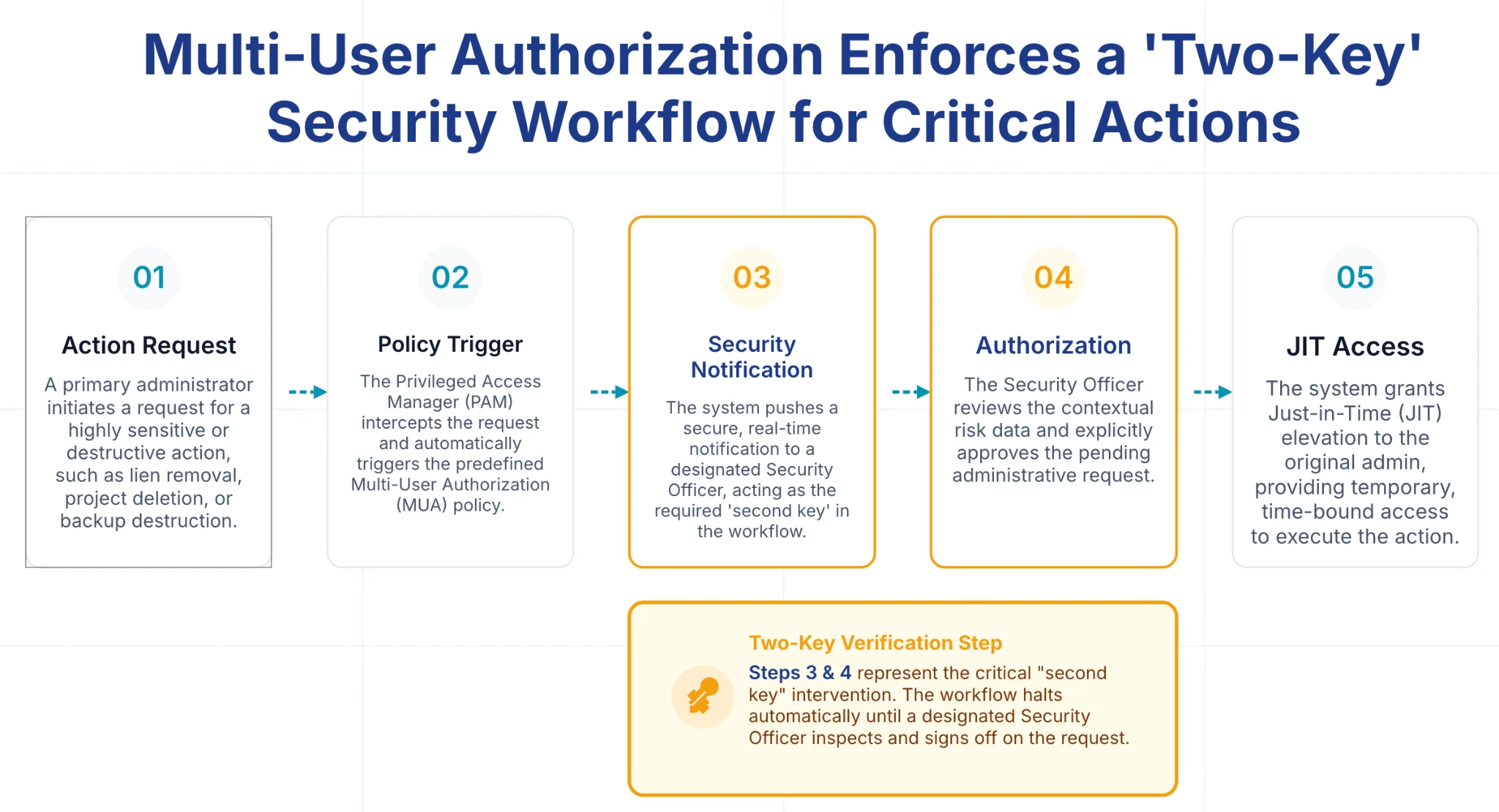
Key Security Benefits:
-
No Single Point of Failure: Sensitive actions—such as shortening backup retention, modifying a critical backup plan, or removing a Project Lien—cannot be done unilaterally.
-
On-demand Temporary Access Elevation: Permissions are granted temporarily (e.g., for 2 hours) and automatically revoked. Also, the permission can be configured in the context of a project or granular resources.
-
Full Compliance Audit Trail: Every elevation request, justification, and approval is logged in Immutable Cloud Logging, providing a pristine audit trail for compliance frameworks.
To configure your multi-party approval system, visit the Google Cloud PAM Implementation Guide.
Layer 5: Backup and DR Org-Policy Integration (Governance at Scale)
This layer uses Organization Policies to enforce security standards automatically, preventing developers or localized admins from accidentally creating non-compliant, vulnerable backup configurations.
Here are three real-world gcloud org policies/constraints you could deploy to enforce resilience by design :
Scenario 1: Preventing Runaway Storage Costs (Max Retention Limit)
Prevent users from accidentally setting a backup vault retention period greater than 1 year, which could lead to unexpected storage costs.
-
Create a new file named constraint-max-retention.yaml and paste the following configuration:
name: organizations/ORGANIZATION_ID/customConstraints/custom.backupVaultMaxRetention
resourceTypes:
- backupdr.googleapis.com/BackupVault
methodTypes:
- CREATE
- UPDATE
condition: "resource.backupMinimumEnforcedRetentionDuration.getSeconds() > 31536000"
actionType: DENY
displayName: Prevent backup vault retention over 1 year
description: Denies the creation of Backup Vaults where the minimum enforced retention duration is greater than 365 days (31,536,000 seconds).
Note: Replace ORGANIZATION_ID with your actual numeric Google Cloud Organization ID.
-
Apply the custom constraint to your organization by running:
# Set organization policy constraint to prevent any backup vault with more than 365 days retention period.
gcloud org-policies set-custom-constraint constraint-max-retention.yaml
Note: Once the constraint is created, you need to actively enforce it on a Project, Folder, or the entire Organization.
Scenario 2: Enforcing Compliance (Min Retention Limit)
Ensure that no malicious actor or compromised script can create a backup vault with a dangerously short retention period (e.g., less than 30 days), which would violate regulatory obligations.
-
Create a new file named constraint-min-retention.yaml and paste the following configuration:
name: organizations/ORGANIZATION_ID/customConstraints/custom.backupVaultMinRetention
resourceTypes:
- backupdr.googleapis.com/BackupVault
methodTypes:
- CREATE
- UPDATE
condition: "resource.backupMinimumEnforcedRetentionDuration.getSeconds() > 2592000"
actionType: ALLOW
displayName: Prevent backup vault retention less than 30 days
description: Denies the creation/update of Backup Vaults where the minimum enforced retention duration is less than 30 days (2592000 seconds).
-
Apply the custom constraint to your organization by running:
# Set organization policy constraint to prevent any backup vault with less than 30 days retention period.

gcloud org-policies set-custom-constraint constraint-min-retention.yaml
Note: Once the constraint is created, you need to actively enforce it on a Project, Folder, or the entire Organization.
Scenario 3: Blocking Sabotage (Preventing Empty Backup Plans)
A common insider threat tactic is to silently edit backup plans to remove all active schedules, leaving production systems running without taking any backups. Below org policy constraint blocks the creation of backup plans that do not contain active rules.
-
Create a new file named constraint-no-empty-backup-plan.yaml and paste the following configuration:
name: organizations/ORGANIZATION_ID/customConstraints/custom.backupVaultWithNoRules
resource_types: backupdr.googleapis.com/BackupPlan
method_types:
  - CREATE
  - UPDATE
condition: >-
  resource.backupRules.size() > 0
action_type: ALLOW
display_name: DisallowBackupPlanWithoutRules
description: Backup plan cannot be empty. It needs to have at-least one backup rule.
-
Apply the custom constraint to your organization by running:
# Set organization policy constraint to prevent any backup plan with no backup rules.

gcloud org-policies set-custom-constraint constraint-no-empty-backup-plan.yaml
Note: Once the constraint is created, you need to actively enforce it on a Project, Folder, or the entire Organization.
Scenario 4: Restricting Maximum PAM Entitlement Duration
Your organization wants to enforce the principle of least privilege. Although Backup and DR and security administrators occasionally need elevated administrative permissions, leaving those active for extended periods increases exposure.
By applying this custom organization policy, any attempt to create or update a PAM Entitlement where the maximum granted duration exceeds 2 hours will be rejected instantly.
-
Create a new file named constraint-max-entitlement-duration.yaml and paste the configuration below.
name: organizations/ORGANIZATION_ID/customConstraints/custom.pamMaxEntitlementDuration
resourceTypes:
- privilegedaccessmanager.googleapis.com/Entitlement
methodTypes:
- CREATE
- UPDATE
condition: "resource.maxRequestDuration.getSeconds() > 7200"
actionType: DENY
displayName: Prevent PAM entitlements over 2 hours
description: Denies the creation or modification of Privileged Access Manager (PAM) Entitlements where the maximum allowed request duration is set to more than 2 hours (7,200 seconds).
-
Apply the custom constraint to your organization by running:
gcloud org-policies set-custom-constraint constraint-max-entitlement-duration.yaml
Note: Once the constraint is created, you need to actively enforce it on a Project, Folder, or the entire Organization.
Layer 6: Real-Time Threat Detection & Alerting via Security Command Center (SCC)
Static defense layers are crucial, but true cyber resilience requires active visibility. If a threat actor breaches your network, their preparatory actions in your backup environment must be caught immediately.
By integrating GCBDR with Google Cloud Security Command Center (SCC), your Security Operations Center (SecOps) team receives real-time, high-fidelity alerts the moment anomalous activity is detected within your backup architecture.
Key Security Benefits:
-
Early Warning Indicators: Ransomware groups often disable or pause backup routines days before executing an encryption payload. SCC instantly flags multiple disabled or failing backup jobs as high-severity anomalies.
-
Rapid Incident Response: Unauthorized attempts to delete vaults, modify locked policies, or bypass project liens are streamed to Chronicle SIEM or third-party SOAR platforms, triggering automated Playbooks (e.g., isolating a compromised admin session).
-
Compliance Alignment: Provides SecOps with unified visibility and an unalterable history of backup security events to meet stringent regulatory reporting timelines (such as SEC or NIS2 rules).
To learn how to stream backup logs directly into your monitoring dashboard, reference the Security Command Center Integration Guide.
Summary of Cyber Resilience Layers
To help you present this structure quickly to stakeholders, here is how each layer acts as a barrier against specific, critical threats:
| Layer | Core Security Control | Threat Mitigated | Key Takeaway |
| Layer 1: Backup Vaults | Logically air-gapped, immutable, and indelible vaults | Ransomware encryption & data deletion | Your core data cannot be altered or deleted before expiration. |
| Layer 2: IAM Separation | Strict separation of production and backup permissions | Single point of credentials compromise | Production admins cannot access or delete your backup environments. |
| Layer 3: Project Liens | Locking API call for project-level deletion | "Scorched-earth" project deletion tactics | A heavy padlock prevents a compromised account from wiping the project. |
| Layer 4: PAM & MUA | Just-in-Time elevation & multi-user approvals | Compromised admin credentials & rogue insiders | Destructive actions require a "second key" approval to execute. |
| Layer 5: Org Policies | Automated constraints (e.g., minimum retention rules) | Configuration drift & rogue script overrides | Enforces guardrails automatically at folder or organization scale. |
| Layer 6: Security Command Center | Real-time threat scanning & SecOps alerts | Silent target tampering & disabled backups | Early warning allows rapid incident response before encryption happens. |
Key Takeaway: Operational Backups Alone Won't Save You from an Adversary
Operational recovery assumes mistakes happen. Cyber resilience assumes a determined adversary will breach your environment and attempt to wipe out your recovery safety net.
By implementing a Multi-Layer Defense-in-Depth model, you can enhance security of your backup environment so that it can survive credential theft, insider threats, and automated attacks.
Audit Your Resilience Today Week
Don’t wait for a ransomware event or an account takeover to find the gaps in your recovery plan. Run this quick 3-point audit on your Google Cloud environment today:
| Priority Check | Vulnerability to Look For | Recommendation |
| 1. Immutability | Can your backups be deleted while they are under a retention period? | Move critical backups into Backup Vaults with an enforced retention period. |
| 2. Project Deletion Risk | Can an admin run gcloud projects delete on your backup project? | Deploy a Project Lien today. Place a one-line deletion restriction lock so no single script or rogue credential can wipe out your backup vaults. |
| 3. 24/7 Admin Exposure | Do backup or storage admins have permanent, standing write/delete access? | Implement Privileged Access Manager (PAM). Require on-demand access elevation with multi-party approvals (two-key rule) for any destructive action. |
