
Question

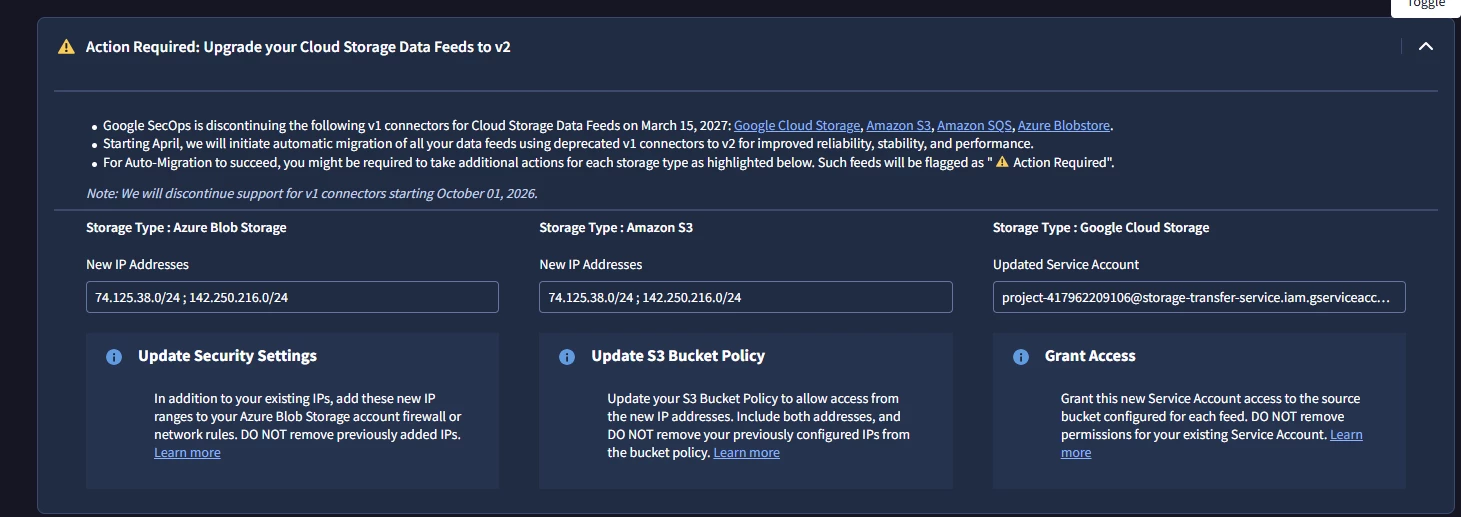
Action Required: Upgrade your Cloud Storage Data Feeds to v2

  • August 11, 2026
  • 1 reply
  • 9 views

arv261095
Forum|alt.badge.img+6

Hi Fam,

Where do i exactly need to go and check if this is applicable to my secops :

can someone suggest steps where to go and check this out and identify if its applicable to us or we need to take any action.

thanks
Β 

Β 

1 reply

thineth_dasun
Forum|alt.badge.img+5

Hi arv261095,

To check if this update applies to your SecOps setup, follow these steps:

  1. Go to SecOps Admin Console β†’ Data Feeds

    • Look for connectors configured for Google Cloud Storage, Amazon S3, Amazon SQS, or Azure Blob Storage.

  2. Verify connector version

    • If you see v1 Cloud Storage connectors, this notice applies.

    • If already on v2, no action is needed.

  3. Apply updates if v1 is in use

    • Azure Blob Storage β†’ Add new IP ranges (74.125.38.0/24, 142.250.216.0/24) to firewall/network rules.

    • Amazon S3 β†’ Update bucket policy to allow those IPs.

    • Google Cloud Storage β†’ Grant access to the new service account [removed by moderator] .

  4. Timeline awareness

    • v1 connectors stop working on March 15, 2027.

    • Automatic migration to v2 begins in April 2027.

    • Support for v1 ends on October 1, 2026.

πŸ‘‰ In short: Check your Data Feeds page, confirm if you’re using v1 connectors, and if yes, apply the IP/service account updates. If you don’t use these feeds, no action is required.

Hope this helps clarify whether you need to take action!

