Question

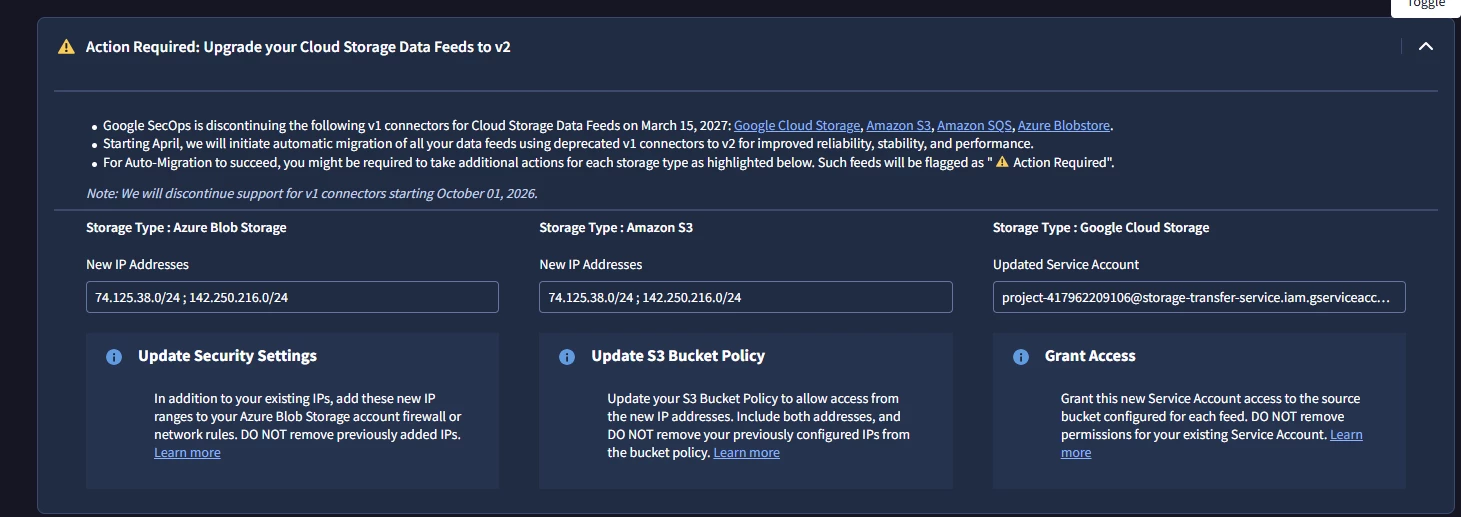
Action Required: Upgrade your Cloud Storage Data Feeds to v2

  • August 11, 2026
  • 4 replies
  • 25 views

arv261095
Forum|alt.badge.img+6

Hi Fam,

Where do i exactly need to go and check if this is applicable to my secops :

can someone suggest steps where to go and check this out and identify if its applicable to us or we need to take any action.

thanks


4 replies

thineth_dasun
Forum|alt.badge.img+5

Hi,

To check if this banner is applicable to your environment and see which specific feeds require action, follow these steps in your Google SecOps SIEM console:

Step 1: Navigate to Feeds

  1. Log in to your Google SecOps console.

  2. Go to SIEM Settings (Gear icon at the bottom left) > Feeds.

Step 2: Filter and Identify v1 Connectors

  1. Look at the list of configured data feeds.

  2. Feeds that use the deprecated v1 connectors (Google Cloud Storage, Amazon S3, Amazon SQS, or Azure Blobstore) will have a status indicator marked as "⚠️ Action Required" or will explicitly display a prompt to upgrade to v2.

  3. Check the Source Type column for any feeds ingesting data from cloud storage buckets.

Step 3: Determine Required Actions

If you have active cloud storage feeds using v1, here is what you need to verify based on your storage provider:

  • For Azure Blob Storage: Ensure your Azure storage account firewalls / virtual network rules allow the new IP ranges (74.125.38.0/24 and 142.250.216.0/24) without removing existing IPs.

  • For Amazon S3 / SQS: Update your S3 Bucket Policy and SQS access policies to allow traffic from the new IP addresses.

  • For Google Cloud Storage (GCS): Grant access to the updated Service Account ( [removed by moderator] ) on your target GCS source buckets (do not remove permissions for your existing service account until migration completes).

Note: If you do not have any data feeds flagged with "⚠️ Action Required" under SIEM Settings > Feeds, or if all your cloud storage feeds are already running on v2, no further action is needed on your part.

Hope this helps! Let us know if you hit any issues checking your Feeds management page.


arv261095
Forum|alt.badge.img+6
  • Author
  • Bronze 2
  • August 11, 2026

Hi,

To check if this banner is applicable to your environment and see which specific feeds require action, follow these steps in your Google SecOps SIEM console:

Step 1: Navigate to Feeds

  1. Log in to your Google SecOps console.

  2. Go to SIEM Settings (Gear icon at the bottom left) > Feeds.

Step 2: Filter and Identify v1 Connectors

  1. Look at the list of configured data feeds.

  2. Feeds that use the deprecated v1 connectors (Google Cloud Storage, Amazon S3, Amazon SQS, or Azure Blobstore) will have a status indicator marked as "⚠️ Action Required" or will explicitly display a prompt to upgrade to v2.

  3. Check the Source Type column for any feeds ingesting data from cloud storage buckets.

Step 3: Determine Required Actions

If you have active cloud storage feeds using v1, here is what you need to verify based on your storage provider:

  • For Azure Blob Storage: Ensure your Azure storage account firewalls / virtual network rules allow the new IP ranges (74.125.38.0/24 and 142.250.216.0/24) without removing existing IPs.

  • For Amazon S3 / SQS: Update your S3 Bucket Policy and SQS access policies to allow traffic from the new IP addresses.

  • For Google Cloud Storage (GCS): Grant access to the updated Service Account ( [removed by moderator] ) on your target GCS source buckets (do not remove permissions for your existing service account until migration completes).

Note: If you do not have any data feeds flagged with "⚠️ Action Required" under SIEM Settings > Feeds, or if all your cloud storage feeds are already running on v2, no further action is needed on your part.

Hope this helps! Let us know if you hit any issues checking your Feeds management page.

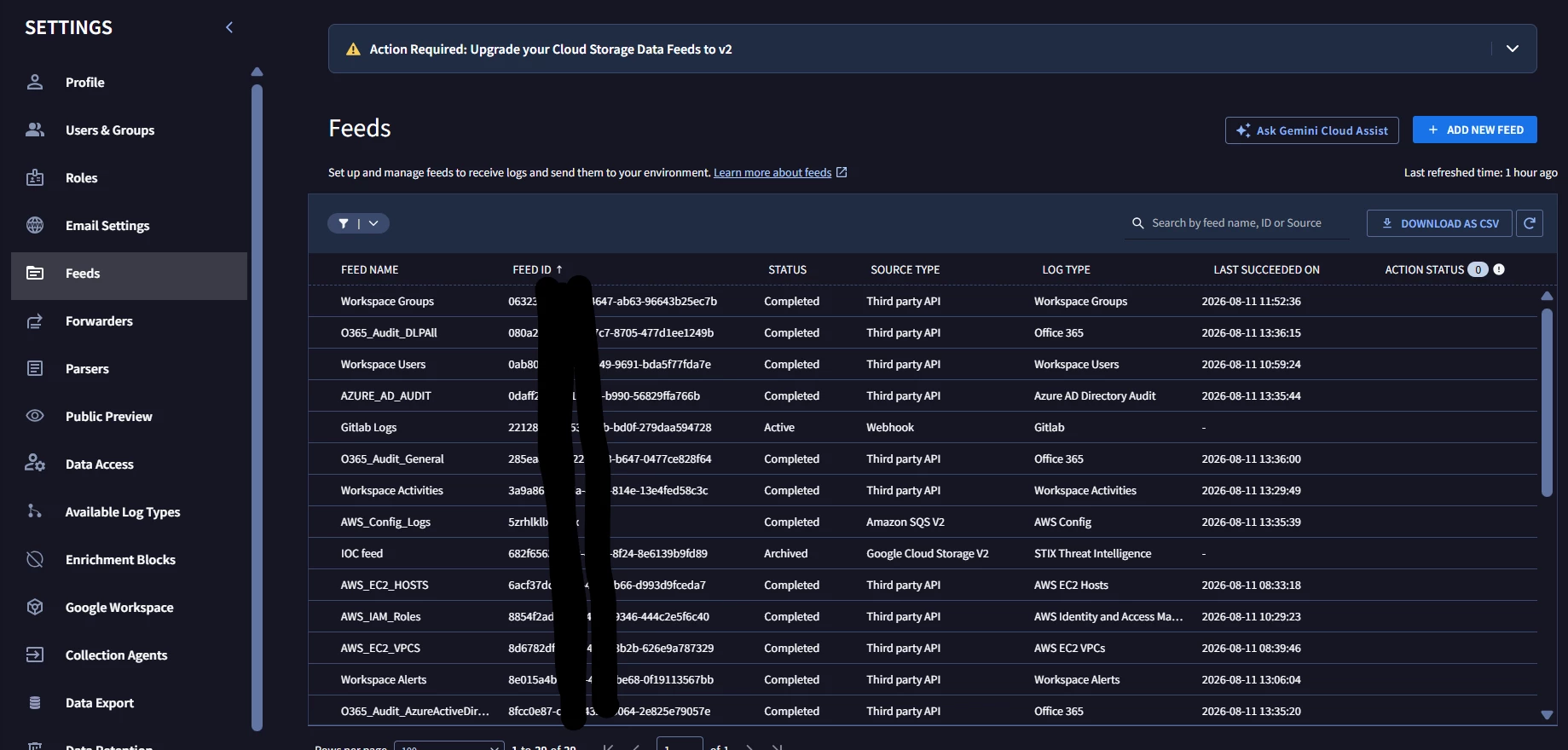
Hi ​@thineth_dasun  / ​@cmorris  i do not see any action required flag in my case should i take any action or not is what i need to check.

let me know if i need to take any action at my end.


cmorris
Staff
Forum|alt.badge.img+16
  • Staff
  • August 11, 2026

Sort by the Source Type and double check for GOOGLE_CLOUD_STORAGE, AMAZON_S3, AMAZON_SQS, and AZURE_BLOBSTORE feeds (not V2).


thineth_dasun
Forum|alt.badge.img+5

Hi,

Based on the screenshot you shared, no action is required on your end!

Here is why:

  1. Your feeds are already on V2:

    • AWS_Config_Logs is configured as Amazon SQS V2.

    • IOC feed is configured as Google Cloud Storage V2.

  2. All other feeds are unaffected: Your other feeds are using Third party API or Webhook, which are not impacted by the Cloud Storage v1 deprecation notice.

The banner displayed at the top is a global administrative notification informing tenants about the upcoming v1 connector deprecation. Since you don't have any legacy v1 connectors (non-V2 GOOGLE_CLOUD_STORAGE, AMAZON_S3, AMAZON_SQS, or AZURE_BLOBSTORE) active in your environment, you can safely ignore the banner warning.