Question

Add Tag to an Alert

  • May 12, 2026
  • 5 replies
  • 48 views

delston
Forum|alt.badge.img+2

Is there a way to add a Tag to an Alert via a playbook? I can add one to the case but I don’t see an option to add to the Alert.

5 replies

cmorris
Staff
Forum|alt.badge.img+13
  • Staff
  • May 12, 2026

There is not today. I see a feature request, but no ETA at the moment


delston
Forum|alt.badge.img+2
  • Author
  • Bronze 2
  • May 13, 2026

In the documentation https://docs.cloud.google.com/chronicle/docs/soar/marketplace-integrations/microsoft-365-defender it states the job to synchronize alerts must meet the following condition(s):

  • The Google SecOps case must contain the Microsoft Defender XDR Alert tag

I would have expected this to be created at Alert Ingestion / Case Creation but I do not see anything.

And as I cannot set this by a playbook can anybody shed any light on this?

Thanks


cmorris
Staff
Forum|alt.badge.img+13
  • Staff
  • May 13, 2026

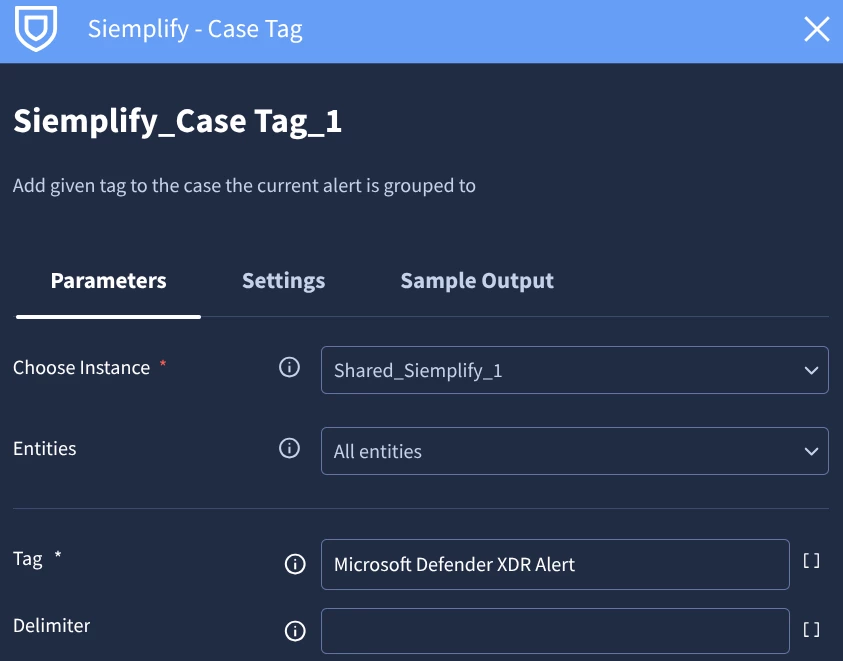
I do not have Defender XDR to test with, but you should be able to add the tag Microsoft Defender XDR Alert to the case via playbook or manual action. It looks like a case tag is expected.


delston
Forum|alt.badge.img+2
  • Author
  • Bronze 2
  • May 13, 2026

Thanks cmorris, I have managed to do this via a playbook just wasn’t clear from the documentation. I will configure the Synch Job and see if this does the trick.


delston
Forum|alt.badge.img+2
  • Author
  • Bronze 2
  • May 18, 2026

Hi All, 

I can confirm that adding the tag “Microsoft Defender XDR Alert” as a Case Tag the Synch works as expected.


Thanks