Question

Automated SOAR Playbook Failure Notifications Via Email

  • July 7, 2026
  • 5 replies
  • 62 views

soaruser
Forum|alt.badge.img+5

How do I automate the process of sending email notifications to team, if SOAR playbook gets failed in Google SecOps SOAR. It should be real time. So that team can quickly check and fix the issue.

5 replies

ar3diu
Forum|alt.badge.img+10
  • Silver 2
  • July 7, 2026

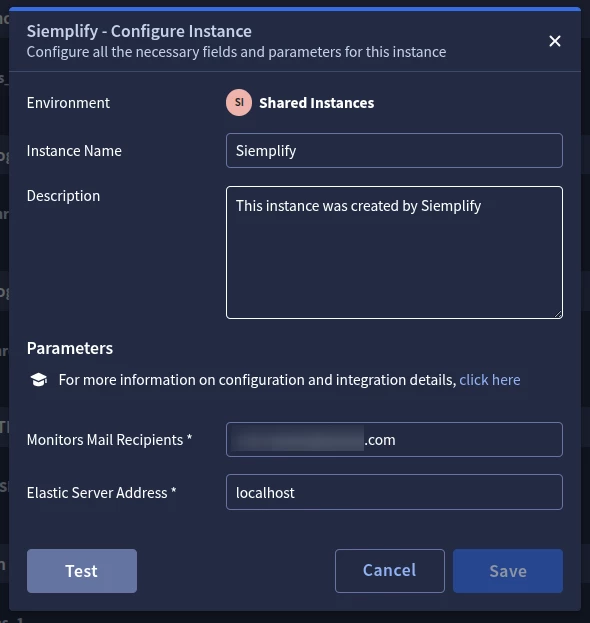
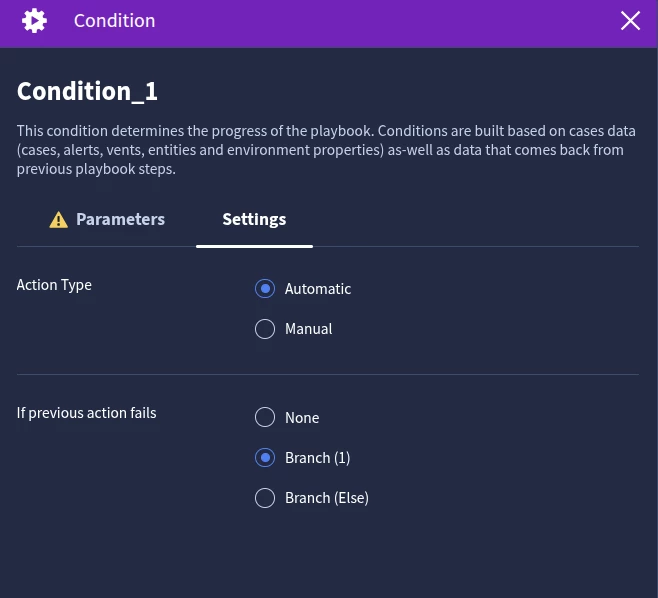
You can add comma-delimited email addresses to the Siemplify integration instance, but these will not provide real-time notifications. Alternatively, you can add a conditional flow directly in the SOAR playbook and change the settings in the 'If previous action fails'.


whathehack81
Forum|alt.badge.img+2

For failures inside a specific playbook: add an error-handling branch
In the playbook designer, configure the risky action so the playbook does not just stop silently:
Open the playbook.
Select the action that may fail.
In the action settings, use If step fails → Skip step.
Add a Condition block after that action.
In the condition settings, configure If previous action fails to route to a failure branch.
In that failure branch, add an email action using EmailV2 / Send Email or your configured email integration.
Include placeholders such as:
playbook name
case ID
alert name
failed action name
error output
environment
case URL


Karol_Wroblewski

you can also build a job

we have watchdog but for jobs checking

so just switch integration to mail and jobs to playbooks and should be done


import datetime
from SiemplifyJob import SiemplifyJob
from SiemplifyUtils import output_handler

# Microsoft Teams specific imports from the native integration
from MicrosoftConstants import INTEGRATION_NAME
from MicrosoftManager import MicrosoftTeamsManager

def get_failed_jobs_report(siemplify, lookback_hours):
"""
Fetches faulted job instances and returns a simplified HTML list.
"""
try:
# Fetch faulted jobs within the specified time window
faulted_jobs = siemplify.get_faulted_jobs(lookback_hours)
if not faulted_jobs:
return None

rows = ""
for job in faulted_jobs:
# Fallback checks to extract the job name dynamically
job_name = job.get('JobName') or job.get('job_definition_name') or "Unnamed Job"
# Fallback checks to extract the error details
error_msg = job.get('ErrorMessage') or job.get('error_message') or "Check logs for details"

rows += f"<li><b>{job_name}</b>: {error_msg}</li>"

# Construct a simple HTML body for MS Teams
html_content = f"""
<h3>⚠️ SecOps SOAR Watchdog Alert</h3>
<p>The following background jobs failed in the last {lookback_hours} hours:</p>
<ul>{rows}</ul>
<p><b>Action:</b> Please navigate to <i>Response > Jobs Scheduler</i> in the SOAR UI to investigate.</p>
"""
return html_content
except Exception as e:
siemplify.LOGGER.error(f"Failed to fetch faulted jobs: {e}")
return None

@output_handler
def main():
siemplify = SiemplifyJob()
siemplify.script_name = "Watchdog_Teams_Alert"
logger = siemplify.LOGGER

try:
logger.info("--- Starting Watchdog Health Check Job ---")

# 1. Fetch Integration Configuration and Job Parameters
conf = siemplify.get_configuration(INTEGRATION_NAME)
lookback_hours = int(siemplify.extract_job_param(param_name="Lookback Hours", default_value="24"))

# Target Teams Chat or Channel ID
chat_id = "YOUR_TEAMS_CHAT_OR_CHANNEL_ID"

# 2. Reuse the native MicrosoftTeamsManager using the existing integration's credentials
manager = MicrosoftTeamsManager(
client_id=conf.get("Client ID"),
client_secret=conf.get("Secret ID"),
tenant=conf.get("Tenant"),
refresh_token=conf.get("Refresh Token"),
redirect_url=conf.get("Redirect URL"),
verify_ssl=str(conf.get("Verify SSL", "false")).lower() == 'true',
)

# 3. Generate the health report
report_html = get_failed_jobs_report(siemplify, lookback_hours)

# 4. Dispatch the alert only if any failures were found
if report_html:
logger.info("Faulted jobs detected. Sending notification to MS Teams.")
manager.send_message_to_chat(
chat_id=chat_id,
message=report_html,
content_type="html"
)
logger.info("Alert message sent successfully.")
else:
logger.info(f"No faulted jobs found in the last {lookback_hours} hours.")

except Exception as e:
logger.error(f"Watchdog Job execution failed: {e}")

# Explicitly terminate the script execution context
siemplify.end_script()

if __name__ == "__main__":
main()


Forum|alt.badge.img+13

You could also achieve this with SOAR Logs in Cloud Logging, and create a Cloud Monitoring Alert for errors on a given Playbook which can send to email, sms, slack, webhook, etc…


https://docs.cloud.google.com/chronicle/docs/secops/collect-secops-soar-logs


ar3diu
Forum|alt.badge.img+10
  • Silver 2
  • July 9, 2026

@cmmartin_google that’s an even a more interesting approach