
Question

Chronicle on Chronicle? Searching for Chronicle events

  • August 11, 2025
  • 4 replies
  • 64 views

Chris_B
Forum|alt.badge.img+8

As a Splunk user I got used to the _index and being able to search on user activity and other events in Splunk. 

I don’t see as a clear a path to search for Chronicle activity in Chronicle

The following search is for a user creating a rule, but including the match fields shows no results even tho commenting them out does.

metadata.log_type = "GCP_CLOUDAUDIT"
target.application = "chronicle.googleapis.com"
principal.user.attribute.permissions.name = "chronicle.rules.create"
$time = timestamp.get_timestamp(metadata.event_timestamp.seconds)
$user_email = principal.user.email_addresses
$prod_event = metadata.product_event_type
$user_perm = principal.user.attribute.permissions.name
$req_type = target.resource.attribute.labels["request_type"]


// match:
// $time , $user_email , $prod_event , $user_perm , $req_type
//outcome:
// $event_count = count_distinct(metadata.id)
// $user_perms = array_distinct($user_perm)


I’m curious if other users monitor rule creation, edits  using searches for managing and reporting rule creation.

...or manage their MSSP analysts using searches to see how the analysts are using searches.


thanks

4 replies

Eoved
Forum|alt.badge.img+8
  • Bronze 1
  • August 12, 2025

Hi,
for start, please make sure you ingest all the relevant logs according to the following guide
https://cloud.google.com/chronicle/docs/administration/audit-logging
 

Then, you can create the following monitoring rule:
https://security.googlecloudcommunity.com/community-blog-42/monitoring-for-unexpected-rule-changes-in-google-security-operations-1-of-2-3905


chrisd2
Forum|alt.badge.img+9
  • Bronze 5
  • August 12, 2025

Hello,

I tried to reproduce your issue in order to troubleshoot, but all results show up on my SecOps instance whether I include match & outcome sections or not :/


Chris_B
Forum|alt.badge.img+8
  • Author
  • Silver 2
  • August 12, 2025

@chrisd2  thx for checking it out.

I wonder if there is something odd about my Chronicle  instance logs - to get results when just using the search, then not getting results when I add a match and outcome feels like a Splunk “| stats”  output with no fillnull defined.

...but that’s not how it should workin in UDM search.


I’ll keep working at it


chrisd2
Forum|alt.badge.img+9
  • Bronze 5
  • August 13, 2025

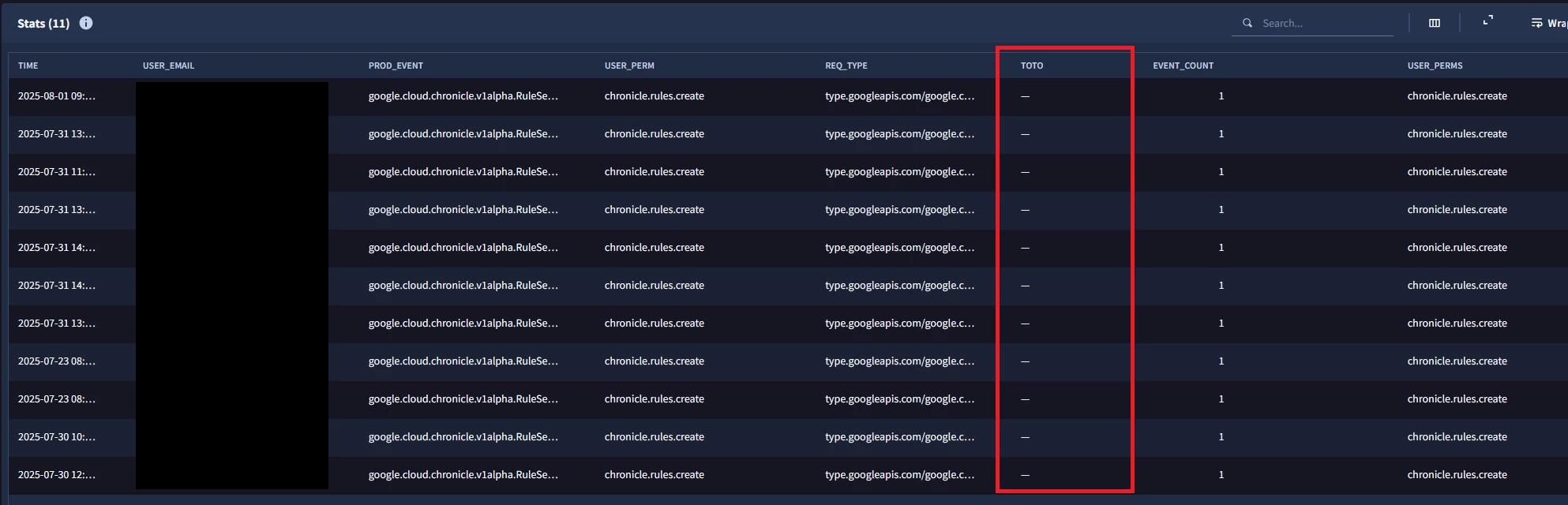
Yep, in UDM Search it should show the results even though one of the match variables is empty. I tried by defining a placeholder `$toto = target.user.userid` (empty for rule creation logs) and adding it to the match section. SecOps returns the table with an empty column correctly :
 

Stats table with empty match variable

Regarding Rules, the engine removes logs where a placeholder used in match section is empty ( “”, 0, false, … depending on the field type). Source: Zero value handling in the match section

But again, this should not happen in UDM Stats Search… You may be good to open a support case ? I’m curious to know the root cause of this one, if you could keep us updated :)


Regards, and good luck !