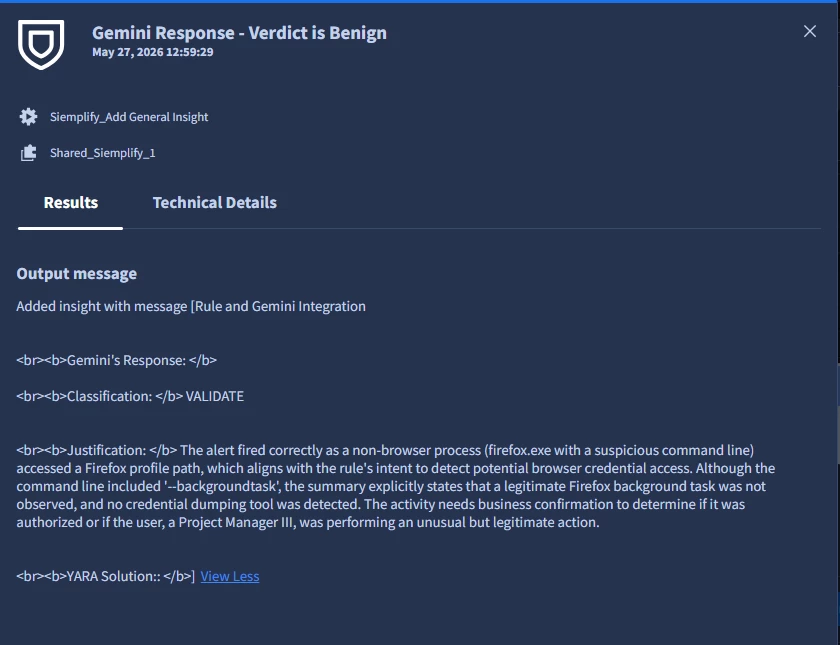
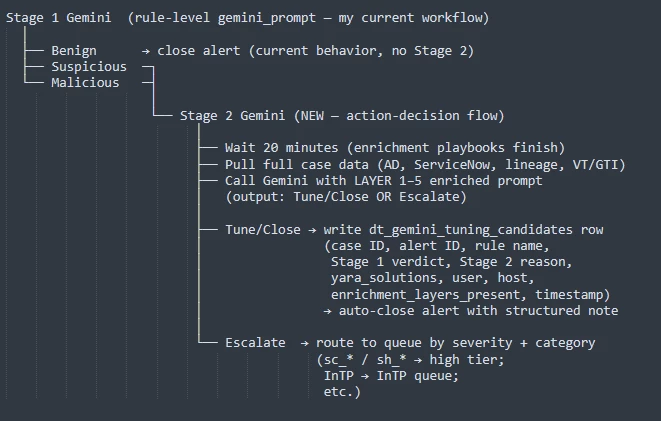
I wanted to share the workflow we’ve been using to connect Chronicle detection rules with SOAR (Gemini) playbooks, specifically focusing on how rule design directly drives playbook effectiveness.
The key idea is:
The rule is not just a trigger — it is responsible for providing all the context the playbook needs to make a decision.
1. Rule as the Context Engine
Instead of relying on the playbook to “figure things out,” we push as much structure and meaning as possible into the rule itself.
Each rule is responsible for:
- Identifying the behavior
- Normalizing key fields
- Providing investigation-ready context via the outcome section
By the time the alert reaches the playbook, it should already answer:
- What happened?
- Who did it?
- On what system?
- Why is it suspicious?
2. Outcome Section as the Contract
The outcome section acts as a contract between the detection rule and the playbook.
We standardize outcomes across rules so every playbook receives consistent inputs.
Core pattern we use:
$outcomeUserIsTechnical(true/false)$outcomeUserRoleHint(technical vs non-technical + elevated context)
These are derived from datatables (title + department), not hardcoded logic.
Why this matters
The playbook doesn’t need to:
- Parse job titles
- Infer privilege
- Guess intent
It can immediately reason with:
- “This is a non-technical user running a recon tool”
- “This is an elevated admin performing a sensitive action”
3. Passing High-Value Fields Only
We intentionally keep outcome fields:
- Concise
- High signal
- Consistent across rules
Typical fields include:
- Command line
- File path
- Process name
- Target resource
- User role indicators
We avoid:
- Excessive raw telemetry
- Fields that don’t influence decisions
This keeps playbook prompts clean and performant.
4. Playbook Design (Driven by Rule Output)
Playbooks are designed with the assumption that:
- The rule already identified suspicious behavior
- The outcome already provides structured context
So the playbook focuses on decisioning, not discovery.
Playbook Responsibilities
Given the alert + outcome data, the playbook:
-
Evaluates context
- User type (technical vs non-technical)
- Execution context (host, process, command line)
- Action being performed
-
Determines verdict
- Malicious
- Suspicious
- Benign
-
Provides reasoning
- Based strictly on the current alert context
-
Recommends next steps
- Investigate
- Escalate
- Close
5. Key Design Constraint
Each playbook execution is context-isolated.
This means:
- No linking to other alerts
- No historical correlation assumptions
Because of this, the rule + outcome must be self-sufficient.
If the rule doesn’t provide enough context, the playbook cannot compensate.
6. Workflow in Practice
The flow looks like this:
- Rule triggers on high-fidelity behavior
- Rule populates standardized outcome fields
- Alert is sent to SOAR
- Playbook consumes:
- Detection metadata
- Outcome variables
- Playbook produces:
- Verdict
- Reasoning
- Recommended actions
7. Handling Noise (Critical Insight)
If alerts are noisy, we do not fix that in the playbook.
We go back to the rule and:
- Refine conditions
- Add exclusions
- Tighten logic
Reason:
A playbook should not be responsible for compensating for weak detections.
Cleaner rules = better automation decisions.
8. Where This Model Works Best
This workflow is especially effective for:
- Behavioral detections (execution, configuration changes, discovery activity)
- Privilege-sensitive actions
- High-confidence signals with clear intent
9. Outcome
This approach gives us:
- Consistent playbook inputs across all rules
- Simpler and more reliable automation logic
- Better triage quality (especially with Gemini)
- Reduced need for complex playbook branching
Closing
The biggest shift for us was treating the rule as the primary source of truth, and the playbook as a decision layer, not a discovery layer.
Curious how others are structuring:
- Outcome sections
- Rule-to-playbook contracts
- Context standardization across detections
Happy to compare approaches.