Question

Clarification on Alert Order in Merged Cases


VictorSOAR
Forum|alt.badge.img+7

Hi Team,

When multiple cases are merged, does the alert order remain unchanged, with the parent case's alert always appearing first, or can the alerts be reordered/shuffled?

If the alert order can change, how can we identify which alert belongs to the parent case?


Thanks.

6 replies

cmorris
Staff
Forum|alt.badge.img+17
  • Staff
  • August 12, 2026

If you move an alert to a new case, it will be ordered based on the alert timestamp (ex. if moved alert is oldest, it will show as first alert and if newest, it will show as last alert).

The moving of alerts is documented on the case wall, so you can tell via the audit event around the move on the wall.


VictorSOAR
Forum|alt.badge.img+7
  • Author
  • Bronze 1
  • August 12, 2026

Hi ​@cmorris , Thanks,

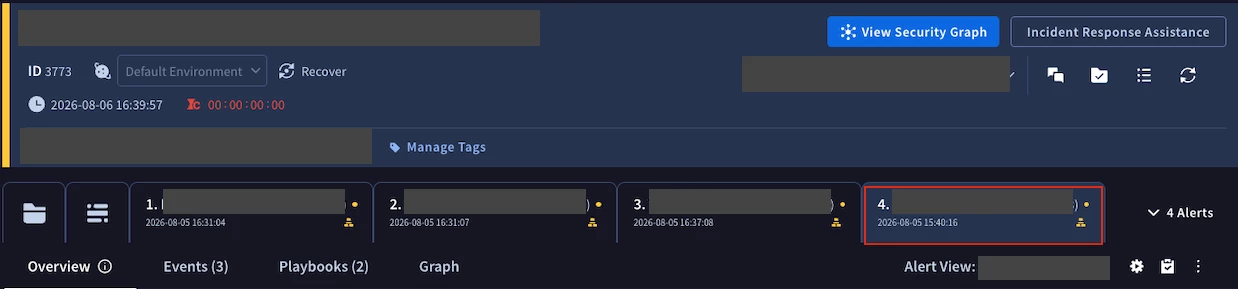
This behavior appears to be valid for automatically grouped alerts. However, for manually merged cases, the behavior seems to be different.

In the screenshot below, the fourth alert appears to be the earliest alert based on the timestamp and would therefore be expected to appear first.


cmorris
Staff
Forum|alt.badge.img+17
  • Staff
  • August 12, 2026

Sorry, I was moving alerts from one case to another in my testing as opposed to merging the cases. I will double check with the team and get back to you.


cmorris
Staff
Forum|alt.badge.img+17
  • Staff
  • August 14, 2026

​@VictorSOAR - For now, it looks like your initial observation is the behavior - parent case alerts first - I spoke with product and then we created a request to change this to be based on the timestamp, like when alerts are moved. The request number is 546006817, you can check the status with your account team or via a support case.


VictorSOAR
Forum|alt.badge.img+7
  • Author
  • Bronze 1
  • August 14, 2026

​@VictorSOAR - For now, it looks like your initial observation is the behavior - parent case alerts first - I spoke with product and then we created a request to change this to be based on the timestamp, like when alerts are moved. The request number is 546006817, you can check the status with your account team or via a support case.

Thanks for checking on this and creating a request ​@cmorris! Appreciate the update. 


VictorSOAR
Forum|alt.badge.img+7
  • Author
  • Bronze 1
  • August 14, 2026

Thanks for checking on this and creating a request ​@cmorris ! Appreciate the update.