Question

Clarification on Approach and Webhook of SOAR

  • April 22, 2026
  • 3 replies
  • 22 views

harshal.thakor
Forum|alt.badge.img

Hi everyone,

We are working on integrating Google SecOps SOAR with an external application security platform, and wanted to validate our approach as well as explore better alternatives.

Use Case

1. Incident Sync (Bi-directional)

  • Sync status and comments:
    • From SecOps SOAR → external platform
    • From external platform → SecOps SOAR

Current Approach

  • Using a scheduled job (polling) to:
    • Fetch updates from both systems
    • Compare changes
    • Push updates accordingly

Questions

  1. Architecture Validation
    • Is a polling-based approach considered acceptable for this use case?
    • Or is any other approach recommended?
  2. Webhook Capabilities in SecOps SOAR
    • Are there limitations on which fields can be mapped via webhook?
    • Is it possible to map custom fields (status, comments, metadata)?
    • Is there any reference for the list of fields.
  3. Comments / Notes Mapping
    • In SecOps SOAR alerts, which field is best suited to store external comments/notes?
    • Is there a recommended standard field (e.g., notes, activity log)?

3 replies

dnehoda
Staff
Forum|alt.badge.img+16
  • Staff
  • April 22, 2026

Sounds like this is another ticketing system.   I have customers doing something similar with JIRA and Service Now.  The Jobs is definitely the right approach.  

You can look at one of those integrations for the sync capabilties. 


The Recommended Approach: Hybrid Push-Pull The industry standard for SecOps SOAR is a Webhook-driven Push for "Actionable Events" and an API Pull for "Bulk/Integrity Checks."

  • SecOps → External Platform: Use a Playbook Trigger or Job that fires an "Outbound Webhook" (via a custom connector or the generic HTTP connector) whenever a case status changes or a comment is added.


  • External Platform → SecOps: Configure the external platform to send a webhook to a Google SecOps Webhook Ingestion point. This triggers a playbook that updates the existing case.

2. Webhook Capabilities & Mapping

Google SecOps SOAR is highly flexible regarding outbound webhooks, provided you use the Playbook Designer rather than a fixed system-level webhook.

  • Field Mapping: There are virtually no limitations on which fields you can map. When building an outbound request in a playbook, you can use the Placeholder Picker to map:

    • Standard fields (Status, Priority, Assignee).


    • Custom Fields: [CaseCustom.your_field_name] or [AlertCustom.your_field_name].

    • Comments/Metadata: You can iterate through the Wall Activities or Comments objects to send the most recent entry.

  • Custom Fields: You must first define these in Settings > SOAR Settings > Case Data > Custom Fields. Once defined, they are available as JSON keys in any outgoing API request.

3. Comments and Notes Mapping

To maintain a clean audit trail, you should avoid "overwriting" a single text field with comments.

  • The Best Field: Wall Activities (or Case Wall).

    • In SecOps SOAR, comments are not a single static field but a stream of activities.

    • Recommended Method: Use the "Add Case Comment" action within your synchronization playbook. This ensures that notes from the external platform appear in the SOAR UI's activity feed with a timestamp and attribution.

  • Storage for "External ID": If you need to store the external platform's unique ID (to ensure you aren't creating duplicate comments), create a Custom Field (e.g., external_app_sys_id) to act as the primary key for the sync.

  • Reference: The best reference for field names is the Swagger UI on your instance (https://<your_instance>/swagger/index.html) or the SOAR Case Schema documentation.


cmorris
Staff
Forum|alt.badge.img+12
  • Staff
  • April 22, 2026

You could use a webhook or a connector for the ingest of the alert into SecOps. You would then use a job to sync the status of the alert. I would take a look at an integration like CrowdStrike Falcon or Cortex XDR to see the structure as far as alert ingest, sync, and actions - ex. add a comment or some other update to the external alert or to close the external alert out.


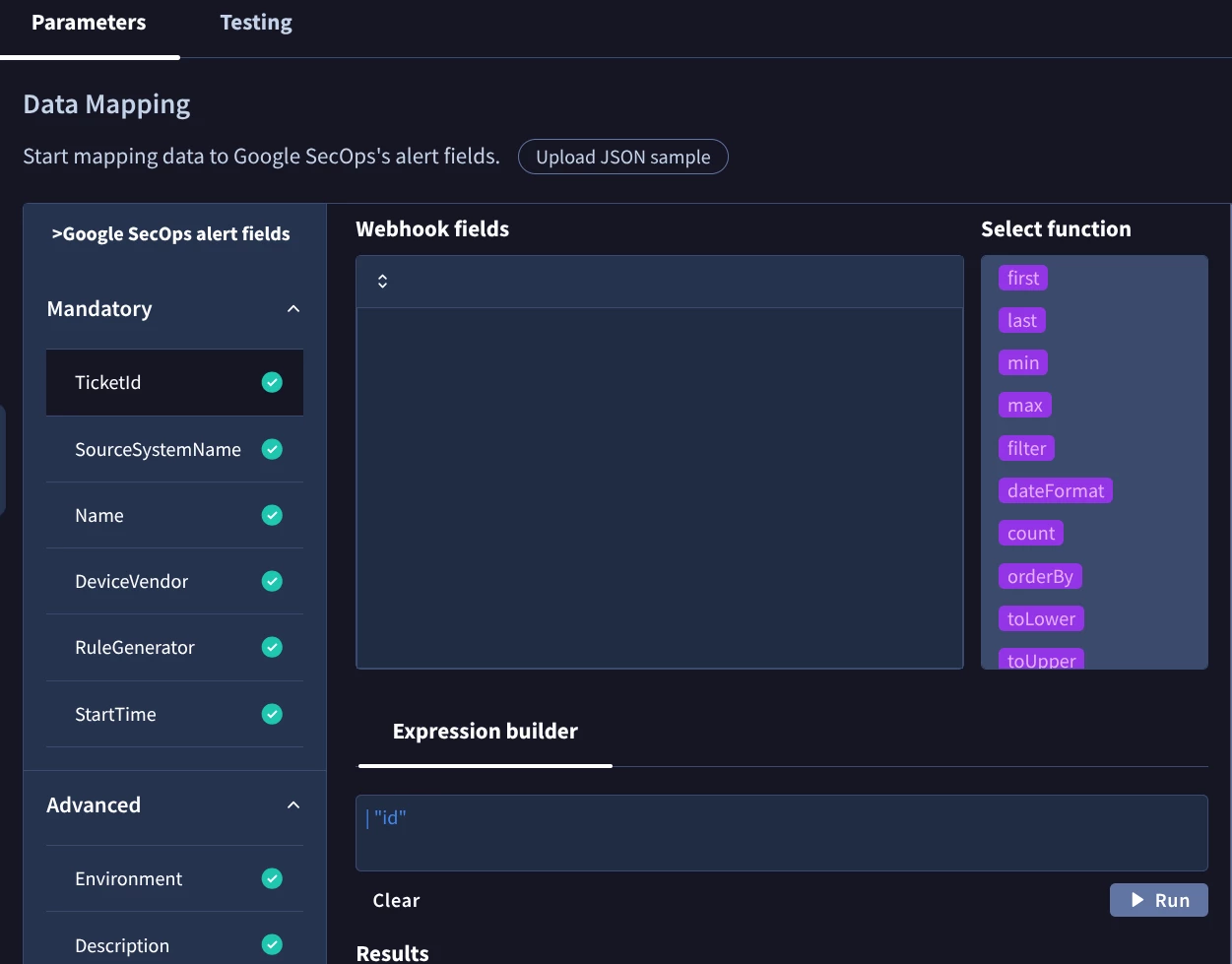
To see the fields available for the Webhook mapping, go to SOAR Settings > Ingestion > Webhooks and create a new webhook. From there, you can upload a JSON sample and configure mappings. There will be a mix of mandatory and other fields:

Also worth noting, the RuleGenerator mapping will be the name of the case and the Name mapping will be the name of the alert. The Name mapping needs to be unique for a new case to be created.


For the comments, I would store these on the Case Wall. It acts as an activity feed for the case. When an external comment is received, you can use the SOAR "Add Comment" action to add the comment.


harshal.thakor
Forum|alt.badge.img

Thanks for the response,

I have few questions and clarifications:

  1. How can we have a trigger for playbook that triggers playbook when some field changed in case or alert? Can you tell if there is any specific trigger available to do that? can we can modify alert/case fields?
  2. For webhook, Do we have any field related to case comment and case status? So, it can be directly mapped when payload is ingested in SecOps. (Just for clarification, We are using webhook to create alerts in SecOps)
  3. If we create custom field for case, can we be able to map it with webhook mappings? If yes, Is the custom fields changeable through API or UI?