Solved

Crowdstrike - Some Actions Not Working

  • August 4, 2026
  • 8 replies
  • 91 views

mguevarra

Having some issues running Crowdstrike actions, specifically - Run Script, Execute Command, and Contain Endpoint. 


Contain Endpoint - I selected the hostname as the entity. but get the output message “None of the provided endpoints were found in Crowdstrike Falcon.”

Run Script/Execute Command - I’ve tried to reference the script name and raw script. But I just get the output message “Script wasn't executed on the provided endpoints in CrowdStrikeFalcon.”


I know the integration works for the most part as I run the “Get Host Information” and that gave me no issues. 


Any one have any insight into this?

Best answer by whathehack81

Since Get Host Information works, the connection is probably fine, but that action only requires Hosts.Read.

The failed actions need additional permissions:

Contain Endpoint: Hosts.Read and Hosts.Write

Execute Command / Run Script: Hosts.Read, Real time response.Read, and Real time response.Write

Admin-level commands also require Real time response (admin).Write

I would check the API client scopes first. Also confirm the exact same hostname or IP successfully resolves through Get Host Information, and check the returned device_id and online_status.

If enrichment works for that exact entity but containment or RTR still fails after the scopes are confirmed, then the next place to check is Falcon RTR access/policy for that endpoint and the action’s raw execution output.

That is the only logical fix I can find. I've searched for a couple days now. 

8 replies

ayatkamona
Forum|alt.badge.img+1
  • New Member
  • August 5, 2026

Hello!

Did you check what host it’s resolving to in the error message? Make sure it’s not taking the fqdn name instead of the short hostname that’s on CrowdStrike.


Another thing to check is the scopes on the API client, make sure it has enough read and write permissions.


whathehack81
Forum|alt.badge.img+9
  • Bronze 1
  • Answer
  • August 5, 2026

Since Get Host Information works, the connection is probably fine, but that action only requires Hosts.Read.

The failed actions need additional permissions:

Contain Endpoint: Hosts.Read and Hosts.Write

Execute Command / Run Script: Hosts.Read, Real time response.Read, and Real time response.Write

Admin-level commands also require Real time response (admin).Write

I would check the API client scopes first. Also confirm the exact same hostname or IP successfully resolves through Get Host Information, and check the returned device_id and online_status.

If enrichment works for that exact entity but containment or RTR still fails after the scopes are confirmed, then the next place to check is Falcon RTR access/policy for that endpoint and the action’s raw execution output.

That is the only logical fix I can find. I've searched for a couple days now. 


mguevarra
  • Author
  • August 5, 2026

Thanks! I got it to work. For some reason it’s looping containment/lift containment… but that’s another’s day problem. 


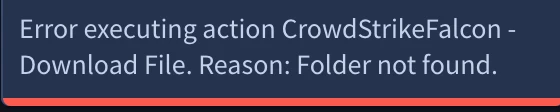
Now I’m having issues with “Download File”. I’ve selected the File Name and Host Name in the scope. But it’s saying the file path can’t be found - which isn’t the case if I RTR into the machine myself.


whathehack81
Forum|alt.badge.img+9

So I was looking at this and, I am super glad you got it working.
For Download File, I'd verify the action is receiving the full absolute path exactly as RTR expects (including the correct drive letter and escaping). Also make sure the file exists from the context of the RTR session running under the integration, not just your interactive RTR session.
One question: are you passing the full path (for example C:\Temp\test.txt) or just the file name? And what's the exact error returned by the action?

Lemme know. 


mguevarra
  • Author
  • August 5, 2026

I’ve tried passing both the full path and just the file name. This is the error I get:


I’ve even have the entity File Name being just the file name and file name with extension.


ayatkamona
Forum|alt.badge.img+1
  • New Member
  • August 6, 2026

I was looking into the action script and found this 

“if folder_path[0] != "/":

            raise FolderNotFoundException”

Make sure your folder path starts with “/” if it doesn’t already. I got the same error while testing and this solved it for me.


mguevarra
  • Author
  • August 6, 2026

Now I’m getting this error: 


Overall trying to create a block to run script (script creates a file) then download said file. 


mguevarra
  • Author
  • August 6, 2026

Now I’m getting this error: 


Overall trying to create a block to run script (script creates a file) then download said file. 

Okay now it’s saying it can’t find the file. Ugh.