Question

Custom Additional Fields Visible in Search but Not Returning Values in Native Dashboard YARA-L

  • August 4, 2026
  • 4 replies
  • 12 views

I created a custom parser extension for Qumulo and mapped the following values to additional.fields:

additional.fields["before_ctime"]

additional.fields["after_ctime"]

additional.fields["before_mtime"]

additional.fields["after_mtime"]

additional.fields["before_size"]

additional.fields["after_size"]


I can successfully see these fields populated in Search/Event Viewer for:
metadata.log_type = "QU_FS"

metadata.product_event_type = "fs_write_metadata"

for eg:
 

additional.fields["before_ctime"] = 2026-08-04T15:34:56.456288103Z

additional.fields["after_ctime"] = 2026-08-04T15:34:56.46247726Z

additional.fields["before_mtime"] = 2026-08-04T15:34:56.456288103Z

additional.fields["after_mtime"] = 2026-08-04T15:34:56.46247726Z

additional.fields["before_size"] = 0

additional.fields["after_size"] = 23

Eg:
 

events:

$e.metadata.log_type = "QUMULO_FS"

$e.metadata.product_event_type = "fs_write_metadata"


$log_id = $e.metadata.product_log_id


match:

$log_id over 1h


outcome:

$count = count($e.metadata.id)


condition:

$e


What is the recommended/supported method for displaying custom parser-extension values stored in additional.fields[]within Native Dashboard table widgets?

Is there a specific YARA-L syntax required, or are there limitations when using additional.fields[] in dashboard outcomes?


4 replies

cmorris
Staff
Forum|alt.badge.img+16
  • Staff
  • August 4, 2026

In your outcome section, try adding something like the below after updating the ‘my_addtl_field’ to the name of your field:

outcome:
$field1 = array_distinct(additional.fields["my_addtl_field1"])
$field2 = array_distinct(additional.fields["my_addtl_field2"])

If you are trying to aggregate based on the additional field you could also add to the query:

$field1 = array_distinct(additional.fields["my_addtl_field1"])

and then add $field1 to the match section


  • Author
  • August 4, 2026

I tested using the additional field in both the outcome and match sections as suggested:
 

$before_ctime = $e.additional.fields["before_ctime"]

match:

$before_ctime over 1h

outcome:

$before_ctime_value = array_distinct($before_ctime)


However, the dashboard still returns no results, while Search/Event Viewer clearly shows values for additional.fields["before_ctime"].

Is there a different syntax required for Native Dashboards when referencing custom additional.fields[] values?


  • Author
  • August 4, 2026

when I add multiple custom fields from additional.* to a Pivot/Native Dashboard table, I receive:

Can't use the same UDM field for Group By: additional

Is there a supported way to display multiple fields originating from additional.fields[] in the same Native Dashboard table widget?
for eg:
 

additional.before_ctime

additional.after_ctime

additional.before_mtime

additional.after_mtime

additional.before_size

additional.after_size

hould these fields be used as Values instead of Group By, or is there a recommended dashboard/YARA-L approach for displaying several custom additional fields in the same row?


cmorris
Staff
Forum|alt.badge.img+16
  • Staff
  • August 4, 2026

I tested using the additional field in both the outcome and match sections as suggested:
 

$before_ctime = $e.additional.fields["before_ctime"]

match:

$before_ctime over 1h

outcome:

$before_ctime_value = array_distinct($before_ctime)


However, the dashboard still returns no results, while Search/Event Viewer clearly shows values for additional.fields["before_ctime"].

Is there a different syntax required for Native Dashboards when referencing custom additional.fields[] values?

In your results, there could be events where the additional.fields are not mapped from before the extension or they could just be events that would not include the data to be mapped in the additional field.

Sample query I have tested with:

metadata.log_type = "GCP_CLOUDAUDIT"
metadata.product_name = "Google Cloud Platform"
$user = principal.user.userid
$date = timestamp.get_timestamp(metadata.event_timestamp.seconds)
$permission = re.capture(metadata.product_event_type , `\w+$`)
additional.fields["operation_producer"] != ""

match:
$user

outcome:
$field1 = array_distinct(additional.fields["operation_producer"])

Note in line 6, I am checking that the additional field is not empty. I am then using the outcome section to show the result in the dashboard. I would try to take line 6 and the outcome section from this query and adapt it into your query.

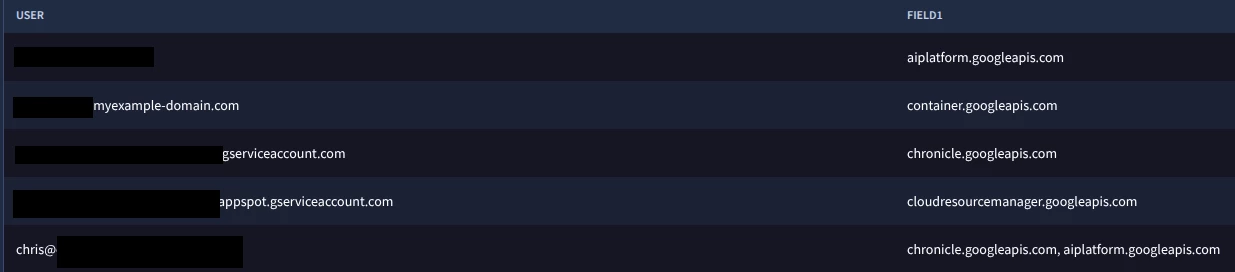
Result - note that I am displaying the value of additional.fields["operation_producer"] in the column on the right, Field1.