

Question

Discrepancy between dashboard filter for graph.metadata..interval.start_time and Local Time Filters inside edit mode of panel.

  • February 5, 2026
  • 1 reply
  • 79 views

harshal.thakor
Forum|alt.badge.img+1

I’m encountering a strange filtering behavior in Google SecOps SIEM dashboards specifically when working with Entity data. I’m hoping to get some clarity on why the global time filters are behaving differently,

The Issue:

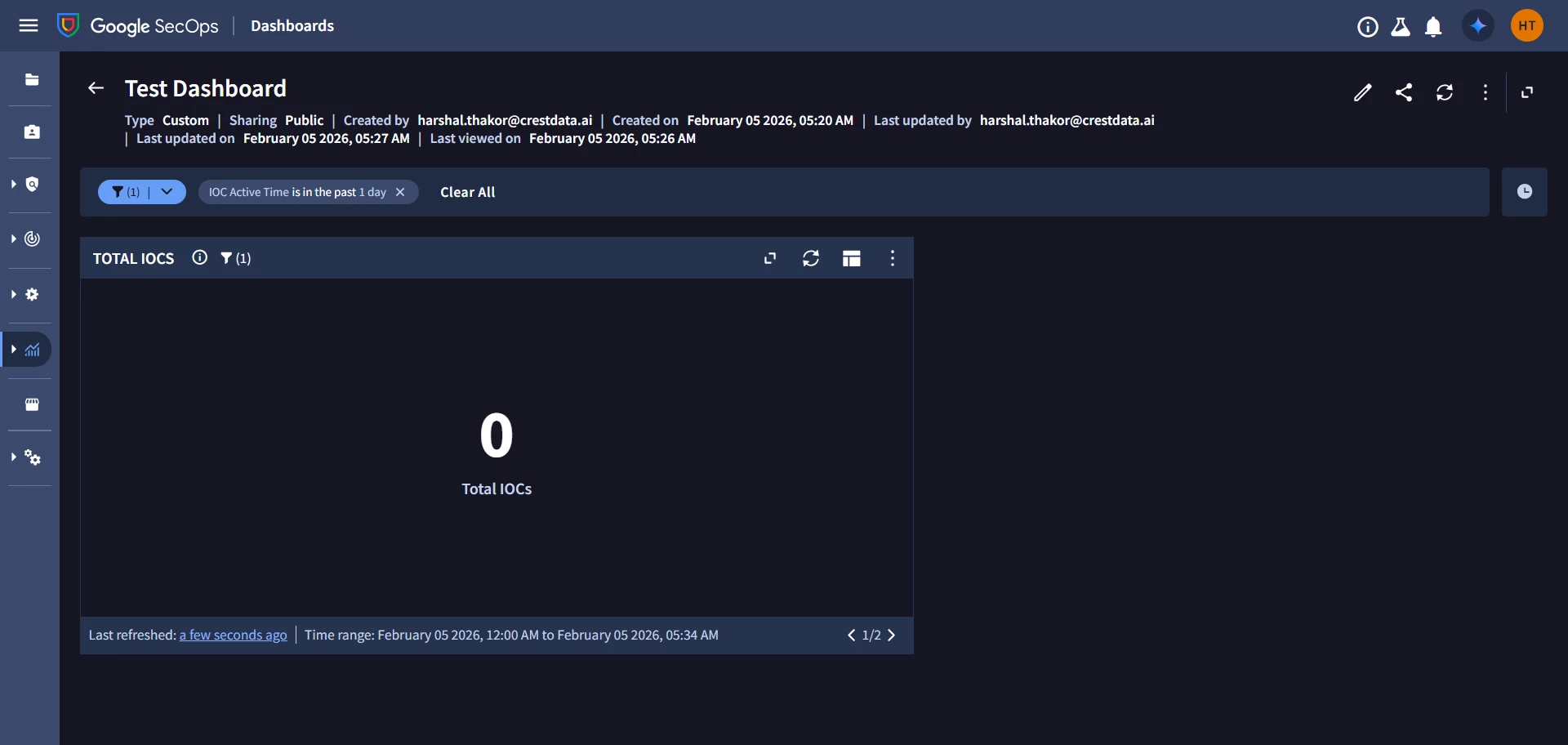
  • When I use the dashboard-level filter ( in example below - IOC Active time) based on UDM field graph.metadata.interval.start_time set to "Last 1 Day," the dashboard panels show no data as shown below.
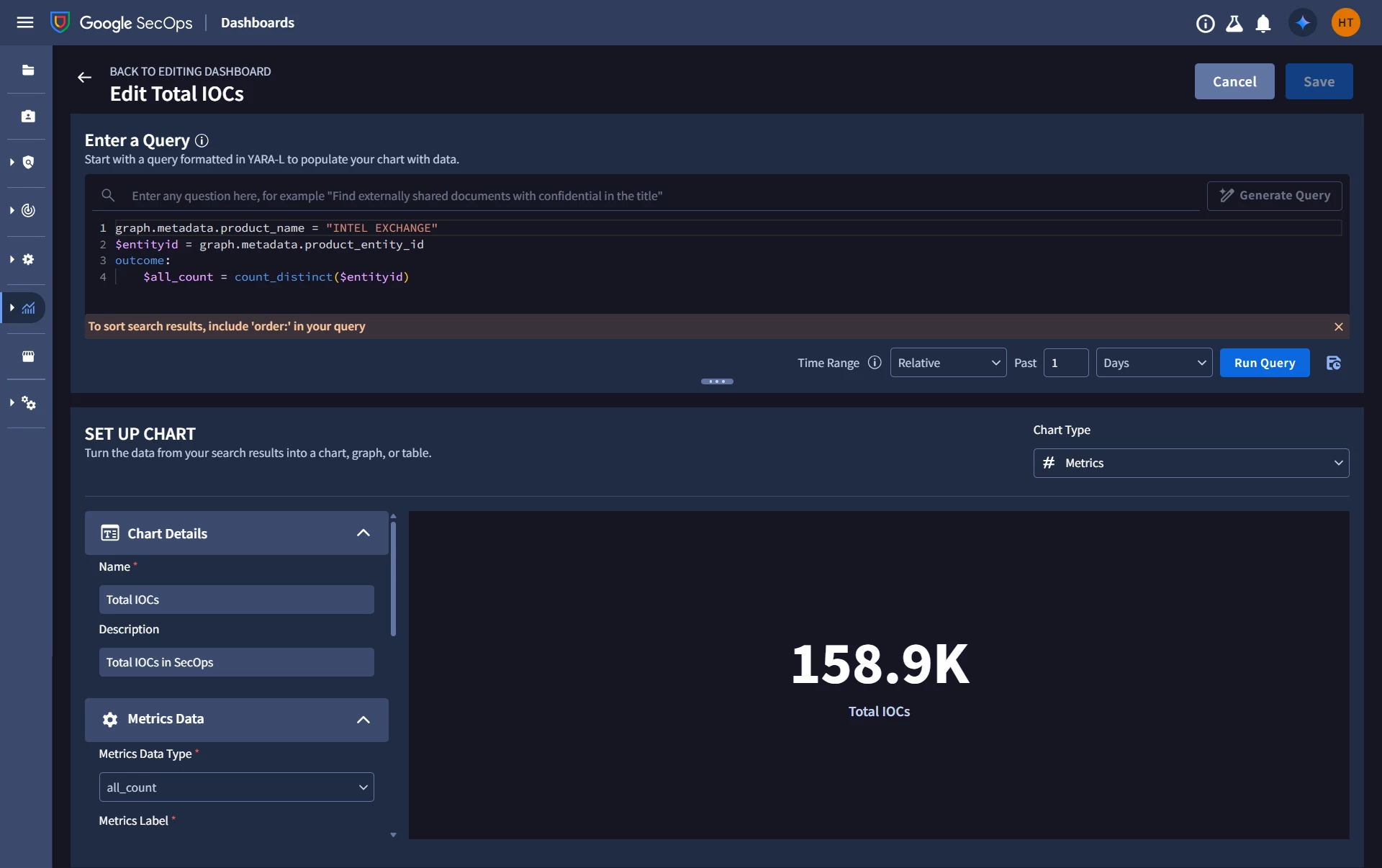
  • But, If I go in the Edit Mode inside dashboard for that specific panel and apply a time filter for the "Last 1 Days" within the query/filter settings, the data populates for panel.
Technical Details:

  • Data Type: The panels queries are pulling Entity data (not UDM events).

  • Filter Used: graph.metadata,interval.start_time

Questions:

  • Why does the graph.metadata.interval.start_time fail to pull Entity data that is clearly available when filtered inside the edit mode of panel?
  • Is the time filter inside the edit mode of panel work on metadata.interval.start_time or is there any other UDM field on that time filter is applying for entity model?

Any advice on how to properly sync these would be greatly appreciated.

1 reply

JeremyLand
Staff
Forum|alt.badge.img+7
  • Staff
  • February 13, 2026

TLDR: Use the ‘global time filter’ at the dashboard level and apply it to your Total IOCs widget then the results should match.

Explanation:

Theres a few differences between events and entities, and the timepicker for search vs the timepicker for dashboards that combine to cause this behavior.


Time matching applies differently for entities than they do for events. With events the search timerange looks for  metadata.event_timestamp to be inside the range you specify; but when searching for entities the search time filter will match entities where their validity interval (the time between graph.metadata.interval.start_time & graph.metadata.interval.end_time) OVERLAPS with the search interval.  At first that may not seem terribly different, but when creating IOC entities (anything with a graph.metadata.threat section)  if you do not specify the interval start & end times in the entity context record they will default to 1970-01-01 and 9999-12-31.  Then the graph maintains a separate instance of the entity for each day (UTC midnight to UTC midnight) that entity is in its validity interval. So when searching for an entity you will see multiple entries for each entity, one for each day, running 00:00:00 to 00:00:00.

Next, the relative timerange picker for dashboards does not apply the time filter the same way the that search does.  In search when you click the ‘last hour’ time range quick select you can easily see that it sets the end time to now (matching to the minute) then subtracts one hour for the start time, and for last 24 hours the start time is exactly (to the minute) 24 hours ago.

In dashboards when using the absolute timerange you get the same behavior as search; however, when using the relative timerange, the timerange is actually anchored to the start of that interval.  If you run a dashboard for ‘last 1 hour’ at 14:35, the start for the dashboard timerange will be 14:00,  if you run a dashboard for ‘last 1 day’ at 14:35 the start for the dashboard timerange will be 00:00.

The other behavior is something I had not noticed previously but a little bit of testing confirmed;  the normal dashboard time filter (global or in the dashboard editor) is an inclusive match, so setting a time range for past 1 days will match all the way down to 00:00:00.000, but when you build a custom filter for time that becomes an exclusive match,  so would require the timestamp to be greater than 00.000.

So it is likely your IOC are all overlapping with the last 24h and show up when you use the time picker built into the editor, but that when you explicitly specify the dashboard level filter to reference the interval.start_time it doesn’t match because your IOCs intervals are all starting at 00:00:00 and are not included in the results which is looking for greater than 00:00:00

If you enable the global time filter for this chart you should see consistent data since the match method will align between the chart edit window.

