Displaying Case Attachments as a HTML view Downloadable Table (with correct file extensions)

  • July 15, 2026
  • 5 replies
  • 53 views

AnimSparrow
Forum|alt.badge.img+6

Post inspired by recent struggle with csv/pdf output generation and hastle it take to find output in wall to get them.

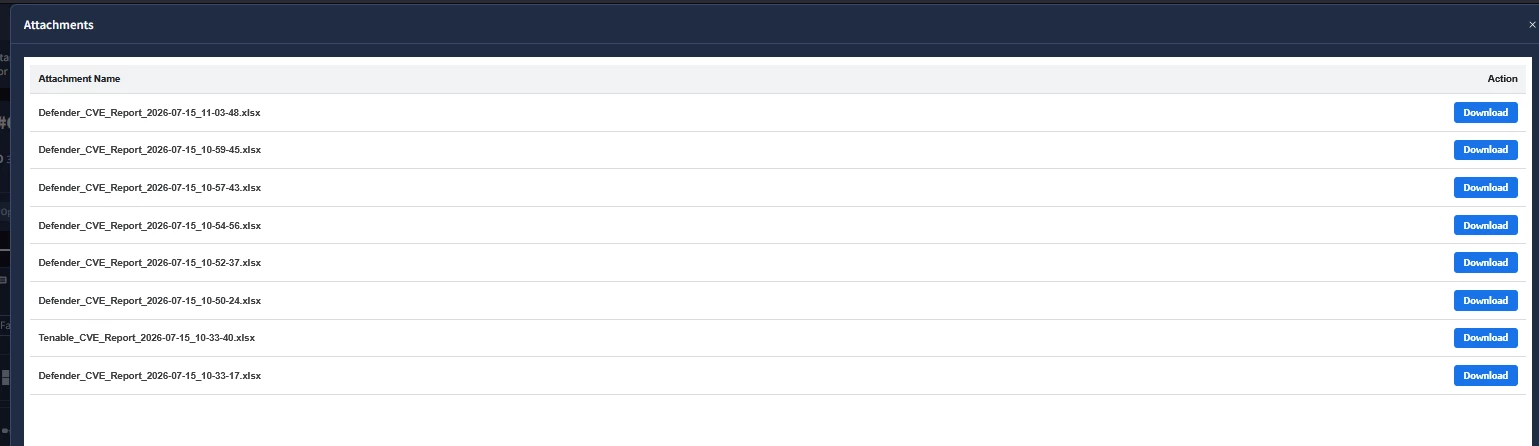
Preview:
Here's the full working setup, including a few gotchas that cost me some time.

Playbook steps:

  1. FileUtilities → Get Attachment — pulls all attachments from the case (returns a list, even for a single file, with evidenceName, fileType, base64_blob, etc.)
  2. TemplateEngine → Render Template — takes the JSON from step 1 and renders it into HTML using the Jinja template below. Email template -skip-

Configuration for step 2:

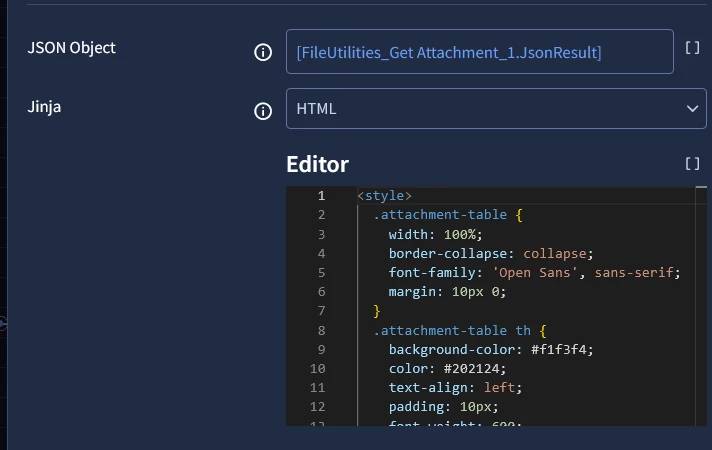
  • JSON Object: [FileUtilities_Get Attachment_1.JsonResult]
    • ⚠️ If the field auto-populates with a trailing {} after the placeholder, remove it — it breaks JSON parsing and throws JSONDecodeError: Extra data.
  • Jinja (dropdown): HTML
  • Editor: paste the template below — this is the only field that actually needs your code
  • Template (dropdown further down, e.g. "Email Template"): leave this alone. It's a separate, unrelated mechanism (pre-built email templates) and has no effect on this output.
  • Include Case Data: uncheck this if you don't need the full case context passed in — it adds unnecessary overhead and may slow down or affect large cases.

In the HTML widget (View settings), just reference the render result:

 
[TemplateEngine_Render Template_1.JsonResult.html_output]

(the exact key name may vary — check your action's JSON Result if the widget stays blank). OR set context value and use global case.YOURNAME value.

The template:

<style>
.attachment-table {
width: 100%;
border-collapse: collapse;
font-family: 'Open Sans', sans-serif;
margin: 10px 0;
}
.attachment-table th {
background-color: #f1f3f4;
color: #202124;
text-align: left;
padding: 10px;
font-weight: 600;
border-bottom: 2px solid #dadce0;
font-size: 12px;
}
.attachment-table td {
padding: 10px;
border-bottom: 1px solid #dadce0;
font-size: 12px;
color: #3c4043;
}
.download-btn {
background-color: #1a73e8;
color: white;
border: none;
padding: 6px 12px;
border-radius: 4px;
cursor: pointer;
font-weight: bold;
font-size: 11px;
text-decoration: none;
display: inline-block;
transition: background-color 0.2s;
}
.download-btn:hover {
background-color: #1557b0;
}
</style>
<table class="attachment-table">
<thead>
<tr>
<th>Attachment Name</th>
<th>Type</th>
<th>Action</th>
</tr>
</thead>
<tbody>
{% if base64_blob %}
<tr>
<td><strong>{{ evidenceName }}{{ fileType }}</strong></td>
<td>{{ fileType | default('.file') | replace('.', '') | upper }}</td>
<td>
<button class="download-btn" onclick="downloadBlob('{{ base64_blob }}', '{{ evidenceName }}{{ fileType }}')">
Download
</button>
</td>
</tr>
{% elif attachments %}
{% for attachment in attachments %}
<tr>
<td><strong>{{ attachment.evidenceName }}{{ attachment.fileType }}</strong></td>
<td>{{ attachment.fileType | default('.file') | replace('.', '') | upper }}</td>
<td>
<button class="download-btn" onclick="downloadBlob('{{ attachment.base64_blob }}', '{{ attachment.evidenceName }}{{ attachment.fileType }}')">
Download
</button>
</td>
</tr>
{% endfor %}
{% else %}
<tr>
<td colspan="3" style="text-align: center; color: #70757a;">No attachment data found in JSON.</td>
</tr>
{% endif %}
</tbody>
</table>
<script>
function downloadBlob(base64, filename) {
try {
const byteCharacters = atob(base64);
const byteNumbers = new Array(byteCharacters.length);
for (let i = 0; i < byteCharacters.length; i++) {
byteNumbers[i] = byteCharacters.charCodeAt(i);
}
const byteArray = new Uint8Array(byteNumbers);
const blob = new Blob([byteArray], { type: 'application/octet-stream' });

const link = document.createElement('a');
link.href = window.URL.createObjectURL(blob);
link.download = filename;
document.body.appendChild(link);
link.click();

document.body.removeChild(link);
window.URL.revokeObjectURL(link.href);
} catch (e) {
alert("Error downloading file: " + e.message);
}
}
</script>

Why this approach:

  • Files are decoded from base64 to a Blob only on click (not upfront), so the browser isn't forced to hold decoded binary data for every row on page load.
  • link.download includes the file extension ({{ evidenceName }}{{ fileType }}) — without this, files download as generic files with no extension and the OS won't know how to open them.

Known limitation: as mentioned in the original thread, this isn't recommended for large files — long base64 strings in the HTML can slow down rendering or the browser. For very large attachments, consider adding a size check to skip embedding and just show a "too large, use Case Wall" message instead.


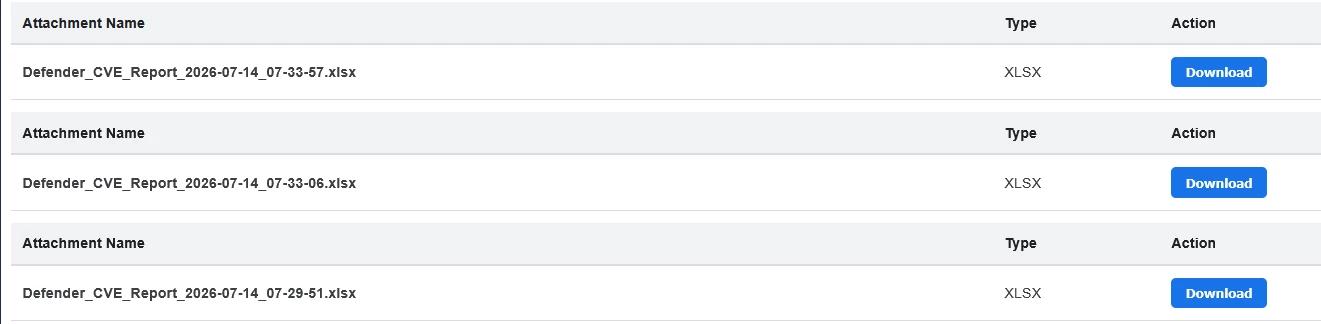
How it looks like:

Hope this will help to save some time for you folks!

5 replies

a_aleinikov
Forum|alt.badge.img+7
  • Bronze 2
  • July 15, 2026

Nice practical workaround. The notes about file extensions and large base64 payloads are especially useful.


whathehack81
Forum|alt.badge.img+6

Really useful write-up—especially the notes on filename extensions and large base64 payloads. One possible hardening improvement would be to avoid passing the base64 and filename directly through the inline onclick handler. Using data-* attributes or attaching the click handler in JavaScript would reduce quoting/escaping issues and work better with stricter CSP configurations. It may also be worth using the attachment’s actual MIME type when creating the Blob, rather than always using application/octet-stream. Nice practical solution overall. 🧠 


AnimSparrow
Forum|alt.badge.img+6
  • Author
  • Bronze 5
  • July 15, 2026

here is short version without format table and separate call

<style>
.attachment-table {
width: 100%;
border-collapse: collapse;
font-family: 'Open Sans', sans-serif;
margin: 10px 0;
}
.attachment-table th {
background-color: #f1f3f4;
color: #202124;
text-align: left;
padding: 10px;
font-weight: 600;
border-bottom: 2px solid #dadce0;
font-size: 12px;
}
.attachment-table td {
padding: 10px;
border-bottom: 1px solid #dadce0;
font-size: 12px;
color: #3c4043;
}
.download-btn {
background-color: #1a73e8;
color: white;
border: none;
padding: 6px 12px;
border-radius: 4px;
cursor: pointer;
font-weight: bold;
font-size: 11px;
text-decoration: none;
display: inline-block;
transition: background-color 0.2s;
}
.download-btn:hover {
background-color: #1557b0;
}
</style>

<table class="attachment-table">
<thead>
<tr>
<th>Attachment Name</th>
<th style="width: 100px; text-align: right;">Action</th>
</tr>
</thead>
<tbody>
{% if base64_blob %}
<!-- Scenario 1: Single file object -->
<tr>
<td><strong>{{ evidenceName }}{{ fileType }}</strong></td>
<td style="text-align: right;">
<button class="download-btn" onclick="downloadBlob('{{ base64_blob }}', '{{ evidenceName }}{{ fileType }}')">
Download
</button>
</td>
</tr>
{% elif attachments %}
<!-- Scenario 2: Array of attachments -->
{% for attachment in attachments %}
<tr>
<td><strong>{{ attachment.evidenceName }}{{ attachment.fileType }}</strong></td>
<td style="text-align: right;">
<button class="download-btn" onclick="downloadBlob('{{ attachment.base64_blob }}', '{{ attachment.evidenceName }}{{ attachment.fileType }}')">
Download
</button>
</td>
</tr>
{% endfor %}
{% else %}
<tr>
<td colspan="2" style="text-align: center; color: #70757a;">No attachment data found in JSON.</td>
</tr>
{% endif %}
</tbody>
</table>

<script>
// 1. DYNAMIC FILE DOWNLOAD LOGIC
if (typeof downloadBlob !== 'function') {
window.downloadBlob = function(base64, filename) {
try {
const cleanBase64 = base64.includes(',') ? base64.split(',')[1] : base64;
const byteCharacters = atob(cleanBase64.trim());
const byteNumbers = new Array(byteCharacters.length);
for (let i = 0; i < byteCharacters.length; i++) {
byteNumbers[i] = byteCharacters.charCodeAt(i);
}
const byteArray = new Uint8Array(byteNumbers);
const blob = new Blob([byteArray], { type: 'application/octet-stream' });

const link = document.createElement('a');
link.href = window.URL.createObjectURL(blob);
link.download = filename;
document.body.appendChild(link);
link.click();

document.body.removeChild(link);
window.URL.revokeObjectURL(link.href);
} catch (e) {
alert("Error downloading file: " + e.message);
}
}
}

(function() {
setTimeout(function() {
const tables = document.querySelectorAll('.attachment-table');
if (tables.length > 1) {
const targetTableBody = tables[0].querySelector('tbody');
for (let i = 1; i < tables.length; i++) {
const rowsToMove = tables[i].querySelectorAll('tbody tr');
rowsToMove.forEach(function(row) {
targetTableBody.appendChild(row);
});
tables[i].remove();
}
}
}, 50);
})();
</script>


whathehack81
Forum|alt.badge.img+6

Nice    🧠   this is much easier to follow, and handling both the single-object and attachment-array cases in one template is a solid improvement.

One small hardening suggestion: base64_blob and the generated filename are inserted directly into an inline onclick JavaScript context. A filename containing quotes or other unexpected characters could break the handler and, depending on template escaping, potentially introduce script injection.

Using data-* attributes with an event listener, or serializing the values with the template engine’s JSON-safe filter such as |tojson, would make it safer.

It may also be worth enforcing an attachment-size limit because Base64 decoding creates multiple in-memory copies of the file in the browser. Otherwise, this looks like a strong simplified version.


AnimSparrow
Forum|alt.badge.img+6
  • Author
  • Bronze 5
  • July 16, 2026

Nice    🧠   this is much easier to follow, and handling both the single-object and attachment-array cases in one template is a solid improvement.

One small hardening suggestion: base64_blob and the generated filename are inserted directly into an inline onclick JavaScript context. A filename containing quotes or other unexpected characters could break the handler and, depending on template escaping, potentially introduce script injection.

Using data-* attributes with an event listener, or serializing the values with the template engine’s JSON-safe filter such as |tojson, would make it safer.

It may also be worth enforcing an attachment-size limit because Base64 decoding creates multiple in-memory copies of the file in the browser. Otherwise, this looks like a strong simplified version.

good catch - on our side - not going to happen as all files gathered and all use-cases that use this options are done by us from start to end so the names are ‘static+date’