Question

Drill-Down Support for Open and Closed Cases in Dashboards

  • May 25, 2026
  • 8 replies
  • 34 views

manoj610
Forum|alt.badge.img+5

Hello,

Can someone please let me know if it is possible to create a drill-down for Open and Closed Cases in dashboards?

For example, if I click on the “Open Cases” or “Closed Cases” count/chart, I would like it to redirect me to the Cases page filtered specifically for Open or Closed cases.

Is this functionality currently possible in Google SecOps dashboards?

Thank you.

8 replies

ar3diu
Forum|alt.badge.img+10
  • Silver 2
  • May 25, 2026

An easy way to achieve this would be through (global) Dashboard Filters.


manoj610
Forum|alt.badge.img+5
  • Author
  • Bronze 1
  • May 25, 2026

I did try using the dashboard filters. However, since I am displaying the metrics and pie chart, the filter only shows the total count of open and closed cases.

What I need is a drill-down functionality where, if I click on the open case count, it should navigate and display the list of open cases. Is this possible?


ar3diu
Forum|alt.badge.img+10
  • Silver 2
  • May 25, 2026

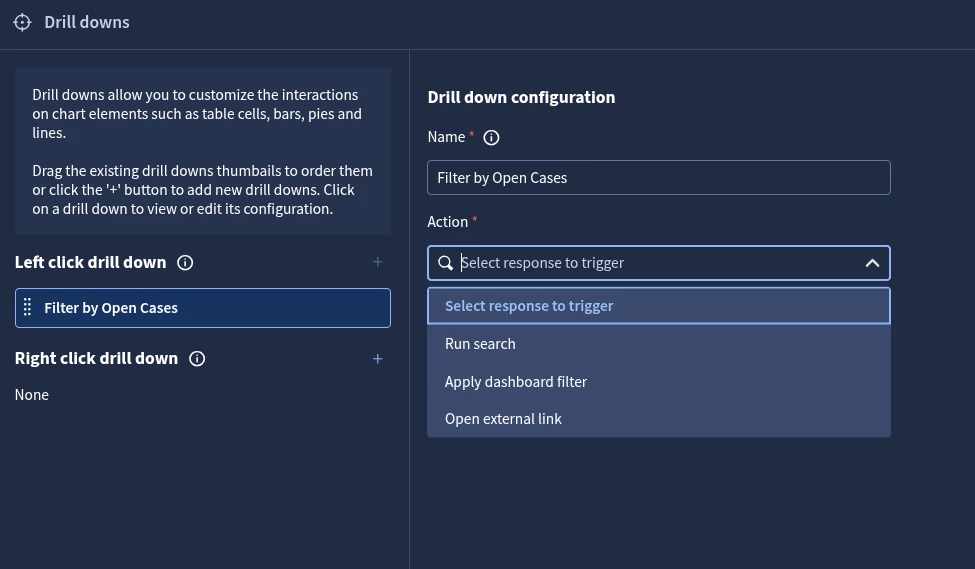
Yes, it’s actually called “Drill downs”. Find it in the bottom left of the Dashboard Edit page. 


manoj610
Forum|alt.badge.img+5
  • Author
  • Bronze 1
  • May 25, 2026


Yes, I have already tried this.

“Run Search” will not work in this case because these are not traditional UDM fields.

$Case_ID = case.response_platform_info.response_platform_id

$Case_Name = case.display_name

$Case_Status = case.status

case.status = "CLOSED"

match:
    $Case_ID, $Case_Name, $Case_Status

“Apply to Dashboard Filter” works, but it only shows the total count of closed cases.

“Open External Link” also works. I provided the SOAR search link, but I still need to manually go to the status filter, select OPEN or CLOSED, and then click Apply.


ar3diu
Forum|alt.badge.img+10
  • Silver 2
  • May 25, 2026

What if you use the "Apply to Dashboard" filter and add a new table to the dashboard alongside the pie chart, showing the list of cases to be filtered?


manoj610
Forum|alt.badge.img+5
  • Author
  • Bronze 1
  • May 25, 2026

In a different panel, I am able to get the Case ID, Case Name, and Status. If I click on the Case ID, it navigates to that particular case successfully.

However, I specifically wanted to know if this is possible directly from the pie chart or metrics panel.

For example, if the total number of open cases is 10 and I click on the “Open Cases” count in the metric or pie chart, will it navigate and show all 10 open cases in the SOAR search or anywhere else in the platform?


ar3diu
Forum|alt.badge.img+10
  • Silver 2
  • May 25, 2026

I think that feature is not available yet.

Maybe you can build that Table in another dashboard and have a click drill down in the Pie Chart Dashboard that just redirects to it (left click for Open, right click for Closed)


manoj610
Forum|alt.badge.img+5
  • Author
  • Bronze 1
  • May 25, 2026

yup i am using that for now. Thanks for the support ​@ar3diu