


Hello Folks!
I wanted to share a practical use case I recently implemented to tackle lack of immediate context in security notifications. When an alert fires, every second counts, and I consider that having key threat intelligence delivered right in the initial notification can significantly streamline the initial triage and reduce MTTR.
The Problem: Lack of Enriched Context in Initial Alerts
Alert fatigue often stems from notifications that simply state that an incident happened, without providing enough intelligence and impeding the ability to take confident decisions.
The Solution: Dynamic Templates via Expression Builder
To solve this, I used Expression Builder in SecOps a feature I consider often flies under the radar. It allows us to extract output variables from our integrations (like VirusTotal) and map them dynamically into a pre-formatted delivery templates (like HTML).
Workflow Operation:
Detection: A YARA-L Rule flags a user attempting a DNS resolution to a known malicious domain (managed via Reference Lists) e.g.,%malicious_domains
Enrichment: The alert triggers a Playbook that automatically runs the VT integration, retrieving information against the domain to retrieve threat metrics.
I do recommend by a lot more, VirusTotalV3 integration rather than VTv1 (Just be careful with API quotas)
Dynamic Mapping: Using Expression Builder, specific variables from the VT integration output are extracted alongside core alert details (Case ID, Users, Domain).
Formatted Output: The Email integration populates these variables into an HTML template, delivering a structure mini-briefing directly to the analyst’s inbox.
Note on Flexibility & Ontology:
- Integrations & Entities: While I used a “malicious domain” alert with VT for this example, this exact method works across many integrations (EDR, IdP, Network) and entity types (IPs, File, Hashes, Usernames)
- Entity Mapping: Always ensure your entity mapping is properly configured under SOAR Settings > Ontology so your playbook extract those entities correctly
Here is an example of how I integrated those Expression Builder variables into a HTML template to deliver via e-mail:
<b>VirusTotal Report:</b><br>

<table border="1" cellpadding="6" cellspacing="0" style="border-collapse: collapse; font-family: Arial, sans-serif; font-size: 13px;">

  <tr style="background-color: #f2f2f2;">

    <th>Metric</th>

    <th>Value</th>

  </tr>

  <tr>

    <td><b>IOC Evaluated</b></td>

    <td>[VirusTotalV3_Enrich IOC_1.JsonResult| "iocs.details.id"]</td>

  </tr>

  <tr>

    <td><b>Reputation Scoring</b></td>

    <td>[VirusTotalV3_Enrich IOC_1.JsonResult| "iocs.details.attributes.reputation"]</td>

  </tr>

  <tr>

    <td><b>Malicious Detections</b></td>

    <td style="color: red; font-weight: bold;">[VirusTotalV3_Enrich IOC_1.JsonResult| "iocs.details.attributes.last_analysis_stats.malicious"]</td>

  </tr>

  <tr>

    <td><b>Suspicious Detections</b></td>

    <td style="color: orange; font-weight: bold;">[VirusTotalV3_Enrich IOC_1.JsonResult| "iocs.details.attributes.last_analysis_stats.suspicious"]</td>

  </tr>

  <tr>

    <td><b>Clean Detections (Harmless)</b></td>

    <td style="color: green;">[VirusTotalV3_Enrich IOC_1.JsonResult| "iocs.details.attributes.last_analysis_stats.harmless"]</td>

  </tr>

  <tr>

    <td><b>Undetected</b></td>

    <td>[VirusTotalV3_Enrich IOC_1.JsonResult| "iocs.details.attributes.last_analysis_stats.undetected"]</td>

  </tr>

</table>

<br>
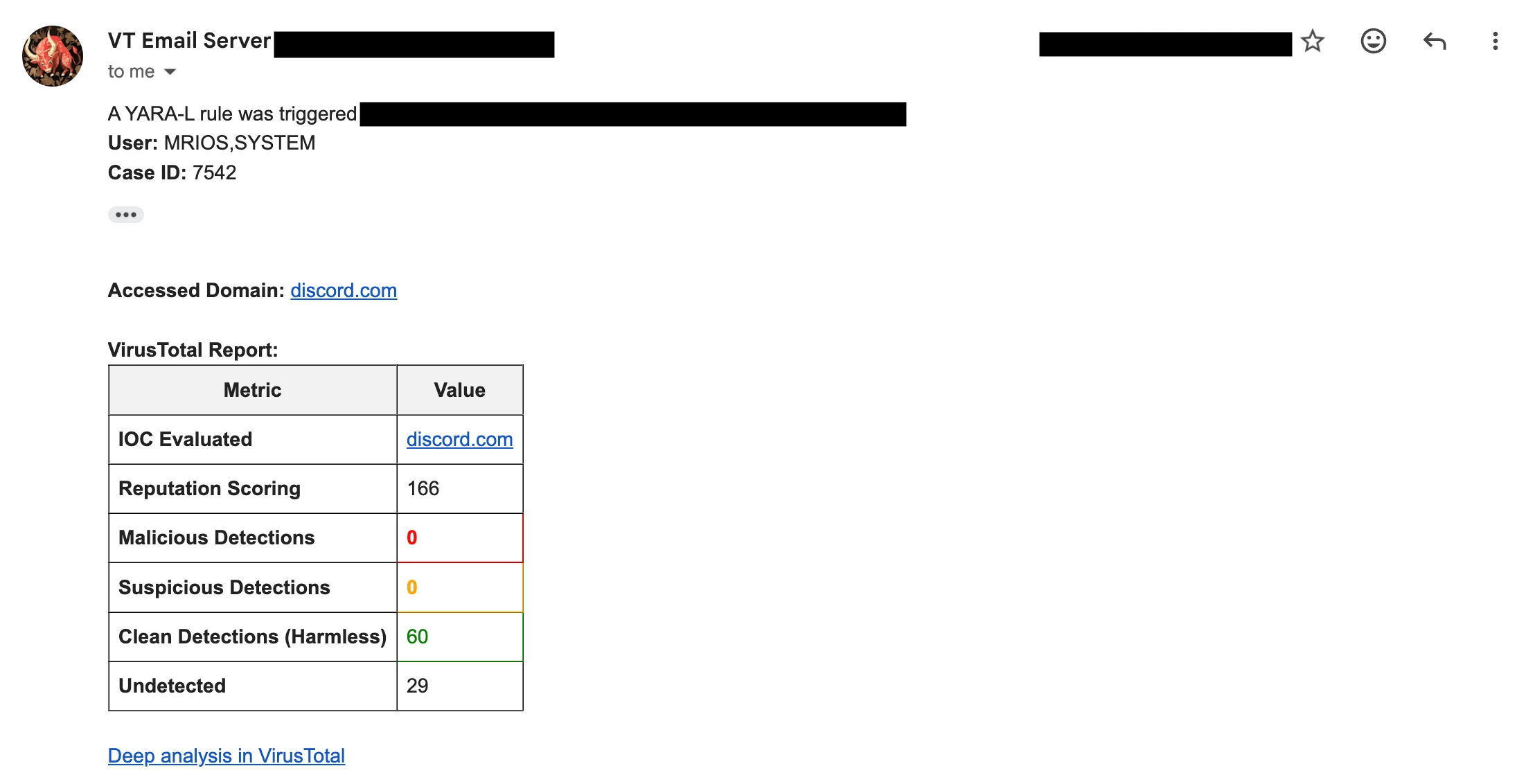
Combining Expression Builder with custom output templates can make a big difference, by transforming flat, static alerts into actionable, high-context briefings tailored specifically to the metrics your team cares about most (and why not, add a little bit of your spice in that notification) !
I hope this provides a helpful reference for anyone looking to optimize their notification outputs !


