
Solved

Error in GSuite Integration for SOAR

  • October 24, 2025
  • 17 replies
  • 180 views

ar3diu
Forum|alt.badge.img+8

I’m trying to configure the GSuite Integration in SOAR:

  • I have created a service account and granted the SecOps “soar-python” service account access with the Service Account Token Creator.
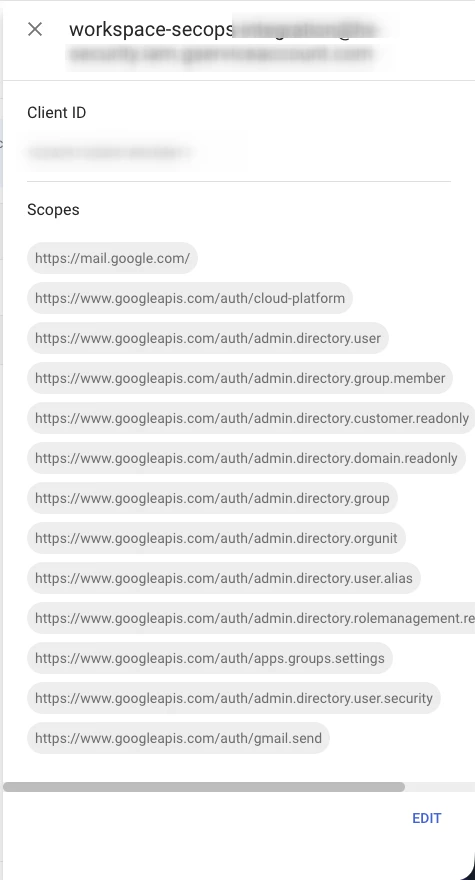
  • I delegated domain-wide authority to this service account using the client ID and scopes from this guide: https://cloud.google.com/chronicle/docs/soar/marketplace-integrations/google-workspace#search_user_activity_events
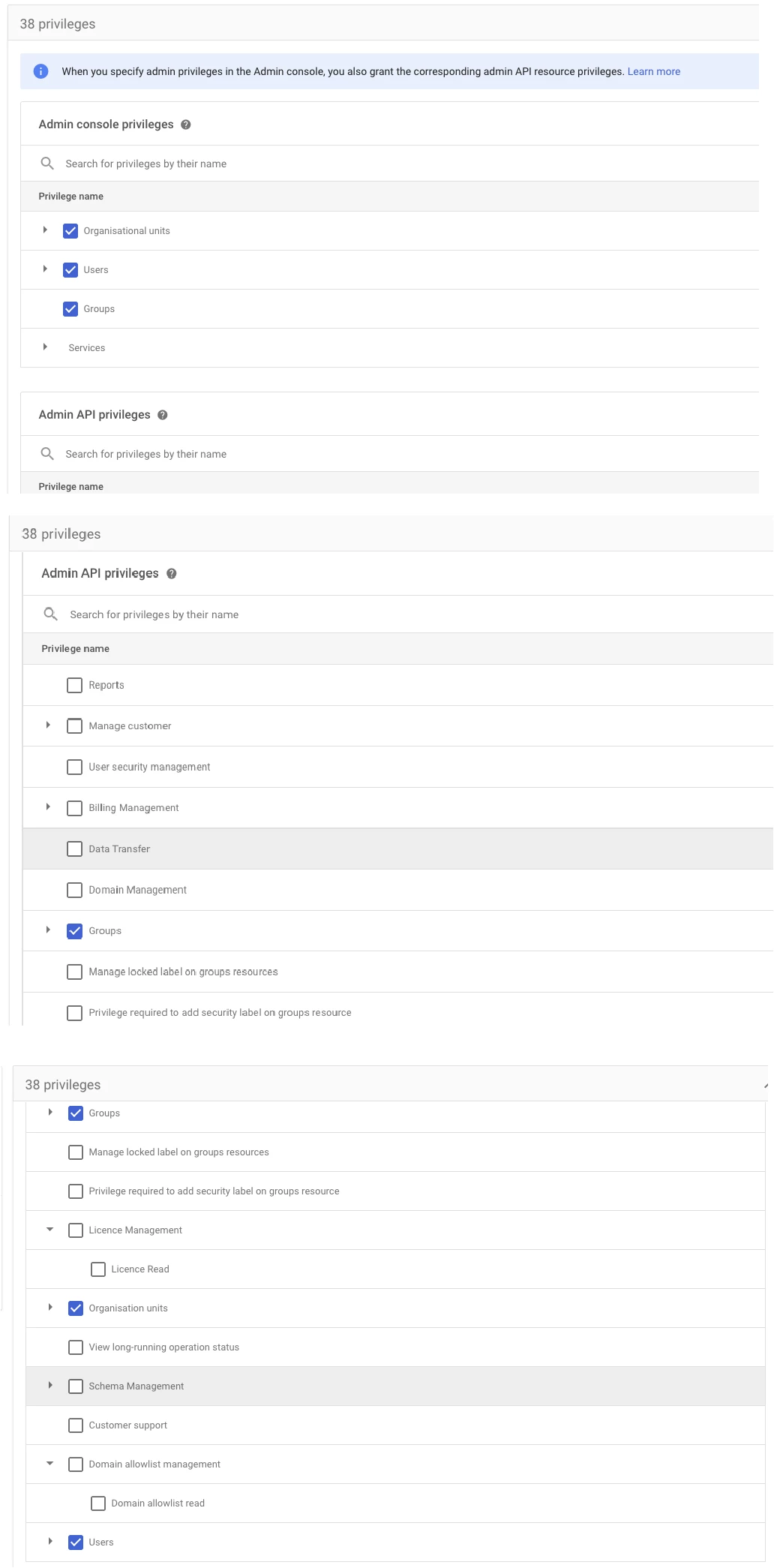
  • I also created an admin custom role in GWS Admin Console and assign it to a new user, as described in the guide.
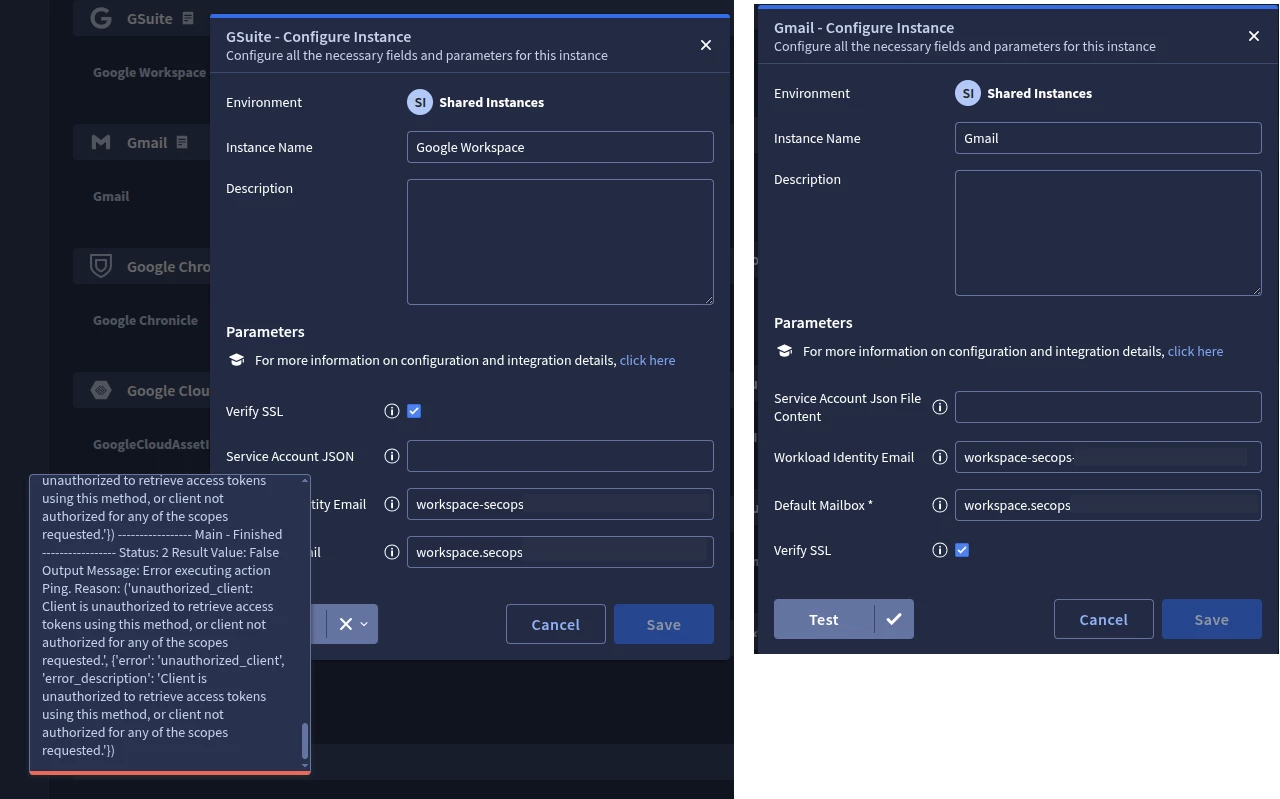
  • I configured the GSuite Integration in SOAR and I’m still getting the following error when using the Test button:

```

{'error': 'unauthorized_client', 'error_description': 'Client is unauthorized to retrieve access tokens using this method, or client not authorized for any of the scopes requested.'}

```

  • I understand that most of the time, the issue here are the scopes assigned to the Client ID in Admin Console, that’s why I checked them multiple times and made sure they are correct.
  • What’s weird though, is that the Gmail Integration which uses very similar scopes, works when tested with the same credentials. 


Any ideas what could be wrong? Did anyone manage to get this configured?
 

Best answer by ar3diu

Apparently, this is a bug and the following access scopes should also be added to the Client ID in Workspace, in case anyone else encounters this issue.

https://www.googleapis.com/auth/admin.reports.audit.readonly,
https://www.googleapis.com/auth/admin.directory.device.chromebrowsers.readonly,
https://www.googleapis.com/auth/chrome.management.appdetails.readonly,
https://www.googleapis.com/auth/chrome.management.policy


17 replies

ar3diu
Forum|alt.badge.img+8
  • Author
  • Silver 2
  • October 24, 2025

It should be noted that I also tried with a service account key instead of Workload Identity Email and I’m getting the exact same error.


AymanC
Forum|alt.badge.img+13
  • Bronze 5
  • October 26, 2025

Hi ​@ar3diu 


It’s not an integration I've used, but what I would look to do is:

Although testing when configuring the instance isn’t working, what happens when you go into the IDE, and try to run an action with the configured instance (Even if the test within configuration is showing an ‘X’)?


Kind Regards,

Ayman


ar3diu
Forum|alt.badge.img+8
  • Author
  • Silver 2
  • October 27, 2025

@AymanC Thanks, but I already tried that and got the same error...


ylandovskyy
Staff
Forum|alt.badge.img+16
  • Staff
  • October 29, 2025

​Hey @ar3diu

Are you still stuck with this error? Is “workspace.secops” a real user or it’s a mail group?


ar3diu
Forum|alt.badge.img+8
  • Author
  • Silver 2
  • October 29, 2025

@ylandovskyy Yes, I actually have a support case, and I have not received any resolution for it yet. The workspace.secops is a real workspace user. It’s really weird because the Gmail SOAR Integration is very similar to the G Suite one in terms of access scopes and configuration, and that integration works flawlessly while the G Suite one doesn’t work at all (the Admin SDK API is enabled.)


ylandovskyy
Staff
Forum|alt.badge.img+16
  • Staff
  • October 29, 2025

@ar3diu there is also dedicated Gmail API. Do you have it enabled as well?


ar3diu
Forum|alt.badge.img+8
  • Author
  • Silver 2
  • October 29, 2025

Yes, since I mentioned the Gmail integration it’s already working 😁


ar3diu
Forum|alt.badge.img+8
  • Author
  • Silver 2
  • October 29, 2025

Admin SDK API and Gmail API are both enabled.

Both GSuite and Gmail SOAR Integrations use the same workload identity email and delegated account in Workspace.

The only difference is that the GSuite integration requires one additional scope to be added in Workspace to the Client ID and I literally copy pasted the list from the integration guide and got an error for the GSuite integration and a success for the Gmail one.

I have tested other actions from both integrations and only the Gmail one is working.


ylandovskyy
Staff
Forum|alt.badge.img+16
  • Staff
  • October 29, 2025

@ar3diu Oh, sorry, I misread. One additional nuance is that for Gsuite is that the impersonated user should be an Admin or has all relevant permissions tied to the Role that was assigned to that user.

That can also result in the same problem. Gmail has less required permissions, so maybe there is some gap in this area, which can result in the misalignment.


ar3diu
Forum|alt.badge.img+8
  • Author
  • Silver 2
  • October 29, 2025

The custom role assigned to the Workspace user (multiple screenshots stitched together)


ylandovskyy
Staff
Forum|alt.badge.img+16
  • Staff
  • October 29, 2025

@ar3diu It does look accurate. Can you try to run any other action within integration? (for example, List Users). 


ar3diu
Forum|alt.badge.img+8
  • Author
  • Silver 2
  • October 30, 2025

Yes, I did. I get the same error for all the actions.


ylandovskyy
Staff
Forum|alt.badge.img+16
  • Staff
  • October 30, 2025

@ar3diu Just to be 100% on the same page, can you share the list of permissions that you’ve assigned to the identity? I will compare it with my working credentials. There can be a documentation gap somewhere.


ar3diu
Forum|alt.badge.img+8
  • Author
  • Silver 2
  • October 30, 2025

@ylandovskyy 


ar3diu
Forum|alt.badge.img+8
  • Author
  • Silver 2
  • Answer
  • October 31, 2025

Apparently, this is a bug and the following access scopes should also be added to the Client ID in Workspace, in case anyone else encounters this issue.

https://www.googleapis.com/auth/admin.reports.audit.readonly,
https://www.googleapis.com/auth/admin.directory.device.chromebrowsers.readonly,
https://www.googleapis.com/auth/chrome.management.appdetails.readonly,
https://www.googleapis.com/auth/chrome.management.policy


josh212
Forum|alt.badge.img
  • Bronze 1
  • October 31, 2025

Apparently, this is a bug and the following access scopes should also be added to the Client ID in Workspace, in case anyone else encounters this issue.

https://www.googleapis.com/auth/admin.reports.audit.readonly,
https://www.googleapis.com/auth/admin.directory.device.chromebrowsers.readonly,
https://www.googleapis.com/auth/chrome.management.appdetails.readonly,
https://www.googleapis.com/auth/chrome.management.policy


Thank you for sharing this, I was monitoring this thread as I was running into the same issue. Hopefully Google updates the documentation to reflect these additional scopes. 


ar3diu
Forum|alt.badge.img+8
  • Author
  • Silver 2
  • October 31, 2025

@josh212 Yes, the Support Team confirmed they will do it.