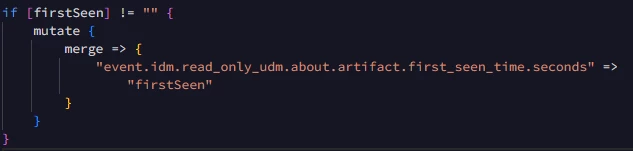
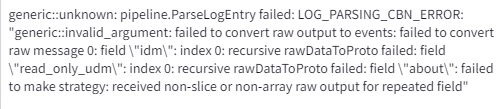
I have been encountering an error whenever I try to parse the timestamps in the log below,
"about.artifact.last_seen_time" and "about.artifact.first_seen_time" are the UDMs I'm trying to map.
To parse the above timesamps, I've attached my code and the error,
I tried to use "replace" and "merge" function to parse the timestamp, still face the same error.
Is there a specific way that I'm supposed to parse the timestamps ?
Best answer by citreno
The correct filter is date as replace or merge will not automatically convert your RFC formatted date into seconds. Additionally about is repeated so you have to merge it. if you're parsing date into anything other then metadata.event_timestamp you need to set target => of the field, you don't have to set the seconds.
The correct filter is date as replace or merge will not automatically convert your RFC formatted date into seconds. Additionally about is repeated so you have to merge it. if you're parsing date into anything other then metadata.event_timestamp you need to set target => of the field, you don't have to set the seconds.
To provide a solution, I'll outline general steps for parsing timestamps and addressing common issues you might encounter:
### 1. **Identify the Timestamp Format:** - Ensure that the timestamps in your logs are in a consistent format. - Common formats include: - `YYYY-MM-DDTHH:MM:SSZ` (ISO 8601) - `YYYY-MM-DD HH:MM:SS` - `MM/DD/YYYY HH:MM:SS`
### 2. **Using Python's `datetime` Module:** - Python's `datetime` module is often used for parsing and formatting timestamps. - Example: ```python from datetime import datetime
### 3. **Handling Timezones:** - If the timestamp includes timezone information, consider using the `pytz` library to handle conversions correctly. - Example: ```python from datetime import datetime import pytz
### 4. **Common Parsing Issues:** - **Mismatch in Format:** Ensure that the format string used in `strptime` exactly matches the format of the timestamp. - **Trailing/Leading Whitespaces:** Use `.strip()` to remove unnecessary whitespaces from the timestamp string. - **Timezone Issues:** Be mindful of timezone differences when parsing and converting times.
### 6. **Mapping UDMs:** - If you're mapping the timestamps to UDMs (Unified Data Models) like `about.artifact.last_seen_time`, ensure that the parsed timestamp matches the expected format in your UDM model.
If these steps don't address your issue, please provide the exact error message and a snippet of the code where the error occurs, and I'll offer more targeted advice.
To provide a solution, I'll outline general steps for parsing timestamps and addressing common issues you might encounter:
### 1. **Identify the Timestamp Format:** - Ensure that the timestamps in your logs are in a consistent format. - Common formats include: - `YYYY-MM-DDTHH:MM:SSZ` (ISO 8601) - `YYYY-MM-DD HH:MM:SS` - `MM/DD/YYYY HH:MM:SS`
### 2. **Using Python's `datetime` Module:** - Python's `datetime` module is often used for parsing and formatting timestamps. - Example: ```python from datetime import datetime
### 3. **Handling Timezones:** - If the timestamp includes timezone information, consider using the `pytz` library to handle conversions correctly. - Example: ```python from datetime import datetime import pytz
### 4. **Common Parsing Issues:** - **Mismatch in Format:** Ensure that the format string used in `strptime` exactly matches the format of the timestamp. - **Trailing/Leading Whitespaces:** Use `.strip()` to remove unnecessary whitespaces from the timestamp string. - **Timezone Issues:** Be mindful of timezone differences when parsing and converting times.
### 6. **Mapping UDMs:** - If you're mapping the timestamps to UDMs (Unified Data Models) like `about.artifact.last_seen_time`, ensure that the parsed timestamp matches the expected format in your UDM model.
If these steps don't address your issue, please provide the exact error message and a snippet of the code where the error occurs, and I'll offer more targeted advice.