Google Chronicle Enrichment Issues

  • September 9, 2026
  • 3 replies
  • 92 views

arv261095
Forum|alt.badge.img+7

Hi Team,

I need to know how to solve the enrichment issue in google chronicle siem as i am finding some issue lately where chronicle wrongly categorized IP location which was US to Iran and there are other instances as well where there is issue with the geo based enrichments in terms of location and IP.

3 replies

htaeh
Forum|alt.badge.img
  • New Member
  • September 9, 2026

Was it an IPv6 by chance?


JeremyLand
Staff
Forum|alt.badge.img+8

Please open a support case with the details so we can investigate the discrepancy.


The SecOps IP location data pulls from Google internal IP location tracking which considers a few data sources that aren’t available anywhere else which can result in mismatches when compared with other tools.  


kylechamplin
Staff
Forum|alt.badge.img+4

Hello ​@arv261095 - We outline why this can happen in this doc:

https://docs.cloud.google.com/chronicle/docs/event-processing/data-enrichment#ip_geolocation_enrichment

Specific to the GeoIP data we bundle with SecOps today, it is what we refer to as “timed” data, meaning the source data bundle is a combination of day bucket, IP and country. From time to time this data will be out of sync, often due to a new bundle deploy being delayed, worst case is ~1 week as we tie bundle updates to our general deployment cadence. 

As an alternative/work around, it is possible to integrate GeoIP data from other providers, such as MaxMind. This avails us with two key features, with one possible downside:

  • We do not need to disable existing GeoIP enrichment; the Data Tables approach can be used in parallel
    • This can lead to some issues during investigations, as UDM search will return our GeoIP data, and we have no mechanism for automatic use of data tables in search (it’s an explicit set of YL2 search commands)
  • Customers will have ultimate optionality in terms of which source of GeoIP enrichment they wish to use. The main limit here is the size of the reference GeoIP dataset, as it must adhere to our service limits


Reference Example

To test out this option, we have the following pieces:

  1. A SecOps account that has the ability to manage datatables (chroncile.dataTables.*) - this account will be used to upload the datatable CSV file - we will use the bearer token from this account to make the API call
  2. Access to a GeoIP dataset in CSV format that has at least CIDR ranges and a Country name - in our example we are using the MaxMind GeoLite Country file. NOTE: that MaxMind has premium offerings that you could also integrate with this approach if you want.
  3. The ability to execute a cURL command from a machine that has local access to the GeoIP dataset - this will upload the data table definition and file to the Secops tenant


Before proceeding, you will need to perform the following steps:

  • Document your SecOps tenant “Customer ID” - this is in the Settings > SIEM Settings
  • Document your SecOps tenant “GCP Project Number” - this is in the Settings > SIEM Settings
  • Clean the CSV file to remove the header row - Data Tables expect the source data to only contain the values - the header is defined in the API request itself


Uploading the CSV file to the Data Tables API

Here is an example cURL command (it’s been a while since I tested this end to end so YMMV). You will need to substitute the proper values in for the <placeholder> values. Also, if you have a different schema (CSV headers) you will need to adjust the “column_info” payload accordingly. Note that columns are typed as follows:

https://cloud.google.com/chronicle/docs/reference/rest/Shared.Types/DataTableColumnType


STRING = 1

REGEX = 2

CIDR = 3


curl --location -X POST   'https://us-chronicle.googleapis.com/upload/v1alpha/projects/<GCP Project Number>/locations/us/instances/<Customer ID>/dataTables:bulkCreateDataTableAsync' -H "Authorization: Bearer $(gcloud auth print-access-token)"   -H "X-Return-Encrypted-Headers: all_response"   -H "Content-Type: multipart/form-data"   -F 'data_table_id={"data_table_id":"mmdb_lite", "data_table": {"name": "projects/<GCP Project Number>/locations/us/instances/<Customer ID>/dataTables/mmdb_lite", "column_info": [
{"column_index": 0, "original_column": "network", "column_type": 3},
{"column_index": 1, "original_column": "country", "column_type": 1},
{"column_index": 2, "original_column": "country_code", "column_type": 1},
{"column_index": 3, "original_column": "continent", "column_type": 1},
{"column_index": 4, "original_column": "continent_code", "column_type": 1},
{"column_index": 5, "original_column": "asn", "column_type": 1},
{"column_index": 6, "original_column": "as_name", "column_type": 1},
{"column_index": 7, "original_column": "ad_domain", "column_type": 1},
]}};type=application/json' -F "file=@/file_path/to/ipinfo_lite.csv;type=application/octet-stream" --verbose -i -H "X-Goog-Upload-Protocol: multipart"

REST API Reference:
https://cloud.google.com/chronicle/docs/reference/rest/v1alpha/projects.locations.instances.dataTables/upload

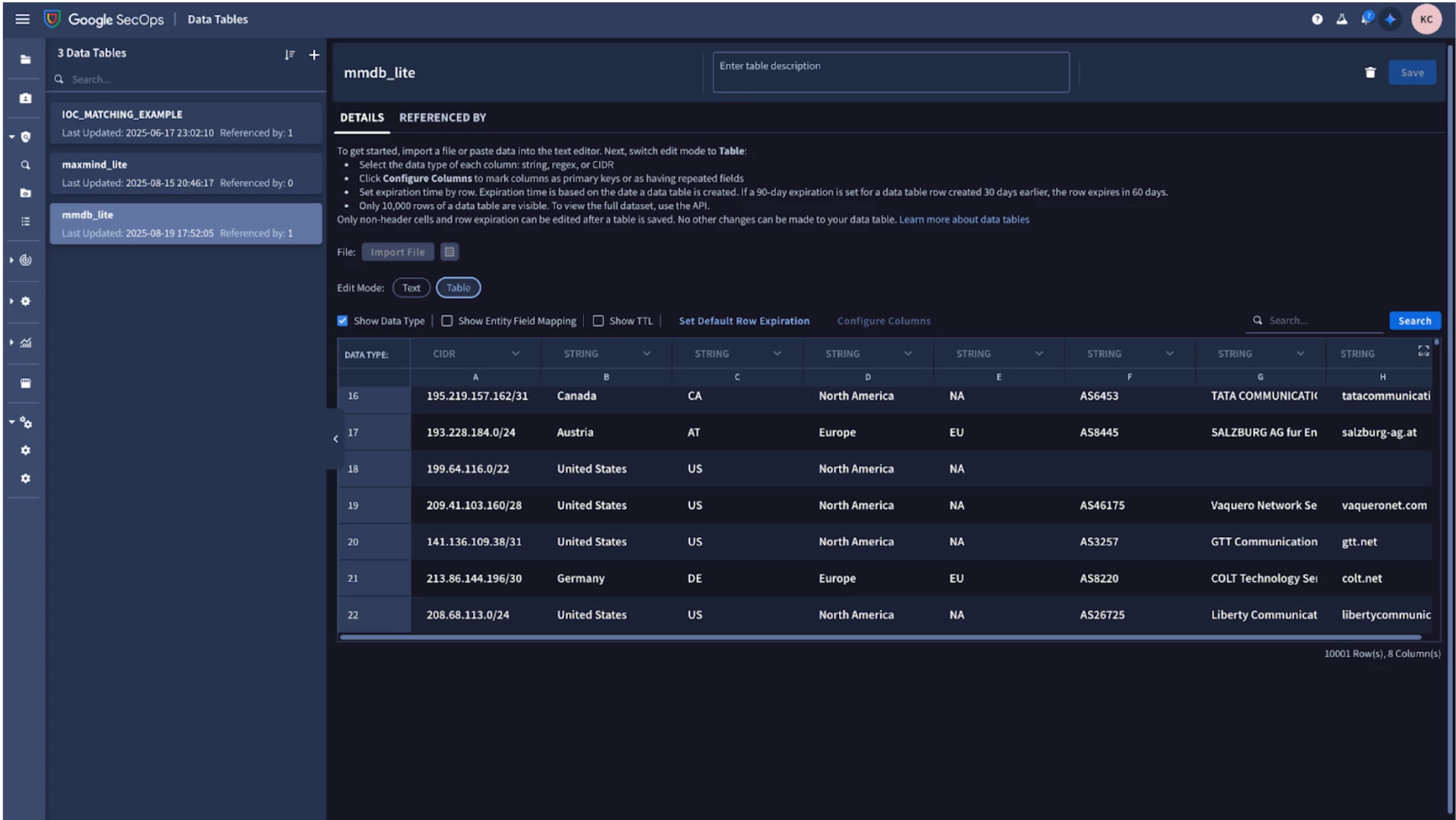
This should take about 5 minutes or so to complete for a ~500MB file. Once the process completes (assuming no errors) you should see an entry in the Data Tables UI similar to the following:


In this case we have two important columns with regards to our rule logic:

Network - this is the CIDR range we wish to “join” against
Country - this is the value we will pull in from the join to determine if an employee has logged in from multiple countries


Using Data Tables for CIDR Matching In Rules


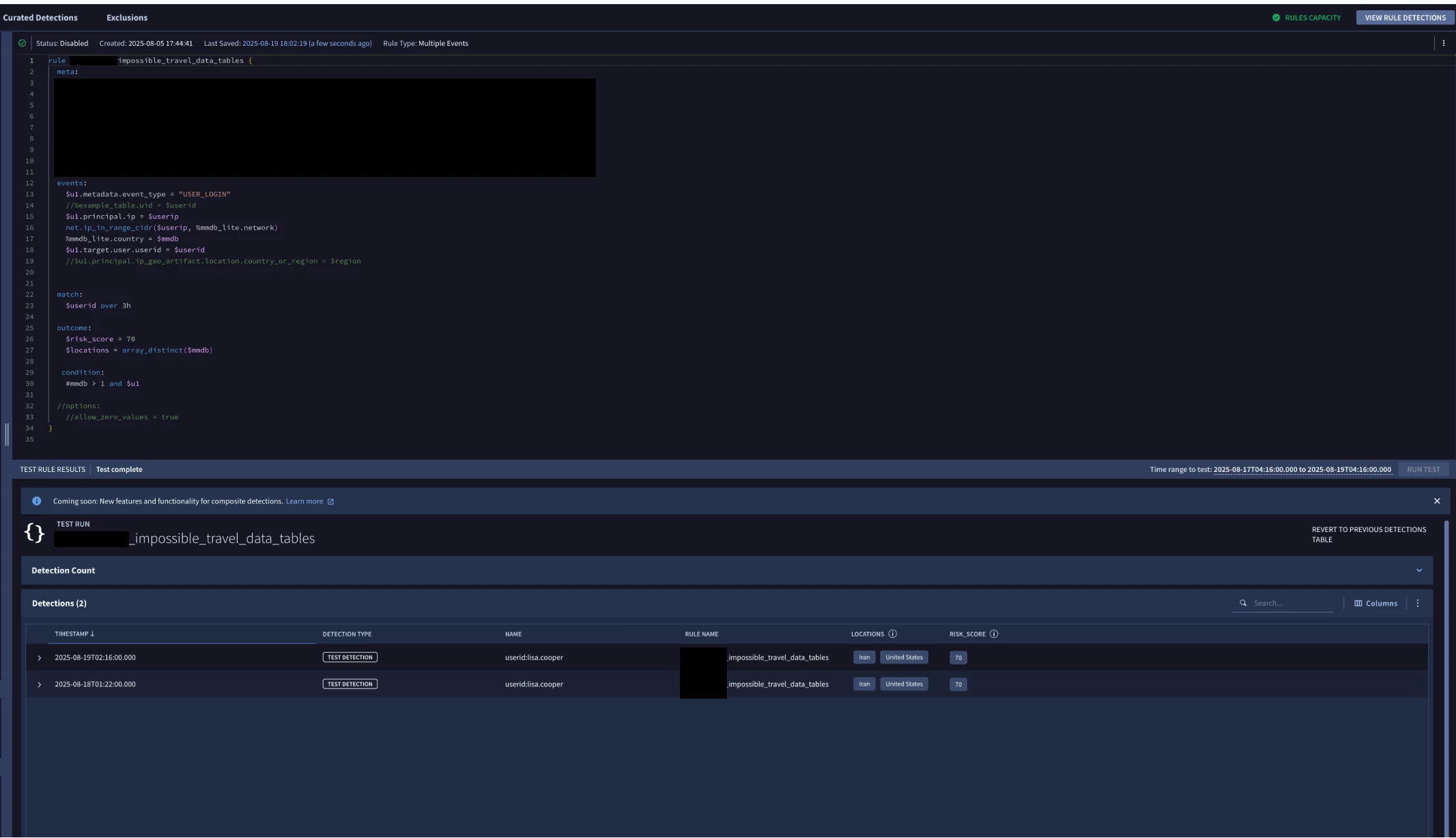
The following rule is an example of using this data table in conjunction with user login events, to determine which country the user logged in from. It accomplishes this by enriching the UDM events via a join against the mmdb_lite data table on the $u1.principal.ip value, and specifically uses the operator net.ip_in_range_cidr() to check the users IP against a CIDR range in the data table. 


rule impossible_travel_data_tables {
meta:
description = "Rule will alert on Suspicious User Login from two or more countries in less than 3 hours"


events:
// filter to user login events
$u1.metadata.event_type = "USER_LOGIN"
//assign the value of a users IP address to the variable $userip
$u1.principal.ip = $userip
// do a cidr lookup against our data table and the users IP variable
net.ip_in_range_cidr($userip, %mmdb_lite.network)
// capture the MMDB value from our matched lookup table join
%mmdb_lite.country = $mmdb
// for posterity, this is how you access the enriched variable if we were using the built in enrichment.
//$u1.principal.ip_geo_artifact.location.country_or_region = $region

// get our user ID as this will be part of our aggregation.match window
$u1.target.user.userid = $userid


// aggregate by user over the last 3 hours
match:
$userid over 3h

// grab the distinct countries in that window (via $mmdb variable)
// and assign it to the $locations variable
outcome:
$risk_score = 70
$locations = array_distinct($mmdb)

// which users have more than one location value
// over the last three hours
condition:
#mmdb > 1 and $u1

//options:
//allow_zero_values = true
}